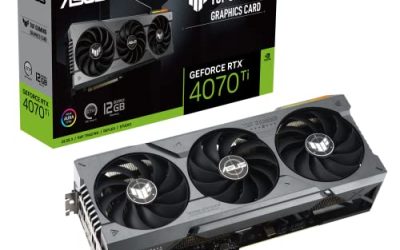
The best RTX graphics card overall is the GeForce RTX 5080, which pairs 16GB of GDDR7 memory with the strongest gaming performance of any card in this guide. For most gamers, though, the best-value RTX is the GeForce RTX 5070, which covers 1440p gaming properly without the 5080’s power demands.
This guide is for anyone speccing a new build or replacing an older card who wants the RTX range explained tier by tier rather than as a single ranking. The five cards below were picked from their Amazon US listings to represent each step of the current range, from the RTX 5060 up to the RTX 5080, and they are compared on memory, clock speeds, power draw and the resolution each tier actually suits.
Our Top Picks
 GIGABYTE GeForce RTX 5080 Gaming OC 16G GraphicsRTX508013.46 x 5.59 x 2.76 inches4.03 poundsCheck on Amazon
Pros & cons
- 16GB GDDR7 on a 256-bit bus suits demanding titles
- WINDFORCE cooling system supports sustained clock speeds
- PCIe 5.0 interface keeps the card future-ready
- Color and exact factory clock speeds are not detailed
- Over 4-pound card needs a case with solid support
 ASUS SFF-Ready Prime NVIDIA GeForce RTX 5070 GraphicsRTX507012 x 5 x 2 inches3.3 poundsCheck on Amazon
 ASUS Dual GeForce RTX 5060 Ti 16GB GDDR7RTX5060Ti|OC|16GB9 x 4.7 x 2 inches1.4 poundsCheck on Amazon
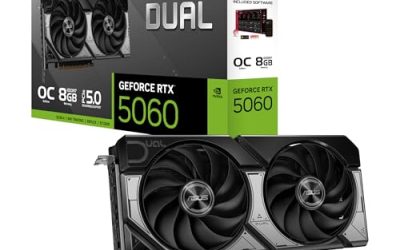
 GIGABYTE GeForce RTX 5060 WINDFORCE OC 8G GraphicsRTX5060|OC|8GB7.83 x 4.57 x 1.57 inchesCheck on Amazon

Top 3 picks at a glance
Quick Picks
As an Amazon Associate we earn from qualifying purchases.
| Product | Best for | Key spec from title |
|---|---|---|
| GIGABYTE GeForce RTX 5080 Gaming OC 16G | 4K gaming at high settings | 16GB GDDR7, 256-bit memory bus |
| MSI Gaming RTX 5070 Ti 16G Gaming Trio OC | High-refresh 1440p and entry 4K | 16GB GDDR7, 2580 MHz Extreme Performance |
| ASUS Prime GeForce RTX 5070 | Best-value 1440p gaming | 12GB GDDR7, 2542 MHz GPU clock |
| ASUS Dual GeForce RTX 5060 Ti 16GB OC Edition | 1440p on a tighter power budget | 16GB GDDR7, 2632 MHz boost clock |
| GIGABYTE GeForce RTX 5060 WINDFORCE OC 8G | 1080p gaming and easy upgrades | 8GB GDDR7, 2512 MHz core clock |
How to Choose
Start From Your Monitor, Not the Badge
The right RTX tier follows your resolution. At 1080p, an RTX 5060 or 5060 Ti already delivers high frame rates in most games, and paying for more silicon mostly buys heat and power draw. At 1440p, the RTX 5070 is the natural centre of the range, with the 5070 Ti adding headroom for high-refresh monitors. Genuine 4K gaming at high settings is where the RTX 5080 earns its place. Buying one tier above your monitor wastes money; buying one below it means turning settings down within a year, so match the card to the screen you own or are buying next.
VRAM Decides How Long the Card Stays Relevant
Memory capacity is the specification that ages fastest. The RTX 5060’s 8GB is workable at 1080p today but already forces texture compromises in some new releases. The RTX 5070’s 12GB is a comfortable 1440p allocation, while the 16GB fitted to the RTX 5060 Ti, 5070 Ti and 5080 gives real longevity for texture-heavy games, modding and higher resolutions. If two cards sit near each other in performance, the one with more memory is usually the better long-term buy. That is why the 16GB version of the 5060 Ti appears here rather than the 8GB variant.
Power Draw Climbs Fast Between Tiers
Each step up the range carries a real running cost in watts. NVIDIA rates the RTX 5060 at 145W, the 5060 Ti at 180W, the 5070 at 250W, the 5070 Ti at 300W and the 5080 at 360W. Recommended power supplies climb with them, from 550W at the bottom of the range to 850W for an RTX 5080 system. Before choosing a tier, check the power supply you already own: its wattage, its age and whether it has the connectors the card needs. A tier upgrade that also forces a power supply replacement costs more than the card alone suggests.
Features Are Shared, Raw Speed Is Not
Every card in this guide is a Blackwell-generation RTX with DLSS 4 and Multi Frame Generation support, fourth-generation ray tracing cores and the same video encoding features. Software support does not separate the tiers; raw rendering power, memory bandwidth and VRAM capacity do. That simplifies the decision: pick the slowest, coolest card that still hits your resolution and frame rate targets, and let features take care of themselves. Chasing a higher tier for a feature checkbox makes little sense when the entry card in the range already supports the same DLSS generation.
The 5 Best Options
GIGABYTE GeForce RTX 5080 Gaming OC 16G
The RTX 5080 is the strongest card in this guide and the answer for 4K gaming at high settings, with 16GB of GDDR7 on a 256-bit bus feeding the fastest GPU here. Gigabyte’s Gaming OC version adds its WINDFORCE cooling system to keep the 360W-class card in check during long sessions. It asks more of the rest of your system than anything else in this line-up, including a recommended 850W power supply, but nothing below it matches its headroom for high-refresh 4K or heavy ray tracing. This is the best RTX card, full stop, if the budget and the power supply allow it.
Specs
- GPU: NVIDIA GeForce RTX 5080
- Memory: 16GB GDDR7, 256-bit
- Cooling: WINDFORCE cooling system
- Interface: PCIe 5.0
- Model: GV-N5080GAMING OC-16GD
Best for: 4K gaming at high settings and builders who want maximum headroom.
Watch out for: Confirm your power supply meets the 850W recommendation and that the card’s length clears your case.
ASIN: B0DS2R6948
MSI Gaming RTX 5070 Ti 16G Gaming Trio OC
The 5070 Ti is the thinking gamer’s high-end card: the same 16GB of GDDR7 as the 5080, a slightly smaller GPU and a 300W power rating that keeps power supply requirements at the 750W level. MSI’s Gaming Trio OC version runs an Extreme Performance clock of 2580 MHz behind a triple-fan cooler. At 1440p it is effectively as fast as most monitors can display, and it handles 4K credibly with DLSS doing the heavy lifting. If the 5080’s demands feel like a tier too far, this is where the smart money in the upper range usually lands.
Specs
- GPU: NVIDIA GeForce RTX 5070 Ti
- Memory: 16GB GDDR7, 256-bit
- Extreme Performance clock: 2580 MHz
- Outputs: 3x DisplayPort 2.1a and 1x HDMI 2.1b
- Architecture: NVIDIA Blackwell
- Model: GeForce RTX 5070 Ti 16G Gaming Trio OC
Best for: High-refresh 1440p gaming and 4K with upscaling.
Watch out for: It is a long triple-fan card, so check case clearance, and confirm your power supply is in the 750W class.
ASIN: B0F11KQQF4
ASUS Prime GeForce RTX 5070
This is the best-value RTX card for most people. The RTX 5070 brings 12GB of GDDR7, a 250W power rating and performance aimed squarely at 1440p, and ASUS’s Prime version is an SFF-Ready 2.5-slot design with three Axial-tech fans and a Dual BIOS switch. It ships and sells through Amazon’s own listing, and its compact-for-the-tier dimensions make it an easier fit than most 5070 models. Pair it with a 650W power supply and a 1440p monitor and you have the balanced build this generation is really about, without paying for 4K capability you may never use.
Specs
- GPU: NVIDIA GeForce RTX 5070
- Memory: 12GB GDDR7
- GPU clock speed: 2542 MHz
- Design: 2.5-slot, SFF-Ready, triple Axial-tech fans
- Features: Dual BIOS
- Model: PRIME-RTX5070-12G
Best for: 1440p gaming and balanced new builds.
Watch out for: The 12GB of memory is fine for 1440p but is the first thing that will feel tight if you move to 4K later.
ASIN: B0DS6V1YSY
ASUS Dual GeForce RTX 5060 Ti 16GB OC Edition
The 5060 Ti 16GB is the value sleeper of the range: it matches the 5070 Ti and 5080 on memory capacity while drawing only 180W, so it slots into systems with a 600W power supply. ASUS’s Dual version is a 2.5-slot card with a 2632 MHz boost clock, Axial-tech fans and 0dB fan-stop behaviour at idle. That memory capacity makes it a genuine 1440p card rather than a 1080p one, and a safer long-term buy than its 8GB sibling. Choose it if your budget stops below the 5070 but you refuse to compromise on VRAM.
Specs
- GPU: NVIDIA GeForce RTX 5060 Ti
- Memory: 16GB GDDR7
- Boost clock: 2632 MHz in OC mode
- Design: 2.5-slot with Axial-tech fan and 0dB technology
- Outputs: HDMI 2.1b and DisplayPort 2.1b
- Model: DUAL-RTX5060TI-O16G
Best for: 1440p gaming with maximum VRAM per watt.
Watch out for: Make sure you are buying the 16GB version of this listing family, not the separate 8GB model.
ASIN: B0F7WB6LSH
GIGABYTE GeForce RTX 5060 WINDFORCE OC 8G
The entry point to the current RTX range is still a proper gaming card: 8GB of GDDR7, DLSS 4 with Multi Frame Generation and a 145W power draw that almost any existing system can feed. Gigabyte’s WINDFORCE OC is a compact dual-fan version with a 2512 MHz core clock, Hawk fan blades and a semi-passive mode for quiet light use. It is the easiest upgrade in this guide for an older PC, needing only a 550W power supply and one 8-pin connector. For 1080p gaming it delivers the full current feature set at the lowest wattage here.
Specs
- GPU: NVIDIA GeForce RTX 5060
- Memory: 8GB GDDR7, 128-bit
- Core clock: 2512 MHz
- Memory speed: 28 Gbps
- Outputs: DisplayPort and HDMI
- Interface: PCIe 5.0
- Model: GV-N5060WF2OC-8GD
Best for: 1080p gaming and upgrading an older PC without changing the power supply.
Watch out for: The 8GB of memory limits texture settings in newer games, so treat this as a 1080p card, not a 1440p one.
ASIN: B0F8LDHQ7Y
Which One Fits Your Situation
You Play at 4K and Refuse to Turn Settings Down
The RTX 5080 is your card. It is the only option here with the raw speed and memory bandwidth to drive a 4K high-refresh monitor at high settings without leaning entirely on upscaling. Take the GIGABYTE Gaming OC version, budget for an 850W-class power supply, and make sure your case has room for a large triple-fan card. Everything below it in this guide involves some compromise at 4K.
You Play at 1440p and Want the Sensible Sweet Spot
Start with the ASUS Prime RTX 5070. Its 12GB of memory, 250W draw and SFF-Ready dimensions make it the balanced centre of the range, and it leaves money in the build for the monitor and processor that complete a 1440p system. Step up to the MSI 5070 Ti only if your monitor runs at very high refresh rates or you plan to keep the card through your next monitor upgrade as well.
Your Power Supply or Case Limits Your Options
Work downwards from your constraints instead of upwards from your ambitions. The RTX 5060 Ti 16GB draws 180W and fits a 600W power supply while still offering 16GB of memory, and the RTX 5060 needs only 550W and a single 8-pin connector. Both ASUS and GIGABYTE offer compact versions of these cards. A lower tier installed today beats a higher tier that forces a new power supply, a new case and a month of saving.
You Stream or Create Video as Well as Game
All five cards share the same Blackwell media engine generation, so the decision comes back to memory and speed. The 16GB cards, the 5060 Ti, 5070 Ti and 5080, give editing timelines and local AI tools more room to work than the 8GB and 12GB models. The 5070 Ti is the practical creator pick: near-flagship memory capacity, strong gaming speed and a power supply requirement that does not dominate the build budget.
Common Mistakes
- Buying the flagship tier for a 1080p monitor, where the extra performance cannot be displayed.
- Choosing an 8GB card for a long-term build when a 16GB version of the same tier exists.
- Forgetting the power supply: jumping two tiers often means moving from a 550W recommendation to 750W or 850W.
- Comparing cards by clock speed alone, when memory capacity and bus width separate the tiers more in real games.
- Assuming a previous-generation card is the safer buy without checking whether its listing is still sold and supported.
Frequently Asked Questions
What Is the Best RTX Graphics Card Overall?
The GeForce RTX 5080 is the best RTX card in this guide, with 16GB of GDDR7 on a 256-bit bus and the strongest gaming performance of the five cards compared. It is the right choice for 4K gaming at high settings. The trade-offs are a 360W power rating and an 850W recommended power supply, so it suits deliberate high-end builds rather than casual upgrades.
Which RTX Card Is the Best Value?
The GeForce RTX 5070 offers the best value for most gamers, because it targets 1440p, the resolution most gaming monitors actually use, with 12GB of GDDR7 and a moderate 250W draw. If your budget is tighter, the RTX 5060 Ti in its 16GB form is the value alternative, trading some speed for the same memory capacity as the flagship cards.
How Much VRAM Do I Need for Gaming in 2026?
For 1080p, 8GB still works but is beginning to limit texture settings in new releases. For 1440p, treat 12GB as the sensible minimum and 16GB as the comfortable choice for a card you plan to keep for years. At 4K, 16GB is effectively required for high settings, which is why every card above the 5070 tier in this guide carries it.
Do All RTX 50-Series Cards Support DLSS 4?
Yes. Every card in this guide, from the RTX 5060 up to the RTX 5080, is built on NVIDIA’s Blackwell architecture and supports DLSS 4 with Multi Frame Generation. The tiers differ in raw rendering speed, memory capacity and power draw, not in feature support, so a lower-tier card still receives the same upscaling and frame generation technology as the flagship.
Related guides
More from Amazon
Programs that pair well with the guide above. Offers and eligibility are set by Amazon and may change.
Free shipping on eligible items, Prime Video and more. Eligible new members can start with a free trial.
Start a Prime free trialAd-free music streaming. Eligible new subscribers can start with a free trial.
Try Music Unlimited freeA Prime membership for ages 18-24 with a trial period. Eligibility is set by Amazon.
See Prime for Young AdultsAudiobooks and podcasts to listen to on the go. Eligible new members can start with a free trial.
Try Audible freeAs an Amazon Associate we earn from qualifying purchases.