Helldivers 2 drops four players into dense, effects-heavy firefights where explosions, weather and swarms of enemies all compete for your graphics card’s attention at once. It is a third-person co-op shooter that scales well across a wide range of hardware, but the jump from 1080p to 1440p and 4K quickly separates entry-level cards from genuinely capable ones.
As an Amazon Associate, we earn from qualifying purchases.
This guide compares five cards that cover the realistic buying range for the game: two Radeon RX 7600 models, two GeForce RTX 3060 models with a generous memory buffer, and a newer RTX 4060. The two RTX 3060 picks sit at the value end and suit 1080p and 1440p play best, while the newer cards give you more headroom for higher resolutions and quality settings.
Our Top Picks


Top 3 picks at a glance

Quick answer
For most Helldivers 2 players, the two RX 7600 cards and the RTX 4060 Eagle OC are the sweet spot for smooth 1440p play, with the 4060 offering the newest feature set. The two RTX 3060 12GB models remain sensible value picks for 1080p and lighter 1440p settings thanks to their larger memory buffer. For 4K, plan on upscaling and tuned settings with any card here.
PowerColor Fighter AMD Radeon RX 7600 8GB GDDR6
The PowerColor Fighter is the straightforward route into this lineup: a standard RX 7600 (the non-XT model) with 8GB of GDDR6 memory, sold under the model code RX7600 8G-F. It is a compact, no-frills card aimed at players who want modern hardware for 1080p and 1440p without paying for factory extras they will not use.
The listing states a Game Clock of 2250 MHz and a Boost Clock of 2655 MHz, and those figures are worth attributing to the listing itself rather than treating them as guaranteed in-game speeds. In practice, an RX 7600-class card is a comfortable fit for Helldivers 2 at 1080p with high settings and at 1440p with a sensible mix of settings, especially with the game’s built-in upscaling and render-scale options doing some of the work.
Because this is an AMD card, its upscaling route is AMD FidelityFX Super Resolution and the game’s own scaling options, not NVIDIA DLSS. That is not a drawback in this title, which was built with broad hardware support in mind, but it is worth knowing before you buy so you set the game up correctly on day one.
Specs
- GPU: AMD Radeon RX 7600 (non-XT)
- Memory: 8GB GDDR6
- Model: RX7600 8G-F
- Game Clock: 2250 MHz (per listing)
- Boost Clock: 2655 MHz (per listing)
ASRock Radeon RX 7600 Challenger 8GB OC
ASRock’s Challenger version of the RX 7600 shares the same core GPU and 8GB of GDDR6 memory as the Fighter above, but wraps it in a different cooler and feature package. The listing title confirms AMD RDNA 3 architecture, PCIe 4.0 support, dual fans and 0dB Silent Cooling, which keeps the fans stopped under light loads so the card stays quiet in menus and desktop use.
Output options are a practical strength here: the card lists HDMI 2.1 and DisplayPort 1.4, which covers modern high-refresh 1440p monitors without adapters. The Challenger carries an OC designation in its name (model RX7600 CL 8GO), marking it as ASRock’s overclocked variant of the 7600, though the listing does not state its clock figures in the facts recorded here, so treat exact speeds as not stated.
For Helldivers 2, expect a similar performance class to the other RX 7600 in this guide: strong at 1080p, capable at 1440p with tuned settings and upscaling. As with the Fighter, upscaling on this AMD card runs through FSR and the game’s internal scaling rather than DLSS. Choose between the two 7600 cards on cooler design, outputs and which listing suits your case, not on the GPU itself, which is the same silicon.
Specs
- GPU: AMD Radeon RX 7600, RDNA 3
- Memory: 8GB GDDR6
- Interface: PCIe 4.0
- Cooling: Dual fans, 0dB Silent Cooling
- Outputs: HDMI 2.1, DisplayPort 1.4
- Model: RX7600 CL 8GO
MSI GeForce RTX 3060 Ventus 2X 12G OC
The RTX 3060 Ventus 2X 12G OC is the value anchor of this guide. Its headline feature is memory: 12GB of GDDR6 on a 192-bit bus running at 15 Gbps, which gives it a larger buffer than the 8GB cards above. Helldivers 2 is not the most VRAM-hungry game at 1080p, but that extra headroom helps with high texture settings and keeps the card relevant for other modern titles in your library.
MSI’s Ventus line is its mainstream cooler design, and this model uses a Torx twin-fan setup with HDMI and DisplayPort outputs and PCIe 4 support. The OC in the name marks it as a factory-overclocked variant; a separate non-OC sibling listing exists, so check the exact model name and the ASIN in the reference table below before ordering to make sure you get this version.
Honest framing matters here: this is a card for 1080p first and 1440p with adjusted settings and DLSS upscaling. It should not be bought as a 4K card. Within that role it remains a sensible buy, because DLSS support in Helldivers 2 lets it punch above its raw specifications at higher resolutions.
Specs
- GPU: NVIDIA GeForce RTX 3060
- Memory: 12GB GDDR6
- Bus and speed: 192-bit, 15 Gbps
- Interface: PCIe 4
- Cooling: Torx twin fan
- Outputs: HDMI, DisplayPort
MSI GeForce RTX 3060 Gaming X 12G

The Gaming X is MSI’s step-up RTX 3060 line, and it shares the same core specification that matters most for this game: 12GB of GDDR6 memory on a 192-bit bus at 15 Gbps, per the listing titles. That memory configuration, rather than the cooler branding, is what defines its Helldivers 2 behaviour.
Keep this card strictly separate from the Ventus 2X above in your mind: they are different cooler lines and different listings, even though the underlying GPU and memory are the same class. The Gaming X series is generally MSI’s more premium treatment of a given GPU, so if both listings are in front of you, the choice comes down to the cooler design and the specific listing details rather than raw game performance, which will be closely matched.
Its role in a Helldivers 2 build mirrors the Ventus: a strong 1080p card and a workable 1440p card when you lean on DLSS and sensible quality settings, not a 4K solution. The 12GB buffer is the lasting advantage, giving textures room to breathe in the game’s busiest missions, where swarms and weather effects stack up on screen at once.
Specs
- GPU: NVIDIA GeForce RTX 3060
- Series: RTX 3060 Gaming X 12G
- Memory: 12GB GDDR6
- Bus and speed: 192-bit, 15 Gbps
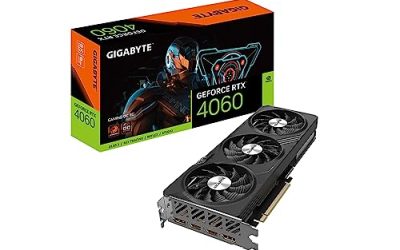
GIGABYTE GeForce RTX 4060 Eagle OC 8G
The RTX 4060 Eagle OC is the newest architecture in this guide and the natural pick if you want the longest useful life from the purchase. It carries 8GB of GDDR6 on a 128-bit bus, with Gigabyte’s 3X WINDFORCE triple-fan cooler on top, under the model code GV-N4060EAGLE OC-8GD.
The narrower memory bus compared with the RTX 3060 cards is worth understanding rather than fearing: the 4060 compensates with a much newer, more efficient GPU design and support for DLSS 3 frame generation in the games that offer it, which is a different class of feature from the older cards’ upscaling alone. In Helldivers 2 terms, it is the most comfortable 1440p card in this lineup and the one best placed to try 4K with upscaling and tuned settings, though native 4K at maximum settings is still beyond this tier of hardware.
Its 8GB buffer is the one figure that gives pause next to the 12GB RTX 3060 models, and at 1080p and 1440p in this game it is not a practical problem. If you play a wide mix of newer releases and want the modern feature set, this is the card to stretch to; if your budget is fixed and 1080p is your target, the older cards above remain rational buys.
Specs
- GPU: NVIDIA GeForce RTX 4060
- Memory: 8GB GDDR6
- Bus: 128-bit
- Cooling: 3X WINDFORCE fans
- Model: GV-N4060EAGLE OC-8GD
How to choose
Start with your monitor’s resolution, because it decides which tier you actually need. At 1080p, every card here handles Helldivers 2 well, so buy on value and features. At 1440p, favour the RX 7600 cards or the RTX 4060, and expect to use upscaling or a render-scale step down in the busiest missions. At 4K, treat upscaling as mandatory with any card in this guide and be ready to lower effects settings.
Next, pick your upscaling ecosystem. NVIDIA cards use DLSS, and the RTX 4060 adds frame generation support for games that include it. AMD cards use FSR and the game’s own scaling options. Both routes work in Helldivers 2, so this is a preference and wider-library decision rather than a performance verdict.
Then weigh memory. The 12GB RTX 3060 models offer more VRAM headroom, which helps texture quality and longevity across a mixed library. The 8GB cards are faster or newer in other respects, and 8GB is adequate for this game at 1080p and 1440p. Finally, check the basics the listings do state: cooler size and fan count for your case, and outputs such as HDMI 2.1 or DisplayPort for your monitor. Where a fact is not stated in a listing, such as exact clock speeds on some models here, confirm it on the product page before ordering.
Who should skip
Skip this entire tier if you want native 4K at maximum settings with no upscaling; that calls for a higher class of card than any model here. Skip the RTX 3060 models if you are building new for 1440p high-refresh play and can stretch to the newer cards, because their role is value at 1080p and moderate 1440p. Skip the 8GB cards if you know your wider library includes the most VRAM-hungry recent releases at high resolutions and you cannot compromise on texture settings. And skip every pick here if your current card already matches this class; Helldivers 2 scales down gracefully, and a settings change may give you the experience you want without new hardware.
FAQ
Is 8GB of VRAM enough for Helldivers 2?
For 1080p and 1440p, yes. The 8GB cards in this guide are well matched to the game at those resolutions, particularly with upscaling enabled. The 12GB RTX 3060 models add headroom for high texture settings and for other games in your library, which is their main advantage rather than a requirement for this title.
Which card here is best for 4K?
None of these cards is a native 4K maximum-settings card. The RTX 4060 Eagle OC is the strongest candidate if you want to play at 4K with DLSS upscaling and tuned settings, with the RX 7600 cards behind it using FSR. If native 4K is non-negotiable, look a tier above this guide.
Does Helldivers 2 support DLSS and FSR?
The game includes upscaling options that cover both ecosystems, alongside its own render scaling. NVIDIA cards in this guide use DLSS, and the RTX 4060 also supports frame generation in games that offer it. The AMD cards use FSR; they do not support DLSS, so set them up through the AMD route in the game’s settings.
Should I buy an RTX 3060 in 2026 for this game?
As a value pick for 1080p, and for 1440p with DLSS and adjusted settings, it remains a rational buy, and the 12GB buffer is a genuine plus. Just be sure you are ordering the exact model you intend: the Ventus 2X OC and the Gaming X are separate listings, and a non-OC Ventus sibling also exists, so match the ASIN in the reference table below.
Final verdict
Helldivers 2 rewards a sensible match between card and resolution more than raw spending. The RTX 4060 Eagle OC is the best all-round pick here for 1440p and the longest feature life. The two RX 7600 cards are strong, modern alternatives at the same resolutions, separated mainly by cooler and outputs. The two RTX 3060 12GB models earn their place as value picks for 1080p and lighter 1440p play, with their memory buffer as the standout spec. Pick the card that fits your monitor and your wider library, and verify the exact ASIN before you order.
Product and ASIN Reference
| Product | ASIN |
|---|---|
| PowerColor Fighter AMD Radeon RX 7600 8GB GDDR6 | B0C488N4BF |
| ASRock Radeon RX 7600 Challenger 8GB OC | B0C626FFG2 |
| MSI GeForce RTX 3060 Ventus 2X 12G OC | B08WPRMVWB |
| MSI GeForce RTX 3060 Gaming X 12G | B08WPJ5P4R |
| GIGABYTE GeForce RTX 4060 Eagle OC 8G | B0C8K441T1 |
Related guides
More from Amazon
Programs that pair well with the guide above. Offers and eligibility are set by Amazon and may change.
Free shipping on eligible items, Prime Video and more. Eligible new members can start with a free trial.
Start a Prime free trialAd-free music streaming. Eligible new subscribers can start with a free trial.
Try Music Unlimited freeA Prime membership for ages 18-24 with a trial period. Eligibility is set by Amazon.
See Prime for Young AdultsAudiobooks and podcasts to listen to on the go. Eligible new members can start with a free trial.
Try Audible freeAs an Amazon Associate we earn from qualifying purchases.