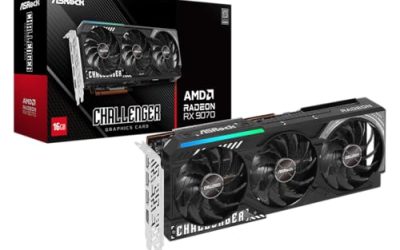
The RX 9070 vs RTX 5070 debate is, at its core, a memory debate. AMD’s card arrives with 16GB of GDDR6, while NVIDIA’s card counters with 12GB of GDDR7, a newer and faster memory type fitted to a 192-bit bus on every RTX 5070 pick in this guide. Both GPUs sit in the same general class for 1440p gaming, so the real choice is which memory trade-off suits the games, texture settings and upscaling features you actually use.
This guide compares five verified cards: two RX 9070 models from Sapphire and Gigabyte, and three RTX 5070 models from Gigabyte and ZOTAC. One naming note before the picks: the AMD card here is the standard RX 9070, not the RX 9070 XT, which is a different GPU with its own separate comparisons. There is no universal winner below, because the right answer depends on whether you value memory capacity or memory speed and the NVIDIA feature set more.
As an Amazon Associate, we earn from qualifying purchases.
Top 3 picks at a glance


Quick answer
The RX 9070 side gives you more memory: both AMD picks carry 16GB of GDDR6. The RTX 5070 side gives you faster memory and DLSS: all three NVIDIA picks carry 12GB of GDDR7 on a 192-bit bus. Choose the RX 9070 if texture headroom matters most in your build; choose the RTX 5070 if you prefer NVIDIA upscaling, faster memory chips and the wider model choice.
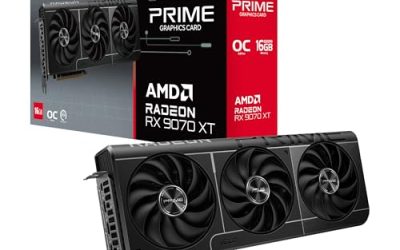
Sapphire Pulse AMD Radeon RX 9070 Gaming 16GB
Sapphire’s Pulse line is the brand’s straightforward, no-frills range, and this card is the plainest way into the RX 9070 side of the comparison. The listing title confirms the essentials: the GPU is the standard RX 9070 in non-XT form, it carries 16GB of GDDR6 memory, and it offers Dual HDMI and Dual DisplayPort outputs, which covers most dual-monitor and mixed TV-and-monitor desk setups without adapters.
Because the verified record for this listing rests on its title, the finer details stay honestly short. The memory bus width and the interface are not stated in the record, so they are recorded as not stated in the Specs below rather than filled in from other RX 9070 cards. That discipline matters in this comparison, because memory configuration is exactly what separates the two sides.
As an AMD card, its upscaling and frame-generation route is FSR. It does not support DLSS, which is NVIDIA-only, and no FSR generation is stated in the record, so none is claimed here. If you want the 16GB capacity in a simple dual-output card and your games lean on FSR, this is the entry point on the AMD side.
Specs:
– GPU: AMD Radeon RX 9070 (non-XT)
– Memory: 16GB GDDR6
– Outputs: Dual HDMI, Dual DisplayPort (per listing title)
– Memory bus: not stated
– Interface: not stated
GIGABYTE Radeon RX 9070 Gaming OC 16G
The second AMD pick is Gigabyte’s Gaming OC edition of the RX 9070. The verified record for this listing is firmer: it confirms a PCIe 5.0 interface, 16GB of GDDR6 memory, and the model code GV-R9070GAMING OC-16GD, which is the code to match when ordering so this card is not confused with other Gigabyte RX 9070 variants.
Like the Sapphire card, this one keeps the AMD side of the memory story unchanged: 16GB of GDDR6 capacity. The memory bus width and the display outputs are not stated in the record for this listing, so they appear as not stated below. Do not borrow those figures from the Sapphire pick or from any RX 9070 XT card; the XT is a different GPU and its specifications do not transfer.
The Gaming OC name marks this as Gigabyte’s overclocked edition within its own range, which makes it the natural AMD pick for buyers who want the capacity advantage plus a factory-tuned variant from a major board partner. Its upscaling route is FSR, as on every AMD card, and DLSS is not available on this side of the comparison.
Specs:
– GPU: AMD Radeon RX 9070 (non-XT)
– Memory: 16GB GDDR6
– Interface: PCIe 5.0
– Model: GV-R9070GAMING OC-16GD
– Memory bus: not stated
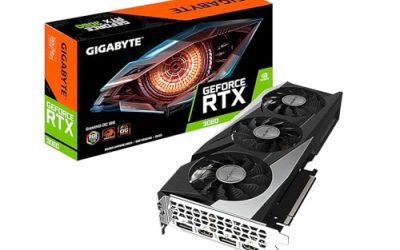
GIGABYTE GeForce RTX 5070 Eagle OC SFF 12G
The first NVIDIA pick is Gigabyte’s Eagle OC in its SFF form. Its record confirms the full RTX 5070 memory configuration that defines this side of the comparison: 12GB of GDDR7 on a 192-bit bus, with a PCIe 5.0 interface and Gigabyte’s WINDFORCE cooling. The model code is GV-N5070EAGLE OC-12GD.
The trade against the AMD picks is explicit. You give up 4GB of capacity compared with the RX 9070 cards, and in return you get the faster GDDR7 memory type and access to DLSS, NVIDIA’s upscaling technology, which is not available on the AMD side. For players whose favourite titles lean heavily on DLSS, that feature gap can matter more than the capacity gap.
The SFF designation in the name marks this as the small-form-factor-oriented model in the Eagle range, which makes it the natural shortlist entry for compact cases among the NVIDIA picks. Order it by its exact model code, because the next pick is a second, separate Eagle listing with a similar name and a different code.
Specs:
– GPU: NVIDIA GeForce RTX 5070
– Memory: 12GB GDDR7
– Memory bus: 192-bit
– Interface: PCIe 5.0
– Cooling: WINDFORCE
– Model: GV-N5070EAGLE OC-12GD
GIGABYTE GeForce RTX 5070 Eagle OC ICE SFF 12G

This is the second Gigabyte Eagle listing, and it needs to be kept strictly separate from the pick above. The ICE model is the white variant of the Eagle OC SFF, sold under its own listing and its own model code, GV-N5070EAGLEOC ICE-12GD. It is not a colour option on the previous listing; it is a distinct product entry.
On recorded facts, its memory configuration matches the other NVIDIA picks exactly: 12GB of GDDR7 on a 192-bit bus, a PCIe 5.0 interface and WINDFORCE cooling. Nothing about the white finish changes the memory trade-off at the heart of this comparison, so the decision between this card and the standard Eagle comes down to the look of the build and the exact listing you order from.
That makes this the obvious RTX 5070 pick for a white-themed compact build. Because the two Eagle names are so close, check the full model code before ordering: GV-N5070EAGLEOC ICE-12GD is the white ICE card, while the code ending in OC-12GD without ICE is the standard version. Like every NVIDIA pick here, it supports DLSS, and it has no access to FSR exclusives on the AMD side.
Specs:
– GPU: NVIDIA GeForce RTX 5070
– Memory: 12GB GDDR7
– Memory bus: 192-bit
– Interface: PCIe 5.0
– Cooling: WINDFORCE
– Colour: White (ICE variant)
– Model: GV-N5070EAGLEOC ICE-12GD
ZOTAC Gaming GeForce RTX 5070 AMP White Edition

The third NVIDIA pick is a second white option, this time from ZOTAC’s AMP line. Its listing title records 12GB of GDDR7 running at 28 Gbps on a 192-bit bus, a PCIe 5.0 interface, IceStorm 2.0 cooling and Spectra RGB lighting, under the model code ZT-B50700FQ-10A. The 28 Gbps figure is worth noting because it is the only explicit memory speed recorded for any pick in this guide, and it underlines the NVIDIA side’s pitch: less capacity, delivered faster.
The AMP White Edition gives white-build shoppers a genuine alternative to the Gigabyte ICE card, with a different cooler design and RGB lighting in place of the Eagle’s plainer presentation. The memory facts, though, are identical in shape to the other RTX 5070 picks: 12GB of GDDR7, never the 16GB of GDDR6 found on the AMD side.
One ordering caution applies to this card. The listing’s model suffix reads -10A, while ZOTAC’s own materials use -10P for this family, so verify the exact model code on the product page when ordering to be sure the listing matches the card you intend to buy.
Specs:
– GPU: NVIDIA GeForce RTX 5070
– Memory: 12GB GDDR7, 28 Gbps
– Memory bus: 192-bit
– Interface: PCIe 5.0
– Cooling: IceStorm 2.0
– Lighting: Spectra RGB
– Model: ZT-B50700FQ-10A (verify the exact code on the product page)
How to choose
Start with the memory trade-off, because it is the whole point of this pairing. The RX 9070 picks carry 16GB of GDDR6, which gives more raw capacity for texture-heavy settings. The RTX 5070 picks carry 12GB of GDDR7, a faster memory type on a 192-bit bus, with the ZOTAC pick recording a 28 Gbps memory speed. Neither arrangement is simply better; they are different answers to the same budget.
Next, settle the upscaling question. DLSS is NVIDIA-only, so it exists solely on the three RTX 5070 picks. The AMD picks use FSR as their upscaling and frame-generation route. If the games you play most are built around one of those ecosystems, that can decide the comparison before memory even enters the discussion.
Then check the platform details. A PCIe 5.0 interface is recorded for four of the five picks; it is not stated for the Sapphire card. After that, choose the model: the two Gigabyte Eagle cards suit compact SFF builds, the ICE Eagle and the ZOTAC AMP are the white options, and the Sapphire Pulse and Gigabyte Gaming OC split the AMD side between a simple dual-output card and an overclocked edition.
Finally, order by exact model code or ASIN rather than by name alone. The two Eagle listings differ by a few letters, and the ZOTAC card carries the suffix caution described in its section.
Who should skip
Skip this entire comparison if you are actually shopping for the RX 9070 XT or the RTX 5070 Ti. Those are different GPUs from the ones covered here, and nothing in this guide, including the memory figures, should be transferred to them.
Skip the AMD picks if DLSS support is a firm requirement for the games you play, because no RX 9070 card offers it. Skip the NVIDIA picks if you have already decided that 16GB of memory capacity is non-negotiable, because every RTX 5070 in this guide carries 12GB.
Also skip the Sapphire Pulse if you need a stated memory bus width or interface in the listing record before you buy; those fields are not stated for that card, so you would need to confirm them on the product page first.
FAQ
Is the RX 9070 in this guide the same card as the RX 9070 XT?
No. The XT is a separate, higher-tier GPU. Both AMD picks here are the standard RX 9070 in non-XT form, with 16GB of GDDR6, and XT specifications should not be applied to them.
Does the RX 9070 support DLSS?
No. DLSS is NVIDIA-only technology, so it is available only on the three RTX 5070 picks in this guide. The AMD picks use FSR as their upscaling route instead, and no FSR generation is stated in the listings, so none is assigned here.
How much memory does each side have?
The split never changes across the picks: both RX 9070 cards carry 16GB of GDDR6, and all three RTX 5070 cards carry 12GB of GDDR7 on a 192-bit bus. The AMD side offers more capacity; the NVIDIA side offers the faster memory type.
Are the two Gigabyte Eagle RTX 5070 cards identical?
No. They are separate listings. The Eagle OC SFF is the standard model, code GV-N5070EAGLE OC-12GD, while the Eagle OC ICE SFF, code GV-N5070EAGLEOC ICE-12GD, is the white variant. Match the model code or ASIN when ordering.
Final verdict
There is no universal winner in the RX 9070 vs RTX 5070 pairing, only a clear trade. Take the RX 9070, in Sapphire Pulse or Gigabyte Gaming OC form, if 16GB of memory capacity is your priority and your games are comfortable on FSR. Take the RTX 5070, across the two Gigabyte Eagle listings or the ZOTAC AMP White Edition, if you prefer 12GB of faster GDDR7, DLSS support, and the wider choice of compact and white models. Decide which memory philosophy fits your library, then pick the model that matches your case and colour scheme.
Product and ASIN Reference
| Product | ASIN |
|---|---|
| Sapphire Pulse AMD Radeon RX 9070 Gaming 16GB | B0DRPSF34T |
| GIGABYTE Radeon RX 9070 Gaming OC 16G | B0DS2QZC9P |
| GIGABYTE GeForce RTX 5070 Eagle OC SFF 12G | B0DTQNSRZG |
| GIGABYTE GeForce RTX 5070 Eagle OC ICE SFF 12G | B0DTQTJQGZ |
| ZOTAC Gaming GeForce RTX 5070 AMP White Edition | B0GK8WHH7V |
Related guides
More from Amazon
Programs that pair well with the guide above. Offers and eligibility are set by Amazon and may change.
Free shipping on eligible items, Prime Video and more. Eligible new members can start with a free trial.
Start a Prime free trialAd-free music streaming. Eligible new subscribers can start with a free trial.
Try Music Unlimited freeA Prime membership for ages 18-24 with a trial period. Eligibility is set by Amazon.
See Prime for Young AdultsAudiobooks and podcasts to listen to on the go. Eligible new members can start with a free trial.
Try Audible freeAs an Amazon Associate we earn from qualifying purchases.