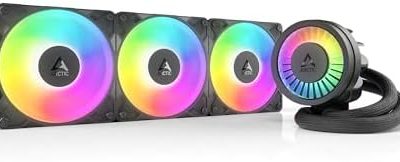
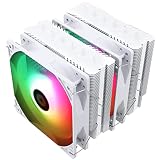
The best cooler for an Intel Core i7-12700K is a dual-tower air cooler such as the Thermalright Peerless Assassin 120 SE or DeepCool AK620 for most buyers, and a 280mm or 360mm liquid cooler such as the Arctic Liquid Freezer III if you run the chip at high sustained power or want the cleanest look. The 12700K is a 12-core, 20-thread processor with a 125W base power and up to about 190W maximum turbo power per Intel’s published specifications, so a cooler rated well above 190W handles it comfortably. The sections below explain the heat math, compare air and liquid options, and cover the LGA1700 mounting quirks that affect real temperatures.
As an Amazon Associate we earn from qualifying purchases at no extra cost to you.


Our Top Picks


Top 3 picks at a glance
The i7-12700K at a glance
| Specification | Published value | What it means for cooling |
|---|---|---|
| Cores and threads | 12 cores (8 Performance + 4 Efficient), 20 threads | Heavy multi-core loads produce a lot of heat |
| Processor base power | 125W | The sustained target in Intel’s stock settings |
| Maximum turbo power | 190W | Peak heat the cooler must handle |
| Socket | LGA1700 | Coolers must support LGA1700 mounting |
| Maximum temperature limit | 100 degrees C | The chip throttles near this point |
| Typical gaming load | Roughly 60W to 120W in most games | Gaming is far gentler than a rendering workload |
The 12700KF is the same chip without integrated graphics, and it cools the same way. Many motherboards remove power limits by default, so the chip can sit near or above 190W in heavy all-core loads unless you set limits in the BIOS. That is why the cooler choice depends on how you use the PC.
The heat math: how big a cooler do you need?
Cooler manufacturers rate their products in watts of heat they can dissipate. Those ratings are not standardized across brands, so treat them as rough guides. A practical method uses three steps.
- Find your realistic peak. For a gaming-only PC, peak processor power is often 100W to 130W. For rendering, encoding or heavy multitasking with no power limits, assume the full 190W and possibly higher on boards that disable limits.
- Add a margin. Multiply by 1.3 to 1.4 so the cooler is not running at its limit. 190W x 1.3 is about 250W.
- Compare to the manufacturer’s rating. Dual-tower air coolers like the Peerless Assassin 120 SE and the DeepCool AK620 are commonly rated around 250W to 260W by their makers. A 280mm or 360mm liquid cooler has similar or higher capacity and keeps fans quieter at the same load because the radiator is large.
Worked example: a gamer who plays at about 100W processor power needs 100 x 1.3 = 130W of rated capacity, so even a good single-tower cooler is adequate. A video editor who loads all cores at 190W needs about 250W rated capacity, which points to a dual-tower air cooler or a 280mm to 360mm liquid cooler.
Quick comparison of seven picks
| Cooler | Type | Best for | Noise character | Price tier |
|---|---|---|---|---|
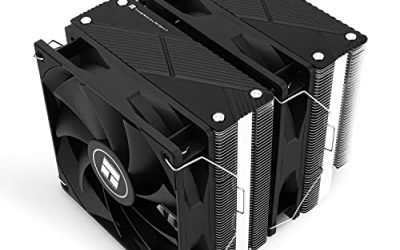
| Thermalright Peerless Assassin 120 SE | Dual-tower air, two 120mm fans | Best value | Quiet at moderate load | Low |
| DeepCool AK620 | Dual-tower air | Strong air cooling with a tidy look | Quiet to moderate | Low to mid |
| Noctua NH-U12A | Single-tower air, two 120mm fans | Compact, quiet, memory-friendly | Very quiet | Mid to premium |
| Noctua NH-D15 G2 | Large dual-tower air | Best air cooling with low noise | Very quiet | Premium |
| Arctic Liquid Freezer III 280 | 280mm AIO | Quiet, strong cooling at good value | Quiet | Mid |
| Arctic Liquid Freezer III 360 | 360mm AIO | Maximum cooling for heavy loads | Quiet under load | Mid to premium |
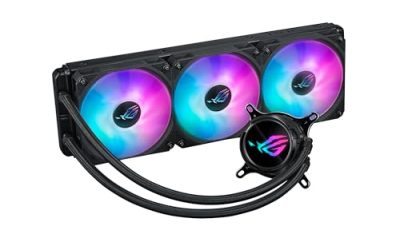
| DeepCool LT720 | 360mm AIO | Stylish liquid cooling with a rotating pump head | Moderate | Mid |
Cooler models are revised periodically, so confirm that the current version supports LGA1700 and fits your case. Temperature differences between these coolers depend on case airflow, fan speed and thermal paste, and published reviews vary, so treat the order here as a guide.
1. Thermalright Peerless Assassin 120 SE: best value
Spec line: Dual-tower heatsink with six heatpipes and two 120mm fans, supporting LGA1700 and AM5 mounting. Best for: an i7-12700K in a gaming or mixed-use PC. Skip if: your case is narrow or your memory modules are very tall.
This cooler is widely cited in reviews as one of the strongest air coolers per dollar. For a 12700K it handles gaming and moderate all-core loads comfortably, though sustained 190W workloads will push temperatures higher than a large liquid cooler would.
- Pro: Excellent cooling for a low price tier.
- Pro: Simple, secure mounting.
- Pro: No pump or leak risk.
- Con: Large; check case and RAM clearance.
- Con: Fan noise rises at maximum load.
2. DeepCool AK620: best-looking mainstream air cooler
Spec line: Dual-tower heatsink with two fans and a black finish, with LGA1700 support in the box. Best for: buyers who want strong air cooling in a tidy design. Skip if: your case has limited height.
The AK620 is a popular alternative to the Peerless Assassin and competes closely on temperatures. Its black finish and top plate suit many builds, and a white variant has been offered.
- Pro: Strong cooling and a clean design.
- Pro: Widely available.
- Pro: Straightforward mounting.
- Con: Tall, so check the case’s cooler height limit.
- Con: Performance is similar to cheaper alternatives.
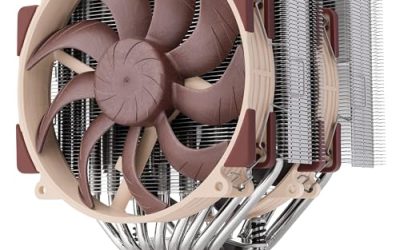
3. Noctua NH-U12A: best compact quiet air cooler
Spec line: Single-tower heatsink with two 120mm fans, strong low-noise reputation. Best for: quiet builds and cases with limited width. Skip if: you want the lowest possible price.
Noctua’s design is known for build quality and a long warranty reputation. The NH-U12A trades a bit of peak cooling for a slimmer profile and easier memory clearance.
- Pro: Very quiet at moderate loads.
- Pro: Compact and easy to fit.
- Pro: Excellent build quality.
- Con: Higher price tier than similar-performing rivals.
- Con: Tan and brown color scheme does not suit every build.
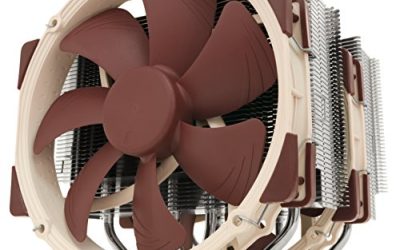
4. Noctua NH-D15 G2: best air cooling overall
Spec line: Large dual-tower heatsink with two high-pressure fans, designed with modern sockets in mind. Best for: maximum air cooling with low noise. Skip if: your case is small or you want a minimal look.
For a 12700K that runs at high sustained power, the NH-D15 G2 is among the strongest air options and keeps noise low. It is large and expensive, so it suits full-size cases and buyers who value silence.
- Pro: Top-tier air cooling performance.
- Pro: Very quiet under load.
- Pro: Long-term reliability reputation.
- Con: Premium price tier.
- Con: Large size can block memory slots or the case panel.
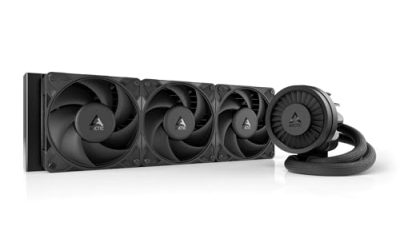
5. Arctic Liquid Freezer III 280: best liquid cooler value
Spec line: 280mm all-in-one liquid cooler with two 140mm fans, supporting LGA1700. Best for: quiet, strong cooling in a case with a 280mm radiator mount. Skip if: your case has no 280mm mounting position.
The Liquid Freezer III family is frequently cited in reviews for strong thermals at a reasonable price, along with a design that offers contact pressure suited to LGA1700. A 280mm radiator provides ample capacity for a 12700K, including sustained heavy loads.
- Pro: Strong cooling and low noise.
- Pro: Good value in the liquid cooler tier.
- Pro: Mounting hardware is designed for LGA1700 pressure.
- Con: Needs radiator space in the case.
- Con: Pump and tubing add potential failure points compared with air.
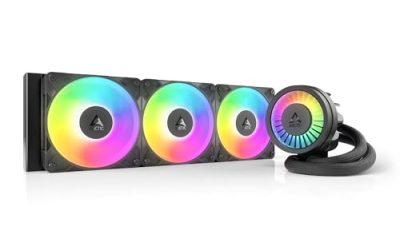
6. Arctic Liquid Freezer III 360: best for heavy sustained loads
Spec line: 360mm all-in-one liquid cooler with three 120mm fans. Best for: rendering, encoding and overclocking a 12700K. Skip if: you only game, since the extra capacity will rarely be used.
The larger radiator keeps fans slower at the same load, which keeps noise down. For a 12700K that spends hours at full load, it gives the most margin.
- Pro: Maximum cooling headroom.
- Pro: Quiet at sustained loads.
- Pro: Clean look in a glass-panel case.
- Con: Requires a case that supports a 360mm radiator.
- Con: More expensive than air coolers with similar gaming results.
7. DeepCool LT720: best stylish AIO
Spec line: 360mm all-in-one liquid cooler with a rotating pump-head display and LGA1700 mounting. Best for: builders who want a design feature on the pump head. Skip if: you prefer plain, quiet cooling.
The LT720 targets buyers who care about appearance as well as temperatures. It cools a 12700K comfortably, though fan noise at full speed is moderate.
- Pro: Strong cooling for a 360mm unit.
- Pro: Distinct appearance.
- Pro: Wide availability.
- Con: Fan noise at full speed.
- Con: Premium for the styling.
Air versus AIO for a 12700K: decision matrix
| Your situation | Better choice | Reason |
|---|---|---|
| Gaming only, standard case | Dual-tower air cooler | Gaming loads are modest; air is cheap and reliable |
| Video editing or rendering for hours | 280mm or 360mm AIO | Larger heat-removal capacity at lower fan speed |
| Small or narrow case | Compact air cooler or 240mm AIO | Clearance limits |
| Quiet build priority | NH-D15 G2 or a 280mm to 360mm AIO | Large surface area allows slow fans |
| Minimal maintenance | Air cooler | No pump or fluid |
| Showcase build | 360mm AIO with matching fans | Cleaner look around the CPU socket |
LGA1700 quirks that change real temperatures
Socket bending and contact pressure
The LGA1700 socket and its stock retention bracket have been reported to flex under mounting pressure, which can reduce contact between the heat spreader and the cooler on some chips. Aftermarket contact frames address this by holding the processor more evenly, and some builders report lower temperatures after fitting one. If your temperatures are unusually high with good mounting, check contact before replacing the cooler. Use a frame only if it is compatible with your cooler’s mounting hardware, and consider the effect on your warranty before modifying the socket.
Thermal paste application
Use a pea-sized dot or a thin line across the center, and let the cooler spread it. Too much paste is a mess, but too little leaves air gaps. Reapply paste when you remove the cooler.
Fan and pump settings
Set a custom fan curve in the BIOS. A simple curve keeps fans near 30% to 40% under 60 degrees C, rises to 60% around 75 degrees C and reaches full speed only above 85 degrees C. A flat, quiet response avoids sudden ramps during short game loads.
Power limits
If temperatures are high, lowering the processor’s long-duration power limit to around 150W or applying a modest undervolt reduces heat with little effect on gaming performance. Do this in the BIOS and verify stability with a stress test.
Case airflow decides how much the cooler can do
Every cooler ends up exhausting heat into the case air, so the best heatsink still struggles in a sealed case. A reasonable layout for a 12700K and a mid-range graphics card is two or three intake fans at the front and one exhaust fan at the rear, running at moderate speed. For a 280mm or 360mm radiator, mounting it at the front as intake feeds the processor cooler with cool air but warms the graphics card slightly, while a top-mounted exhaust radiator keeps the case air cooler for the graphics card but gives the processor slightly warmer coolant. Neither layout is wrong; pick the one that fits your case and check temperatures of both components after the first load test.
Memory and clearance checks before buying
Dual-tower air coolers can overhang the first memory slot. If you use tall RGB memory modules, measure the height against the cooler’s published memory clearance, or choose low-profile modules. Also check the cooler height against the case’s published maximum, usually 155mm to 170mm for mid-towers, since a few millimeters too tall means the side panel will not close. For a liquid cooler, confirm that the radiator and fans fit without touching the memory or the top-edge motherboard components, and that the tubes reach the pump block without being stretched.
Temperatures to expect
Temperature results vary with ambient room temperature, case airflow, paste and power limits, so treat the ranges below as typical of published reviews rather than guarantees.
| Workload | Good air cooler | 280mm to 360mm AIO |
|---|---|---|
| Gaming | Roughly 50 to 70 degrees C | Roughly 45 to 65 degrees C |
| Sustained all-core load at stock limits | Roughly 75 to 95 degrees C | Roughly 65 to 85 degrees C |
If your processor exceeds about 90 degrees C in gaming, check that the cooler is mounted evenly, that the case has intake and exhaust fans, and that the paste was applied correctly.
Frequently Asked Questions
What is the best cooler for the i7-12700K?
For most buyers, a dual-tower air cooler such as the Thermalright Peerless Assassin 120 SE or DeepCool AK620 is the best choice. If you run heavy sustained workloads, a 280mm or 360mm AIO such as the Arctic Liquid Freezer III gives more headroom and lower noise.
Does the i7-12700K need liquid cooling?
No. A good air cooler handles it for gaming and moderate workloads. Liquid cooling helps with sustained all-core loads, quiet operation and aesthetics.
Is the stock cooler enough?
The 12700K is sold without a cooler in its K version, so you need to buy one. Do not use a low-profile cooler on this chip unless you limit its power.
Do I need a contact frame for LGA1700?
It is optional. Some builders see lower temperatures with a frame, but a properly mounted cooler is adequate for many systems. Consider a frame if you see uneven or unusually high temperatures despite good mounting.
Is air or AIO better for a 12700K?
Air is simpler and cheaper and works well for gaming. AIO coolers excel at heavy sustained loads and make quieter, tidier builds. Choose based on your workload and case support.
What temperature is too hot for a 12700K?
Sustained temperatures above about 90 degrees C are worth investigating, and the chip begins to throttle near 100 degrees C. Check mounting, fans and power limits if you approach those figures.
Bottom line
For a gaming-focused 12700K, buy a quality dual-tower air cooler and spend the savings elsewhere. For rendering, long encodes or a quiet showcase build, step up to a 280mm or 360mm liquid cooler. Verify LGA1700 support, case clearances and memory height before you order, and set a sensible fan curve and power limit in the BIOS.
Related guides
More from Amazon
Programs that pair well with the guide above. Offers and eligibility are set by Amazon and may change.
Free shipping on eligible items, Prime Video and more. Eligible new members can start with a free trial.
Start a Prime free trialAd-free music streaming. Eligible new subscribers can start with a free trial.
Try Music Unlimited freeA Prime membership for ages 18-24 with a trial period. Eligibility is set by Amazon.
See Prime for Young AdultsAudiobooks and podcasts to listen to on the go. Eligible new members can start with a free trial.
Try Audible freeAs an Amazon Associate we earn from qualifying purchases.