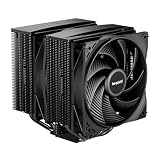
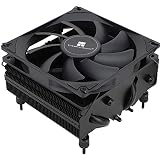
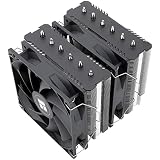
For most gaming PCs, a good dual-tower air cooler is enough, and an AIO only becomes the better choice when the case, the CPU’s power draw, or your noise and looks goals push you there. If you run a mid-range or X3D-class processor in a roomy case, air cooling is simpler and lasts longer. If you run a high-power Intel chip, hate a huge heatsink hanging over your RAM, or want a clean look with a screen or lighting, a 360mm liquid cooler earns its place. Below you will find the real trade-offs, the numbers to check in your own build, and four 360mm AIOs worth considering.
Our Top Picks
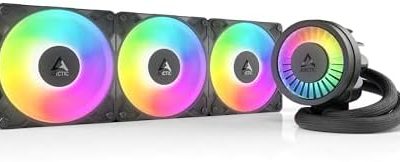
 ARCTIC Liquid Freezer III Pro 360 A-RGBLiquid Freezer III Pro 360 A-RGB15.7 x 4.7 x 2.9 Inches4.5 PoundsCheck on Amazon
 Thermalright Frozen Notte 360 Black ARGB V2 Water360MM0.98 x 4.72 x 4.72 Inches0.2 poundsCheck on Amazon

Top 3 picks at a glance
Quick Verdict
| Your situation | Our verdict |
|---|---|
| Gaming-focused Ryzen X3D chip (for example a 120 W TDP part) in a standard mid-tower | Air cooler. A large dual-tower handles gaming loads, and there is no pump to fail. |
| High-power Intel Core i7/i9 or Core Ultra 9 with heavy rendering or streaming alongside games | 360mm AIO. The extra radiator area gives more headroom under all-core loads. |
| Case with limited CPU cooler height or a mesh side panel that makes a tall tower awkward | AIO, as long as the case really supports the radiator position you plan to use. |
| You want the quietest, lowest-maintenance build you can get | Air cooler, ideally a tower with two slow, large fans. |
| You want a showpiece build with a display or heavy lighting | AIO with a pump-head screen, accepting the added complexity. |
| Small case or a top-only radiator mount | Check the case spec first; a 240mm or a slim air cooler may fit where a 360mm will not. |
The Key Differences
Cooling capacity is closer than marketing suggests
Liquid does not magically cool better than metal. Both designs move heat from the CPU’s integrated heat spreader into fins, and then fans push air through those fins. An AIO simply moves the fins to a radiator that can be bigger than any tower, and uses a pump and coolant to carry the heat there. That is why the advantage shows up mostly when the heat load is large and sustained.
Gaming is a modest load for most modern CPUs. AMD lists the Ryzen 7 9800X3D at a 120 W TDP with a 162 W package power limit, and gaming usually draws well below the ceiling because games rarely load every core. Press coverage and enthusiast communities broadly report that a capable dual-tower air cooler keeps this class of chip comfortable in games, and that a 240mm AIO usually lands within a few degrees of a good tower. Treat that as a rule of thumb: exact temperatures depend on ambient room temperature, case airflow, and BIOS power settings.
The picture changes with high-power Intel parts. Intel’s specification pages list a maximum turbo power of 250 W for the Core Ultra 9 285K and 253 W for the Core i9-14900K. Sustained all-core work such as video encoding or compiling will push a tower cooler harder, and a 360mm radiator has far more surface area to absorb it. If your weekend includes rendering as well as gaming, that headroom matters.
Size, clearance and case compatibility
Air coolers are tall. Noctua’s NH-D15 G2, a flagship dual tower, is 168 mm tall with its fans fitted, according to the manufacturer’s specification page, and it weighs about 1.5 kg. Many mid-towers list a maximum CPU cooler height in the 160-170 mm range, so a cooler like this can be a tight fit. You also need to check the front fan against your RAM modules, since a tower’s lower fan can sit directly over the first memory slot.
A 360mm AIO shifts the bulk elsewhere. The radiator is about 397-398 mm long and 120 mm wide, and the thickness varies by model. The block on the CPU is compact, but you need a case that supports a 360mm radiator in the specific position you want, whether front or top, and that leaves enough room between the roof and the motherboard for radiator plus fans. A companion fit-check guide covers how to measure that; the short version is that radiator thickness plus 25 mm fans must clear the tallest part beneath it.
Noise and reliability
An AIO adds a pump to the noise equation, plus three radiator fans. Pumps vary: for example, ARCTIC specifies a pump range of 800-2800 rpm for its Liquid Freezer III Pro series, and some competing designs spin their pumps faster, so a pump profile you can lower in the BIOS or software is a real advantage. A tower with one or two big fans at low speed is often quieter at idle and light gaming.
Longevity is the less glamorous difference. Retailer and enthusiast guides commonly put typical AIO service life at around five to seven years, with the pump or slow coolant loss through the tubing as the usual end of life, though these are general estimates and not measured failure data. An air cooler’s heatsink can last far longer, and when a fan wears out it is cheap to replace. On the other side of the ledger, manufacturer warranties on premium coolers of both types can be long: both Noctua’s NH-D15 G2 and ARCTIC’s Liquid Freezer III Pro 360 list six-year warranties. Always confirm warranty length on the exact listing, because it can differ between sellers and regions.
Comparison at a glance
| Factor | Large dual-tower air | 360mm AIO |
|---|---|---|
| Typical thickness or height to clear | About 150-170 mm above the board (example: 168 mm) | Radiator plus fans, from about 52 mm to 63 mm of depth at the roof or front |
| Moving parts that can fail | Fans only | Pump and fans |
| Best at | Gaming loads, value, simplicity | Sustained high-wattage loads, clean CPU area |
| Main risk | Clearance over RAM and case height | Radiator fit, pump orientation, long-term pump or coolant loss |
| Typical lifespan guidance | Heatsink very long; fans replaceable | Often quoted around 5-7 years |
The figures in the table are approximate and depend on the exact model. The 168 mm number comes from Noctua’s specification page; the 52 mm and 63 mm radiator-plus-fan depths come from the Thermalright and ARCTIC product specifications respectively. Always confirm on the actual listing.
Which AIO details matter
If you do go liquid, three specs separate models. Radiator thickness is first: 27 mm designs are common, while ARCTIC’s Liquid Freezer III Pro 360 uses a 38 mm radiator, which can improve heat transfer but needs more space and brings its depth with 25 mm fans to about 63 mm. Pump placement and tubing length come next: tubes of roughly 400-450 mm leave room for either front or top mounting in most mid-towers. Finally, socket support: check that the mounting hardware covers your platform, such as AM5 or LGA1851 and LGA1700.
How to Decide
Run through this short checklist before you spend anything.
- Find your CPU’s sustained power. Look up the processor’s rated power limit. As a rule of thumb, parts that top out around 120-160 W are comfortable on a quality dual tower; parts specified near 250 W are where a 360mm radiator starts to pay off.
- Measure the case. Note the maximum CPU cooler height in the case manual and compare it with the tower’s listed height. For a 360mm radiator, note the supported positions and any RAM or motherboard-component height limits for a top mount.
- Measure the RAM. Tall heat spreaders matter for both choices. A kit around 44 mm tall can collide with a top-mounted radiator stack or the front fan of a large tower, while a low-profile kit near 33 mm leaves more room.
- Decide your noise tolerance. If you want silence at idle, favor a tower or an AIO with an adjustable pump curve.
- Plan for the long run. If you expect to keep the build for eight years or more, an air cooler needs less planning than an AIO that may be due for replacement partway through.
Worked example (rule of thumb, not a measurement): Suppose your case manual allows a 165 mm cooler and a 360mm radiator at the front only. A 168 mm tower will not fit, so the choice is between a shorter tower and a front-mounted 360mm AIO. If you also run a 250 W-class CPU, the AIO is the stronger answer. If you run a 120 W-class gaming chip, a 160 mm tower is the simpler choice.
Products That Fit
The four coolers below are all 360mm all-in-ones, so they suit the AIO side of the decision. If you landed on air cooling, treat them as the alternative to consider only if clearance or CPU power pushes you to liquid.
ARCTIC Liquid Freezer III Pro 360 (A-RGB) – high-wattage CPUs and thick-radiator cooling
As an Amazon Associate we earn from qualifying purchases at no extra cost to you.

This model suits the reader with a 250 W-class processor who wants maximum radiator capacity and a manufacturer-listed six-year warranty. Its 38 mm radiator is thicker than the common 27 mm design, which is the main reason it is a strong pick when sustained load is the concern. It also adds a small VRM fan on the block to move air over the motherboard’s power stages, which helps in cases where airflow is weak.
- Radiator about 398 x 120 x 38 mm; around 63 mm deep with the supplied 25 mm fans (manufacturer specification).
- Three P12 Pro A-RGB fans, 600-3000 rpm; pump 800-2800 rpm PWM.
- Supports AMD AM5/AM4 and Intel LGA1851/1700 per the manufacturer.
- Colorway and exact SKU: confirm on listing.
Caveat: the depth. Many cases that advertise 360mm support were designed around 27 mm radiators, so a roof or front mount can run out of room.
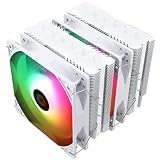
ARCTIC Liquid Freezer III Pro 360 (second listing) – the alternate colorway or SKU

This second listing carries the same product name and appears to be a different color variant of the same cooler, with the retailer page URL suggesting the white edition. It fits the same reader as the first listing, with the extra consideration of matching a light-colored build. If your case has a white interior or you are using white fans elsewhere, pick the colorway that matches rather than paying attention to the cooling difference, which should be the same design.
- Same 360mm A-RGB cooler family; confirm color and SKU on the listing.
- 38 mm radiator and 25 mm fans in the spec sheet for the Pro 360 series.
- Six-year manufacturer warranty on the series; confirm the seller’s terms.
- Included thermal paste and socket hardware: confirm on listing.
Caveat: because two listings share a name, make sure you are comparing the same model number before you buy, and check that the fan lighting header on your board matches the cooler’s connector.
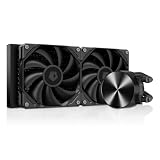
Thermalright Frozen Notte 360 Black ARGB V2 – slim radiator, simple build

The Frozen Notte suits a reader who wants a 360mm AIO for a standard mid-tower and values a more compact radiator. Its 27 mm-class radiator is easier to fit under roofs where the thicker designs struggle, and the three fans are a standard 25 mm thickness. It is a straightforward fit for the “I just need to move more heat than my tower can” scenario.
- Radiator about 397 x 120 x 27 mm; three 120 x 25 mm PWM ARGB fans (per retailer and manual listings).
- Water block about 72 x 72 x 54 mm; pump up to roughly 5300 rpm per listings.
- Supports AMD AM4/AM5 and Intel LGA1700/1851 among others; confirm on listing.
- Warranty length varies between sellers in retailer listings: confirm before buying.
Caveat: pump speed is specified higher than some rivals, so check whether your board or software lets you lower it if noise matters.
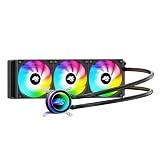
Thermalright Peerless Vision 360 ARGB – for builds that want a display

This is the pick for readers who see the cooler as part of the look. The pump head carries a 3.95-inch IPS screen at 480 x 480 resolution, which can show temperatures, clocks, or images. Cooling hardware is a 27 mm class radiator with three fans, so the thermal case is similar to other 360mm AIOs, with the screen as the differentiator.
- 3.95-inch IPS LCD, 480 x 480, 60 Hz (per retailer listings).
- Radiator about 397 x 120 x 27 mm; about 52 mm deep with fans fitted.
- Pump about 3000 rpm PWM; block roughly 81 x 79 x 67.6 mm.
- Fan speed and socket support differ between listings: confirm on the product page.
Caveat: the block is taller and larger than a plain pump head, so check clearance, and expect to rely on the vendor’s software for the screen.
Common Mistakes
- Assuming an AIO always runs cooler than a good tower; at gaming loads the gap can be small.
- Buying a 360mm radiator for a case that supports it only at the front, then trying to fit it at the roof.
- Ignoring radiator thickness, especially with 38 mm designs plus 25 mm fans.
- Forgetting RAM height when choosing a tower or a top-mounted radiator.
- Mounting the radiator so the pump is the highest point of the loop, which lets air collect in the pump and causes gurgling.
- Treating “quiet” as a given: pump speed and fan curves still need setting in the BIOS.
Questions
Is a 360mm AIO overkill for gaming?
For many gaming CPUs it is more cooling than you need. A good dual-tower or a 240mm AIO is usually enough for a 120 W-class chip. A 360mm radiator makes more sense for 250 W-class processors or mixed gaming and rendering.
Do AIOs leak?
Leaks are rare on current sealed units, but the sealed system can lose a small amount of liquid through tubing over years, and the pump can wear out. Warranty length is a practical signal of the maker’s confidence. Check the exact listing for terms.
Should the radiator go on the front or the top?
Both work if the case supports them. Manufacturer guidance generally says to keep the pump below the highest point of the loop, so a top mount with the tubes lower on the radiator, or a front mount with tubes at the bottom, avoids trapping air in the pump. Follow your cooler’s manual if it differs.
Is the screen on a Peerless Vision worth it?
It does not change cooling. It is a cosmetic and monitoring feature, and it adds software and a larger block. If you do not want it, a plain AIO is simpler.
How long should an AIO last?
General guides cite roughly five to seven years, with pump failure or coolant loss as the typical limit, but they are estimates, not measured failure data. Keep an eye on temperatures and pump noise as the unit ages.
Update History
- October 14, 2026 – Initial publication.
- Check the product page for current specifications and availability before buying.
Sources
- ARCTIC Liquid Freezer III Pro 360 A-RGB manufacturer specification sheet and retailer listing fields
- Noctua NH-D15 G2 manufacturer specification page
- Thermalright Frozen Notte 360 and Peerless Vision 360 retailer listing fields and manual excerpts
- AMD processor specification pages (Ryzen 7 9800X3D power ratings)
- Intel ARK specification pages (maximum turbo power for Core Ultra 9 285K and Core i9-14900K)
- Corsair mounting-orientation guidance for AIO radiators
- General industry guides on AIO and air cooler lifespan (estimates, not failure data)