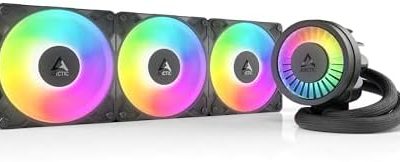
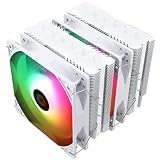
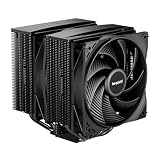
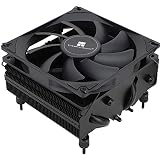
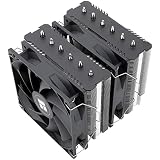
The best CPU cooler for a Ryzen 5 3400G is a single-tower air cooler rated for at least 120W, such as the Thermalright Peerless Assassin 120 SE or the Noctua NH-U12S Redux. The 3400G is a 4-core, 8-thread, 65W AM4 chip that runs acceptably on its bundled cooler, but a bigger heatsink makes it quieter and cooler. Small-case builds should look at low-profile coolers like the Thermalright AXP90-X53 instead.
Our Top Picks
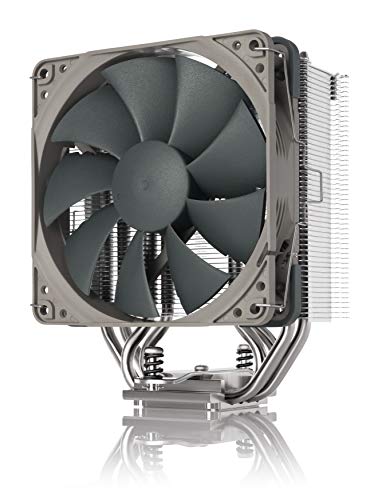


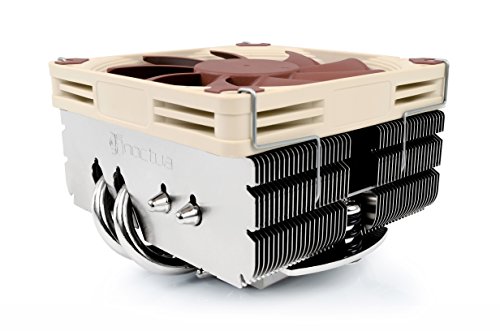


Top 3 picks at a glance
Quick answer: which cooler for which 3400G build
| Your build | Cooler class | Pick | Why |
|---|---|---|---|
| Standard ATX or micro-ATX tower, quiet priority | Single tower, 120mm fan | Noctua NH-U12S Redux | Low-noise design, 158mm tall, 5 heat pipes |
| Most cooling per dollar | Dual-fan tower | Thermalright Peerless Assassin 120 SE | 6 heat pipes, two 120mm PWM fans, big safety margin |
| Compact cooler with a very high rating | Double tower | be quiet! Pure Rock Pro 3 | 250W TDP rating per the maker, two silent-oriented 120mm fans |
| Simple upgrade from the bundled cooler | Single tower | Scythe Mugen 6 | 120mm single tower, AM4 support listed by the maker |
| Mini-ITX or slim HTPC case | Low profile, about 53mm | Thermalright AXP90-X53 | 92mm slim PWM fan, 4 heat pipes, 53mm height |
| Smallest case, silence first | Low profile, 65mm | Noctua NH-L9x65 | 65mm height, built for quiet small-form-factor PCs |
| Slim case, recognised brand | Low profile, 100W rating | be quiet! Pure Rock Low Profile | 100W TDP rating per the maker, 3 heat pipes |
What the Ryzen 5 3400G actually needs from a cooler
Per AMD’s specification, the Ryzen 5 3400G has 4 cores and 8 threads, a 3.7 GHz base clock, a 4.2 GHz boost clock, 4 MB of L3 cache, a 65W default TDP and Socket AM4. It carries integrated Radeon RX Vega 11 graphics and supports dual-channel DDR4-2933. It launched in July 2019, so every AM4 cooler made since mounts on it with the standard AM4 bracket.
The number that matters is power, not the TDP label. AMD’s AM4 processors are generally allowed to draw about 1.35 times their rated TDP for sustained boost (the package power limit). For a 65W chip that is roughly 88W of heat when all cores and the graphics block are busy. A manual overclock raises it further, because the 3400G puts CPU cores and a Vega graphics block on one small die.
| Scenario | Approx. heat to remove | Cooler rating to look for |
|---|---|---|
| Stock settings, gaming and browsing | 45 to 65W typical | At least 95W |
| Stock settings, all-core load (rendering, encoding) | About 88W package limit | At least 120W |
| Manual overclock on CPU and Vega 11 | 100W or more (varies by chip) | 150W or more |
| Small case with weak airflow | Same heat, warmer case air | Add roughly 30 percent margin |
These are planning figures derived from the rated TDP and the AM4 power rule, not measured results. A practical rule: choose a cooler rated at 1.5 times the 88W package limit if you want fans that stay slow. That is about 130W, which every tower on this list clears. The low-profile models are chosen for case size and sit closer to the limit.
Do you need to replace the bundled cooler?
Not always. The 3400G originally shipped with the AMD Wraith Spire, a 92mm-fan cooler that AMD lists for CPUs up to 95W. TechSpot’s review reported a peak temperature of about 58 degrees Celsius in a Blender workload with the Spire and a sustained clock near 3.95 GHz out of the box, so the stock cooler is adequate. The reasons to buy a new one are noise, overclocking, a hot small case, or a unit that arrived with a smaller bundled cooler.
On that last point, AMD has been phasing out Wraith Spire and Wraith Prism coolers for select Ryzen models, and the 3400G’s bundled cooler moved from the Spire to the smaller Wraith Stealth in 2025 according to a published list of AMD’s changes. If your box has a Stealth, an aftermarket cooler is a sensible upgrade rather than a luxury. Check the listing details before you order.
How We Chose
This guide is research-based. We did not use these coolers ourselves. Picks come from the manufacturers’ published specifications (socket support, rated TDP, height, fan size, heat-pipe count) and from editorial coverage of the same cooler families. The filters were: official AM4 support, a fit with the standard AM4 bracket, a rated capacity at or above the 3400G’s roughly 88W limit (except low-profile picks chosen for case size), a PWM fan that can slow down at idle, and no RGB-first designs with unclear AM4 support.
Best CPU coolers for Ryzen 5 3400G
Best overall: Noctua NH-U12S Redux
The Redux line is Noctua’s lower-cost take on its well-known U12S single tower. It is 158mm tall, uses five heat pipes and a 120mm PWM fan, and the maker lists support for Intel and AMD sockets including AM4. For a 65W chip the heatsink is far larger than necessary, which is the point: it lets the fan idle near its minimum speed. Choose it if low noise matters more than the lowest cost.
- Type: single tower, 120mm PWM fan
- Height: 158mm (check case clearance)
- Heat pipes: 5
- Best for: quiet desktop builds in ATX or micro-ATX cases
- Skip if: your case supports under about 160mm of cooler height, or you want a no-frills budget part
Pros: low noise, well-understood mounting, strong rating for a 65W chip. Cons: costs more than similar-performing alternatives, plain looks.
As an Amazon Associate we earn from qualifying purchases at no extra cost to you.
Best value: Thermalright Peerless Assassin 120 SE
This dual-fan, six-heat-pipe tower is the usual answer when someone wants top-tier air cooling for modest money. The listing describes two 120mm PWM fans with a 1550RPM top speed, which is moderate. On a 65W Ryzen the fans can stay near idle speed through most work. It is wider than a basic single tower, so verify case and RAM clearance first.
- Type: dual-fan tower
- Heat pipes: 6
- Fans: two 120mm PWM, 1550RPM maximum
- Best for: the largest cooling margin per dollar
- Skip if: you use tall-heatsink RAM in a tight case or want a smaller footprint
Pros: large headroom for overclocking, quiet at low RPM, simple AM4 mount. Cons: wide and heavy, can crowd the first RAM slot with some memory kits.

Best high-rated compact tower: be quiet! Pure Rock Pro 3
The maker rates this double tower at 250W TDP and pairs it with two 120mm PWM fans. That rating is far above what the 3400G needs, which means the fans can run at a low, steady speed through long gaming sessions. It suits builders who want an understated black cooler that could carry a hotter 8-core AM4 chip later.
- Type: double tower with two 120mm PWM fans
- Rated capacity: 250W TDP per the manufacturer
- Best for: quiet builds that may move to a 5000-series CPU later
- Skip if: budget is the main concern
Pros: very large margin, quiet-focused design, AMD and Intel support. Cons: more cooler than a 65W chip needs, upper price tier.

Best simple single tower: Scythe Mugen 6
The Mugen 6 is a single-tower 120mm cooler with an aluminium top cover, and the listing names AM4 support alongside AM5 and Intel LGA1700 and LGA1151. It sits between the bundled cooler and the oversized dual towers: easier to fit, easier to clear RAM, and plenty for 65W.
- Type: single tower, 120mm
- Sockets: AM4, AM5, LGA1700, LGA1151 per the listing
- Best for: first-time builders upgrading from a bundled cooler
- Skip if: you want maximum headroom for overclocking
Pros: broad socket support, straightforward mounting, reusable on a later AM5 build. Cons: less headroom than dual-fan designs.

Best low-profile budget pick: Thermalright AXP90-X53
For mini-ITX, slim cases and HTPC builds, the AXP90-X53 packs four heat pipes into a 53mm-tall body with a slim 92mm PWM fan. The 3400G is a natural fit for these cases, since Vega 11 graphics can run without a separate graphics card. Expect more fan noise under sustained load than a full tower, but it covers the stock 65W limit.
- Type: low-profile, 92mm slim PWM fan
- Height: 53mm
- Heat pipes: 4
- Best for: mini-ITX and slim HTPC cases with limited height
- Skip if: you plan to overclock or your case has room for a tower
Pros: very small, low cost, AM4 support. Cons: fan becomes audible under load, limited overclocking headroom.

Best quiet low-profile: Noctua NH-L9x65
This 65mm-tall cooler is aimed at small-form-factor builds where noise matters. It is a better match for a 65W APU than for a hot 8-core chip, so the 3400G is inside its comfort zone. It costs several times more than the AXP90-X53, and that is the trade-off: you pay for quieter fan behaviour and build quality.
- Type: low-profile, 65mm height
- Best for: silent small-form-factor and living-room PCs
- Skip if: you only need a cheap slim cooler
Pros: low noise, compact, long record in small cases. Cons: price, not suited to overclocking.

Best 100W-rated slim option: be quiet! Pure Rock Low Profile
The maker lists a 100W TDP rating, three 6mm heat pipes and AMD and Intel support. That rating clears the 3400G’s roughly 88W package limit with a little room to spare, which makes it an acceptable slim option when the Noctua is out of budget and you want an established brand.
- Type: low-profile, 3 heat pipes
- Rated capacity: 100W TDP per the manufacturer
- Best for: compact cases that still need a rated margin
- Skip if: you have space for a full tower and want lower noise
Pros: rated above the 3400G’s limit, established brand, simple install. Cons: little room beyond stock settings.

Side-by-side comparison
| Cooler | Type | Key figure from maker or listing | Margin over 88W |
|---|---|---|---|
| be quiet! Pure Rock Pro 3 | Double tower | 250W TDP rating | About 2.8x |
| Thermalright Peerless Assassin 120 SE | Dual-fan tower | 6 heat pipes, 2 fans | Large (rating not stated in listing) |
| Noctua NH-U12S Redux | Single tower | 158mm height, 5 heat pipes | Large (rating not stated in listing) |
| Scythe Mugen 6 | Single tower | 120mm, AM4 listed | Comfortable |
| be quiet! Pure Rock Low Profile | Low profile | 100W TDP rating | About 1.1x |
| Thermalright AXP90-X53 | Low profile | 53mm height, 4 heat pipes | Adequate at stock |
| Noctua NH-L9x65 | Low profile | 65mm height | Adequate at stock |
Noise expectations: what to expect from each class
Fan speed, not cooler brand, decides how loud a PC is. A large tower at 600 to 900 RPM on a 65W chip is close to inaudible in a normal room. A slim 92mm fan must spin faster to move the same air, often above 1,500 RPM under load. That is why the tower picks are the better choice whenever a case allows them, and why low-profile coolers are the answer to a space problem rather than a performance one.
| Class | Typical fan size | Likely behaviour on a 65W APU |
|---|---|---|
| Dual tower or dual-fan tower | 2 x 120mm | Stays near idle speed in games |
| Single tower | 120mm | Low, steady speed, rises briefly on heavy loads |
| Low profile | 92mm slim | Audible ramp during sustained loads |
| Bundled Wraith Spire | 92mm | Noticeable at full load, fine at idle |
Compatibility checks before you buy
- Case clearance. Look up your case’s maximum CPU cooler height. A 158mm tower needs about 160mm; some slim cases allow under 70mm.
- RAM clearance. Wide dual-fan towers can overhang the first memory slot. Use low-profile RAM or raise the front fan.
- Socket support. All picks list AM4 compatibility. The 3400G uses the standard AM4 bracket and backplate that ship with most AM4 boards.
- Board layout. On compact B450 or A320 boards, large coolers may crowd the top PCIe slot; check board photos.
- Fan header. Confirm CPU_FAN is a 4-pin PWM header so the fan can slow down at idle.
- BIOS support. The 3400G needs a Ryzen 3000-ready BIOS on early 300-series boards; flash before installing if your board predates it.
Thermal paste and installation tips
Most coolers on this list arrive with paste pre-applied or in a small syringe. If you remove the Wraith Spire, wipe the old paste off the heat spreader with isopropyl alcohol and apply a pea-sized amount. A small tube of general-purpose paste covers several re-mounts, and it is handy if you swap the CPU later.
Optional extra: ARCTIC MX-4 thermal paste
MX-4 is a widely used, non-conductive compound that forgives a sloppy first application, so it suits first-time installs. The 4g tube covers several mounts.

Mount the cooler with even diagonal pressure, connect the fan to CPU_FAN, and check in the BIOS that the fan reports a sensible RPM and that idle temperature sits roughly 15 to 25 degrees Celsius above room temperature on a typical system.
Settings that matter more than the cooler
- Fan curve. Set a gentle curve in BIOS: low RPM below 60 degrees Celsius, ramping to about 70 percent by 80 degrees.
- Memory speed. Vega 11 shares system memory, so faster dual-channel DDR4 usually helps integrated gaming more than extra cooling does.
- Case airflow. One front intake and one rear exhaust usually lowers temperatures more than swapping to a bigger cooler in a closed case.
- Dust. Clean the heatsink fins every six months; clogged fins undo the benefit of any cooler.
Planning an upgrade path
If you may replace the 3400G with a Ryzen 5000 chip later, an AM4 tower cooler carries over unchanged. A Ryzen 7 5700X or 5800X draws more heat than the 3400G, so the Peerless Assassin 120 SE and Pure Rock Pro 3 are the safer long-term picks. The low-profile models are best kept for a build that will stay on an APU.
Frequently Asked Questions
Does the Ryzen 5 3400G need an aftermarket cooler?
No, the bundled Wraith Spire is adequate for stock use, and TechSpot reported modest peak temperatures with it. An aftermarket cooler mainly reduces noise, helps overclocking and replaces a smaller Wraith Stealth.
What is the best budget CPU cooler for the 3400G?
A single tower with at least four heat pipes and a 120mm PWM fan is the sweet spot. The Thermalright Peerless Assassin 120 SE is a strong value pick, and the Scythe Mugen 6 is a simple alternative.
Can I use an AIO liquid cooler on a Ryzen 5 3400G?
You can, because AM4 is widely supported, but a 65W chip does not need one. A good air cooler matches an entry-level AIO for this chip at lower cost and with fewer parts to fail.
Will a low-profile cooler overheat the 3400G?
At stock settings, a quality low-profile cooler rated at or above 100W should keep it within safe limits, though fans run faster. Avoid overclocking with low-profile models and keep case airflow decent.
Is the Wraith Spire good enough to overclock the 3400G?
Light overclocks are possible, but noise and temperature climb quickly. If you plan to raise CPU or Vega 11 clocks, a tower cooler rated for 130W or more is safer.
Which cooler fits a mini-ITX 3400G build?
The Thermalright AXP90-X53 at 53mm and the Noctua NH-L9x65 at 65mm are the compact picks here. Always compare the cooler height with your case’s listed clearance.
Do I need new thermal paste when I swap coolers?
Yes. Clean off the old compound and apply fresh paste, since reused paste often leaves air gaps and raises temperatures.
Sources
AMD Ryzen 5 3400G product specifications; TechSpot, Ryzen 5 3400G review; manufacturer specification pages for Noctua, Thermalright, be quiet! and Scythe coolers; VideoCardz and Wccftech reports on Wraith cooler discontinuation.
Last updated: October 2026