A 360mm AIO fits your case only if three measurements all check out: the case must list 360mm support for the exact mounting position you plan to use, the radiator plus fan stack must clear the tallest part under it (usually your RAM or a VRM heatsink), and the tubes and pump block must reach the CPU socket. “Supports 360mm” on a spec sheet does not guarantee all three. This guide shows how to measure each one with a tape or ruler, what typical radiator sizes look like, and which of four popular 360mm coolers is easiest to fit.
Our Top Picks
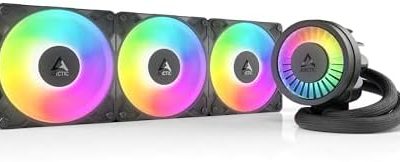
 ARCTIC Liquid Freezer III Pro 360 A-RGBLiquid Freezer III Pro 360 A-RGB15.7 x 4.7 x 2.9 Inches4.5 PoundsCheck on Amazon
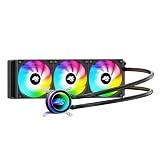
 Thermalright Frozen Notte 360 Black ARGB V2 Water360MM0.98 x 4.72 x 4.72 Inches0.2 poundsCheck on Amazon

Top 3 picks at a glance
Quick Verdict
| Your situation | Our verdict |
|---|---|
| Case lists 360mm at the front and you have tall RAM | Front mount. It avoids the clearance fight above the motherboard. |
| Case lists 360mm only at the top and gives less than about 55-60 mm above the board | Choose a 27 mm radiator and low-profile RAM, or reconsider a 240mm. |
| Case lists “up to 360mm” but gives no clearance figure | Measure it yourself before buying; do not rely on the headline spec. |
| You are considering a 38 mm thick radiator | Only if the case spec or your measurement allows about 63 mm of stack depth. |
| Small or compact mid-tower | Likely a 240mm or air cooler instead; a 360mm often does not fit without compromises. |
| Open-frame or showcase case with a rail system | Usually fine, but still check the tube length to the CPU. |
What You Need to Know
What “360mm” actually means
The number refers to the fan layout: three 120mm fans in a row. The radiator itself is longer than 360 mm. Retailer and manufacturer specifications for the coolers covered here put the radiator body at about 397-398 mm long and 120 mm wide. That length is what has to fit between the case’s mounting points. The thickness is the figure that changes from model to model, and it is the one people overlook.
| Cooler (as listed) | Radiator size | Depth with 25 mm fans | Tubing |
|---|---|---|---|
| ARCTIC Liquid Freezer III Pro 360 A-RGB | About 398 x 120 x 38 mm | About 63 mm | About 450 mm |
| Thermalright Frozen Notte 360 Black ARGB V2 | About 397 x 120 x 27 mm | About 52 mm | Confirm on listing |
| Thermalright Peerless Vision 360 ARGB | About 397 x 120 x 27 mm | About 52 mm | About 400 mm |
These numbers come from manufacturer specification sheets and retailer listing fields, and the Thermalright figures differ slightly between listings, so confirm them on the page for the version you buy. Your own measurement of the installed stack is the final word.
Mounting position changes everything
Front-mounted radiators sit beside the motherboard, so the clearance question becomes how far the stack reaches toward the graphics card and the case’s front panel. Roof-mounted radiators sit above the motherboard, so the stack competes with the top edge of the board. Many mid-tower cases advertise 360mm support at the front but only 240mm or 280mm at the top, so read the radiator-support table by position, not just the headline.
At the roof, the usable depth is the gap between the roof’s mounting rails and the highest component below. Tall memory heat spreaders, VRM heatsinks, the EPS power connector, and fan frames all count. As a rough guide, one popular mid-tower analysis found a 27 mm radiator plus 25 mm fans (a 52 mm stack) left fans hanging low enough to rest over the first memory slots, restricting RAM height to roughly 44 mm. Treat that as an example from one case, not a general rule. Your case may have offset rails that free up space.
RAM and VRM clearance
Memory height varies more than most people expect. The G.Skill Flare X5 line is specified at a low-profile 33 mm on the manufacturer’s page, while Corsair’s Vengeance family is around 44 mm according to retailer listings and press measurements. That 11 mm difference can decide whether a top-mounted stack clears. VRM heatsinks and rear-panel shrouds on the upper edge of the board can be taller than the RAM, so measure from the board to the highest point of anything on the top edge.
Pump and tube reach
Tubes need slack. Coolers with 400-450 mm tubing generally reach from a front or roof radiator to the socket in a mid-tower, but a tight corner routing can add strain. The pump block’s footprint matters too, particularly on boards with crowded socket areas. Listings put the Frozen Notte’s block at about 72 x 72 x 54 mm and the Peerless Vision’s at about 81 x 79 x 67.6 mm, so a taller block is something to check against tall RAM near the socket.
For orientation, manufacturer guidance is that the pump should not sit at the highest point of the loop, otherwise air collects inside the pump. A roof mount with the tubes toward the lower side, or a front mount with the tubes at the bottom, are the usual safe layouts. Follow the cooler’s manual if it gives different advice.
Fans: push, pull and thickness
The common stack counts only one set of fans on the radiator. If your case has room, a second set in push-pull adds about 25 mm more depth per side, which usually does not fit at the roof. Stay with one set unless your case spec explicitly allows more.
How to Decide
Use this checklist with a ruler and the cooler’s spec sheet. It takes about ten minutes.
- Find the supported position. In the case manual, locate the radiator-support table and confirm 360mm for front, roof, or both.
- Record the stack depth. Radiator thickness plus 25 mm fans, plus a few millimeters for screws and gaskets. For the cooler examples above that is roughly 52-63 mm.
- Measure the roof gap. Measure from the underside of the roof’s radiator mounting surface down to the motherboard. Subtract the stack depth from that figure to get the space left under the fans.
- Measure the tallest component. RAM, VRM heatsink, or connectors at the top of the board. The leftover space from step 3 must be larger than that height.
- Check tube length. Run a string from the radiator position to the CPU socket and compare it to the cooler’s tubing length.
- Check front clearance. For a front mount, make sure the stack does not hit the graphics card’s end or any drive cage.
Worked example (illustrative numbers, not a specific case): You measure 85 mm from the roof’s mounting surface to the board. With a 52 mm stack, that leaves 33 mm. A 33 mm low-profile RAM kit would just clear; a 44 mm kit would not. With a 63 mm stack, only 22 mm is left, so the same case would need a front mount or a different cooler. As a rule of thumb, leave a few millimeters of margin rather than planning to the exact figure.
Products That Fit
ARCTIC Liquid Freezer III Pro 360 – roomy cases with deep radiator support
As an Amazon Associate we earn from qualifying purchases at no extra cost to you.

This model fits readers whose case has generous radiator space, typically a front mount or a roof with offset rails. At about 63 mm of stack depth with the supplied fans, it is the deepest of the group, so the measurement steps above matter most here. The tubing is listed at roughly 450 mm, which gives routing slack in larger cases.
- Radiator about 398 x 120 x 38 mm (manufacturer specification).
- Three 25 mm A-RGB fans; pump 800-2800 rpm.
- Tubing about 450 mm long.
- Colorway and kit contents: confirm on listing.
Caveat: if your measured roof gap is under about 65 mm plus RAM height, pick a thinner radiator or move to the front.
ARCTIC Liquid Freezer III Pro 360, alternate listing – same fit rules, different colorway

This listing shares the cooler name and appears to be a white colorway, so it has the same dimensions and the same fit requirements as the first. It suits a reader who has already confirmed the 63 mm stack works and wants the color to match a light interior. Nothing about the physical fit changes between colors, but verify that the listing’s model number matches the one you measured for.
- Same radiator thickness and fan stack as the black version.
- Supports AM5/AM4 and LGA1851/1700 per the manufacturer.
- Included mounting hardware: confirm on listing.
- Fan header and A-RGB connector layout: confirm on listing.
Caveat: because two listings carry the same product name, match the model number before you order so you do not buy the wrong variant for your case plan.
Thermalright Frozen Notte 360 Black ARGB V2 – tighter roof gaps

With a 27 mm-class radiator, this is the easier fit when the roof gap is limited. The stack lands near 52 mm, roughly 11 mm shallower than the thick ARCTIC option, which can be the difference between clearing a 44 mm RAM kit and not. The block is a compact square, which helps near crowded sockets.
- Radiator about 397 x 120 x 27 mm (retailer and manual listings).
- Three 120 x 25 mm PWM fans with ARGB.
- Block about 72 x 72 x 54 mm.
- Tubing length and warranty term: confirm on listing, as they vary by seller.
Caveat: confirm tube length for your case layout, because longer routes from a front mount to the socket can run tight.
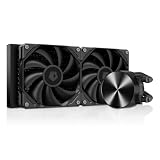
Thermalright Peerless Vision 360 ARGB – fits like a standard 27 mm AIO, with a taller block

The radiator is the same slim 27 mm class, so roof and front clearance behave like the Frozen Notte. The difference is the pump head, which carries a 3.95-inch screen and is larger and taller. Pick it if your socket area has room and you want the display.
- Radiator about 397 x 120 x 27 mm; about 52 mm with fans.
- Block about 81 x 79 x 67.6 mm (listings).
- Tubing about 400 mm.
- Screen: 3.95-inch IPS, 480 x 480; confirm fan speed and sockets on listing.
Caveat: the 400 mm tubing is the shortest of the four, so check the route if the radiator sits at the far end of a large case.
Common Mistakes
- Trusting the headline “360mm support” without checking whether it applies to the roof, front, or both.
- Counting the radiator thickness but forgetting the 25 mm fans on top of it.
- Ignoring RAM height and VRM heatsinks on the upper edge of the board.
- Buying a thick radiator for a case designed around 27 mm radiators.
- Letting the pump become the highest point of the loop by mounting the radiator low.
- Planning to the exact millimeter with no margin for screws, gaskets and tube bends.
Questions
Can I fit a 360mm AIO in a mid-tower?
Often yes, usually at the front, and sometimes at the roof. Check the manual’s radiator-support table by position and measure the clearance above your RAM. Many mid-towers only support 240mm or 280mm at the roof.
Does a thicker radiator cool better?
A thicker radiator can hold more liquid and shed heat more effectively, which is the stated reason for ARCTIC’s 38 mm design. The gain depends on fans and airflow, and the extra thickness costs space. Choose it only if your case has the room.
Can I mount a 360mm radiator at the bottom of the case?
Manufacturers generally advise against it, because the pump ends up as the highest point of the loop and traps air. A front or roof mount is the safer choice.
Will low-profile RAM help?
Yes, especially at a roof mount. A 33 mm kit leaves about 11 mm more room than a 44 mm kit. Confirm the kit’s height on its own specification page.
What if my radiator slightly interferes with the RAM?
Do not force it. Try a front mount, a thinner radiator, shorter RAM, or loosening the rail position if the case allows. Pressing a fan frame onto memory can damage parts.
Update History
- October 14, 2026 – Initial publication.
- Check the product page for current specifications and availability before buying.
Sources
- ARCTIC Liquid Freezer III Pro 360 A-RGB manufacturer specification sheet and retailer listing fields
- Thermalright Frozen Notte 360 and Peerless Vision 360 retailer listing fields and manual excerpts
- G.Skill Flare X5 product page (module height)
- Corsair AIO mounting guidance and Corsair Vengeance product listings (module height)
- Case-maker radiator support tables and mounting guides (general clearance practice)