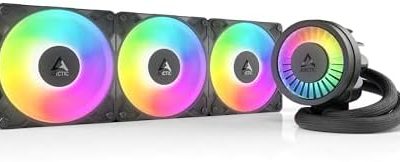
The ARCTIC Liquid Freezer III Pro 360 A-RGB is the best overall 360mm all-in-one (AIO) cooler on this list for builders who care about cooling per decibel: it combines a thick radiator, three P12 Pro fans, a fan on the pump block for the motherboard’s power circuitry and a 6-year warranty. If you want a screen on the pump, the NZXT Kraken Plus 360 is the alternative. A 360mm AIO has a radiator that holds three 120mm fans, which gives hot, high-core-count CPUs the most surface area a standard all-in-one offers.
Our Top Picks
 ARCTIC Liquid Freezer III Pro 360 A-RGBLiquid Freezer III Pro 360 A-RGB15.7 x 4.7 x 2.9 Inches4.5 PoundsCheck on Amazon



Top 3 picks at a glance

Quick List
- ARCTIC Liquid Freezer III Pro 360 A-RGB (first listing) – best overall for cooling performance and a long warranty
- ARCTIC Liquid Freezer III Pro 360 A-RGB (second listing) – best for buyers who want the same cooler in a different listing or finish
- ID-COOLING FX360 PRO – best for a no-frills 360mm cooler with an unlit, high-airflow fan set
- Minorsonic 360mm AIO – best for shoppers who want ARGB fans and a 3-phase-motor pump from a lesser-known brand
- NZXT Kraken Core 360 RGB – best for a simple NZXT design with a single-frame fan array and no LCD
- NZXT Kraken Plus 360 – best for builders who want an LCD pump head on a 360mm radiator
Which One Is Right for You?
| If you… | Choose |
|---|---|
| run a hot Ryzen 9 or Core i9-class CPU and want maximum cooling headroom | ARCTIC Liquid Freezer III Pro 360 A-RGB |
| want a cheaper-tier 360mm cooler with strong fans and no lighting | ID-COOLING FX360 PRO |
| want a screen on the pump block | NZXT Kraken Plus 360 |
| want NZXT styling and a single-frame fan set without an LCD | NZXT Kraken Core 360 RGB |
| want ARGB fans and are comfortable checking a lesser-known brand’s details | Minorsonic 360mm AIO |
| found the other ARCTIC listing in your preferred color | ARCTIC Liquid Freezer III Pro 360 A-RGB (second listing) |
The two ARCTIC listings share the same product name, so they are most likely color variants of one cooler; confirm the finish on the listing you open. For most builders, the decision comes down to whether you value cooling headroom (ARCTIC), a screen (Kraken Plus) or a lower-cost fan set (ID-COOLING).
All 6 Picks in Detail
1. ARCTIC Liquid Freezer III Pro 360 A-RGB – Best Overall for Cooling Headroom
As an Amazon Associate we earn from qualifying purchases at no extra cost to you.

This is the performance-focused pick. ARCTIC’s own specification sheet lists a 38mm-thick radiator, three P12 Pro A-RGB fans and a small VRM fan on the pump block. It suits builders with hot CPUs who want strong cooling and are happy to trade some thickness for it.
The standout is thermal headroom: the 38mm radiator and high-pressure P12 Pro fans give you the option to run fans faster when a CPU spikes. In return you need room, roughly 63mm with fans mounted, and a top mount may collide with tall memory or VRM covers. ARCTIC’s single-cable design lets one CPU fan header control the pump, VRM fan and radiator fans, which keeps cabling tidy. Set a custom fan curve, because the fans at full speed are loud.
- 360mm aluminum radiator, about 398 x 120 x 38mm
- Three P12 Pro A-RGB fans, rated 600 to 3,000 RPM by ARCTIC, with fluid dynamic bearings
- Pump rated 800 to 2,800 RPM; copper cold plate with micro-skived fins
- VRM fan on the pump block; pre-applied MX-6 paste
- Supports Intel LGA1851 and LGA1700 and AMD AM5 and AM4; 6-year warranty
Pros
- Strong cooling headroom for hot CPUs
- Integrated VRM fan helps nearby components
Cons
- Thick radiator needs more case clearance
- Fans at full speed are loud
Compared with the ID-COOLING FX360 PRO, it offers more cooling capability but needs more space.
2. ARCTIC Liquid Freezer III Pro 360 A-RGB (Second Listing) – Best for Alternate Finish or Availability

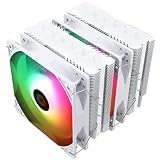
This listing carries the identical product name to the first one. It is most likely the other color version of the same Liquid Freezer III Pro 360 A-RGB, so the cooling hardware should be the same. It suits builders who want the same cooler in a finish that matches their case.
If you are comparing the two ARCTIC listings, check the product image, color name and bundled accessories rather than the title, which is identical. Mounting hardware, fans and warranty should match across color variants, but availability and delivery can differ, so choose the one that ships in your preferred finish. If both look identical in the images, confirm on the listing which edition you are buying before you rely on it matching a white or black build.
- Same 360mm radiator, 38mm thick, as the first listing
- Same three P12 Pro A-RGB fans and VRM fan
- Same socket list (Intel LGA1851 and LGA1700; AMD AM5 and AM4)
- 6-year warranty for the Liquid Freezer III Pro line
- Color or edition: confirm on the listing
Pros
- Same strong cooling hardware
- Gives a color choice
Cons
- Same thick radiator needs clearance
- Listing name does not state the color
Compared with the first listing, choose purely on color and availability.
3. ID-COOLING FX360 PRO – Best for a No-Frills High-Airflow Cooler
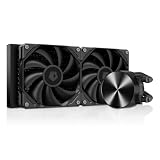
The FX360 PRO is a straightforward 360mm AIO with three unlit 120mm fans and a standard-thickness radiator. It suits builders who want strong airflow and a clean look without paying for lighting or a screen.
The unlit fans suit builds that already carry plenty of RGB elsewhere, or where a clean, dark look matters. Published reviews describe the pump as a newer generation with PWM control, and they note the fans run around 500 to 1,800 RPM, so you can keep the PC quiet at moderate loads. Warranty length is reported at 3 years, but sources differ, so check the listing. Mount the radiator so the pump is not the highest point, as with any AIO.
- 360mm aluminum radiator, about 397 x 120 x 27mm, per reviewers
- Three 120mm fans, listed around 500 to 1,800 RPM with hydraulic bearings and no lighting
- Pump rated around 2,800 to 2,900 RPM according to different sources
- Supports current Intel and AMD sockets, including LGA1851 and AM5, according to published reviews
- Warranty reported as 3 years; confirm on listing
Pros
- Standard 27mm radiator fits more cases
- High airflow with simple, unlit fans
Cons
- No RGB or screen
- Warranty is shorter than the ARCTIC and NZXT Plus models
Compared with the Kraken Core 360 RGB, it offers more fan airflow but less lighting.
4. Minorsonic 360mm AIO – Best for Lesser-Known ARGB Value

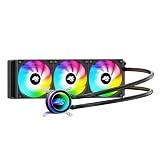
This listing advertises a high-speed ceramic bearing pump with a 3-phase motor and three PWM ARGB fans, with Intel LGA1851 and LGA1700 and AMD AM5 and AM4 support. It suits shoppers who want ARGB and are willing to check a lesser-known brand’s details first.
The listing reads like a feature checklist: a ceramic-bearing pump, a 3-phase motor and three PWM ARGB fans. None of that tells you how loud the pump is, how thick the radiator is or how long coverage lasts. Before buying, find the radiator thickness (it affects case fit), the pump speed range and the return policy. If you want a cooler with published, independent measurements behind it, the ARCTIC and ID-COOLING models are better documented.
- 360mm radiator with three 120mm PWM ARGB fans
- Ceramic-bearing pump with a 3-phase motor, per the listing
- Fan speed up to about 1,600 RPM, according to retailer data
- Supports Intel LGA1851 and LGA1700 and AMD AM5 and AM4
- Warranty and radiator thickness: confirm on listing
Pros
- ARGB fans with PWM control
- Modern socket support listed
Cons
- Little independent data and unclear warranty terms
- Radiator thickness is not stated in the title
Compared with the ID-COOLING FX360 PRO, it adds lighting but has far less published evidence behind it.
5. NZXT Kraken Core 360 RGB – Best for Simple NZXT Styling

The Kraken Core 360 RGB is NZXT’s entry 360mm model: Turbine pump, a single-frame fan with three fans, and RGB lighting but no LCD. It suits clean builds where the single-frame design matters.
Its single-frame fan array means one piece to mount rather than three fans and their screws, which speeds installation and gives a tidy front. The trade-off is that you cannot swap one fan on its own, and NZXT notes that lighting runs through the motherboard instead of its software. The standard 27mm radiator is easier to fit in cases than ARCTIC’s thicker one, which makes it a practical pick for mid-tower builds.
- 360mm radiator, about 397 x 120 x 27mm, per NZXT’s specification page
- One F360 RGB Core single-frame fan array, rated around 500 to 2,400 RPM
- Pump cap with RGB lighting and no screen
- Supports Intel LGA1851, 1700, 1200 and 115X and AMD AM5 and AM4
- 5-year warranty; lighting is controlled through the motherboard according to NZXT
Pros
- Single-frame fans cut screws and cables
- Standard radiator thickness
Cons
- No LCD and less control software
- Fixed frame makes fan replacement harder
Compared with the Kraken Plus 360, it removes the screen to keep the design simpler.
6. NZXT Kraken Plus 360 – Best for an LCD on a 360mm Radiator

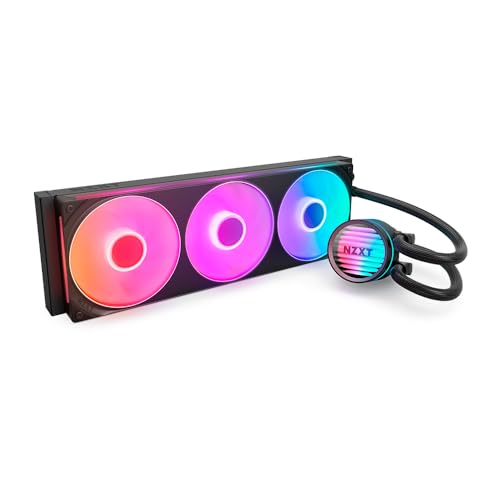
The Kraken Plus 360 carries the 2025 Kraken Plus design with a customizable LCD pump head and a Turbine pump. It suits builders who want a visible display for temperatures or custom images on a high-capacity radiator.
This is the styling-first choice. The LCD gives a visible readout, and NZXT backs the Kraken Plus line with a 6-year warranty. Because the listing does not state the fan model, confirm whether the fans are RGB or unlit before you plan your lighting. Expect software to be part of the experience for the screen, and make sure your case can hold a 360mm radiator of about 397mm length.
- 360mm radiator with the Turbine pump
- Customizable LCD on the pump cap
- Fans: the listing name does not state them; the non-RGB Kraken Plus 240 uses unlit F120P fans, so confirm on listing
- Supports Intel LGA1851, 1700 and 1200 and AMD AM5 and AM4, per NZXT’s Kraken Plus line specs
- 6-year warranty for the Kraken Plus line
Pros
- Long warranty and LCD
- Strong cooling capacity from a 360mm radiator
Cons
- More complex software setup
- Higher cost tier than basic 360mm options
Compared with the ARCTIC Liquid Freezer III Pro 360, it adds a screen but offers less cooling headroom in published specs.
Specs Compared
| Model | Radiator | Fans | Lighting | Display | Sockets (listing) | Warranty |
|---|---|---|---|---|---|---|
| ARCTIC Liquid Freezer III Pro 360 A-RGB (first) | 360mm, about 38mm thick | 3x P12 Pro A-RGB plus VRM fan | A-RGB | None | LGA1851, 1700; AM5, AM4 | 6 years |
| ARCTIC Liquid Freezer III Pro 360 A-RGB (second) | 360mm, about 38mm thick | 3x P12 Pro A-RGB plus VRM fan | A-RGB | None | LGA1851, 1700; AM5, AM4 | 6 years |
| ID-COOLING FX360 PRO | 360mm, about 27mm | 3x 120mm | None | None | Confirm on listing | Confirm on listing |
| Minorsonic 360mm AIO | 360mm, thickness confirm | 3x 120mm PWM ARGB | ARGB | None | LGA1851, 1700; AM5, AM4 | Confirm on listing |
| NZXT Kraken Core 360 RGB | 360mm, about 27mm | 3-fan single-frame RGB array | RGB fans and pump | None | LGA1851, 1700, 1200, 115X; AM5, AM4 | 5 years |
| NZXT Kraken Plus 360 | 360mm, confirm thickness | Confirm on listing | Pump head | LCD | Confirm on listing | 6 years (Plus line) |
How We Chose These
We selected the coolers from current catalog listings and compared them using manufacturer specification pages, retailer listing fields and published independent reviews. We weighed radiator thickness, fan range, pump design, socket coverage, warranty length and the extras included. We did not run our own thermal measurements and we make no performance claims beyond published numbers. When two sources disagreed, for example on a fan’s top speed or a warranty period, we noted it and recommend confirming on the product page. Lesser-known brands were included only where the listing gave enough information to describe them honestly, and we marked what is unverified.
What to Look For
Who actually needs 360mm
A 360mm radiator spreads heat across three fans, which lowers the fan speed needed for a given temperature. It is worth the extra size for CPUs that sustain 200W or more, such as high-core-count Ryzen 9 and Core i9 chips under rendering or compile loads. For gaming on a 100W to 150W processor, a 240mm AIO or a good air cooler is often enough. Choose 360mm for quiet operation and thermal headroom, not because every system needs it.
Radiator thickness and clearance
Most 360mm radiators are 27mm thick, and with three 25mm fans the stack is about 52mm. ARCTIC’s 38mm radiator makes that stack about 63mm. If you mount the radiator at the top of the case, check the clearance over memory and the motherboard’s heatsinks. A front mount avoids the issue, though a graphics card’s length can limit the space. The radiator itself is close to 400mm long, so confirm that your case lists 360mm radiator support at the top or front, not just 280mm.
Pump, tubing and orientation
Tubing of about 400 to 450mm reaches most mid-tower layouts, but a full tower with a top-mounted radiator may need the longer end of that range. Keep the pump at or below the top of the radiator so air does not collect at the pump, which can cause noise. Plug the pump into the AIO_PUMP or CPU_FAN header and run it at a fixed high speed unless the manufacturer says otherwise. Do not kink the tubes, and do not hold the cooler by its tubing.
Mounting and safe installation
Remove the plastic film from the cold plate and use the thermal paste that is already applied, or clean it off and apply a pea-sized amount if you reuse the cooler. Tighten the CPU mount screws in a cross pattern a little at a time. For AM5, the existing backplate usually stays in place. Switch off the power supply and unplug the PC before installing. ARGB lighting uses a 5V 3-pin header and RGB uses a 12V 4-pin header, and the two are not interchangeable; connecting a 12V plug to a 5V ARGB header can damage the LEDs or the board.
Rule of thumb for fan speed
If your CPU idles at 35C to 45C and reaches the 70s under load, a 360mm cooler with fans in the 1,000 to 1,500 RPM range is usually quiet enough. If you see the high 80s or low 90s at that speed, check paste contact, case airflow and fan direction before assuming the cooler is at fault.
Noise, fan curves and the pump
Three fans at moderate speed are quieter than two fans at high speed, which is the main payoff of 360mm. Set a fan curve that stays low until the CPU passes about 60C, then ramps gently, because short spikes should not cause sudden noise. Keep the pump at a steady speed. If you hear gurgling after install, tilt the case gently or reposition the radiator so the pump is below the highest point; that usually clears trapped air.
Warranty and maintenance
Premium 360mm coolers are covered for 5 to 6 years, while entry-level ones commonly carry 2 to 3. Clean dust from the radiator and fans every few months, and replace a cooler that develops a loud pump or steadily rising temperatures. Do not disassemble the sealed loop. If coolant ever appears, power the system off and unplug it before cleaning, and contact the manufacturer for service.
Questions
Is a 360mm AIO overkill for gaming?
For most gaming CPUs it is more than needed, but it can still run quieter than a smaller cooler at the same temperature. It makes the most sense for hot, high-wattage processors or for builders who want the lowest fan noise.
Will a 360mm AIO fit in my case?
Only if the case specification lists 360mm radiator support at the front, top or side. Also check the thickness of the radiator plus fans against the space over your motherboard and memory.
Do I need to replace the thermal paste?
No, not on a new cooler, since paste is pre-applied. If you remove and reinstall the cooler, clean the old paste off the CPU and cold plate and apply fresh paste.
Which sockets do these coolers support?
The listed models cover Intel LGA1851 and LGA1700 and AMD AM5 and AM4, with some also listing older Intel sockets. Confirm on the product page, especially for lesser-known brands and for the models where the listing name does not list sockets.
Are AIO coolers safe to install myself?
Yes, if you follow the manual. Power the PC off, unplug it, do not squeeze or kink tubes, and keep the pump from being the highest point in the loop. If you ever see coolant, power down and unplug the PC before cleaning.
How loud is a 360mm AIO under load?
It depends on the fans and the curve. Three fans at around 1,000 RPM are usually quiet, while full-speed fans on performance models such as ARCTIC’s can be loud. Set a curve that ramps gently with CPU temperature, and keep the pump at a steady speed so the noise stays predictable.
Update History
- October 14, 2026 – Initial publication; product set drawn from current catalog listings.
- Check the product page for current specifications and availability before buying.
Sources
- Manufacturer product and specification pages for ARCTIC and NZXT
- Retailer listing titles and specification fields
- Independent published reviews of the ID-COOLING FX360 PRO and ARCTIC Liquid Freezer III Pro