Replacing the cooler that came with a processor, or skipping the stock unit entirely, is really a decision about headroom. A stronger aftermarket cooler decides how much heat your CPU can shed before fan speeds climb and clock speeds settle, and it also decides how much noise the PC makes while doing ordinary work. Buyers usually land here after a boxed cooler starts sounding busy under load, or when a new chip arrives with no cooler in the box at all and the choice has to be made from scratch.
The five coolers below cover the main aftermarket camps: a flagship dual-tower air cooler, a dual-tower built around listed value, a compact single tower for first upgrades, a 240 mm all-in-one liquid cooler, and a dual-tower tuned for quiet running. Every pick was chosen from the names and specifications on its Amazon listing, so socket support, heights and fan figures are the ones each brand publishes for that exact model.
Our Top Picks
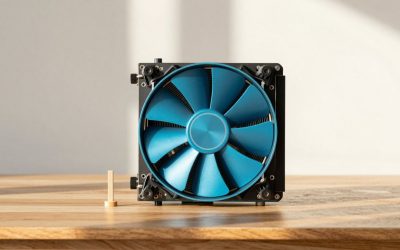
 Cooler Master Hyper 212 Black II CPU Air4 Heat Pipes4.7 x 3.1 x 6.3 inches1.54 poundsCheck on Amazon

Top 3 picks at a glance

Quick Picks
As an Amazon Associate we earn from qualifying purchases.
| Product | Best for | Key spec from title |
|---|---|---|
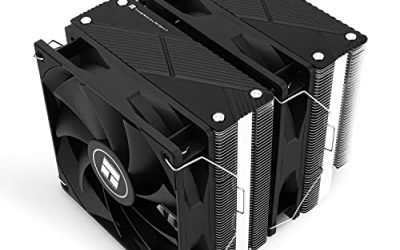
| Noctua NH-D15 | High-end air cooling with low noise | Dual tower, 6 heatpipes, 2x 140 mm fans |
| Thermalright Peerless Assassin 120 SE | Dual-tower cooling on a tighter spend | 6 AGHP heat pipes, dual 120 mm PWM fans |
| Cooler Master Hyper 212 Black | First upgrade from a stock cooler | 4 copper heat pipes, 152 mm tall |
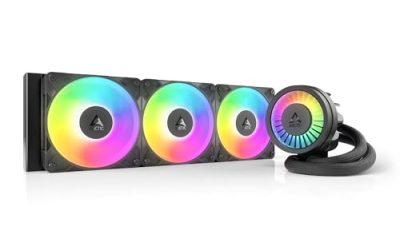
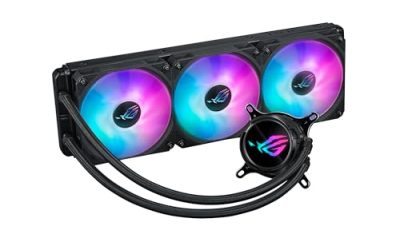
| ARCTIC Liquid Freezer III 240 | Liquid cooling with VRM airflow | 240 mm radiator, PWM pump and VRM fan |
| be quiet! Dark Rock Pro 5 | Quiet dual-tower performance | 7 copper heat pipes, speed switch |
How to Choose
Match the cooler to your socket first
Nothing else about a cooler matters if its mounting hardware does not cover your platform. Current listings state support in plain terms, and the five picks here all list Intel LGA1700 and AMD AM5, with most adding LGA1851 for the newest Intel boards and AM4 for older AMD builds. Check the exact socket list on the listing against your motherboard before comparing anything else, because a cooler bought for a previous platform may need a separate mounting kit, and some kits are only supplied on request rather than packed in the box.
Measure case clearance and memory height
Air coolers fail builds on millimetres, not on cooling power. Tower height is the first figure to check: the listings here run from 152 mm for the Hyper 212 Black to 165 mm for the NH-D15 with its fans fitted, and each needs a case rated for at least that much CPU cooler clearance. Width matters too, since a wide dual tower can hang over the first memory slot and force the front fan upward, which adds height again. Liquid coolers trade that problem for radiator space, so confirm a free 240 mm mount with room for the radiator and its fans.
Read fan and noise figures as a pair
A cooler’s listed fan speed only tells half the story, because a 120 mm fan at its maximum and a 140 mm fan at a moderate setting move very different amounts of air. Compare the noise figure printed beside the speed: the NH-D15 lists 24.6 decibels at up to 1,500 RPM, while smaller fans that spin past 2,000 RPM list figures in the mid-twenties and above. PWM control appears on every pick here, which lets the motherboard hold speeds down during desktop work and raise them only when temperatures demand it.
Decide between air and liquid honestly
A dual-tower air cooler has no pump, no coolant and nothing to wear out beyond its fans, which is why many builders treat it as fit-and-forget hardware. An all-in-one liquid cooler moves the heat to a radiator at the case edge, freeing space around the socket and suiting cases with limited tower clearance, but it adds a pump whose speed and mounting position need a little thought. Neither format wins by default. Pick based on your case layout, how long you plan to keep the build, and whether features like the Liquid Freezer’s VRM fan solve a problem you actually have.
The 5 Best Options
Noctua NH-D15
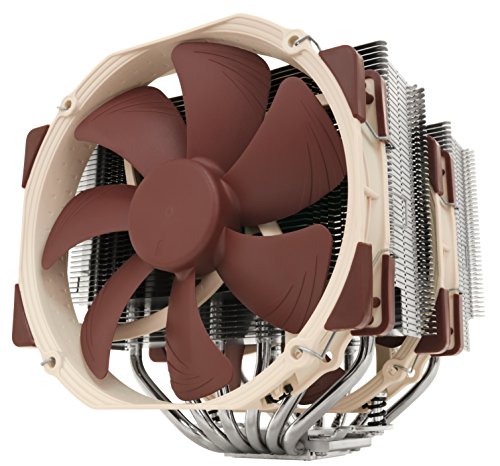
The Noctua NH-D15 is the long-running flagship of aftermarket air cooling: two fin towers, six heatpipes and a pair of NF-A15 140 mm PWM fans. Its listing leads with quiet operation, quoting a noise level of 24.6 decibels at a maximum fan speed of 1,500 RPM, and the package includes Low-Noise Adaptors for builders who want to cap speeds further. SecuFirm2 mounting hardware and NT-H1 thermal paste come in the box, and Noctua backs the cooler with a six-year manufacturer warranty, the longest backing listed among these five picks.
Specs
- Cooling method: Air, dual-tower heatsink
- Heatpipes: 6
- Fans: 2x NF-A15 140 mm PWM
- Maximum fan speed: 1,500 RPM
- Noise level: 24.6 decibels as listed
- Height with fan: 165 mm
- Weight with fans: 1,320 g
- Socket support: Intel LGA1851, LGA1700, LGA1200, LGA115x; AMD AM5, AM4
- Included: NT-H1 thermal paste, SecuFirm2 mounting kit, Low-Noise Adaptors
- Warranty: 6 years as listed
Best for: High-wattage Intel and AMD builds where quiet air cooling matters more than a compact footprint.
Watch out for: At 165 mm tall with fans fitted it needs a roomy case, and tall memory modules can force the front fan to sit higher still.
ASIN: B00L7UZMAK
Thermalright Peerless Assassin 120 SE
Thermalright built the Peerless Assassin 120 SE around the same dual-tower recipe as the flagship class, with six 6 mm heat pipes that use the brand’s AGHP anti-gravity design and a pure copper base. Two TL-C12C 120 mm PWM fans run at 1,550 RPM and are listed at 66.17 CFM with a noise level of 25.6 decibels. The whole unit stands 155 mm tall, a useful step down from the largest towers, and the listing notes that the fan placement leaves room for memory modules rather than covering the slots nearest the socket.
Specs
- Cooling method: Air, dual-tower heatsink
- Dimensions: 125 x 135 x 155 mm
- Heatpipes: 6x 6 mm AGHP heat pipes, copper base
- Fans: 2x TL-C12C 120 mm PWM
- Fan speed: 1,550 RPM
- Airflow: 66.17 CFM as listed
- Noise level: 25.6 decibels as listed
- Weight: 0.97 kg
- Socket support: Intel LGA1150, LGA1151, LGA1155, LGA1156, LGA1200, LGA1700, LGA1851; AMD AM4, AM5
Best for: Builders who want dual-tower cooling capacity while keeping the overall spend on the build in check.
Watch out for: The listing states that AMD installation uses the motherboard’s original backplate, which is not included with the cooler.
ASIN: B09SD44SL1
Cooler Master Hyper 212 Black
The Cooler Master Hyper 212 Black is the current form of the single-tower design that introduced many builders to aftermarket cooling. Four copper heat pipes meet a copper base under an aluminium fin stack with a black top cover, and one SickleFlow 120 Edge PWM fan handles airflow across a wide 690 to 2,500 RPM range. At 152 mm tall it fits cases that cannot take the big dual towers, and the listing describes it as intended for Ryzen 7 and Core i7 class processors. Redesigned brackets cover the current AMD and Intel platforms, and CryoFuze thermal paste is included.
Specs
- Cooling method: Air, single-tower heatsink
- Heatpipes: 4 copper heat pipes with copper base
- Fan: SickleFlow 120 Edge 120 mm PWM
- Fan speed: 690 to 2,500 RPM
- Noise level: 26 decibels as listed
- Height: 152 mm
- Socket support: AMD AM5, AM4; Intel LGA1851, LGA1700, LGA1200
- Included: CryoFuze thermal paste, aluminium top cover design
Best for: A first replacement for a loud stock cooler in a mid-tower or compact case.
Watch out for: A single tower and one fan leave less thermal headroom for flagship chips under sustained all-core loads than the dual towers here.
ASIN: B07H25DYM3
ARCTIC Liquid Freezer III 240

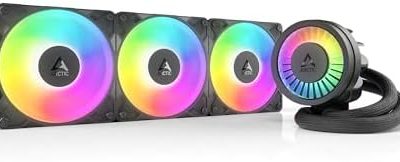
The ARCTIC Liquid Freezer III 240 is the liquid option in this group, built around a 240 mm radiator and two 120 mm PWM fans that run from 200 to 1,800 RPM. Its pump is PWM-controlled as well, and the pump housing carries a small VRM fan that blows air over the motherboard’s voltage regulators, a detail few rival designs bother with. Intel mounting uses a contact frame listed for LGA1851 and LGA1700, while the AMD side uses an offset mounting position. Fan cables are integrated into the hose sleeving, so the installed result needs fewer separate leads around the socket.
Specs
- Cooling method: Water, all-in-one liquid cooler
- Radiator: 240 mm
- Fans: 2x 120 mm PWM, 200 to 1,800 RPM
- Pump: PWM-controlled, with integrated VRM fan
- Airflow: 56 CFM as listed
- Socket support: Intel LGA1851, LGA1700; AMD AM5, AM4
- Mounting: Intel contact frame and AMD offset mounting as listed
- Weight: 1,460 g
Best for: Cases with a free 240 mm radiator mount where socket-area airflow for the VRM is also welcome.
Watch out for: The radiator and fan stack needs more mounting depth than the thinnest 240 mm units, so check the space above the motherboard before ordering.
ASIN: B09VGX1WQH
be quiet! Dark Rock Pro 5
The be quiet! Dark Rock Pro 5 pairs a dual-tower heatsink with seven copper heat pipes and two Silent Wings PWM fans, a 120 mm unit at the front and a 135 mm unit between the towers. A speed switch on the cooler toggles between Quiet and Performance modes, letting the same hardware lean toward silence or maximum airflow without software. The listing quotes a maximum noise level of 23.3 decibels, the lowest figure in this roundup, alongside airflow of 68.7 CFM. A black coating with ceramic particles covers the fins and pipes, and thermal grease is included in the box.
Specs
- Cooling method: Air, dual-tower heatsink
- Heatpipes: 7 copper heat pipes
- Fans: Silent Wings PWM, 120 mm front and 135 mm centre
- Maximum fan speed: 2,000 RPM as listed
- Airflow: 68.7 CFM as listed
- Noise level: Up to 23.3 decibels as listed
- Height: 168 mm
- Socket support: Intel LGA1851, LGA1700, LGA1200, LGA1151, LGA1150, LGA1155; AMD AM5, AM4
- Extras: Speed switch with Quiet and Performance modes, thermal grease included
Best for: Noise-sensitive workstations and gaming PCs that still run high-core-count processors.
Watch out for: It is the tallest cooler here at 168 mm, so narrow cases are out, and the front fan may need raising over tall RAM.
ASIN: B0CJY3DYQ3
Which One Fits Your Situation
Your stock cooler is the loudest part of the PC
Start with the Hyper 212 Black if the PC is a mid-range build, since its single tower and wide fan-speed range calm most stock-cooler noise without demanding a large case. If the processor is a high-core-count model that also runs hot, step up to the Dark Rock Pro 5 instead: its listed noise ceiling is the lowest here, and the Quiet mode on its speed switch is made for exactly this complaint.
You are building around a flagship CPU
Give the processor a dual tower or the 240 mm radiator. The NH-D15 remains the straightforward air answer, with the Peerless Assassin 120 SE close behind in layout at a shorter 155 mm height. Choose the Liquid Freezer III 240 when the case reserves its clearance for a radiator instead of a tall tower, or when the motherboard’s VRM area gets little airflow from case fans.
Your case is compact or your RAM is tall
Measure before anything else. The Hyper 212 Black at 152 mm and the Peerless Assassin 120 SE at 155 mm are the realistic air options, and both listings discuss memory clearance in their own terms. If even those heights clash with a side panel, move the cooling to the case edge with the Liquid Freezer III 240, provided a 240 mm mount exists and the radiator depth fits above the board.
The PC works as hard as it plays
For rendering, compiling or streaming machines that sit beside a desk all day, the Dark Rock Pro 5 and NH-D15 suit best: both list noise figures in the low-to-mid twenties with fans that stay composed at moderate speeds. The Noctua adds the longest listed warranty, which matters on a machine you plan to keep through several upgrade cycles.
Common Mistakes
- Ordering by socket name alone and skipping the listing’s full support list, then finding a newer platform like LGA1851 needs hardware the box does not include.
- Comparing coolers by fan RPM without reading the noise figure beside it, which makes small high-speed fans look stronger than large slow ones.
- Forgetting that raising a front fan over tall memory adds to the installed height, so a cooler that measured fine on paper touches the side panel.
- Mounting a 240 mm radiator without checking the combined radiator and fan depth against motherboard heatsinks and cable runs at the top of the case.
- Reusing old thermal paste or skipping it entirely on a fresh install, when every cooler here includes paste or grease in the box.
Frequently Asked Questions
Does a third-party cooler void a CPU warranty?
No. Fitting an aftermarket cooler is a normal part of building a PC, and the listings for these coolers are written for retail processors from both Intel and AMD. What matters is correct installation: even mounting pressure, full socket contact and a fan header connected before first boot, so the processor is never run uncooled.
How much cooler will my CPU run with a dual tower?
Listings do not publish a universal temperature figure, because results depend on the processor, case airflow and ambient conditions. What the specifications do show is the mechanism: more heatpipes, a second fin tower and a second fan spread heat over far more surface than a stock unit, which lowers fan speeds at a given temperature even before peak temperatures improve.
Is a 240 mm liquid cooler better than a big air cooler?
Neither format is automatically ahead. A 240 mm unit like the Liquid Freezer III moves heat directly to the case edge and keeps the socket area clear, while a dual tower such as the NH-D15 has no pump and fewer parts to age. Decide by case layout, clearance and features rather than by format loyalty.
What should I check before reusing an old cooler on a new build?
Confirm the listing’s socket list covers your new platform and that you still have the correct brackets and backplate parts, since some mounting pieces are platform-specific. Check the fan bearings for noise by spinning the blades by hand, and plan on fresh thermal paste, because the original application will not survive the move intact.
Related guides
More from Amazon
Programs that pair well with the guide above. Offers and eligibility are set by Amazon and may change.
Free shipping on eligible items, Prime Video and more. Eligible new members can start with a free trial.
Start a Prime free trialAd-free music streaming. Eligible new subscribers can start with a free trial.
Try Music Unlimited freeA Prime membership for ages 18-24 with a trial period. Eligibility is set by Amazon.
See Prime for Young AdultsAudiobooks and podcasts to listen to on the go. Eligible new members can start with a free trial.
Try Audible freeAs an Amazon Associate we earn from qualifying purchases.