As an Amazon Associate I earn from qualifying purchases.
Our Top Picks
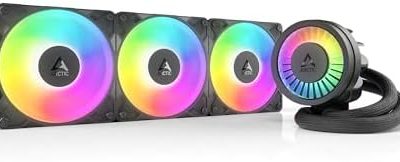
 Cooler Master 360L Core AIO CPU Liquid Cooler360L Core15.5 x 4.7 x 1.1 inches2.2 poundsCheck on Amazon


Top 3 picks at a glance

The Short Answer
For most ASUS builders, the best aura sync cpu coolers pick is the ASUS ROG Strix LC III 360 ARGB: a 360mm all-in-one liquid cooler with a rotatable water block, an Asetek Gen7 v2 pump, and ROG ARGB fans, with lighting built around Aura Sync effects. It covers the current Intel and AMD sockets most gaming builds use, and it carries a six-year warranty.
The right pick still depends on what you want beyond lighting. If you want a display on the pump, the Strix LC III 360 ARGB LCD adds a 2.1-inch screen to the same cooler family. If you want a flagship cooler with a larger display and a fan aimed at the motherboard power area, the ROG Ryujin III 360 ARGB Extreme White Edition sits at the top of this list. And if you want the simplest path to Aura Sync lighting from a different brand, the Cooler Master MasterLiquid 360L Core uses a standard 3-pin 5V ARGB connection that Aura Sync can control through the motherboard.
One honest note: every cooler in this guide is a 360mm all-in-one liquid cooler. No air cooler with a verified Aura Sync listing and a confirmed Amazon US code was found while this guide was put together, so no air cooler has been forced into the list to fill a slot. If your case cannot fit a 360mm radiator, measure first and look at the 240mm versions of these same cooler families instead.
Our Top Picks
- Best overall Aura Sync cooler: ASUS ROG Strix LC III 360 ARGB — 360mm AIO, rotatable water block, Gen7 v2 pump, Aura lighting effects, no display to configure.
- Best cooler with a display: ASUS ROG Strix LC III 360 ARGB LCD — the same cooler family with a 2.1-inch IPS screen for system stats, custom art, or the time of day.
- Best flagship pick: ASUS ROG Ryujin III 360 ARGB Extreme White Edition — 360mm AIO, 3.5-inch LCD, embedded VRM fan, magnetic ARGB fans for a white ROG build.
- Best simple ARGB alternative: Cooler Master MasterLiquid 360L Core — 360mm AIO, Gen S dual-chamber pump, three ARGB PWM fans, standard 3-pin ARGB connection for Aura Sync control.
Quick Comparison
| Cooler | Radiator | Pump | Display | Socket support | Warranty |
|---|---|---|---|---|---|
| ASUS ROG Strix LC III 360 ARGB | 360mm | Asetek Gen7 v2 | None | Intel LGA 1851, 1700, 1200, 115X; AMD AM4, AM5 | 6 years |
| ASUS ROG Strix LC III 360 ARGB LCD | 360mm, 394 x 121 x 27 mm | Asetek Gen7 v2, 800 to 2,800 RPM | 2.1-inch IPS LCD, 480 x 480, 60 Hz | Intel LGA 1851, 1700, 1200, 115X; AMD AM5, AM4 | 6 years |
| ASUS ROG Ryujin III 360 ARGB Extreme White Edition | 360mm, 399.5 x 120 x 30 mm | Asetek Gen8 V2 | 3.5-inch LCD | AMD AM5 and Intel Core Ultra ready; confirm socket list on the listing | 6 years |
| Cooler Master MasterLiquid 360L Core | 360mm, 394 x 119.6 x 27.2 mm | Gen S dual-chamber | None | AMD AM5, AM4; Intel LGA 1851, 1700, 1200 | 2 years |
How to Choose
Check the motherboard header first
Aura Sync lighting runs through the motherboard. A cooler syncs when its lighting connects to a 3-pin 5V ARGB header on an ASUS board and is controlled in Armoury Crate. Before you buy, confirm in your motherboard manual that it has a 3-pin 5V ARGB header. A 4-pin 12V RGB header is a different connection, and the two are not interchangeable.
Measure the radiator space
All four coolers here use a 360mm radiator, which needs three 120mm fan mounts in a row. Check the top or front of your case for that mounting space, and check clearance against tall memory modules and the top of the motherboard. If the case only has room for two 120mm fans in a row, a 360mm cooler is the wrong size.
Decide whether a display is worth it
A pump display is the clearest split in this guide. Two of the four coolers have one, and two do not. A display adds a place to show coolant temperature, clock speeds, or custom art, and it becomes a visual centerpiece of the build. It also adds software setup and a cable to route. If you want a clean build with lighting that simply matches the rest of the system, the display-free coolers are the better fit.
Look at the fan and pump details
Fan speed range, airflow, and static pressure tell you more about everyday behavior than radiator size alone. A fan that can drop to a low speed or stop at light load keeps the desk quiet while you browse or work. This guide gives those numbers where the manufacturer states them, and where a number is not stated on the listing, the guide says so.
The Picks in Detail
1. ASUS ROG Strix LC III 360 ARGB — Best Overall Aura Sync Cooler
ASUS ROG Strix LC III 360 ARGB
The Strix LC III 360 ARGB is the straightforward pick in this guide: a 360mm all-in-one liquid cooler with a 360-degree rotatable water block, an Asetek Gen7 v2 pump, and premium ROG ARGB fans. Its listing names more than ten custom Aura lighting effects, which is the point of this guide: the lighting is designed to sync with the rest of an ASUS build rather than sit apart from it.
The rotatable water block lets you mount the cooler with the tubing on the side that suits your case and still keep the pump cap oriented the way you want it. The cooler carries a six-year warranty, and socket support covers Intel LGA 1851, 1700, 1200, and 115X, plus AMD AM4 and AM5.
Pros:
- Aura lighting effects are built into the design, with a rotatable water block for flexible mounting
- Asetek Gen7 v2 pump and 360mm radiator suit demanding processors
- Six-year warranty is long for a liquid cooler in this class
- Broad socket support covers current Intel and AMD platforms
Cons:
- Needs a case with 360mm radiator clearance, which rules out compact builds
- No pump display, so there is no on-cooler readout of system information
- Fan speed, airflow, and noise figures are not all stated on the listing, so confirm on the listing before buying
2. ASUS ROG Strix LC III 360 ARGB LCD — Best Cooler with a Display
ASUS ROG Strix LC III 360 ARGB LCD
The Strix LC III 360 ARGB LCD takes the cooler above and adds a 2.1-inch IPS LCD to the pump. The screen runs at 480 x 480 resolution and 60 Hz, and its graphics rotate through 360 degrees, so the display stays upright whatever way the pump is mounted. It can show system stats, custom art, or the time of day, and the lighting still syncs through Aura Sync.
Under the display, the hardware matches the family: an Asetek Gen7 v2 pump running from 800 to 2,800 RPM, a copper cold plate, and three ROG STRIX AF-12S ARGB fans. Those fans run from 800 to 2,200 RPM, move 70.38 CFM each, and produce 3.92 mmH2O of static pressure, with a listed noise level of 36 dB(A). They also support a 0dB mode that stops the fans at light load. The radiator measures 394 x 121 x 27 mm, the sleeved rubber tubing is 400 mm long, and the box includes a 1-to-3 fan splitter cable and a 1-to-4 ARGB splitter cable. Thermal compound comes pre-applied.
Socket support is wide: Intel LGA 1851, 1700, 1200, and 115X, plus AMD AM5 and AM4. The cooler carries a six-year warranty. This is the pick for a builder who wants the display as part of the build and is willing to set it up in Armoury Crate.
Pros:
- 2.1-inch IPS display with rotatable graphics adds system monitoring and custom art to the pump
- Asetek Gen7 v2 pump and ROG ARGB fans with a 0dB mode for quiet light-load running
- Pre-applied thermal compound and splitter cables in the box simplify installation
- Six-year warranty and broad Intel and AMD socket support
Cons:
- The 360mm radiator needs a case with room for three 120mm fans in a row
- Display and lighting control depend on Armoury Crate software
- The display adds cost and setup time over the display-free version of the same cooler
3. ASUS ROG Ryujin III 360 ARGB Extreme White Edition — Best Flagship Pick
ASUS ROG Ryujin III 360 ARGB Extreme White Edition
The Ryujin III 360 ARGB Extreme White Edition is the flagship of this list, built for a white ROG system where the cooler is meant to be seen. It uses an Asetek Gen8 V2 pump, a 3.5-inch LCD on the pump cap, and magnetic ARGB fans that snap together so a single cable serves all three fans, plus an embedded VRM fan in the pump housing.
The fans are thickened to 30 mm, up from the usual 25 mm, and the listing gives a fan speed of up to 2,800 RPM, airflow of 89.73 CFM, and static pressure of 5.15 mmH2O. The radiator measures 399.5 x 120 x 30 mm, and the tubing is 400 mm long. The 3.5-inch display shows hardware monitoring data and custom images, and the cooler is listed as ready for AMD Ryzen 9000 series processors and Intel Core Ultra processors. It carries a six-year warranty.
Its ARGB lighting is managed through Armoury Crate, the same software that runs Aura Sync on ASUS boards. Because the listing for this model centers on its ARGB fans and LCD rather than spelling out a separate Aura Sync line, confirm on the listing that the Aura Sync behavior matches your board before buying.
Pros:
- Asetek Gen8 V2 pump, 3.5-inch LCD, and embedded VRM fan make it the most feature-rich cooler here
- Magnetic fans simplify cable routing, with one cable serving all three fans
- Thickened 30 mm fans and a 30 mm radiator suit high heat loads
- White finish matches a white ROG motherboard, memory, and case
Cons:
- The largest and most complex cooler in this guide, with the most software setup
- White finish limits it to builds where white components are wanted
- Confirm on the listing that Aura Sync control matches your exact motherboard, since the listing centers on ARGB and the LCD
4. Cooler Master MasterLiquid 360L Core — Best Simple ARGB Alternative
Cooler Master MasterLiquid 360L Core
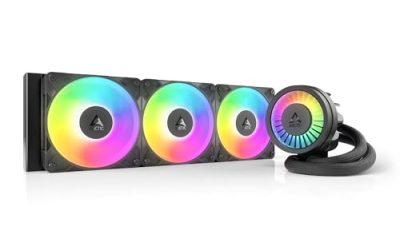
The MasterLiquid 360L Core is the non-ASUS pick in this guide, and it earns its place by keeping the Aura Sync connection simple. It is a 360mm all-in-one liquid cooler with a Gen S dual-chamber pump, a copper base, and three 120mm ARGB PWM fans. Its lighting connects through a standard 3-pin 5V ARGB header, and the manual names ASUS Aura Sync among the motherboard software that can control it.
The numbers on the listing are clear. The radiator measures 394 x 119.6 x 27.2 mm. The fans run from 650 to 1,750 RPM, move 71.93 CFM, and are listed at 27.2 dB. The cooler includes CryoFuze thermal paste with a listed conductivity of 14W/mK. Socket support covers AMD AM5 and AM4, plus Intel LGA 1851, 1700, and 1200. The listing gives a two-year warranty, shorter than the six-year warranty on the three ASUS coolers here.
This is the cooler to choose when you want a 360mm ARGB cooler that syncs with an ASUS board without paying for a display or a flagship pump. Its minimalist pump design keeps the lighting on the fans and the frosted fan blades.
Pros:
- Standard 3-pin 5V ARGB connection works with Aura Sync through the motherboard
- Gen S dual-chamber pump with a copper base and included CryoFuze thermal paste
- Clear fan specifications, with a 650 to 1,750 RPM range and listed airflow
- Minimalist pump design suits builds where the cooler should stay understated
Cons:
- Two-year warranty is shorter than the six-year warranty on the ASUS picks
- No pump display and no VRM fan, so it is a simpler cooler overall
- Fan and pump lighting depend on the motherboard ARGB header, so a board without one cannot sync it
Who Should Choose What
Choose the Strix LC III 360 ARGB if you want Aura Sync lighting and a 360mm liquid cooler with no display to configure. It is the balanced pick for a black ROG build.
Choose the Strix LC III 360 ARGB LCD if you want a display on the pump and you are happy to set it up in Armoury Crate.
Choose the Ryujin III 360 ARGB Extreme White Edition if you are building a white flagship system and you want the largest display, the embedded VRM fan, and magnetic fans in one cooler. Confirm the Aura Sync behavior and the socket list on the listing first.
Choose the MasterLiquid 360L Core if you want the simplest route to Aura Sync lighting from a non-ASUS cooler, or if you prefer a minimalist pump without a screen.
Common Mistakes
Buying a 360mm cooler for a case that fits only 240mm. This is the most common error with this kind of cooler, and it is also the easiest to avoid. Measure the mounting area and check the case manual for radiator support before ordering. A radiator that does not fit cannot be fixed with a different fan or a shorter tube.
Connecting ARGB lighting to a 4-pin 12V RGB header. The 3-pin 5V ARGB header and the 4-pin 12V RGB header look similar at a glance, and they are not interchangeable. Check the motherboard manual for the header layout, and plug the ARGB cable into the header marked for addressable lighting.
Expecting lighting to sync without software. Aura Sync effects are set in Armoury Crate, and a cooler with a display needs that software for the screen as well. Install the software before you judge the lighting.
FAQ
Do I need an ASUS motherboard to use an Aura Sync CPU cooler?
An ASUS motherboard with a 3-pin 5V ARGB header and Armoury Crate is the intended setup for Aura Sync. The Cooler Master cooler also syncs through a standard ARGB header, so it works with an ASUS board that has one. Confirm the header on your exact board before buying.
What is the difference between ARGB and RGB on a CPU cooler?
RGB lighting typically changes the whole strip or fan to one color at a time, while addressable RGB lets the software control individual LEDs, which makes flowing and chasing effects possible. Aura Sync is ASUS software for controlling addressable lighting across compatible parts.
Will a 360mm cooler fit in a mid-tower case?
Many mid-tower cases fit a 360mm radiator on the top or the front, but not all of them do. Check the case manual for radiator support and measure the mounting area. If the case only lists 240mm or 280mm support, a 360mm cooler will not fit.
Does a pump display affect cooling performance?
The display itself does not cool the processor. Cooling comes from the pump, the cold plate, the radiator, and the fans. A display adds a screen, a cable, and software setup, and it can show useful information, but it does not change how much heat the cooler can move.
Can I control the lighting without Armoury Crate?
The ASUS coolers in this guide are designed around Armoury Crate, which is where Aura Sync effects are set. Some motherboards let you set a basic lighting mode in the BIOS, but the full range of effects and the display setup need the software.
Do these coolers come with thermal paste?
The Strix LC III 360 ARGB LCD lists pre-applied thermal compound, so it is ready to mount out of the box. The MasterLiquid 360L Core includes CryoFuze thermal paste in the box. For the other two coolers, confirm on the listing whether paste is pre-applied or included.
Conclusion
The best aura sync cpu coolers are the ones that treat lighting as part of the build, not as an add-on. The ASUS ROG Strix LC III 360 ARGB is the pick for most ASUS builders: a 360mm AIO with a rotatable water block, a Gen7 v2 pump, and Aura lighting effects, with no display to configure. The Strix LC III 360 ARGB LCD adds a 2.1-inch screen for builders who want system information on the pump. The ROG Ryujin III 360 ARGB Extreme White Edition is the flagship choice for a white build, with a 3.5-inch LCD, an embedded VRM fan, and magnetic fans. And the Cooler Master MasterLiquid 360L Core is the simple alternative, syncing through a standard 3-pin ARGB header.
Whichever you choose, confirm the 3-pin ARGB header on your motherboard, measure the 360mm radiator space in your case, and check the socket list on the listing.
Related guides
More from Amazon
Programs that pair well with the guide above. Offers and eligibility are set by Amazon and may change.
Free shipping on eligible items, Prime Video and more. Eligible new members can start with a free trial.
Start a Prime free trialAd-free music streaming. Eligible new subscribers can start with a free trial.
Try Music Unlimited freeA Prime membership for ages 18-24 with a trial period. Eligibility is set by Amazon.
See Prime for Young AdultsAudiobooks and podcasts to listen to on the go. Eligible new members can start with a free trial.
Try Audible freeAs an Amazon Associate we earn from qualifying purchases.