Cooling a gaming PC splits into two separate purchases that buyers constantly blur: the processor needs a cooler matched to its socket, and the graphics card needs its own solution matched to its board layout. A product that excels at one job does nothing for the other, so the honest first step is naming which component is actually running hot before spending anything. Noise complaints blur the picture further, because the loudest fan in the case is not always attached to the hottest part.
This guide covers both sides of the case. It is for builders assembling a high-core-count gaming rig, owners of a loud stock graphics card, and upgraders whose case has room for one more radiator. Every entry states plainly whether it cools the CPU or the GPU, and its specs come only from its Amazon listing.
Our Top Picks
Top 3 picks at a glance
Quick Picks
As an Amazon Associate we earn from qualifying purchases.
| Product | Best for | Key spec from title |
|---|---|---|
| ARCTIC Liquid Freezer III Pro 360 (cools CPU) | High-end CPUs in cases with 360 mm radiator space | 360 mm AIO with integrated VRM fan |
| Noctua NH-D15 chromax.Black (cools CPU) | Quiet air cooling with no pump or coolant | Dual-tower with two 140 mm fans |
| NZXT Kraken G12 (cools GPU) | Adding a Kraken X AIO to a graphics card | GPU mounting kit with 92 mm VRM fan |
| Alphacool Eiswolf 2 (cools GPU) | ROG Strix RTX 3080 and 3090 owners | Full-cover GPU AIO with backplate |
How to Choose
Start by identifying the hot component
Open a monitoring tool during a gaming session and look at which temperature is the problem. A processor that throttles needs a CPU cooler from the first two picks; a graphics card whose fans scream needs a GPU solution from the last two. Buying the wrong category is the most expensive mistake in this market, because CPU and GPU coolers share almost no mounting hardware, dimensions or installation steps. Watch the pattern, not just the peak: a processor that spikes briefly on loading screens is behaving normally, while one that climbs and stays at its limit through every match is asking for help.
Check socket or card model before radiator size
For CPU coolers, the listing’s socket list must include your exact platform, such as LGA1700 or AM5, or the mounting kit simply will not fit. For GPU coolers the fit question is stricter still: full-cover blocks and brackets are built around specific card models and board layouts, so a cooler for one RTX 3080 variant may not suit another brand’s card with the same chip. Confirm the exact model named in the listing against the card in your case. Manufacturers reuse chip names across very different boards, adding power stages, changing capacitor positions and moving connectors, any of which can defeat a block designed for the reference layout.
Measure the case, not just the spec sheet
A 360 mm radiator needs three fan mounts in a row and clearance from the motherboard and memory; a tall dual-tower air cooler needs roughly 165 mm of space above the socket and can overhang the first RAM slots. GPU AIOs add a radiator plus tubing runs to a case that may already hold a CPU radiator. Ten minutes with a tape measure against the listing’s dimensions prevents the classic cooler-that-almost-fits return. Measure with the components installed where possible: radiator thickness plus fan thickness is the real figure at the top mount, and memory height decides whether a big air cooler’s front fan sits at its intended position or rides up several millimetres.
Understand what the box does and does not include
Bracket kits such as the Kraken G12 are adapters, not complete coolers: the listing assumes you supply a compatible AIO separately. Full GPU AIOs like the Eiswolf 2 arrive complete but fit only the named cards. CPU coolers sit in between, usually including fans, mounting hardware and thermal paste. Reading the includes list on the product page matters more here than in most categories, because a missing AIO turns a cheap bracket into an unfinished project. On GPU jobs, check the listing for thermal pads or compound for the memory and regulators.
The 4 Best Options
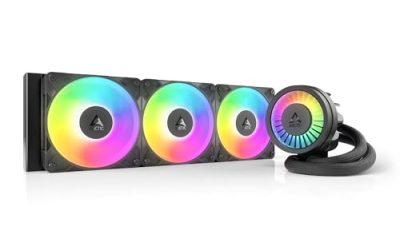
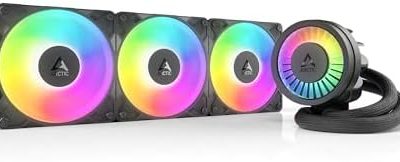
ARCTIC Liquid Freezer III Pro 360 — cools the CPU

ARCTIC’s flagship AIO pairs a 360 mm radiator with a small fan on the pump block that blows air over the motherboard’s voltage regulators, a detail its listing highlights and few rivals copy. It is the pick for a high-core-count Intel or AMD processor in a case with triple-fan mounting space, where sustained gaming and streaming loads run for hours. Socket support in the listing covers current Intel and AMD platforms, so it also survives a platform upgrade better than most.
Specs
- Cools: CPU (liquid AIO)
- Radiator: 360 mm with three 120 mm fans
- Extra feature from listing: integrated VRM fan on the pump unit
- Socket support from listing: Intel LGA1851 and LGA1700, AMD AM5 and AM4
- Tubing: sleeved, with cable management along the tubes
Best for: High-end gaming CPUs in mid-tower or larger cases with 360 mm mounting space.
Watch out for: Confirm your case fits a 360 mm radiator before ordering; it will not squeeze into a 240 mm space.
ASIN: B0DLWGG85P
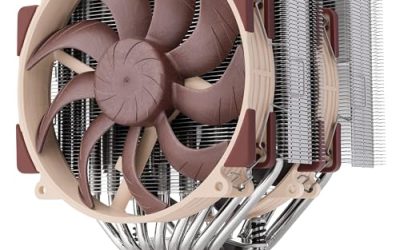
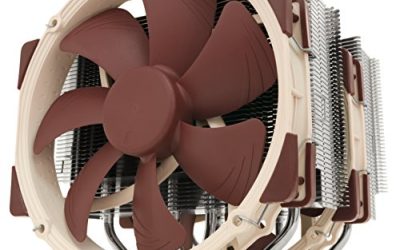
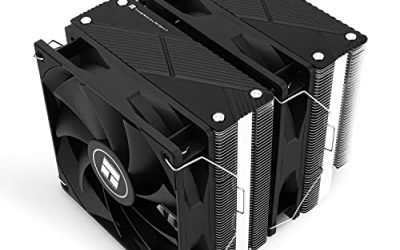
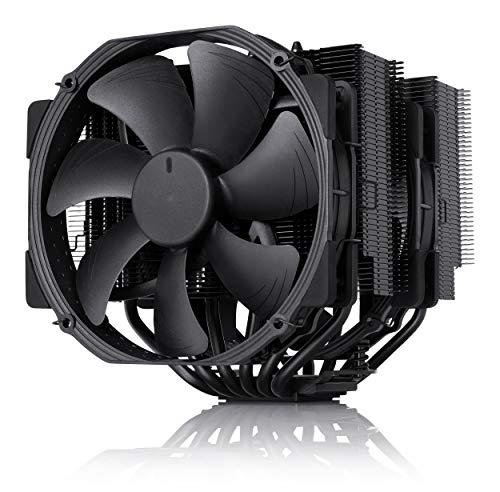
Noctua NH-D15 chromax.Black — cools the CPU
The NH-D15 chromax.Black is the air-cooling benchmark in this guide: a dual-tower heatsink with six heatpipes and two NF-A15 140 mm fans, finished in black for windowed builds. It suits builders who want nothing to leak, no pump to wear out, and noise levels that stay civilised during long sessions. Noctua’s SecuFirm2 mounting system and the included thermal paste make it a complete kit, and its cooling class rivals many liquid units without asking the case for radiator space.
Specs
- Cools: CPU (air cooler)
- Design: dual-tower heatsink with 6 heatpipes
- Fans: 2 × NF-A15 PWM 140 mm
- Height from listing: 165 mm with fans fitted
- Mounting: SecuFirm2 system for Intel and AMD sockets
Best for: Quiet, set-and-forget CPU cooling in cases with generous cooler clearance.
Watch out for: Check RAM clearance; the front fan can sit over tall memory modules and may need raising.
ASIN: B07Y87YHRH
NZXT Kraken G12 — cools the GPU
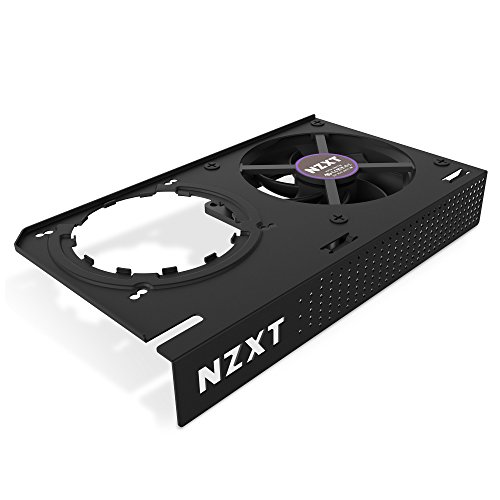
The G12 is a mounting kit that adapts an NZXT Kraken X series AIO to a graphics card, replacing the stock cooler on the GPU core while its own 92 mm fan blows across the memory and voltage regulators. It is a project part for owners of a loud reference-style card who already have, or plan to buy, a compatible Kraken AIO. The listing names AMD and NVIDIA GPU compatibility and the RL-KRG12-B1 model code, and it is explicit that this is a bracket: the liquid cooler itself is a separate purchase.
Specs
- Cools: GPU (mounting bracket for an AIO, AIO not included)
- Model: RL-KRG12-B1
- VRM cooling: integrated 92 mm fan for active VRM and memory airflow
- Compatibility from listing: Kraken X series AIOs; AMD and NVIDIA graphics cards
- Colour: black
Best for: Tinkerers converting a noisy graphics card to liquid cooling with a Kraken X AIO.
Watch out for: Budget for the AIO as well, and verify your exact card against NZXT’s compatibility list first.
ASIN: B06XXF4Q68
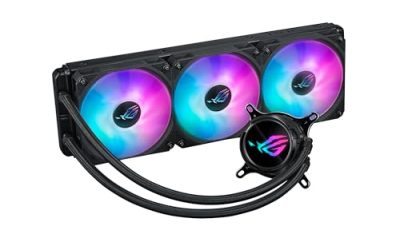
Alphacool Eiswolf 2 — cools the GPU

The Eiswolf 2 is the complete-package alternative to a bracket: a full-cover liquid cooler built for the ASUS ROG Strix versions of the RTX 3080 and RTX 3090, with the water block, radiator and backplate designed around that specific card. Its listing names the 360 mm radiator format, so the case needs the same mounting room as a large CPU AIO. For an owner of that exact Strix card whose fans dominate the room, this is the most thorough GPU cooling swap in the guide.
Specs
- Cools: GPU (full-cover AIO liquid cooler)
- Card fit from listing: ASUS ROG Strix RTX 3080 and RTX 3090
- Radiator: 360 mm
- Includes from listing: pre-filled AIO with full-cover block and backplate
- Connections: quick-release couplings for expanding the loop
Best for: ROG Strix RTX 3080 and 3090 owners wanting a complete GPU liquid conversion.
Watch out for: It fits only the named Strix cards; other RTX 3080 or 3090 models use different boards.
ASIN: B09D8D1QGT
Which One Fits Your Situation
Your processor throttles in long gaming sessions
Choose between the two CPU coolers by case and temperament. The Liquid Freezer III Pro 360 gives a big case and a hot high-end chip the most radiator area, while the NH-D15 chromax.Black answers the same problem with no pump, no coolant and very little noise if your case clears its height. Either way, confirm the old cooler was really the limit: fresh thermal paste and dust-free fins solve a surprising share of overheating complaints before any purchase.
Your graphics card is the loudest part of the build
Look at the GPU pair. If you already own a Kraken X AIO, the G12 bracket is the economical conversion. If you own the specific ROG Strix RTX 3080 or 3090 named in the Eiswolf 2 listing and want everything in one box, that full-cover AIO is the direct route. Before committing, try a gentler fan curve and an undervolt in software; if the card still roars at acceptable temperatures, the hardware swap is justified.
You are planning a fresh build and want both sides quiet
Pair the NH-D15 chromax.Black on the processor with a graphics card bought for its stock cooler, then add a GPU solution only if the card still bothers you. Many builders find air on the CPU plus a well-chosen card removes the urge to liquid-cool the GPU at all. Planning the case around that order also helps: buy the case with radiator room anyway, and the option to convert the card later stays open without a rebuild.
Common Mistakes
- Ordering a GPU bracket and discovering at build time that the AIO it needs is a separate purchase.
- Assuming every RTX 3080 shares one board layout, then finding the full-cover block fits a different variant.
- Buying a 360 mm radiator for a case whose top mount only accepts 240 mm.
- Ignoring cooler height and RAM clearance on large dual-tower air coolers until the side panel will not close.
- Replacing the CPU cooler when monitoring showed the graphics card was the overheating part all along.
Frequently Asked Questions
Can one cooler handle both my CPU and GPU?
Not from this guide. Each product here is built for one component: two cool the processor, two cool the graphics card. Combined cooling for both means a custom water loop with separate blocks, which is a different category of project with its own fittings, pump and planning.
Is the Kraken G12 a complete GPU cooler on its own?
No. The listing describes a mounting kit: it adapts a Kraken X series AIO to the graphics card and adds a 92 mm fan for the voltage regulators. The AIO itself, which does the actual liquid cooling of the GPU core, must be bought separately and must be a compatible Kraken X model.
Do I need to remove my graphics card’s warranty seal to fit a GPU cooler?
Fitting either GPU solution means removing the card’s stock cooler, and card makers treat that differently by region and model. If the card is new and its warranty matters to you, read the manufacturer’s terms before starting; the CPU coolers in this guide carry no such concern.
Which is quieter, the big air cooler or the 360 mm AIO?
Both can be quiet, in different ways. The NH-D15 has only its two fans to hear, while the AIO spreads work across three radiator fans plus a pump. Case placement and fan curves decide more than the format, so either pick here can anchor a low-noise build.
Related guides
More from Amazon
Programs that pair well with the guide above. Offers and eligibility are set by Amazon and may change.
Free shipping on eligible items, Prime Video and more. Eligible new members can start with a free trial.
Start a Prime free trialAd-free music streaming. Eligible new subscribers can start with a free trial.
Try Music Unlimited freeA Prime membership for ages 18-24 with a trial period. Eligibility is set by Amazon.
See Prime for Young AdultsAudiobooks and podcasts to listen to on the go. Eligible new members can start with a free trial.
Try Audible freeAs an Amazon Associate we earn from qualifying purchases.