Our Top Picks



Top 3 picks at a glance
Introduction
A CPU cooler is one of the most consequential parts in a gaming PC. It decides how much heat your processor can shed under load, how loud your system sounds during a long session, and how much room is left inside your case for everything else. Pick the wrong cooler and you end up with a tall tower that blocks your memory slots, a radiator that does not fit your case, or a mounting kit that does not cover your socket. Pick the right one and the cooler simply disappears into the build, doing its job quietly for years.
This guide looks at four CPU coolers that cover the main ways people cool a gaming PC today: a flagship dual-tower air cooler, two compact dual-tower air coolers that punch above their size, and a 360 mm all-in-one liquid cooler. Each one is a different answer to the same question, so the right choice depends on your processor, your case, your memory, and how much noise you are willing to live with.
If you are building a new gaming PC, start with the cooler early in your parts list, not at the end. Cooler height, radiator length, and memory clearance shape which case and which memory kit make sense, and sorting those out first saves you from discovering a conflict after everything else is already bought.
At a Glance
| Cooler | Type | Fans | Height / Size | Socket Support | Standout Feature |
|---|---|---|---|---|---|
| Noctua NH-D15 G2 | Dual-tower air | 2 x 140 mm PWM | 168 mm tall | AMD AM5/AM4, Intel LGA1851/1700/1200/115x | Eight heatpipes with offset AM5 mounting |
| Thermalright Peerless Assassin 120 SE | Dual-tower air | 2 x 120 mm PWM | 155 mm tall | AMD AM4/AM5, Intel LGA1700/1150/1151/1200/1851 | Six heatpipes in a compact dual-tower layout |
| ARCTIC Liquid Freezer III Pro 360 | All-in-one liquid | 3 x 120 mm | 360 mm radiator | AMD AM5/AM4, Intel LGA1851/1700 | 38 mm radiator with a dedicated VRM fan |
| Thermalright Phantom Spirit 120 SE | Dual-tower air | 2 x 120 mm PWM | 154 mm tall | AMD AM4/AM5, Intel LGA1851/1700/1150/1151/1200 | Seven heatpipes with AGHP 4.0 technology |
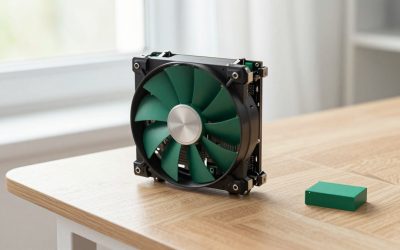
Noctua NH-D15 G2

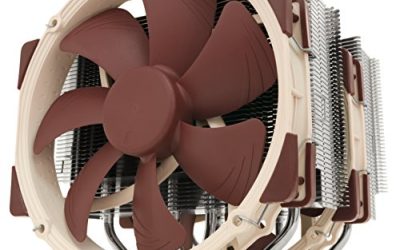
The Noctua NH-D15 G2 is the second generation of a dual-tower air cooler that has been a fixture in high-end builds for years. It is the largest air cooler in this guide and the one aimed most squarely at powerful processors that run hot under sustained load.
The cooler uses two fin stacks joined by eight heatpipes, with two NF-A14x25r G2 140 mm fans mounted in front of and between the towers. The fans are PWM controlled with a maximum rotational speed of 1500 RPM and a listed noise level of 24.8 decibels, and the package includes low-noise adaptors that let you cap fan speed for quieter operation, plus a 4-pin PWM splitter cable so both fans run from a single motherboard header. The heatsink measures 168 mm tall, 150 mm wide, and 152 mm deep, with a copper base and heatpipes paired with aluminium cooling fins and soldered joints.
One of the most useful details in the G2 design is its asymmetrical fin-stack layout. The lower fins are recessed on one side, which clears the top PCIe x16 slot on most current motherboards, and the cooler ships with offset mounting hardware for AMD AM5. Memory clearance is listed at 59 mm in single-fan mode and 32 mm with both fans installed, so tall memory modules with large heat spreaders need a check before you commit.
The box includes Noctua’s SecuFirm2+ mounting system with a Torx-based design and an included NM-SD1 Torx T20 screwdriver, along with NT-H2 thermal compound, a thermal paste guard for AM5, a cleaning wipe, and a metal case badge. Socket coverage is broad: AMD AM5 and AM4, plus Intel LGA1851, LGA1700, LGA1200, and LGA115x. Noctua backs the cooler with a six-year warranty.
Considerations
The NH-D15 G2 is a big cooler, and its size is the main thing to plan around. At 168 mm tall it needs a case with generous cooler clearance, and its 1.52 kg weight means the mounting system does the heavy lifting — follow the manual and tighten the spring-loaded screws evenly. This is the cooler to consider when your processor runs hot for long stretches and you want air cooling with the most headroom, provided your case and memory leave it room to breathe.
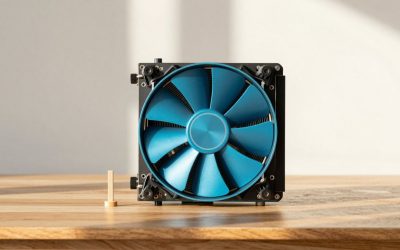
Thermalright Peerless Assassin 120 SE
The Thermalright Peerless Assassin 120 SE is a dual-tower air cooler that keeps the twin-stack layout of much larger coolers while shrinking the footprint. It is a popular choice for mid-range gaming builds where a flagship tower would be overkill or simply would not fit.
Thermalright Peerless Assassin 120 SE
The cooler pairs two aluminium fin towers with six 6 mm heatpipes using AGHP technology, and it ships with two 120 mm TL-C12C PWM fans running at up to 1550 RPM. The heatsink stands 155 mm tall, which is noticeably shorter than the flagship towers in this guide, and that shorter height opens up a wider range of mid-tower and compact cases. An aluminium heatsink cover finishes the top of the towers and gives the cooler a clean, plain look with no lighting.
Socket support covers AMD AM4 and AM5 alongside Intel LGA1700, LGA1150, LGA1151, LGA1200, and LGA1851, so the same cooler works across current AMD and Intel platforms. The two-fan arrangement pushes air through both towers, and the PWM control lets the motherboard scale fan speed with processor temperature, keeping the system quieter at idle and under light loads.
Considerations
The Peerless Assassin 120 SE trades some of the sheer mass of a flagship cooler for a smaller size, so it is best matched to processors in the mid-range and upper mid-range rather than the hottest flagship chips running sustained all-core loads. Its 155 mm height still needs a case with adequate clearance, so measure before ordering. The plain black finish and lack of lighting make it easy to blend into any build, but builders who want a lighted cooler will need to look at the ARGB version of the same model, which is sold under a separate listing.
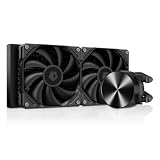
ARCTIC Liquid Freezer III Pro 360
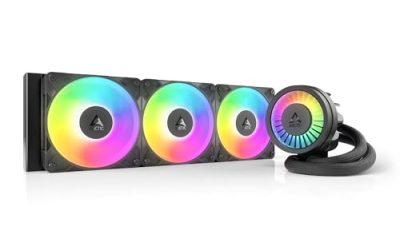
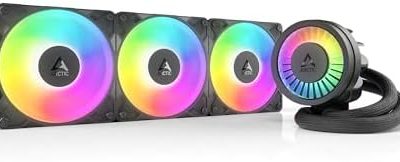
The ARCTIC Liquid Freezer III Pro 360 is the only liquid cooler in this guide, and it takes a different approach from the air coolers: a 360 mm radiator with three 120 mm fans, a pump block that sits on the processor, and a small dedicated fan on the pump housing that moves air over the motherboard area around the socket.
ARCTIC Liquid Freezer III Pro 360
The radiator is 38 mm thick, which is thicker than many 360 mm radiators, and it ships with three pre-installed 120 mm fans. The pump is PWM controlled, and the cooler includes a contact frame for Intel LGA1851 and LGA1700 that helps spread mounting pressure evenly across the processor. Socket support covers AMD AM5 and AM4 as well as Intel LGA1851 and LGA1700. The cabling is integrated, with the fan and pump wiring routed together to keep the inside of the case tidy, and the pump housing carries a small VRM fan that directs airflow toward the voltage regulation components near the socket.
A 360 mm radiator needs a case with a matching mounting location, usually the front panel or the top of the case, and the 38 mm radiator thickness plus the fans means you should confirm the total depth available at that mounting point. The cooler also needs three adjacent 120 mm fan mounts in a row, which rules out smaller cases entirely.
Considerations
Liquid cooling moves the heat away from the processor to the radiator, which can keep the area around the socket clear for tall memory and large graphics cards, but it adds parts that air coolers do not have: a pump, tubing, and a radiator that must fit the case. Check that your case supports a 360 mm radiator at the front or top, confirm the tubing reaches comfortably from the mounting location to the processor, and plan your fan headers so the pump and radiator fans are controlled the way you want. This cooler suits builders who have a case built for a 360 mm radiator and want the clean socket area and large cooling surface that liquid cooling provides.
Thermalright Phantom Spirit 120 SE
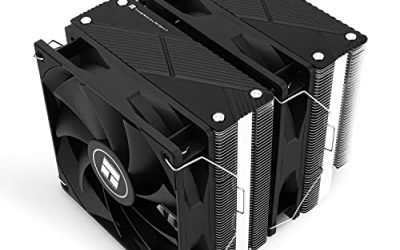
The Thermalright Phantom Spirit 120 SE sits between the Peerless Assassin and the flagship towers: a dual-tower air cooler with seven heatpipes, dual 120 mm fans, and a 154 mm height that fits a wide range of cases.
Thermalright Phantom Spirit 120 SE
The cooler uses seven heatpipes with AGHP 4.0 technology running through two aluminium fin towers, cooled by two 120 mm TL-C12B V2 PWM fans with S-FDB bearings. The heatsink measures 125 mm long, 135 mm wide, and 154 mm high, making it the shortest cooler in this guide by a small margin. Fan speed reaches up to 1500 RPM, and the listed noise level is 25.6 decibels. The design avoids the memory area by keeping the fin stacks clear of the memory slots, and the package includes mounting hardware for AMD AM4 and AM5 plus Intel LGA1851, LGA1700, LGA1150, LGA1151, and LGA1200. Thermalright covers the cooler with a five-year warranty.
Considerations
At 154 mm tall, the Phantom Spirit 120 SE fits more cases than the taller flagship towers, but it is still a dual-tower cooler that needs clearance above the motherboard and room for the front fan next to the memory slots. Tall memory heat spreaders can interfere with the front fan, so check the height of your memory kit against the cooler’s layout. The cooler is a good match for gaming processors that run warm but do not need the largest tower available, and it is worth comparing directly with the Peerless Assassin 120 SE if you are choosing between the two.
How to Choose a CPU Cooler
Start with your processor. Every cooler has a practical limit on how much heat it can move, and the manufacturer’s listed TDP capacity is a useful first filter. A cooler listed for a modest heat output will struggle with a flagship processor under sustained load, while a cooler built for high heat output is wasted on a low-power chip. Match the cooler’s capacity to your processor’s heat output with some headroom, and remember that sustained all-core workloads generate more heat than short bursts in games.
Next, check the socket. All four coolers in this guide cover current AMD and Intel sockets, but that is not true of every cooler on the market. Confirm that the cooler you buy includes mounting hardware for your exact socket — AM5, AM4, LGA1700, or LGA1851 — and that the mounting kit is in the box rather than something you have to order separately.
Then think about noise. Fan size, fan speed, and the number of fans all shape how loud a cooler sounds. Larger fans can move the same amount of air at lower speeds than smaller fans, which is one reason the 140 mm fans on the NH-D15 G2 can run quietly. PWM control matters too: a cooler with PWM fans lets the motherboard slow the fans down when the processor is idle and ramp them up only under load. If a quiet system matters to you, look for coolers that include low-noise adaptors or that are known for low-speed fan curves, and set a fan curve in your motherboard settings rather than leaving everything at full speed.
Cooling type is the next decision. Air coolers are simple: a heatsink, heatpipes, and fans, with no pump and no liquid. They are easy to install, easy to maintain, and they keep working for years with nothing more than an occasional dusting. Liquid all-in-one coolers move heat to a radiator, which can clear space around the socket and handle high heat output in a different way, but they add a pump, tubing, and a radiator that must fit your case. Neither type is better in every situation; the right one depends on your case, your processor, and how you feel about the extra parts.
Fit and Installation Considerations
Measure your case before you order. Every case lists a maximum CPU cooler height, and your cooler must be shorter than that number with room to spare. The NH-D15 G2 at 168 mm needs a case with generous clearance, while the two Thermalright coolers at 154 and 155 mm fit a wider range of mid-tower cases. For the ARCTIC liquid cooler, the number that matters is radiator support: your case must have a 360 mm mounting location, and you need to confirm the total depth of the radiator plus fans at that spot.
Memory clearance deserves its own check. Dual-tower air coolers sit close to the memory slots, and the front fan can overlap tall memory modules. The NH-D15 G2 lists 59 mm of memory clearance in single-fan mode and 32 mm with both fans, which covers standard-height memory but can conflict with tall heat spreaders. If your memory is tall, you may need to raise the front fan, which adds height, or run the cooler with a single fan. The Phantom Spirit 120 SE is designed to avoid the memory area, but it is still worth confirming the layout against your specific memory kit.
Installation itself is straightforward for all four coolers, but a few habits help. Apply thermal paste in a small amount at the centre of the processor and let the mounting pressure spread it, rather than spreading it by hand. Tighten the mounting screws in a cross pattern, a little at a time, so the pressure stays even. Connect the fans to the CPU fan header on the motherboard so the board can control their speed based on processor temperature, and connect the pump of a liquid cooler to the header your motherboard manual recommends for a pump. After installation, check that no cables touch the fan blades, that the fans spin freely, and that the cooler does not press against the memory or the graphics card.
Frequently Asked Questions
Do I need a large cooler for a gaming PC?
It depends on the processor. A mainstream gaming processor with modest heat output runs well on a compact dual-tower cooler like the Peerless Assassin 120 SE or the Phantom Spirit 120 SE. A flagship processor that sustains high heat output under load benefits from a larger cooler with more surface area, such as the NH-D15 G2 or a 360 mm liquid cooler.
Is a liquid cooler better than an air cooler?
Neither is better in every build. Air coolers are simpler, with fewer parts and no pump, and they are easy to install and maintain. Liquid all-in-one coolers move heat to a radiator, which frees space around the socket and can suit cases built for radiators. The deciding factors are usually case support for a radiator, the processor’s heat output, and whether you prefer the simplicity of air cooling or the layout of a liquid cooler.
How do I know if a cooler will fit my case?
Check the case manufacturer’s listed maximum cooler height and compare it with the cooler’s height. For a liquid cooler, check the case’s radiator support list for a 360 mm mounting location. Also confirm memory height against the cooler’s clearance, and check that the cooler’s width does not block the top PCIe slot on your motherboard.
How often should I clean my CPU cooler?
Dust builds up on heatsink fins and fan blades over time and gradually reduces airflow. Cleaning every few months with compressed air, with the system powered off, keeps the cooler working as intended. Hold the fan blades still while you blow dust out so the fans do not spin freely, and clean the intake filters on your case at the same time so less dust reaches the cooler in the first place.
Conclusion
There is no single cooler that fits every gaming PC, and that is why this guide covers four different designs. The Noctua NH-D15 G2 is the choice for powerful processors and large cases, with eight heatpipes, two 140 mm fans, and a mounting kit that covers current AMD and Intel sockets. The Thermalright Peerless Assassin 120 SE and Phantom Spirit 120 SE cover the middle ground: compact dual-tower air coolers that fit a wide range of cases and handle mainstream and upper mid-range processors. The ARCTIC Liquid Freezer III Pro 360 is the liquid option, built for cases with 360 mm radiator support and for builders who want the socket area clear and the heat moved to a radiator.
As an Amazon Associate, we earn from qualifying purchases.
Related guides
More from Amazon
Programs that pair well with the guide above. Offers and eligibility are set by Amazon and may change.
Free shipping on eligible items, Prime Video and more. Eligible new members can start with a free trial.
Start a Prime free trialAd-free music streaming. Eligible new subscribers can start with a free trial.
Try Music Unlimited freeA Prime membership for ages 18-24 with a trial period. Eligibility is set by Amazon.
See Prime for Young AdultsAudiobooks and podcasts to listen to on the go. Eligible new members can start with a free trial.
Try Audible freeAs an Amazon Associate we earn from qualifying purchases.