An all-in-one liquid cooler is the simplest way to keep a hot CPU under control without building a custom loop. The pump, block, tubes and radiator arrive sealed and pre-filled, so the job is mostly mounting the block and finding a home for the radiator. The real decision is not whether liquid cooling works, but which sealed unit fits your case, your CPU and your tolerance for noise. A 360mm radiator gives the most headroom for a high-wattage chip, while a well-built unit with a quiet pump can stay out of the way during long gaming sessions.
This guide is for builders picking a closed-loop cooler for a gaming or work PC, from mid-range chips to flagship CPUs. The five coolers below come from names and specifications on Amazon product pages, covering quiet operation, strong cooling, a pump display, a refillable loop and a low-cost entry point.
Our Top Picks
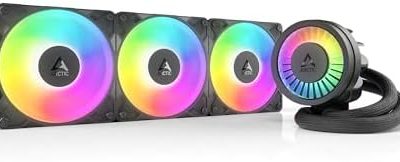
 ARCTIC Liquid Freezer III Pro 360 A-RGBLiquid Freezer III Pro 360 A-RGB15.7 x 4.7 x 2.9 inches4.5 poundsCheck on Amazon
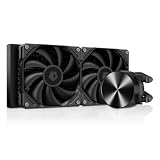
 Thermalright Aqua Elite 360 V3 Water Cooling CPUAE360 BLACK V34.72 x 0.98 x 4.72 inches0.2 poundsCheck on Amazon


Top 3 picks at a glance
Quick Picks
As an Amazon Associate we earn from qualifying purchases
| Product | Best for | Key spec from title |
|---|---|---|
| ARCTIC Liquid Freezer III Pro 360 A-RGB | High-wattage CPUs in a full-size case | 38mm radiator with VRM fan |
| Corsair Nautilus 360 RS ARGB | Quiet builds with simple wiring | 20 dBA pump, daisy-chain fans |
| NZXT Kraken Elite 360 RGB | Showcase builds with a pump screen | 2.72-inch IPS LCD display |
| be quiet! Light Loop 360mm | Near-silent operation with a refill port | 36.8 dB max noise, refillable loop |
| Thermalright Aqua Elite 360 V3 ARGB | First AIO on a tight build budget | 66.17 CFM fans, S-FDB bearings |
How to Choose
Match the radiator to your case
A 360mm radiator needs three 120mm fan mounts in a row, and most mid-tower cases offer that on the front or the top, but not always both. Measure the mount area before ordering, and check the radiator thickness too: a 38mm radiator plus standard 25mm fans takes up more room than a 27mm one, which can clash with tall memory sticks or a long graphics card. Top mounting usually keeps the pump below the radiator, which helps the loop stay quiet. Front mounting works well when the top is crowded, but leave room for the tubes to reach the block without sharp bends.
Check socket support before you buy
Every cooler on this list ships with mounting hardware for modern Intel and AMD sockets, but the exact list varies, and older boards can fall outside it. Confirm that your socket appears on the product page: Intel LGA1851 and LGA1700 cover the newest desktop chips, while AMD AM5 covers the current Ryzen range and AM4 covers the previous generation. Some kits include a contact frame that spreads mounting pressure more evenly across the CPU, which helps with hot chips that bend slightly under the stock bracket. If your motherboard uses an unusual backplate layout, check the manual for clearance around the socket before the cooler arrives.
Pump noise matters more than fan speed
Fans get the attention, but the pump is the part you hear at idle, when the fans spin slowly and the room is quiet. A pump that hums or buzzes at low speed can be more annoying than fans under load, so look for a stated pump noise figure on the listing and check whether the pump speed can be adjusted through the motherboard or the maker’s software. A thicker radiator lets the fans run slower for the same cooling, which lowers the overall sound of the build. If silence is the goal, a cooler with a low pump noise rating and a refill port for topping up coolant over the years is worth a closer look.
Decide what the extras are worth
RGB lighting, a screen on the pump and a VRM fan all add cost, and none of them changes the temperature of your CPU by itself. A pump display is genuinely useful if you like seeing coolant temperature at a glance, and it suits a case with a glass side panel. A small fan aimed at the motherboard’s power delivery helps only when the CPU draws heavy sustained power. RGB fans look good in a lit build but add wiring and software to manage. Spend the extra money on the feature you will actually notice every day, and skip the rest.
The 5 Best Options
ARCTIC Liquid Freezer III Pro 360 A-RGB
The Liquid Freezer III Pro 360 A-RGB is the strongest all-round pick here, built around a 38mm radiator that is thicker than the usual 27mm slab, so it holds more coolant and gives the fans more surface to work with. A small fan on the pump block blows air over the motherboard’s power delivery area, which helps boards that run hot under a flagship CPU. Three P12 Pro A-RGB fans come pre-mounted on the radiator with a single cable, so wiring stays simple. The kit also includes a contact frame for Intel sockets.
Specs
- 360mm radiator, 38mm thick
- 3x P12 Pro A-RGB 120mm fans
- PWM pump with built-in VRM fan
- Intel LGA1851/1700, AMD AM5/AM4
- Contact frame included
- 6-year warranty
Best for: High-wattage CPUs in a full-size case with room for a thick radiator.
Watch out for: The 38mm radiator plus fans needs more clearance than a standard 27mm unit — measure the mount area and memory clearance first.
Corsair Nautilus 360 RS ARGB
The Nautilus 360 RS ARGB is the quiet pick of this list, with a pump rated at 20 dBA and three RS120 ARGB fans that daisy-chain together, so the whole cooler plugs straight into the motherboard with no separate controller box. The convex cold plate comes with thermal paste already applied, which makes the first install quick. Airflow stays strong enough for a high-end CPU, and the plain black design suits builds that do not need a screen or extra lighting effects.
Specs
- 360mm radiator with 3x RS120 ARGB fans
- Pump rated at 20 dBA
- Daisy-chain fans, direct motherboard connection, no controller
- Convex cold plate with pre-applied thermal paste
- Intel LGA1851/1700, AMD AM5/AM4
- Model CW-9060093-WW
Best for: Quiet builds where simple wiring matters more than a pump screen.
Watch out for: There is no display on the pump, so temperature readouts need motherboard software or a separate monitor.
NZXT Kraken Elite 360 RGB
The Kraken Elite 360 RGB is the showcase pick, built around a 2.72-inch IPS display on the pump that shows coolant temperature, CPU load or a custom image through NZXT CAM software. Behind the screen sits a 360mm radiator and a single-frame F360 RGB Core fan unit that replaces three separate fans and cuts down on cables. The Turbine pump is tuned for strong flow at low noise, and the cooler covers current Intel and AMD sockets. It suits a glass-panel build where the pump is always on show.
Specs
- 360mm radiator with F360 RGB Core single-frame fan
- 2.72-inch IPS LCD display on the pump
- NZXT Turbine pump
- Intel LGA1851/1700/1200/115x, AMD AM5/AM4
- Model RL-KR36E-B2
Best for: Showcase builds where the pump screen is part of the look.
Watch out for: The display needs NZXT CAM software, and stock has been thin — one tracker showed only a single unit left, so confirm availability before ordering.
be quiet! Light Loop 360mm
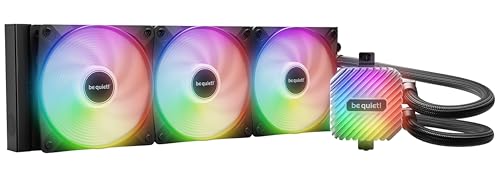
The Light Loop 360mm is the pick for builders who want a quiet room first and lighting second. Three Light Wings LX fans top out at 2100 rpm and the whole cooler is rated at 36.8 dB at full speed, with much lower figures at half speed, so it stays in the background during normal use. The pump block and fans carry 64 ARGB LEDs between them, driven through an included ARGB-PWM hub. A refill port on the radiator lets you top up coolant over the years, which is rare on a sealed unit.
Specs
- 360mm radiator with 3x Light Wings LX 120mm PWM fans
- Max fan speed 2100 rpm, max noise 36.8 dB
- 64 ARGB LEDs with ARGB-PWM hub included
- Refill port on the radiator
- Intel LGA1851/1700/1200/1151/1150/1155, AMD AM5/AM4
- Model BW022
Best for: Near-silent builds that still want full ARGB lighting.
Watch out for: The cooler is sold through the be-quiet-official seller on Amazon in some listings — check the seller name on the listing before ordering.
Thermalright Aqua Elite 360 V3 ARGB
The Aqua Elite 360 V3 ARGB is the low-cost entry point in this list, and it still covers the basics well: a 360mm radiator, three PWM ARGB fans on S-FDB bearings and a pump that spins up to 2800 rpm. Airflow per fan reaches 66.17 CFM, which is enough to keep a mid-range or upper mid-range CPU steady under gaming loads. Socket support is broad, covering current AMD and Intel platforms. It is the sensible pick when the budget goes to the CPU and graphics card first.
Specs
- 360mm radiator with 3x 120mm PWM ARGB fans
- S-FDB fan bearings
- Pump speed up to 2800 rpm
- Max airflow 66.17 CFM per fan
- AMD AM4/AM5, Intel LGA1150/1151/1200/1700/1851
- Model AQUA ELITE 360 V3
Best for: First-time AIO buyers who want a 360mm radiator without a premium price.
Watch out for: Some listings show the brand name misspelled as THERMALRLGHT — check the seller and the exact listing title before ordering.
Which One Fits Your Situation
You run a flagship CPU at full load
Pick the ARCTIC Liquid Freezer III Pro 360 A-RGB. Its 38mm radiator holds more coolant than the standard slabs, and the VRM fan helps the motherboard cope when a flagship chip draws heavy power for long stretches. Mount it at the top of a full-size case so the pump sits below the radiator, and the loop stays quiet while the fans do the work.
You want the quietest PC possible
Pick the be quiet! Light Loop 360mm. Its fans stay low at part speed, the pump noise stays modest, and the refill port means you can keep the loop topped up instead of replacing the whole unit when coolant levels drop over time. Pair it with the Corsair Nautilus 360 RS ARGB if you want a second quiet option with even simpler wiring.
You are building a showcase PC with a window
Pick the NZXT Kraken Elite 360 RGB. The pump display turns the cooler into the visual center of the build, and the single-frame fan keeps the radiator side tidy. It works best in a case with a clear side panel and a motherboard that supports the CAM software, so check both before you buy.
You are buying your first liquid cooler
Pick the Thermalright Aqua Elite 360 V3 ARGB. It covers the essentials — a 360mm radiator, three ARGB fans and broad socket support — without the premium features that add cost and wiring. Check that your case fits a 360mm radiator and that the seller name matches Thermalright on the listing, then mount it and run the pump at a fixed low speed to start.
Common Mistakes
- Buying a 360mm radiator before checking whether the case has three 120mm mounts in a row.
- Mounting the radiator with the pump at the highest point of the loop, which lets air collect in the pump.
- Forgetting to check socket support, especially when moving an old cooler to a new motherboard.
- Plugging RGB fans into the wrong header and wondering why the lighting does not sync.
- Skipping the tube routing check and forcing sharp bends that strain the fittings.
Frequently Asked Questions
Do I need a 360mm AIO for a mid-range CPU?
No. A mid-range CPU runs fine on a smaller radiator or a good air cooler, and a 360mm unit is mainly useful for flagship chips that draw heavy sustained power. Buy the 360mm size when your CPU regularly pushes past the comfort zone of smaller coolers, or when your case already has the mounts and you want headroom for a future upgrade.
How long does a closed-loop cooler last?
A sealed AIO usually lasts several years, and the pump is the part most likely to wear out first. Coolant slowly escapes through the tubes over time, which is why a refill port is a useful feature. Keep the radiator free of dust, run the pump at a steady speed and listen for new rattling or buzzing sounds, which are the usual signs that the pump is starting to fail.
Can I mount the radiator at the front of the case?
Yes, front mounting works well and suits cases where the top is crowded or lacks radiator mounts. Keep the pump below the top of the radiator so air collects at the top of the radiator rather than in the pump. Leave enough slack in the tubes for a gentle curve to the block, and check that the radiator does not block long graphics cards.
Do AIO coolers need maintenance?
Very little. A sealed unit arrives pre-filled and needs no coolant changes under normal use, though models with a refill port let you top up if levels drop after a few years. The main upkeep is cleaning dust from the radiator fins and fans every few months, and checking that the tubes and fittings stay firm with no damp spots around the block.
Related guides
More from Amazon
Programs that pair well with the guide above. Offers and eligibility are set by Amazon and may change.
Free shipping on eligible items, Prime Video and more. Eligible new members can start with a free trial.
Start a Prime free trialAd-free music streaming. Eligible new subscribers can start with a free trial.
Try Music Unlimited freeA Prime membership for ages 18-24 with a trial period. Eligibility is set by Amazon.
See Prime for Young AdultsAudiobooks and podcasts to listen to on the go. Eligible new members can start with a free trial.
Try Audible freeAs an Amazon Associate we earn from qualifying purchases.