
Switching from cloth to a hard pad is a decision about how your mouse stops, not just how it starts. Cloth drags; a hard surface lets the mouse glide freely and then demands that you supply the braking yourself, which changes your aim in the first week more than any sensor upgrade would. Players make the jump for the speed, the consistent glide that never changes with humidity, and a surface that wipes clean instead of absorbing months of dust and skin oil into woven fibres.
The five pads below were picked from Amazon listings that state their surface material plainly: hard plastic from Logitech, a micro-textured hard surface with full RGB from Razer, an ultra-low-friction beaded hard mat, and two tempered glass pads from Wallhack and Pulsar. Between them they cover the real spread of the category, from a moderate-friction plastic pad that eases the transition away from cloth, to glass surfaces that are about as fast as a mouse pad gets. Sizes, thicknesses and base designs below come from the listings, so you can match the footprint to your desk before anything else.
Our Top Picks

Top 3 picks at a glance

Quick Picks
As an Amazon Associate we earn from qualifying purchases
| Product | Best for | Key spec from title |
|---|---|---|
| Logitech G440 | Cloth players moving to hard pads for the first time | Hard surface, 340 x 280 mm, moderate surface friction |
| Razer Firefly V2 Pro | RGB desk builds that refuse a cloth pad | Fully illuminated hard surface, 15-zone Chroma lighting |
| Razer Acari | Speed-first players who want the thinnest hard mat | Ultra-low friction beaded surface, 1.95 mm thin |
| Wallhack SP-004 Glass | Glass glide across the largest area | Tempered glass, XL 430 x 490 mm, full silicone base |
| Pulsar Superglide Glass v2 | Glass glide in a standard large footprint | Alumino-silicate glass, 16.5 x 13 in, moulded silicone base |
How to Choose
Choose the Surface Material Before Anything Else
Material decides the whole feel of a hard pad. Plastic pads like the Logitech G440 keep a degree of texture — its listing describes moderate surface friction — so the glide is quick yet still offers something to push against when you stop. Razer’s Acari goes the other way with a beaded, textured hard surface built for ultra-low friction. Glass is the extreme: the Wallhack SP-004 uses a micro-etched tempered glass finish and the Pulsar Superglide v2 uses alumino-silicate glass, and both glide faster and smoother than any plastic. Decide how much speed you can actually control before you fall for the fastest material on the page.
Balance Glide Speed Against Your Own Braking
A hard pad removes the safety net cloth quietly provided. On cloth, friction stops the mouse for you; on a low-friction hard or glass surface, your hand and your mouse feet do all the stopping, and overshooting targets is the normal first-week experience. Players with a fingertip or claw grip and a habit of small, precise corrections usually adapt fastest. Palm grippers who sweep and lean on friction may prefer starting at the moderate end with the G440 rather than jumping straight to glass. Lowering your in-game sensitivity slightly during the switch is a common, sensible adjustment.
Measure Your Desk and Check the Thickness
Hard pads cannot be rolled up or trimmed, so the listed dimensions are a commitment. The G440 at 340 x 280 mm and the Firefly V2 Pro at 360 x 278 mm suit ordinary desks and moderate mouse movement. The Acari stretches to 420 x 320 mm while staying only 1.95 mm thin, so it barely raises your wrist. The Wallhack SP-004 is a genuine XL surface at 430 x 490 mm that will dominate a small desk, while the Superglide v2 sits at 16.5 x 13 inches. Measure the space your keyboard leaves behind before ordering, especially with glass.
Think About Feet Wear and Sensor Behaviour
Hard and glass surfaces are tougher on mouse feet than cloth, so PTFE feet wear faster and may need replacing sooner to keep the glide consistent — budget that into the switch. Bases matter too: every pad here lists an anti-slip or silicone base, and the glass models use full silicone undersides to keep a heavy, rigid sheet planted during fast swipes. Optical sensors generally track happily on these listed micro-textured and micro-etched finishes, but a perfectly worn or dusty glass surface can behave inconsistently, so keep a microfibre cloth nearby and wipe the pad down as part of your routine.
The 5 Best Options
Logitech G440 Hard Gaming Mouse Pad

The G440 is the sensible doorway into hard pads. Its listing describes a hard surface with moderate surface friction, which in practice means you gain the clean, consistent glide of a rigid pad without surrendering all the stopping help cloth used to give you. At 340 x 280 mm it matches the footprint of a typical cloth pad, so your desk layout and muscle memory for space stay intact, and the non-slip base keeps the sheet where you put it. For a player who is curious about hard surfaces but wary of the glass learning curve, this is the lowest-risk first step.
Specs
- Hard surface
- 340 x 280 mm
- Moderate surface friction as listed
- Non-slip base
Best for: Cloth-pad players who want hard-pad consistency with a gentle learning curve.
Watch out for: Moderate friction means it is not the fastest pad here — players chasing maximum glide speed should look at the Acari or the glass pads instead.
Razer Firefly V2 Pro
Most RGB pads are cloth with a light strip around the edge; the Firefly V2 Pro is the exception, a hard, low-friction micro-textured surface that is fully illuminated across its face with 15-zone Razer Chroma lighting, as its listing states. That makes it the only pick here for a hard-pad player who also wants the pad itself to be part of the lighting build. Razer adds an integrated USB 2.0 passthrough port, handy for a wireless mouse receiver, and a detachable USB Type C cable, with an anti-slip base under a 360 x 278 x 4.6 mm frame.
Specs
- Hard, low-friction micro-textured surface
- Fully illuminated RGB surface with 15-zone Razer Chroma lighting
- Integrated USB 2.0 passthrough port
- Detachable USB Type C cable
- Anti-slip base
- 360 x 278 x 4.6 mm as listed
Best for: RGB desk setups that want a genuinely hard, fast surface instead of an illuminated cloth mat.
Watch out for: At 4.6 mm thick with a rigid frame, it is the tallest pad here, and the lighting needs its cable connected — plan the cable run before it arrives.
Razer Acari
The Acari is built around one idea: the least friction Razer could put in a mat. Its listing describes a beaded, textured hard surface with ultra-low friction, spread across a generous 420 x 320 mm area, and the whole mat is only 1.95 mm thin, so your wrist sits almost level with the desk. That combination suits players who found plastic pads still too slow and want a speed surface without committing to glass. The anti-slip base matters more at this friction level than anywhere else, because a pad this slick has to stay perfectly planted while the mouse flies across it.
Specs
- Beaded, textured hard surface
- Ultra-low friction as listed
- 420 x 320 mm
- 1.95 mm thin form factor
- Anti-slip base
Best for: Speed-focused players who want near-glass glide in a thin, flexible-format mat.
Watch out for: Ultra-low friction is unforgiving while you adapt — expect a week of overshot flicks, and check that 420 mm of width actually fits beside your keyboard.
Wallhack SP-004 Glass Gaming Mouse Pad
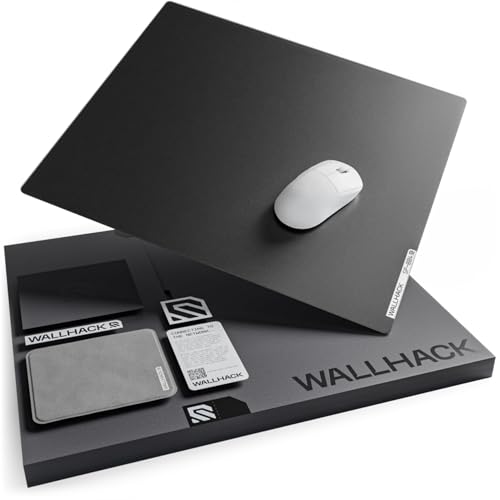
Wallhack’s SP-004 is the full glass commitment: a tempered glass surface with a specialty micro-etched finish, in an XL size of 430 x 490 mm that gives low-sensitivity players room for entire arm sweeps without lifting off the edge. The listing specifies a full silicone base, which is what a heavy glass sheet needs to stay silent and stationary on the desk. Glass glides faster and more consistently than plastic, never absorbs moisture, and wipes completely clean — and this is the largest glass option in the guide, in black, for players who want that feel across their whole mousing area.
Specs
- Tempered glass surface
- Specialty micro-etched finish as listed
- Full silicone base
- XL size: 430 x 490 mm (16.92 x 19.29 in)
Best for: Low-sensitivity players who want glass glide across the biggest possible area.
Watch out for: It is a rigid glass sheet at XL size — measure your desk carefully, and remember glass is unforgiving of being dropped or struck on an edge.
Pulsar Superglide Glass Gaming Mouse Pad v2
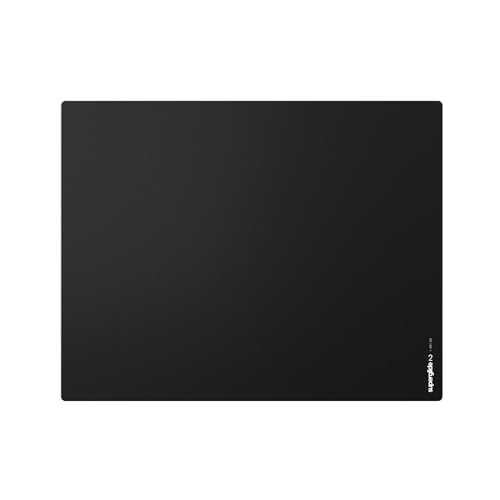
The Superglide v2 brings glass down to a standard large footprint: 16.5 x 13 inches of alumino-silicate glass, the strengthened glass type Pulsar lists for this surface. Underneath sits an anti-slip, fully moulded high-density silicone rubber base, which keeps the pad seated and softens the contact with the desk. Compared with the Wallhack, you trade some area for a pad that fits ordinary desks more easily while keeping the defining glass traits — very fast glide, a surface that does not soak up sweat or humidity, and a finish that wipes clean in seconds.
Specs
- Alumino-silicate glass surface
- Anti-slip fully moulded high-density silicone rubber base
- 16.5 x 13 in (L size)
Best for: Players who want true glass speed in a footprint that fits a normal desk.
Watch out for: This listing is the L size in black — other colours and an XXL version are separate listings, so check the size and colour on the page before ordering.
Which One Fits Your Situation
You Are Leaving Cloth for the First Time
Take the Logitech G440. Its listed moderate surface friction keeps one foot in the cloth world while you learn to brake with your hand instead of the pad, and its familiar 340 x 280 mm size means nothing else on your desk has to move. Give it two weeks of play before judging hard pads as a category — most early frustration is adaptation, not the surface. If it still feels too slow after that, the Acari is the natural next step rather than a leap straight to glass.
You Play Fast, Low-Sensitivity FPS
Your shortlist is the two glass pads. Pick the Wallhack SP-004 if your desk can take its 430 x 490 mm sheet and your aim style uses long arm sweeps; pick the Pulsar Superglide v2 if space is tighter but you still want alumino-silicate glass under the mouse. Both listings describe non-absorbent glass with full silicone bases, so sweat and humidity will not change the glide mid-session the way they slowly change a cloth pad’s feel.
Your Desk Is a Lighting Build as Much as a Battlestation
The Razer Firefly V2 Pro is the only hard pad here that treats lighting as the main event, with a fully illuminated surface and 15-zone Chroma control rather than a glowing rim. Its hard micro-textured surface keeps the glide honest, and the USB passthrough earns its keep by hosting your mouse receiver at the edge of the pad. Just remember it needs its USB Type C cable connected to light up, so it suits a settled desk, not a setup that gets packed away.
Your Room Gets Hot and Your Cloth Pad Feels Grim by Summer
A hard or glass surface solves the hygiene problem that cloth never can. The Acari’s beaded hard surface and both glass pads wipe clean with a cloth, absorb nothing, and feel the same in a humid room as in a dry one. The Acari is the pick if you also want the thinnest profile at 1.95 mm; the glass pads are the pick if you want the surface to stay cool to the touch and completely consistent across a long, warm session.
Common Mistakes
- Jumping straight from cloth to glass and blaming the pad for a week of overshot aim — adaptation is normal, and starting with a moderate-friction plastic pad is a valid route.
- Ordering an XL glass pad without measuring: the Wallhack SP-004 needs 430 x 490 mm of clear desk, and hard pads cannot be folded or trimmed to fit.
- Ignoring mouse feet wear — hard and glass surfaces consume PTFE feet faster than cloth, and worn feet change the glide you bought the pad for.
- Letting dust and grit sit on a glass surface, where it scratches and disrupts tracking; a quick wipe before sessions keeps the glide consistent.
- Assuming every RGB pad is cloth — the Firefly V2 Pro is a hard surface, and buyers expecting a soft mat will be surprised.
Frequently Asked Questions
Are hard mouse pads faster than cloth pads?
Yes, as a category. Hard plastic and glass surfaces present far less friction than woven cloth, so the mouse starts moving more easily and keeps gliding longer. The listings reflect the range: the G440 states moderate surface friction, the Acari states ultra-low friction, and the glass pads sit at the fast extreme. The trade is control — on a hard pad, your hand supplies the stopping power that cloth friction used to provide for free.
Will a glass pad damage my mouse or its feet?
The pad will not damage the mouse body, but glass and hard surfaces do wear PTFE mouse feet faster than cloth does. That is maintenance rather than damage: feet are consumables, and replacing them restores the original glide. Keeping the surface wiped clean also matters, because grit trapped between foot and glass accelerates wear and can scratch the finish the glide depends on.
Do optical sensors track properly on glass?
Modern optical sensors generally track well on the micro-etched and micro-textured finishes these listings describe, because the surface texture gives the sensor detail to read. Problems usually come from a dirty or polished-smooth area rather than the material itself. If tracking ever feels inconsistent on glass, clean the pad first and check the mouse feet for wear before blaming the sensor.
How long does it take to adjust to a hard pad?
Most players need one to two weeks of regular play. The first days feel slippery because your hand has outsourced braking to cloth friction for years; small corrections overshoot until new habits form. Many players lower their sensitivity slightly during the switch. Starting with a moderate-friction pad like the G440 shortens the adjustment compared with going directly to glass.
Related guides
More from Amazon
Programs that pair well with the guide above. Offers and eligibility are set by Amazon and may change.
Free shipping on eligible items, Prime Video and more. Eligible new members can start with a free trial.
Start a Prime free trialAd-free music streaming. Eligible new subscribers can start with a free trial.
Try Music Unlimited freeA Prime membership for ages 18-24 with a trial period. Eligibility is set by Amazon.
See Prime for Young AdultsAudiobooks and podcasts to listen to on the go. Eligible new members can start with a free trial.
Try Audible freeAs an Amazon Associate we earn from qualifying purchases.









