
Buying a compact gaming keyboard and mouse set is really a decision about desk space and mouse room, not about shrinking for its own sake. Dropping the number pad and navigation cluster hands that width back to your aiming hand, which changes how a shooter feels far more than any lighting effect does. The catch is that every set below gives something up to get small, and what it gives up differs, so the layout has to match the games and typing you actually do.
This guide is for players on narrow desks, anyone building a portable setup that travels between rooms or events, and buyers replacing a full-size board who still want a matched mouse in the same box. Every pick is a keyboard and mouse combo set whose Amazon listing states both items are included and states a compact, mini, or 60% or 65% format, and each product was chosen from the name and specifications on its Amazon listing.
Top 3 picks at a glance


Quick Picks
As an Amazon Associate we earn from qualifying purchases
| Product | Best for | Key spec from title |
|---|---|---|
| RedThunder 60% Gaming Keyboard and Mouse Combo (Wired) | Wired play on a tight desk | Ultra-Compact 61 Keys RGB Backlit Mini Keyboard |
| RedThunder 60% Wireless Gaming Keyboard & Mouse Combo | One receiver and no cables | Ultra-Compact Small RGB Mechanical Feel Keyboard |
| CHONCHOW 60% Gaming Keyboard and Mouse Combo | A small wired set for PC and console | 68 Keys Wired LED RGB Backlit |
| Snpurdiri 60% Wireless Gaming Keyboard and Mouse Combo | Wireless play away from the desk | Rechargeable 2000mAh Battery |
| GEODMAER 65% Gaming Keyboard and Mouse Combo | Keeping separate arrow keys | 65% Gaming Keyboard and Mouse Combo, 7200 DPI Gaming Mouse |
How to Choose
Decide which keys you can live without
A 60% board keeps the letter block, number row, and modifiers, then folds the function row, arrows, and navigation keys into Fn layers. A 65% board adds a small arrow cluster back, usually by shortening the right Shift key. Think about your daily habits before choosing: spreadsheet work leans on a number pad that none of these sets include, strategy games often lean on function keys, and platformers feel awkward when arrows hide behind a layer. The GEODMAER set below keeps separate arrows, while the 61-key RedThunder boards expect you to learn combinations for almost everything beyond typing.
Pick wired or wireless as a pair, not separately
In a combo set, both devices share one connection decision. Wired sets plug each device in separately and never need charging, which suits a fixed desk where cables can be routed once and forgotten. Wireless sets here run both halves through a single 2.4GHz receiver, so one USB port covers the pair and the receiver usually stores inside the mouse or keyboard for travel. Check what your machine offers before ordering: a laptop with only USB-C ports needs an adapter for a USB-A receiver, and a console player should confirm the listing names their console rather than assuming support.
Read the mouse half as carefully as the keyboard
Combo listings headline the keyboard, yet the mouse decides how aiming feels. Look for the stated maximum DPI and the steps it switches between, because a mouse that jumps from very low to very high settings gives you little usable middle ground. Shell shape and weight matter just as much: the honeycomb mice in the RedThunder sets are listed at around 65 grams, which suits quick flicks, while a solid shell may feel steadier for slower, deliberate movement. Also confirm the mouse is a full gaming shape rather than a small travel mouse if you play for long sessions.
Check what compact does to typing and shortcuts
Shrinking a keyboard moves work onto your memory. On a 61-key layout, Print Screen, Delete, and the function row all become two-key combinations, and some sets remap WASD into arrow keys with a toggle you can trigger by accident mid-game. Read the listing for how arrows are handled: the Snpurdiri set below switches WASD into direction keys with Fn plus W, which is fine for menus and frustrating if you forget to switch back. If you write code or edit text daily, a 65% layout with real arrows will usually frustrate you less than a strict 60% board.
The 5 Best Options
RedThunder 60% Gaming Keyboard and Mouse Combo (Wired)
This wired RedThunder set is the clearest expression of the compact idea in the group: a 61-key keyboard and a honeycomb mouse, both included, with nothing on the board beyond the typing block. It suits a fixed, narrow desk where cables can stay plugged in permanently and where your priority is the widest possible mouse area for low-sensitivity aiming. The listing describes the keyboard as water-resistant and the mouse as a lightweight perforated design, so it reads as a practical everyday set rather than a showpiece, and console support is stated for PC, Mac, PS5, and Xbox players.
Specs
- Includes: one 60% wired keyboard and one honeycomb optical mouse
- Keyboard format: 60%, ultra-compact 61 keys, RGB backlit mini keyboard
- Mouse: lightweight honeycomb optical mouse, up to 7200 DPI
- Connection: wired RGB gaming set
- Compatibility as listed: PC, Mac, PS5, Xbox
Best for: A permanent small desk where you want wired reliability and maximum mouse room.
Watch out for: There are no dedicated arrow or function keys, so shortcuts and navigation rely on Fn combinations.
ASIN: B09N8YCFDV
RedThunder 60% Wireless Gaming Keyboard & Mouse Combo
RedThunder also sells the K62 layout as a wireless set, and this version changes the daily routine completely: keyboard and mouse share one USB receiver that lives in the bottom of the mouse, and both devices recharge instead of plugging in. Choose it when the same set moves between a desk and a bag, or when cable drag across a small surface annoys you more than charging does. The listing states the keyboard has a mechanical feel rather than mechanical switches, and it gives the mouse as a lightweight honeycomb design, so expect a tidy, portable set built around convenience.
Specs
- Includes: one 60% wireless keyboard and one wireless honeycomb mouse
- Keyboard format: 60%, ultra-compact small keyboard, RGB mechanical feel
- Connection: 2.4GHz wireless, keyboard and mouse share one USB receiver stored in the mouse
- Batteries as listed: 1850mAh keyboard battery and 500mAh mouse battery
- Mouse: honeycomb optical mouse, up to 3600 DPI
Best for: A tidy or portable setup where one receiver and no trailing cables matter most.
Watch out for: The listing title and body give different battery figures, so check the capacity on the product page before ordering.
ASIN: B0CHRBQBLP
CHONCHOW 60% Gaming Keyboard and Mouse Combo
CHONCHOW takes a slightly different route to compact: its keyboard carries 68 keys in a 60% design, so the board stays small at the dimensions listed below while packing in more keys than a 61-key layout. That makes it a sensible wired option for someone who splits time between gaming and ordinary typing and wants a set that also works beyond the PC, since the listing names laptops, consoles, and Mac alongside desktop machines. The mouse is a wired RGB model with three stated DPI levels, which keeps sensitivity changes simple rather than offering a long ladder of settings you will never use.
Specs
- Includes: one 60% gaming keyboard and one RGB backlit mouse
- Keyboard format: 60% design, 68 keys, wired LED RGB backlit
- Keyboard size as listed: 12.2 x 3.94 x 1.38 inches
- Mouse: wired RGB mouse, DPI switchable between 1800, 2400, and 3600
- Mouse size as listed: 4.92 x 2.36 x 1.57 inches
- Compatibility as listed: PC, laptop, PS3, PS4, PS5, Xbox, and Mac
Best for: Mixed gaming and typing on a small desk, including console use from the same set.
Watch out for: The set is wired only, and the 68-key layout still leaves out a dedicated number pad.
ASIN: B0DDT2VLFG
Snpurdiri 60% Wireless Gaming Keyboard and Mouse Combo
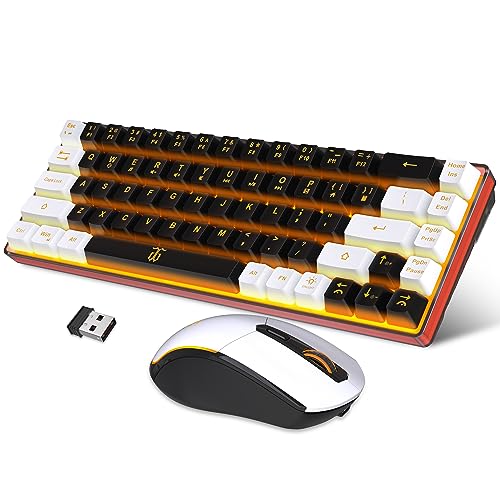
The Snpurdiri set is built around distance and endurance rather than a stripped-back wired desk. Its listing describes a mini mechanical feel keyboard with anti-ghosting, a 2000mAh rechargeable keyboard battery, and a 2.4GHz wireless link with a stated range of up to 10 meters, which opens up couch and media-PC arrangements that a cable cannot reach. The matching mouse carries its own smaller rechargeable battery, so the pair can live away from the computer and come back only for charging. Pick this one when the keyboard needs to work across a room, not just across a desk.
Specs
- Includes: one 60% wireless keyboard and one wireless mouse
- Keyboard format: 60%, mini mechanical feel anti-ghosting keyboard
- Connection: 2.4GHz wireless, stated range up to 10 meters
- Batteries as listed: 2000mAh keyboard battery and 500mAh mouse battery
- Backlighting as listed: backlit keyboard with RGB mouse
Best for: Couch, media-PC, or shared-room play where the set sits well away from the computer.
Watch out for: The keyboard is a mechanical feel membrane design, not a true mechanical board, despite the wording in the name.
ASIN: B0CC58MF5X
GEODMAER 65% Gaming Keyboard and Mouse Combo

GEODMAER is the pick for buyers who want compact without surrendering their arrow keys. Its 65% keyboard keeps 68 keys with a separate arrow cluster and no number pad, so navigating documents and menus stays direct while the board still leaves generous space beside it. The wired mouse is the headline half here, listed up to 7200 DPI with a row of preset steps to move through, and both devices use long braided cables that suit a desk where everything stays in place. It is the least minimal set in this guide, and for many mixed-use desks that balance is exactly the point.
Specs
- Includes: one 65% gaming keyboard and one gaming mouse
- Keyboard format: 65%, ultra-compact, 68 keys, separate arrow keys, no numpad
- Keyboard backlighting: RGB backlit with two-color keycaps
- Mouse: up to 7200 DPI, preset settings of 400, 800, 1200, 1600, 2400, and 3200
- Connection: wired, both devices on 1.8 m braided cables as listed
Best for: A mixed gaming and work desk where real arrow keys matter more than the smallest possible board.
Watch out for: Both devices are wired, so this set does not suit a couch or frequently packed travel setup.
ASIN: B0FBWP81MW
Which One Fits Your Situation
Your desk is narrow and the setup never moves
Choose the wired RedThunder 60% set. With cables routed once, you never think about charging, and the 61-key board returns the most width to your mouse hand. The CHONCHOW set is the alternative if 61 keys feels too stripped back, since its 68-key board keeps the same small footprint idea with more keys on it.
You carry your setup between home, school, or events
Take the RedThunder 60% Wireless set. One receiver runs both devices and stores inside the mouse, both halves recharge, and there are no cables to coil into a bag. Pack a short charging cable as well, because a wireless set with two flat batteries at an event leaves you with no fallback at all.
You play from a couch or a media PC across the room
The Snpurdiri set fits this distance best, with a stated wireless range of up to 10 meters and a large rechargeable keyboard battery for long gaps between charges. Keep the receiver on a short extension lead in line of sight of your seat if your PC sits inside a cabinet, since furniture weakens any wireless link.
You type and edit as much as you play
Start with the GEODMAER 65% set, because its separate arrow keys remove the most common daily frustration of compact boards. If you regularly enter numbers, none of these sets solves that, so plan on a separate number pad later rather than abandoning the compact layout that gives your mouse hand its extra room.
Common Mistakes
- Assuming compact means tenkeyless, then discovering a 60% board also removes the function row, arrows, and navigation keys you use daily.
- Buying a wireless combo for a USB-C-only laptop without checking the receiver type or keeping an adapter in the bag.
- Judging a combo by its keyboard alone and ending up with a small travel-style mouse that cramps your hand during long sessions.
- Forgetting that WASD-to-arrow toggles exist on some 60% sets, then losing movement keys mid-game after pressing the combination by accident.
- Expecting a number pad to appear through a layer and finding data entry slower than it was on the full-size board you replaced.
Frequently Asked Questions
Is a 60% keyboard big enough for everyday gaming?
For most games, yes, because movement, abilities, and chat all sit inside the main typing block that a 60% layout keeps. Problems appear in titles that lean on function keys or a number pad, and in everyday shortcuts that move onto Fn layers. Check your main games against the layout before ordering, especially older strategy and simulation titles.
Do these combo sets work on consoles as well as PC?
Some listings say so and some do not, which is why each product above states compatibility exactly as its listing gives it. The wired RedThunder and CHONCHOW sets name console support, while the wireless sets focus on computer use. Even where a console is named, individual games decide keyboard and mouse support for themselves, so confirm your specific title too.
Will one wireless receiver really run both the keyboard and mouse?
Yes, that is how the wireless sets here are listed: the RedThunder wireless combo shares a single USB receiver stored in the bottom of its mouse, and the Snpurdiri pair likewise runs from one receiver. The benefit is a free USB port and simpler packing. The trade-off is that losing that small receiver disables both devices at once.
What do I lose by choosing a 65% set instead of a 60% set?
Very little space and a slightly wider board. In return, a 65% layout such as the GEODMAER set keeps separate arrow keys, which removes the most frequent layer switching from daily use. You still lose the number pad and a dedicated function row, so the gain is about navigation comfort rather than a return to a full-size typing experience.
Related guides
More from Amazon
Programs that pair well with the guide above. Offers and eligibility are set by Amazon and may change.
Free shipping on eligible items, Prime Video and more. Eligible new members can start with a free trial.
Start a Prime free trialAd-free music streaming. Eligible new subscribers can start with a free trial.
Try Music Unlimited freeA Prime membership for ages 18-24 with a trial period. Eligibility is set by Amazon.
See Prime for Young AdultsAudiobooks and podcasts to listen to on the go. Eligible new members can start with a free trial.
Try Audible freeAs an Amazon Associate we earn from qualifying purchases.









