
Choosing a wired mouse for a small hand is really a decision about reach. On an oversized shell, your fingers stretch to the main clicks, the side buttons sit past your thumb, and every flick starts from a grip that never quite closes. A shorter, narrower body fixes that geometry, and because these picks are wired, the other half of the decision is the cable: how flexible it is, how much drag it adds, and whether it stays out of the way during fast swipes.
This guide is for small-handed players who use claw or fingertip grips, laptop gamers working on compact desks, and anyone replacing a full-size mouse that always felt like a stretch. Every pick below was chosen from its Amazon listing name and stated specifications, with dimensions quoted exactly as each listing gives them, so you can compare shell sizes before anything else.
Top 3 picks at a glance


Quick Picks
As an Amazon Associate we earn from qualifying purchases
| Product | Best for | Key spec from title |
|---|---|---|
| Razer Cobra | Fingertip players who want the lightest wired shell here | 8500 DPI Optical Sensor |
| Logitech G203 | Small hands that still want on-board memory and RGB | 8,000 DPI |
| Glorious Model O- (Minus) | Claw grippers who prefer a honeycomb body | Pixart 3360 Sensor |
| Corsair Katar Pro XT | Players wanting the shortest shell in this group | 18k DPI PixArt Optical Sensor |
How to Choose
Start with length, then width
Shell length decides whether your fingertips land on the clicks or strain toward them. For a small hand, look for listings that state a length under roughly 120 mm, or under 4.75 inches, and then check the width, because a short but wide body can still force your fingers apart. Each pick here prints its dimensions in the Specs list, so measure your current mouse first and compare like for like. If your present mouse feels long, a drop of even a few millimetres in length changes where the buttons fall under your fingers more than any sensor figure will.
Match the shape to your grip
Small hands rarely palm a gaming mouse comfortably, so the realistic choice is between claw and fingertip. A low, gently humped shell suits fingertip control, where only your fingers touch the mouse and movement comes from the wrist and fingers. Claw players arch their fingers and rest the base of the palm on the rear, so they need a hump that fills that small contact patch without pushing the hand back. Ambidextrous shells, like all four picks here, keep the sides even, which helps a smaller hand wrap the body without a sculpted right-hand curve dictating where the thumb must sit.
Judge the cable, not just the connection
Going wired removes batteries and charging from the routine entirely, but it replaces them with cable behaviour. A stiff rubber lead pulls against every swipe and can drag the mouse off line on a small desk. Flexible braided or paracord-style cables, such as the Speedflex cable Razer lists for the Cobra and the paracord cable Corsair lists for the Katar Pro XT, bend easily and resist that pull. Routing matters too: leave slack in front of the mouse, keep the cable off the pad’s edge, and the drag that remains becomes predictable rather than a constant tug.
Weight and buttons within a small hand’s reach
On a compact shell, extra grams are felt quickly because a smaller grip has less leverage. The lightest picks here list 58 g, while the Katar Pro XT further down lists 73 g, and a gap like that shows up during long sessions of small corrective movements. Button placement matters as much as the count. Six buttons is the pattern across this group, and on a shorter body the two side buttons sit closer to a small thumb instead of ahead of it. Check the listing’s stated button count, and favour a layout where the DPI button sits behind the scroll wheel rather than somewhere your fingertip has to hunt for.
The 4 Best Options
Razer Cobra

Razer’s wired Cobra is built around a 58 g shell that measures 4.71 x 2.46 x 1.5 inches as listed, which puts it at the compact end of Razer’s own wired range. That footprint suits a small hand using fingertip or relaxed claw control, because the main clicks stay close and the body does not push the palm backwards. The Speedflex cable is the other half of the appeal: Razer describes it as producing minimal drag, so quick swipes across a pad feel unforced, and the PTFE feet help the shell glide without catching during small aim corrections.
Specs
- Connection: Wired, Razer Speedflex Cable
- Sensor: 8500 DPI optical sensor, adjustable in 50 DPI increments
- Max speed / acceleration: 300 IPS / 35 G
- Switches: Razer Optical Mouse Switches Gen-3, rated up to 90 million clicks
- Buttons: 6 programmable buttons
- Weight: 58 g
- Dimensions: 4.71 x 2.46 x 1.5 inches
- Lighting: Chroma RGB with gradient underglow
- Mouse feet: PTFE
Best for: Small-handed fingertip players who want the joint-lightest pick in this guide with a flexible cable.
Watch out for: The 8500 DPI ceiling is lower than the other picks here, so check it covers the sensitivity range you actually play at.
ASIN: B0C51J2ZXN
Logitech G203
The G203 takes a different route to the same problem: a familiar, compact egg-like shape measuring 4.59 x 2.45 x 1.5 inches as listed, with a wired USB connection and nothing to charge, ever. For small hands that mostly play palm-leaning claw or a relaxed fingertip grip, that rounded profile fills the palm without the length of Logitech’s larger shells. Six programmable buttons and on-board memory mean your settings travel with the mouse between machines, and LIGHTSYNC RGB is there if your setup already leans on Logitech lighting. It is the most conventional design here, which is exactly its strength.
Specs
- Connection: Wired USB
- Sensor: 8,000 DPI
- Buttons: 6 programmable buttons
- Memory: On-board memory
- Lighting: LIGHTSYNC RGB
- Dimensions: 4.59 x 2.45 x 1.5 inches
- Model number: 910-005790
- Compatibility: PC and Mac, as listed
Best for: Small hands that want a proven compact shape with settings stored on the mouse itself.
Watch out for: The listing does not headline a flexible paracord-style cable, so expect a standard wired lead and plan your cable routing accordingly.
ASIN: B07YN82X3B
Glorious Model O- (Minus)
Glorious marks this one clearly in its own title: the Model O- is the Compact version of the Model O, with a honeycomb shell that brings the listed weight down to 58 g. The perforated body and ambidextrous outline suit a small hand that grips with the fingers only, because there is less shell to hold and the sides stay straight rather than sculpted. Its listing names a Pixart 3360 sensor and Omron switches, pairs them with a paracord-style lead in the product description, and rates the sensor up to 12,000 DPI, giving claw and fingertip players a wide sensitivity range inside a genuinely small frame.
Specs
- Connection: Wired USB
- Sensor: Pixart 3360 sensor, up to 12,000 DPI as listed
- Switches: Omron switches
- Buttons: 6 buttons
- Shape: Ambidextrous, honeycomb shell
- Weight: 58 g in the title; 59 grams in the item details
- Dimensions: 5.04 x 2.28 inches (L x W) as listed
- Lighting: RGB
Best for: Small-handed claw and fingertip players who want a honeycomb shell at the lightest weight here.
Watch out for: The open honeycomb shell lets dust reach the inside of the mouse, and the glossy finish on this version shows fingerprints and can feel slick with dry hands.
ASIN: B07VQTP4MK
Corsair Katar Pro XT
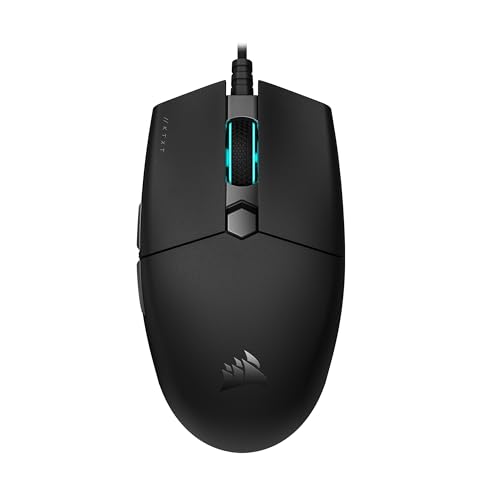
Corsair’s Katar Pro XT is the shortest shell in this group on paper, with listed dimensions of 115.8 x 64.2 x 37.8 mm, and its listing calls the shape compact and symmetric, aimed at claw and fingertip grips. At 73 g it carries a little more mass than the two 58 g picks, which some small-handed players prefer because the mouse feels planted during slow, deliberate tracking. The drag-reducing paracord cable, listed at 1.8 m, keeps that control from being spoiled by cable pull, and the QUICKSTRIKE buttons are built with no gap between button and switch, which suits rapid clicking in close fights.
Specs
- Connection: Wired USB 2.0 Type-A
- Sensor: 18,000 DPI PixArt optical sensor, adjustable in 1 DPI steps
- Buttons: 6 programmable buttons
- Switches: Corsair QUICKSTRIKE buttons
- Weight: 73 g
- Dimensions: 115.8 x 64.2 x 37.8 mm
- Cable: 1.8 m drag-reducing paracord cable
- Lighting: RGB scroll wheel lighting
Best for: Small hands using claw or fingertip grips that want the shortest listed shell and very fine DPI adjustment.
Watch out for: Full use of its settings runs through Corsair’s iCUE software, so check you are comfortable installing it before choosing this one.
ASIN: B08SHCKVTG
Which One Fits Your Situation
You play fingertip grip on a small desk
Pick the Razer Cobra. A fingertip grip moves the mouse with your fingers alone, so the 58 g weight and flexible Speedflex cable keep each nudge light, and the 4.71-inch listed length leaves room on a cramped desk for the cable to arc without pushing against a monitor stand or keyboard tray edge.
You switch between a PC and a laptop
Choose the Logitech G203. Its on-board memory carries your button and sensitivity settings between machines, so the same small shell behaves identically at your desk and on the laptop. The wired connection also means there is no receiver to lose and no battery to check before a session away from home.
You want the airiest shell for fast shooters
Go with the Glorious Model O-. The honeycomb body and 58 g listed weight make direction changes feel immediate, and the ambidextrous shape lets a small hand steer from the fingers without fighting a sculpted curve. Just keep a can of air nearby, because the open shell collects dust faster than a sealed one.
You play claw grip and click rapidly
Take the Corsair Katar Pro XT. Its listed 115.8 mm length is the shortest here, so a claw grip’s arched fingers land naturally on the main buttons, and the QUICKSTRIKE buttons are built to remove the gap before each click registers. The 73 g weight adds a touch of stability when you stop a swipe suddenly.
Common Mistakes
- Buying by sensor figures alone and ignoring the listed shell length, which is what actually decides whether a small hand reaches the clicks comfortably.
- Assuming every mouse labelled lightweight is also small; a light full-size shell still stretches a short hand, so compare dimensions, not just grams.
- Letting the cable rest across the mouse pad or hang off the desk edge, which adds drag that gets blamed on the mouse itself.
- Choosing a palm-grip shape for a small hand, then gripping harder to control it, instead of moving to a claw or fingertip grip on a shorter shell.
- Forgetting to check side button placement; on a compact mouse used by a small thumb, buttons set too far forward may as well not exist.
Frequently Asked Questions
How do I know a wired mouse is small enough for my hand?
Measure your current mouse and compare its length with the dimensions each listing states. The picks here run from 115.8 mm to about 4.71 inches in listed length. If your fingers barely reach the front of your present mouse’s clicks, a shorter shell from this range should put the buttons back under your fingertips.
Does a cable cause more drag than a wireless mouse for small hands?
A cable adds some resistance, but the flexible cables listed on picks like the Cobra and Katar Pro XT are designed to minimise it, and routing the cable with slack in front of the mouse removes most of the rest. In exchange, you never pause to charge, and the connection never depends on a receiver or battery level.
Which grip suits a small hand on these mice?
Claw and fingertip grips suit these compact shells best, because both keep control in the fingers rather than asking a small palm to cover the whole body. Fingertip gives the quickest direction changes on the lightest picks, while claw adds a little palm contact at the rear for stability during slower, tracked movements.
Can I use one of these mice without installing software?
Yes, every pick here works as a wired USB mouse as soon as it is plugged in, with its default sensitivity and buttons active. Software from Razer, Logitech, Glorious or Corsair is only needed when you want to remap buttons, store custom profiles or adjust lighting beyond the defaults the mouse ships with.
Related guides
More from Amazon
Programs that pair well with the guide above. Offers and eligibility are set by Amazon and may change.
Free shipping on eligible items, Prime Video and more. Eligible new members can start with a free trial.
Start a Prime free trialAd-free music streaming. Eligible new subscribers can start with a free trial.
Try Music Unlimited freeA Prime membership for ages 18-24 with a trial period. Eligibility is set by Amazon.
See Prime for Young AdultsAudiobooks and podcasts to listen to on the go. Eligible new members can start with a free trial.
Try Audible freeAs an Amazon Associate we earn from qualifying purchases.









