
Choosing an ergonomic gaming mouse with small hands is really a decision about reach, not about sensor headlines. On a full-size shell, your fingers stretch for the side buttons, the wheel sits too far forward, and the sculpted curves that are meant to support a larger palm end up pushing your hand into an awkward angle. A shorter, narrower ergonomic body lets your hand rest on the shape instead of chasing it.
This guide is for right-handed players with smaller hands who use palm or claw grips, whether they play shooters, action games or long strategy sessions. Every pick below was chosen from its Amazon listing name and stated specifications: each one pairs a right-handed ergonomic shape with compact dimensions, and the measurements are quoted so you can compare them against your current mouse before ordering.
Top 3 picks at a glance


Quick Picks
As an Amazon Associate we earn from qualifying purchases
| Product | Best for | Key spec from title |
|---|---|---|
| Logitech G705 Wireless Gaming Mouse | Palm-grip comfort with a thumb rest | 85 g lightweight design |
| Glorious Model D- (Minus) Wireless | Wireless palm and claw play in a smaller shell | 67 g superlight honeycomb design |
| Razer DeathAdder V2 Mini | A proven ergonomic shape shrunk for smaller hands | 62 g lightweight design |
| Cooler Master MM720 | Claw grip with a dedicated finger rest | 49 g lightweight honeycomb shell |
How to Choose
Start with length, then width
Length decides whether an ergonomic mouse fits a small hand more than any other number. A shell around 105 to 120 mm long lets shorter fingers reach the front of the main buttons without the palm sliding forward, while full-size ergonomic models often stretch well beyond that. Width matters next: a narrower grip area keeps your thumb and ring finger from splaying outward just to hold on. Compare the listed dimensions of each pick here with a ruler against the mouse you already own, because a few millimetres of length change how the whole shape feels.
Match the sculpting to your grip
Ergonomic shells are not interchangeable, because each one is carved around a particular grip. A palm-grip shape such as the G705 or the Model D- Wireless fills the hand and supports the thumb along a rest, which suits relaxed, longer sessions. A claw-oriented shell like the MM720 is shorter and wider, with a rest for the ring finger, and it rewards a more arched hand position. Fingertip players can use either style, but they should favour the lightest options here so constant micro-adjustments stay easy. Pick the carving that mirrors how your hand already sits.
Treat comfort claims as fit guidance, not treatment
Listings describe these shapes with words such as contoured, sculpted and comfort, and those terms are useful only as clues about how a mouse may feel in your hand. A smaller ergonomic body can reduce stretching and awkward angles, yet no mouse shape should be bought as a remedy for pain. If you have ongoing pain, numbness or a diagnosed condition, check with a clinician before relying on a new mouse to address it. Beyond that, sensible habits still matter: keep your wrist in a neutral position, take breaks, and adjust your desk height before blaming the mouse alone.
Decide how the mouse connects before you fall for the shape
Two picks here are wireless and two are wired, and that choice changes daily use more than most sensor differences. The G705 pairs LIGHTSPEED wireless with Bluetooth, which helps if you switch between a gaming PC and a laptop, while the Model D- Wireless uses a 2.4GHz connection and can be played while charging over its cable. The DeathAdder V2 Mini and MM720 stay wired, so there is nothing to charge and no battery weight in the shell. None of these connections makes a mouse more ergonomic, so settle the shape first and the cable question second.
The 4 Best Options
Logitech G705 Wireless Gaming Mouse

Logitech built the G705 specifically around smaller hands rather than shrinking a flagship and hoping for the best. Its listing describes a compact, sculpted body with a thumb rest, at 105.8 mm long and just 85 grams, so a palm or relaxed claw grip can settle onto the curves without the fingers overreaching for the wheel. Six programmable buttons sit within that shorter frame, and the combination of LIGHTSPEED wireless and Bluetooth makes it the easiest pick here for players who split time between a gaming rig and a second machine.
Specs
- Dimensions: 105.8 x 68.1 x 39.4 mm
- Weight: 85 g
- Shape: Compact, contoured design with thumb rest, made for smaller hands
- Sensor resolution: 100 to 8,200 DPI
- Buttons: 6 programmable buttons
- Connection: LIGHTSPEED wireless and Bluetooth
- Battery life: 40 hours with lighting, as listed
- Lighting: LIGHTSYNC RGB
Best for: Small-handed palm-grip players who want a thumb rest and dual wireless modes.
Watch out for: The 8,200 DPI ceiling is lower than the other picks, and the White Mist finish shows wear more visibly than dark shells.
ASIN: B08V1JWV82
Glorious Model D- (Minus) Wireless
The Model D- Wireless takes the right-handed ergonomic outline of the larger Model D and cuts it down, with the listing giving the Minus version at 4.7 inches long against 5 inches for the standard model. That shorter shell, shaped for palm and claw grips, weighs 67 grams thanks to its honeycomb construction, so small hands get a filled, supportive back without a heavy body to push around. Its BAMF sensor and lag-free 2.4GHz link suit competitive play, and the battery figure gives wireless users one less thing to manage between sessions.
Specs
- Dimensions: 4.7 x 2.6 x 1.6 inches (Minus version, as listed)
- Weight: 67 g
- Shape: Ergonomic right-handed shell with honeycomb design
- Sensor: Glorious BAMF sensor, up to 19,000 DPI
- Tracking speed: 400 IPS
- Polling rate: Up to 1,000 Hz
- Connection: 2.4GHz wireless, with play while charging over USB-C cable
- Battery life: Up to 71 hours, as listed
Best for: Competitive players with small hands who want a wireless ergonomic shell under 70 grams.
Watch out for: The honeycomb shell lets dust reach the inside, so it needs occasional cleaning, and the shape is right-handed only.
ASIN: B09R5Z5LZM
Razer DeathAdder V2 Mini
Razer describes this mouse plainly: it takes the well-known DeathAdder ergonomic form and makes it smaller to fit smaller hands and most grip styles. At 4.5 inches long and 62 grams, it keeps the flared, right-handed curves of the full-size version while bringing the side buttons and wheel back within comfortable reach of shorter fingers. The listing includes anti-slip grip tape in the box, which helps if the smooth shell feels loose in a claw grip. Because it is wired, there is no battery to charge before a session and nothing extra adding weight.
Specs
- Dimensions: 4.5 x 2.57 x 1.52 inches
- Weight: 62 g
- Shape: Right-handed ergonomic form factor, made smaller for smaller hands
- Sensor: Optical sensor, 8,500 DPI
- Buttons: 6 programmable buttons
- Connection: Wired, Speedflex cable
- Lighting: Razer Chroma RGB
- Included extra: Anti-slip grip tape
Best for: Players who like the DeathAdder shape but find the standard version stretches their fingers.
Watch out for: The 8,500 DPI sensor is a step below newer flagship sensors, and the wired cable needs desk space to move freely.
ASIN: B08B3K9K6P
Cooler Master MM720
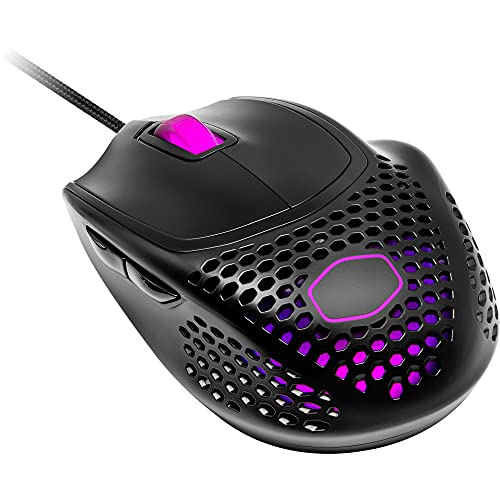
The MM720 approaches small hands from the claw-grip side. Its listing highlights a classic right-handed ergonomic shape with a rest for the ring finger, packed into a body only 105.42 mm long, and the honeycomb shell brings the weight down to 49 grams, the lightest figure in this guide. That short, wide outline gives claw players a stable hold without forcing the palm onto a long rear hump. Optical switches rated for 70 million clicks and an IP58 rating add durability that most ultralight shells do not claim, which matters in a mouse built around holes.
Specs
- Dimensions: 105.42 x 76.52 x 37.35 mm
- Weight: 49 g
- Shape: Ergonomic right-handed claw-grip shape with finger rest
- Sensor: PixArt PMW3389 optical sensor, up to 16,000 DPI
- Switches: Optical switches rated for 70 million clicks
- Connection: Wired, Ultraweave cable
- Protection: IP58 dust and water resistance, as listed
- Feet: PTFE mouse feet
Best for: Claw-grip players with small hands who want the lightest ergonomic option here.
Watch out for: The wide body and ring-finger rest feel unusual if you prefer a narrow palm-grip shell, and the design is right-handed only.
ASIN: B08K2NMXTZ
Which One Fits Your Situation
You rest your whole palm on the mouse
Choose the Logitech G705. Its sculpted back, thumb rest and 105.8 mm length are arranged for a hand that stays planted rather than hovering, and the listing frames the shape around comfort during longer play. The Glorious Model D- Wireless is the alternative if you also want a lighter shell, since its ergonomic outline supports a palm grip at 67 grams.
You play fast shooters and lift the mouse often
Take the Glorious Model D- Wireless or the Cooler Master MM720. Both keep the weight low enough that repeated lifting and resetting does not turn into a workout for a smaller hand. The Model D- Wireless adds wireless freedom for wide, fast swipes, while the MM720 counters with the lowest weight here and a claw shape that locks the hand in place during quick corrections.
You share one desk between gaming and work machines
The G705 fits this routine best because its listing includes both LIGHTSPEED wireless for the gaming PC and Bluetooth for a second computer, so one small mouse can cover both without swapping cables. Its compact footprint also leaves more desk room when the same surface doubles as a workspace, and the shorter shell stays comfortable across long, mixed-use days.
You want the familiar DeathAdder feel in a smaller body
Go with the Razer DeathAdder V2 Mini. It keeps the recognisable ergonomic curves that many players already know, simply scaled down so smaller hands reach the buttons the way the shape intends. The included grip tape helps tailor the hold, and the wired connection keeps the setup simple if your desk arrangement rarely changes.
Common Mistakes
- Buying a full-size ergonomic mouse because the shape looks supportive, then discovering your fingers cannot reach the wheel or side buttons without shifting your grip.
- Judging size by weight alone, when length and width are the numbers that actually decide whether a small hand fits the shell.
- Assuming a mouse described as ergonomic will fix hand or wrist pain, instead of treating shape as one part of desk setup and posture.
- Ignoring grip style and ordering a wide claw-grip shell for relaxed palm play, or a tall palm shell for a fingertip grip.
- Overlooking the connection type and ending up with a wired mouse on a desk where the cable constantly catches, or a wireless one you forget to charge.
Frequently Asked Questions
How do I know if a gaming mouse is small enough for my hand?
Compare the listed length with your current mouse first. Shells around 105 to 120 mm long generally suit smaller hands better than full-size ergonomic models, because the wheel and side buttons sit closer to your fingers. Width and height matter too, so check all three dimensions rather than relying on words such as mini or compact in a product name.
Is a vertical mouse better for small hands than these ergonomic models?
Vertical mice turn the hand into a handshake position, which some people prefer, but most gaming-focused vertical models are built in medium or large sizes that can overwhelm a small hand. The four mice here keep a conventional gaming shape in genuinely compact dimensions, with gaming sensors and button layouts, so they are the safer starting point for smaller-handed players.
Can left-handed players use any of these ergonomic mice?
No. All four picks use right-handed ergonomic shells with thumb buttons placed for a right thumb, so they do not transfer comfortably to the left hand. Left-handed players with small hands should look at ambidextrous models with buttons on both sides instead, and check the listed dimensions just as carefully before ordering one of those.
Does a lighter mouse always feel more comfortable for small hands?
Not always. A lighter shell reduces the effort of lifting and stopping the mouse, which helps during fast play, but shape still decides where your fingers rest. A 49-gram claw mouse can feel wrong to a palm-grip player, while a slightly heavier contoured model can feel easier across a long session. Match the shape first, then compare weights.
Related guides
More from Amazon
Programs that pair well with the guide above. Offers and eligibility are set by Amazon and may change.
Free shipping on eligible items, Prime Video and more. Eligible new members can start with a free trial.
Start a Prime free trialAd-free music streaming. Eligible new subscribers can start with a free trial.
Try Music Unlimited freeA Prime membership for ages 18-24 with a trial period. Eligibility is set by Amazon.
See Prime for Young AdultsAudiobooks and podcasts to listen to on the go. Eligible new members can start with a free trial.
Try Audible freeAs an Amazon Associate we earn from qualifying purchases.









