As an Amazon Associate, we earn from qualifying purchases made through links on this page.
Apartment Wi-Fi fails in predictable ways. The floor plan is small, so raw coverage is rarely the problem. The real enemies are the neighbours: dozens of networks stacked on top of yours in the same building, concrete or brick walls between the entry point and your desk, and a router that has to live wherever the cable or fibre jack happens to be, which is usually a corner behind the TV. Add a gaming PC, a work laptop, a console and a shelf of smart bulbs all sharing one connection, and a weak ISP-supplied router starts to show its limits fast.
The five routers below are chosen for that environment. Every pick is compact enough for a shelf or media console, every one runs Wi-Fi 6 or newer for crowded airspace, and each one solves a slightly different apartment problem: a dependable all-round upgrade, a Wi-Fi 7 step up with multi-gig ports, a two-node mesh for awkward layouts, an app-driven system that disappears into the room, and a pocket router for renters who move often or share building internet. All five are sold on Amazon US, and each section links to the exact listing so you can confirm the current model and configuration before ordering.
Top 3 picks at a glance


What to look for in an apartment router
Wi-Fi 6 or Wi-Fi 7, not raw speed class. In a dense building, the win from Wi-Fi 6 is OFDMA and better handling of many small devices at once, not headline speed. Wi-Fi 7 adds Multi-Link Operation, which lets a compatible device use two bands simultaneously. Either generation copes with neighbouring networks far better than an old Wi-Fi 5 box, so buy the generation first and the speed grade second.
Coverage matched to the floor plan, not the marketing number. Most apartments sit between 500 and 1,200 square feet, which a single well-placed router handles comfortably. Coverage figures on the box assume open-plan space; brick, concrete and plaster-and-lath walls cut real range sharply. If your unit is long and narrow, or the internet jack is at one extreme end, a small two-node mesh is the more reliable answer than one stronger router shouting from a corner.
Band steering and a clean 5 GHz picture. The 2.4 GHz band in an apartment block is a traffic jam of neighbours, Bluetooth gear and microwaves. A good apartment router steers capable devices onto 5 GHz automatically, supports wide 160 MHz channels where the standard allows, and makes it easy to split bands manually if a smart plug refuses to join a combined network.
Enough wired ports for the desk. Gaming PCs and consoles still behave best on Ethernet. Count the LAN ports before you buy: some compact and mesh units ship with only one or two spare ports, which disappears quickly once a PC, a console and a network drive are plugged in. A small unmanaged switch fixes this later, but it is better to know upfront.
Size, heat and placement. Apartment routers live on open shelves, inside TV stands or on top of bookcases. Compact flat or cylindrical designs with passive cooling fit those spots better than tall gaming towers with aggressive styling. Whatever you pick, give it open air on at least two sides; a router baked inside a closed cabinet loses range and stability.
Software that matches your patience. App-only systems are quick to set up and manage themselves, but they hide advanced settings and sometimes put security extras behind a subscription. Traditional routers with a full web interface give you port forwarding, custom DNS, VPN and detailed QoS controls at no ongoing cost. Neither approach is wrong; pick the one you will actually enjoy living with.
1. TP-Link Archer AX21 — the dependable all-round upgrade

See the TP-Link Archer AX21 on Amazon
The Archer AX21 is the straightforward replacement for an ISP router, and it suits the majority of apartments. It is a dual-band Wi-Fi 6 router rated AX1800, split as 1,201 Mbps on 5 GHz and 574 Mbps on 2.4 GHz, with four external antennas and a low, flat case that sits unobtrusively on a shelf. OFDMA and MU-MIMO keep latency steadier when a household’s worth of phones, laptops and smart devices are active at the same time, which is the normal state of an apartment network.
Around the back there are four gigabit LAN ports plus a gigabit WAN port, so a gaming PC, a console and a streaming box can all run wired without a switch. Setup runs through the TP-Link Tether app or a browser, WPA3 is supported, and the router works with Alexa for basic voice control. It also supports TP-Link’s mesh expansion, so if you later move to a bigger place you can add a compatible extender or satellite instead of replacing the router outright.
Who it is for: renters and owners in small to mid-size apartments who want one solid router, plenty of wired ports for a gaming setup, and no subscription attached to core features.
Limitations: AX1800 is an entry speed grade, so a top-tier gigabit plan shared by several heavy users will saturate it sooner than the faster picks below. There is no 2.5 Gbps port for multi-gig internet tiers, and the more advanced HomeShield security features require a paid tier, although the standard parental controls and QoS are included.
2. TP-Link Archer BE230 — Wi-Fi 7 with multi-gig ports
See the TP-Link Archer BE230 on Amazon
The Archer BE230 is the future-proofing pick: a dual-band Wi-Fi 7 router rated BE3600, with 2,882 Mbps on 5 GHz and 688 Mbps on 2.4 GHz. Wi-Fi 7’s Multi-Link Operation lets supported phones, laptops and handhelds hold both bands at once, which pays off in apartment buildings where a single band can get congested at peak evening hours. A 2.0 GHz quad-core processor keeps the network responsive under load.
Its port layout is the strongest in this roundup for a compact router: one 2.5 Gbps WAN port, one 2.5 Gbps LAN port and three gigabit LAN ports, plus a USB 3.0 port for sharing storage across the network. That makes it a natural fit if your building offers a faster-than-gigabit fibre tier, or if your gaming PC has a 2.5 GbE motherboard port waiting to be used. It is EasyMesh compatible, supports VPN client and server functions, and keeps the same four-antenna flat design language as the AX21, so it still fits a media console.
Who it is for: apartment gamers on fast fibre plans who want Wi-Fi 7 and wired multi-gig headroom in a normal-sized box, without moving up to a bulky flagship.
Limitations: it is dual-band only, with no 6 GHz band, so Wi-Fi 7 devices cannot use the cleanest spectrum; a tri-band Wi-Fi 7 router costs considerably more and is larger. You also need Wi-Fi 7 clients to benefit from Multi-Link Operation, and older devices simply see a fast Wi-Fi 6-style network.
3. TP-Link Deco X55 (2-pack) — mesh for awkward layouts
See the TP-Link Deco X55 2-Pack on Amazon
Some apartments defeat any single router: the L-shaped unit, the long corridor floor plan, the home office in a converted bedroom behind two brick walls. The Deco X55 two-pack answers that with two identical cylindrical nodes that form one network with one name, rated AX3000 and covering up to 4,500 square feet in open conditions. In a real apartment, you place one node at the modem and the second halfway towards the far rooms, and devices roam between them automatically.
Each node carries three gigabit Ethernet ports, which is generous for mesh hardware: the satellite can wire a gaming PC or console in the far room, and the two nodes can be linked by Ethernet backhaul if your unit has cabling, which removes the wireless hop entirely. The system handles up to 150 connected devices, is managed from the Deco app, and supports TP-Link HomeShield’s basic network protection. The plain white cylinders blend into a shelf far better than antenna-covered routers, which matters when the second node has to live in the middle of the living space.
Who it is for: larger or awkwardly shaped apartments, and anyone whose desk or gaming setup sits far from the internet entry point.
Limitations: management is app-centred, with a limited web interface, so tinkerers get fewer knobs than a traditional router offers. The two-pack is more hardware than a small studio needs, and because it is dual-band, the wireless backhaul shares the same 5 GHz band as your devices unless you wire the nodes together.
4. Amazon eero 6+ (1-pack) — set it up and forget it

See the Amazon eero 6+ on Amazon
A single eero 6+ is sized almost exactly for apartment life: one small white unit covers up to 1,500 square feet, supports internet plans up to a gigabit, and handles more than 75 connected devices. It is a dual-band Wi-Fi 6 system with 160 MHz channel support on 5 GHz, which helps compatible laptops and phones pull strong speeds in the same room and the next one over. Setup is entirely through the eero app and takes minutes, and the system updates itself in the background.
The eero 6+ doubles as a smart home hub with a built-in Zigbee radio and Thread border routing, so bulbs, locks and sensors can connect without extra hubs cluttering a small home. If you later move somewhere bigger, you add more eero units and the same network stretches to fit; the hardware is deliberately plain, silent and cool-running, designed to sit on a side table rather than a rack.
Who it is for: apartment residents who value a tidy, low-maintenance network over deep settings, especially anyone building a smart home in a small space.
Limitations: there are only two gigabit Ethernet ports on the unit, and one is consumed by the modem connection, leaving a single wired port without a switch. There is no web interface at all, and the advanced security and parental control features sit behind the optional eero Plus subscription, so budget-conscious power users should look at the TP-Link picks instead.
5. GL.iNet GL-AXT1800 (Slate AX) — the pocket router for renters on the move
See the GL.iNet Slate AX on Amazon
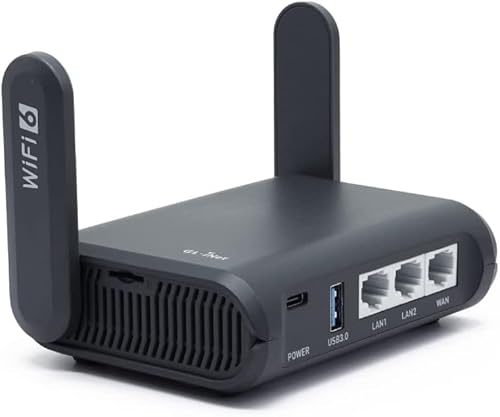
The Slate AX is the specialist of the group: a pocket-sized Wi-Fi 6 router, rated AX1800 with 1,200 Mbps on 5 GHz and 600 Mbps on 2.4 GHz, small enough to drop in a bag. For apartment living it solves renter-specific problems. It can run in repeater mode to build your own private, secured network on top of building-provided or shared Wi-Fi, and when you move apartments, your devices reconnect to the same network name and settings instead of being set up from scratch.
Despite the size, the hardware is complete: one gigabit WAN port, two gigabit LAN ports, a USB 3.0 port, a microSD slot for simple network storage, and USB-C power. It runs OpenWrt-based firmware with a proper web interface, supports WireGuard and OpenVPN as both client and server, and includes AdGuard Home for network-wide ad blocking. For a small studio or a single-room setup, its range is entirely adequate, and wired ports mean a gaming PC still gets a cable.
Who it is for: renters in studios and small units, people on shared or building-managed internet, and anyone who moves often or wants VPN and OpenWrt control in the smallest possible box.
Limitations: two small antennas cannot match the range of a full-size router through multiple masonry walls, so it is not the pick for a large multi-room apartment. The interface rewards users who enjoy configuring their network; if you want an app and nothing else, the eero above is the simpler path.
Comparison table
| Router | Wi-Fi standard | Speed class | Coverage / nodes | Ethernet ports | Standout trait |
|---|---|---|---|---|---|
| TP-Link Archer AX21 | Wi-Fi 6 | AX1800 | Single unit, small to mid apartments | 4 LAN + 1 WAN (gigabit) | Balanced all-rounder with full port count |
| TP-Link Archer BE230 | Wi-Fi 7 | BE3600 | Single unit, small to mid apartments | 2.5 Gbps WAN + 2.5 Gbps LAN + 3 gigabit LAN | Multi-Link Operation and multi-gig wired ports |
| TP-Link Deco X55 (2-pack) | Wi-Fi 6 | AX3000 | Up to 4,500 sq. ft., 2 nodes | 3 gigabit per node | Mesh coverage with Ethernet backhaul option |
| Amazon eero 6+ (1-pack) | Wi-Fi 6 | AX3000 class | Up to 1,500 sq. ft., 1 node | 2 gigabit | App simplicity plus Zigbee and Thread hub |
| GL.iNet Slate AX (GL-AXT1800) | Wi-Fi 6 | AX1800 | Single unit, studios and small units | 1 WAN + 2 LAN (gigabit) | Pocket size, OpenWrt, VPN and repeater mode |
FAQ
Is one router enough for an apartment, or do I need mesh?
For most studios and one or two-bedroom units, one router placed near the middle of the home is enough. Choose a two-node mesh if your apartment is long and narrow, has brick or concrete interior walls, or the internet jack is fixed at one end and your desk is at the other.
Wi-Fi 6 or Wi-Fi 7 for an apartment?
Wi-Fi 6 already fixes the main apartment problem, which is congestion from neighbouring networks and many connected devices. Wi-Fi 7 is worth it if you are on a faster-than-gigabit plan, own recent phones or laptops with Wi-Fi 7 radios, and plan to keep the router for several years.
Where should I place the router in a small apartment?
As central and as high as practical: on a shelf rather than the floor, out in the open rather than inside a closed cabinet, and away from the microwave and thick masonry where possible. Moving a router a few feet out of a corner often improves the far bedroom more than a hardware upgrade.
Can a travel router like the Slate AX really run an apartment network?
Yes, for a studio or small one-bedroom. It is a full router with gigabit ports, VPN support and its own private network, which is especially useful on building-managed internet. Its limits are range and antenna size, so multi-room homes with heavy walls are better served by the full-size or mesh picks.
What if my building provides internet and there is no modem?
A router with a repeater or WISP mode, such as the Slate AX, can join the building network wirelessly and rebroadcast it as your own private network with your own password and settings. A standard router works too if the building provides an Ethernet socket in your unit.
Conclusion
Apartment networking rewards the right shape of solution rather than the biggest specification sheet. For most people, the TP-Link Archer AX21 is the sensible default: Wi-Fi 6, four LAN ports and no ongoing costs. If your building offers fast fibre and your gear supports it, the Archer BE230 adds Wi-Fi 7 and 2.5 Gbps ports in the same footprint. Awkward floor plans belong to the Deco X55 two-pack, small smart homes to the eero 6+, and renters on shared internet or frequent movers to the pocket-sized Slate AX. Match the pick to your floor plan and your plan speed, place it well, and an apartment network stops being a daily irritation.
Related guides
More from Amazon
Programs that pair well with the guide above. Offers and eligibility are set by Amazon and may change.
Free shipping on eligible items, Prime Video and more. Eligible new members can start with a free trial.
Start a Prime free trialAd-free music streaming. Eligible new subscribers can start with a free trial.
Try Music Unlimited freeA Prime membership for ages 18-24 with a trial period. Eligibility is set by Amazon.
See Prime for Young AdultsAudiobooks and podcasts to listen to on the go. Eligible new members can start with a free trial.
Try Audible freeAs an Amazon Associate we earn from qualifying purchases.