Polling rate decides how often your mouse reports its position to the PC, and moving from the standard 1,000Hz to 4,000Hz or 8,000Hz shortens the gap between reports from one millisecond to a fraction of that. The real decision is not the headline number alone: it is whether the high rate works wired or only through a special receiver, how much battery it drains, and whether the shape still suits your grip at that speed.
This guide is for competitive FPS and MOBA players chasing smoother cursor motion, wireless users who want high polling without a cable, and anyone upgrading from a 1,000Hz mouse. The four picks below were chosen from their Amazon listings, where each one states a polling rate above 1,000Hz in its own product name or specification details.
Top 3 picks at a glance

Quick Picks
As an Amazon Associate we earn from qualifying purchases.
| Product | Best for | Key spec from title |
|---|---|---|
| Razer Viper 8KHz | Wired players who want true 8,000Hz with no receiver setup | 8000Hz HyperPolling |
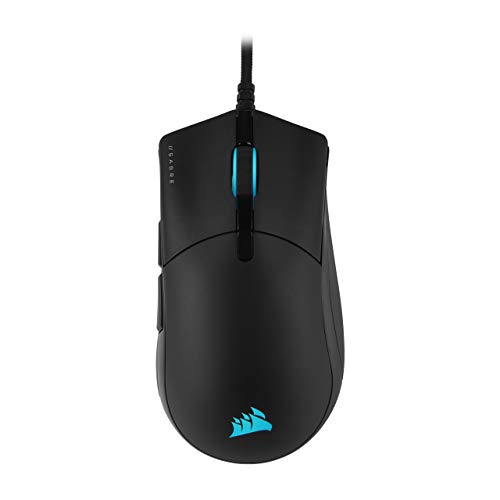
| Corsair Sabre RGB Pro Champion Series | Palm and claw grips on an ergonomic wired shape | 8,000Hz hyper-polling |
| Keychron M3 | Wireless play across PC and Mac with one mouse | 4000Hz Polling Rate |
| WLMouse Beast X Pro | Fingertip players who want the lightest 8K shell here | 8K Polling Rate |
How to Choose
Wired 8,000Hz Versus Wireless High Polling
A wired mouse delivers its top polling rate through the cable with nothing extra to configure beyond the setting itself, which makes wired 8,000Hz models the simplest route to the fastest reporting. Wireless models split: some include a high-rate receiver in the box, while others reach their headline figure only in one connection mode and fall back to 1,000Hz or lower in the rest. The Keychron M3, for example, states 4,000Hz polling alongside tri-mode connection, so check which mode carries the high rate before assuming every connection is equal. Match the connection style to your desk first, then compare rates inside that style.
Polling Rate, Battery Life and System Load
Raising the polling rate asks more of both the mouse and the PC. A wireless mouse reporting 8,000 times per second drains its battery far faster than the same mouse at 1,000Hz, so players who hate charging should weigh how many hours a listing promises and at what setting. High rates also add processor load, and older systems can feel the difference in demanding games. A sensible approach is to pick a mouse whose maximum you can actually use, then run a lower rate for everyday desktop work. Listings that state an adjustable range, such as 125 to 8,000Hz, give you that flexibility instead of locking you into one mode.
Shape and Grip Still Come First
No polling rate rescues a mouse that fights your hand. The ergonomic Corsair Sabre is shaped for claw and palm grips, the Razer Viper 8KHz uses an ambidextrous shell that suits fingertip and claw players on either side, and the WLMouse Beast X Pro is a small, very light shell built around quick fingertip movement. Measure your current mouse, note where your fingers rest, and compare length and hump position before chasing specifications. A shape you can control at speed will improve your aim more than an extra polling step on a shell that cramps your fingers after twenty minutes of play.
Weight and Sensor Headroom
Weight changes how a high-polling mouse feels in motion: lighter shells start and stop faster, which pairs naturally with frequent reporting, while a heavier ergonomic mouse can feel steadier for large sweeping movements. The picks here span from 39 grams to 79 grams, a wide enough gap to feel obvious in the hand. Sensor figures matter as supporting headroom rather than the main event; listings here cite sensors up to 30,000 DPI with tracking speeds such as 650 IPS on the Keychron M3. Choose enough sensor for your sensitivity, then let shape, weight and the polling mode you will actually run decide the purchase.
The 4 Best Options
Razer Viper 8KHz

The Viper 8KHz is the straightforward answer for a wired player who wants the fastest reporting with no receiver, dongle or battery in the equation. Its listing leads with true 8000Hz HyperPolling, an ambidextrous shell and eight programmable buttons, so left-handed players and fingertip grippers are covered as well as right-handed claw users. The Focus+ 20K optical sensor and second-generation optical switches keep the rest of the specification in the same performance tier as the polling rate, and Chroma RGB lighting is there for players who already run Razer lighting across a setup.
Specs
- Polling rate: 8000Hz HyperPolling, as stated in the listing title
- Sensor: Razer Focus+ 20K DPI optical sensor
- Buttons: 8 programmable buttons
- Switches: 2nd-gen Razer optical mouse switches
- Shape: ambidextrous, wired
- Lighting: Chroma RGB
- Model number: RZ01-03580100-R3U1
Best for: wired competitive players who want 8,000Hz with zero receiver setup
Watch out for: it is wired only, so cable drag management on your desk is part of the deal
ASIN: B08QVM2JMQ
Corsair Sabre RGB Pro Champion Series
Corsair built the Sabre RGB Pro for players who prefer a sculpted ergonomic shell over a symmetrical one, and its listing pairs that shape with AXON hyper-processing and 8,000Hz hyper-polling. At 74 grams it stays light for an ergonomic mouse, and the flexible paracord cable reduces the drag that can undermine a wired mouse during fast swipes. QuickStrike buttons, which use a spring-loaded design to close the gap between button and switch, suit FPS and MOBA players who click constantly and want each press registered with as little travel as the design allows.
Specs
- Polling rate: 8,000Hz hyper-polling via Corsair AXON, as stated in the listing
- Weight: 74g, ultra-lightweight for an ergonomic shape
- Shape: ergonomic, listed for claw and palm grips
- Cable: flexible paracord cable
- Buttons: Corsair QuickStrike spring-loaded primary buttons
- Model number: CH-9303111-NA
Best for: palm and claw players who want 8,000Hz on an ergonomic wired shell
Watch out for: the right-handed ergonomic shape does not suit left-handed players or strict fingertip grips
ASIN: B08W2J9JZ9
Keychron M3
The Keychron M3 takes a different route: instead of chasing 8,000Hz, it offers 4,000Hz polling in a tri-mode wireless mouse that also works over Bluetooth 5.1 and a wired connection, for Windows PC and Mac alike. That makes it the natural pick for a desk that mixes gaming with work across two systems. The PixArt PAW 3395 sensor, up to 26,000 DPI and a 79 gram weight keep it credible as a gaming mouse rather than an office mouse with a gaming label, and programmable macro buttons add utility beyond shooters for strategy and MMO players.
Specs
- Polling rate: 4000Hz, as stated in the listing title
- Sensor: PixArt PAW 3395, up to 26,000 DPI
- Connection: tri-mode 2.4 GHz, Bluetooth 5.1 and wired
- Weight: 79g
- Buttons: programmable macro buttons
- Compatibility: Windows PC and Mac, as listed
Best for: wireless players who split time between a gaming PC and a Mac or work laptop
Watch out for: confirm which connection mode carries the 4,000Hz rate before relying on it for competitive sessions
ASIN: B0D3Q2FRC6
WLMouse Beast X Pro

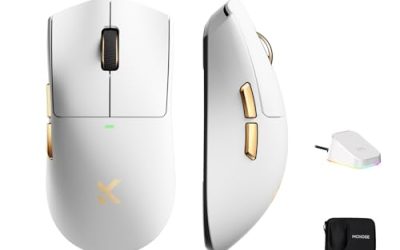
The Beast X Pro is the extreme lightweight entry here: a 39 gram magnesium shell with an adjustable 8K polling rate, listed as a 125 to 8,000Hz range, and a PAW3950 HS sensor reaching 30,000 DPI. Customizable side panels let you choose between side slits and a closed side, which changes both airflow and grip texture on a shell this small. The black version listed here uses TTC switches. For fingertip players who move the mouse with small, fast corrections, this combination of minimal weight and 8,000Hz wireless reporting is the most specialized package in the guide.
Specs
- Polling rate: adjustable 8K polling, 125-8000Hz as stated in the listing
- Sensor: PAW3950 HS, 30,000 DPI
- Weight: 39g, magnesium shell
- Switches: TTC switches on this listed version
- Panels: customizable side panels, side slits version
- Connectivity: USB connectivity, as listed
Best for: fingertip players who want the lightest 8,000Hz mouse in this guide
Watch out for: the small 39 gram shell and side slits will not suit palm players or anyone who dislikes a skeletal feel
ASIN: B0DXFJJ44H
Which One Fits Your Situation
You Play Ranked FPS on a Wired Desk Setup
Choose between the Razer Viper 8KHz and the Corsair Sabre RGB Pro, because both deliver 8,000Hz through a cable with no receiver or battery to manage. Pick the Viper if you use a fingertip or claw grip, play left-handed, or want extra programmable buttons. Pick the Sabre if your hand prefers a sculpted ergonomic shape for palm or claw play and you value its low-drag paracord cable during long sessions.
You Want Wireless Freedom Without Giving Up Speed
The WLMouse Beast X Pro is the wireless speed pick, with an adjustable range reaching 8,000Hz in a 39 gram magnesium shell that rewards fingertip control. The Keychron M3 is the calmer wireless option: its 4,000Hz polling is still four times the standard rate, and tri-mode connection covers a gaming PC, a laptop and a wired fallback. Decide by grip and ecosystem first, because both clear the 1,000Hz baseline.
Your Desk Doubles as a Workstation
The Keychron M3 fits a shared desk best. Bluetooth 5.1 handles the work laptop, the 2.4 GHz connection handles gaming at 4,000Hz polling, and wired mode covers charging while you keep playing. Its 79 gram weight and macro buttons also suit long workdays. The wired Razer and Corsair picks can share a desk too, but they tie you to one machine and one cable, which suits a dedicated gaming setup better than a hybrid one.
You Have Small Hands or a Fingertip Grip
Start with the WLMouse Beast X Pro, whose small, 39 gram magnesium shell is built for fingertip movement and quick stops. If a skeletal shell sounds uncomfortable, the ambidextrous Razer Viper 8KHz is the safer fingertip alternative, with a conventional closed body and side buttons on both sides. Avoid starting with the ergonomic Sabre here; its sculpted shape rewards palm and claw grips, and forcing a fingertip grip onto it wastes the design.
Common Mistakes
- Assuming the headline polling rate applies in every connection mode, when many wireless mice only reach it through one receiver or mode.
- Leaving the mouse at 8,000Hz for desktop work and wondering why wireless battery life feels short.
- Buying a shape that fights your grip because the polling specification looked impressive on the listing.
- Ignoring system load: very high polling rates can strain older processors in demanding games.
- Forgetting cable management on wired 8,000Hz mice, where drag can undo the smoothness the rate provides.
Frequently Asked Questions
Is 8,000Hz polling noticeably different from 1,000Hz?
The reporting interval shrinks from one millisecond at 1,000Hz to an eighth of that at 8,000Hz, so cursor motion can look smoother, especially on high-refresh monitors during slow, precise tracking. The gain is subtle rather than transformative, and it depends on your game and system handling the extra reports without strain. Treat it as a refinement on top of a shape and sensor that already suit you.
Does a higher polling rate drain battery faster?
Yes, on wireless models. Reporting eight times as often means the radio and sensor work harder, so runtime drops compared with running the same mouse at 1,000Hz. Listings that state an adjustable range let you save the highest setting for competitive sessions and step down for everyday use. If you play long wireless stretches, a 4,000Hz model or a wired mouse may fit your routine better.
Do I need a special receiver for high polling rates?
Sometimes. Wired mice such as the Razer Viper 8KHz and Corsair Sabre RGB Pro need nothing extra, because the cable carries the full rate. Wireless models vary: some include the high-rate receiver in the box, while others reach their top figure only in a specific mode. Check the listing for the exact mouse, confirm what its included receiver supports, and keep that receiver close with a clear path.
Should I choose 4,000Hz or 8,000Hz?
Choose by connection and routine rather than the bigger number alone. If you play wired and want the simplest maximum, 8,000Hz models here ask nothing extra of you. If you play wireless across several devices, a 4,000Hz mouse such as the Keychron M3 still reports four times as often as a standard gaming mouse while keeping tri-mode flexibility. Shape, weight and grip should make the final call.
Related guides
More from Amazon
Programs that pair well with the guide above. Offers and eligibility are set by Amazon and may change.
Free shipping on eligible items, Prime Video and more. Eligible new members can start with a free trial.
Start a Prime free trialAd-free music streaming. Eligible new subscribers can start with a free trial.
Try Music Unlimited freeA Prime membership for ages 18-24 with a trial period. Eligibility is set by Amazon.
See Prime for Young AdultsAudiobooks and podcasts to listen to on the go. Eligible new members can start with a free trial.
Try Audible freeAs an Amazon Associate we earn from qualifying purchases.