Picking a mouse for shooters comes down to how reliably it turns a flick into a hit. A sensor that tracks cleanly at high speed, a body light enough to stop on a dime, and a connection that reports movement without delay all shape every duel. Getting any of those wrong shows up as overshoot, drag, or a crosshair that feels half a step behind your hand.
This guide covers competitive FPS players chasing consistent aim, casual shooter fans who want a responsive mouse without a learning curve, and players moving from a heavy office mouse to something built for fast games. The four models below were chosen from the names and specifications on their Amazon product pages, with weight, sensor, polling rate, and shape compared side by side.
Our Top Picks
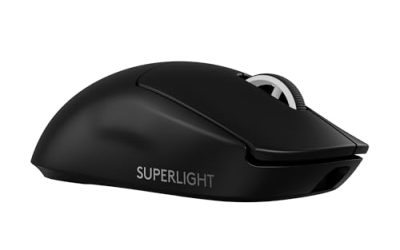
 Logitech G Pro X Superlight 2 Lightspeed WirelessClassic1.57 x 2.5 x 4.92 inches0.1 poundsCheck on Amazon
 Razer DeathAdder V3 Pro Wireless Gaming Mouse1000 Hz5.01 x 2.65 x 1.69 inches0.1 poundsCheck on Amazon
Top 3 picks at a glance

Quick Picks
As an Amazon Associate we earn from qualifying purchases
| Product | Best for | Key spec from title |
|---|---|---|
| Logitech G PRO X Superlight 2 | Competitive FPS with a neutral shape | 60g, 44K DPI sensor, 8kHz report rate |
| Razer DeathAdder V3 Pro | Palm-grip players who want an ergonomic shell | 63g, Focus Pro 30K optical sensor, 90 hr battery |
| Razer Viper V2 Pro | Fingertip and claw players who want the lightest symmetrical mouse | 58g, 30K DPI optical sensor, 90 hour battery |
| Logitech G502 X Lightspeed | Shooter players who want extra buttons and long sessions | HERO 25K sensor, LIGHTFORCE switches, LIGHTSPEED wireless |
How to Choose
Sensor accuracy and tracking speed
A shooter sensor needs to hold its aim during fast flicks and slow micro-adjustments alike. Look for a modern optical sensor with a high maximum DPI and a high tracking speed, since those numbers describe how far and how fast the mouse can move before tracking breaks down. A sensor rated for 30K DPI or higher usually pairs with strong lift-off distance control, which keeps the cursor steady when you reposition the mouse. Check the title and specification list for the sensor name rather than a single DPI figure, because two mice can share a DPI ceiling while tracking very differently in a fast game.
Weight and balance
Weight decides how quickly you can start and stop a movement. Most competitive shooter mice sit between 50g and 70g, and every gram matters when you flick across a wide mousepad hundreds of times in a match. Balance matters as much as the number on the scale: a mouse that feels nose-heavy will drag during horizontal sweeps, while a centered balance keeps turns predictable. If you play with a low sensitivity and a large pad, a lighter body saves your wrist over long sessions. Try to stay under 70g unless you genuinely prefer a heavier feel.
Polling rate and wireless response
Polling rate is how often the mouse reports its position to the computer each second. A 1000 Hz rate reports every millisecond, which has long been the standard for shooters, while 4000 Hz and 8000 Hz options report even more often and can smooth out fast tracking. Higher rates demand more from the processor and shorten battery life, so they suit players with a strong CPU who notice the difference. For wireless models, confirm the listing names a low-latency wireless technology such as LIGHTSPEED or HyperSpeed, since a generic wireless link can add the delay you are trying to avoid.
Shape, grip style, and button layout
Shape decides whether the mouse disappears in your hand or fights it. Symmetrical mice suit claw and fingertip grips and work for either hand, while a right-handed ergonomic shell supports the palm and thumb during long sessions. Measure your hand against the listed length and width, and check whether the side buttons sit where your thumb naturally rests. Shooters need few buttons: two side buttons for common actions are enough, and extra buttons can get in the way during a flick. A textured side grip and a well-placed scroll wheel matter more than a crowded button row.
The 4 Best Options
Logitech G PRO X Superlight 2
Logitech built this mouse around a simple idea: remove everything a shooter player does not need and keep the parts that decide a duel. At 60g it sits in the sweet spot for fast flicks, and the HERO 2 sensor reaches 44K DPI with an 8kHz report rate for tracking that stays smooth at high speed. Five programmable buttons cover the essentials without crowding the shell, and USB-C charging keeps the setup modern. Its neutral, symmetrical shape suits claw and fingertip grips, making it a safe first pick for players who want proven competitive hardware.
Specs
- 60g pro-grade lightweight design
- HERO 2 sensor with 44K DPI
- 8kHz report rate
- 5 programmable buttons
- USB-C charging for PC and Mac
Best for: Competitive FPS players who want a light, neutral-shaped wireless mouse with a top-tier sensor.
Watch out for: Confirm the colour and included accessories on the listing before ordering, since variants can differ in what ships in the box.
Razer DeathAdder V3 Pro
The DeathAdder shape has been a favourite among palm-grip players for years, and this version keeps that ergonomic curve while cutting weight to 63g. Its Focus Pro 30K optical sensor handles fast flicks and fine adjustments, and Gen-3 optical switches remove the mechanical contact point that can wear down over time. HyperSpeed wireless keeps the connection responsive, and the long battery life means fewer charging breaks between sessions. Five programmable buttons keep the layout clean, so your thumb finds the same two side buttons every time.
Specs
- 63g ultra lightweight design
- Focus Pro 30K optical sensor
- Optical Switches Gen-3
- HyperSpeed Wireless
- 5 programmable buttons
- 90 hr battery
Best for: Palm-grip players who want an ergonomic wireless mouse for long shooter sessions.
Watch out for: Check the listing title for the exact bundle, since a version with a HyperPolling dongle is sold separately from the standard model.
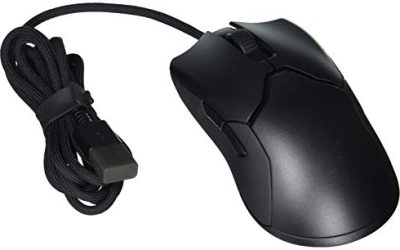
Razer Viper V2 Pro
At 58g, the Viper V2 Pro is the lightest mouse in this guide, and its symmetrical shape is built for claw and fingertip grips. The 30K DPI optical sensor pairs with Gen-3 optical switches for fast, consistent clicks, while HyperSpeed wireless keeps latency low in competitive matches. On-mouse controls let you change DPI without opening software, which helps when you switch between games. A 90-hour battery and the included USB Type-C cable round out a mouse that asks very little of its owner between matches.
Specs
- 58g ultra lightweight design
- 30K DPI optical sensor
- Optical Switches Gen-3
- On-mouse DPI controls
- 90 hour battery
- USB Type C cable included
Best for: Claw and fingertip players who want the lightest symmetrical shooter mouse here.
Watch out for: Verify the seller and condition on the listing, since some third-party sellers list this model alongside the standard Amazon listing.
Logitech G502 X Lightspeed

The G502 X Lightspeed takes a different route from the featherweight mice above: it trades a few grams for versatility. Its HERO 25K sensor and LIGHTFORCE hybrid optical-mechanical switches deliver the tracking and click feel shooter players need, while LIGHTSPEED wireless keeps the connection fast. Thirteen buttons, an infinite scroll toggle, and PowerPlay wireless charging support make it a strong pick for players who also use the same mouse for other games or daily work. The sculpted right-handed shape gives the thumb a clear place to rest.
Specs
- HERO 25K gaming sensor
- LIGHTFORCE hybrid optical-mechanical switches
- LIGHTSPEED wireless
- 13 buttons
- Infinite scroll toggle
- PowerPlay wireless charging capable
- USB-C connection
- Compatible with PC, macOS and Windows
Best for: Shooter players who want extra buttons, a sculpted grip, and very long battery life from one mouse.
Watch out for: Confirm the button count and battery figure on the listing for the exact colour you choose, since listings for different colours can show different details.
Which One Fits Your Situation
Competitive ranked play with a claw or fingertip grip
Choose the Logitech G PRO X Superlight 2. Its 60g body, HERO 2 sensor, and 8kHz report rate give you fast, stable tracking for flicks and spray control, while the neutral shape stays out of the way of a claw or fingertip grip. It is the most straightforward pick when ranked matches are the priority.
Long sessions with a palm grip
Choose the Razer DeathAdder V3 Pro. Its ergonomic shell supports the whole hand, and the 63g weight keeps it light enough for fast aim without tiring your wrist. The 90-hour battery also means you can play for days between charges, which suits long evening sessions. The shape also keeps your thumb relaxed during long matches.
The lightest symmetrical mouse for fast flicks
Choose the Razer Viper V2 Pro. At 58g it is the lightest option in this guide, and the symmetrical shape works well for claw and fingertip players who lift and reposition the mouse often. On-mouse DPI controls add flexibility when you switch sensitivity between games. Its low weight also makes repeated lifts feel effortless during long matches.
One mouse for shooters and everything else
Choose the Logitech G502 X Lightspeed. Its extra buttons, infinite scroll toggle, and long battery life make it useful beyond shooters, while the HERO 25K sensor and LIGHTSPEED wireless keep it quick enough for competitive play. The sculpted shape suits players who rest their whole hand on the mouse. That flexibility makes it the easiest pick for a shared desk setup.
Common Mistakes
- Choosing a mouse by maximum DPI alone instead of checking the sensor name, tracking speed, and lift-off behaviour.
- Picking a heavy mouse for low-sensitivity play, which tires the wrist and slows down large flicks.
- Ignoring grip style and buying an ergonomic shell that fights a claw or fingertip hold.
- Running a high polling rate on a weak processor and blaming the mouse for stutter.
- Buying a bundle with a dongle or charging dock you do not need without reading the listing title first.
Frequently Asked Questions
What DPI should I use for shooters?
Most shooter players use between 400 and 1600 DPI with in-game sensitivity adjusted to match, because lower DPI gives finer control over small aim adjustments. A high maximum DPI is useful as headroom, not as a setting to play at. Start at 800 DPI, set your in-game sensitivity so a full mousepad sweep turns you roughly 180 degrees, and adjust in small steps from there.
Is a wireless mouse fast enough for competitive shooters?
Yes, when the listing names a low-latency wireless technology such as LIGHTSPEED or HyperSpeed. Modern wireless gaming mice report at 1000 Hz or higher, matching wired models in response time. Keep the receiver close to the mouse, keep the battery charged, and use the included cable or extender if your desk setup puts the receiver far from your hand.
Does a lighter mouse really improve aim?
A lighter mouse helps most players flick faster and stop more precisely, because less mass means less effort to start and stop a movement. The gain is largest for low-sensitivity players who move the mouse across a wide pad. Below about 70g the differences shrink, so shape and sensor quality matter more than chasing the lowest number on the scale.
How many buttons do I need on a shooter mouse?
Two side buttons plus the standard left, right, and scroll-wheel click cover almost every shooter need, from melee and grenades to push-to-talk. Extra buttons help in games with many abilities or in titles where you also manage inventory, but they can cause accidental presses during flicks. Pick a layout where every button sits under a finger without stretching.
Related guides
More from Amazon
Programs that pair well with the guide above. Offers and eligibility are set by Amazon and may change.
Free shipping on eligible items, Prime Video and more. Eligible new members can start with a free trial.
Start a Prime free trialAd-free music streaming. Eligible new subscribers can start with a free trial.
Try Music Unlimited freeA Prime membership for ages 18-24 with a trial period. Eligibility is set by Amazon.
See Prime for Young AdultsAudiobooks and podcasts to listen to on the go. Eligible new members can start with a free trial.
Try Audible freeAs an Amazon Associate we earn from qualifying purchases.