As an Amazon Associate, we earn from qualifying purchases made through links on this page.
CenturyLink is really two different networks wearing one name. Fiber customers (including homes migrated to Quantum Fiber) connect through an ONT on the wall, so they need a standalone router that speaks PPPoE and can tag its WAN traffic with VLAN ID 201. DSL customers connect over phone wiring, so they need a modem and router in one box that matches their exact line type: non-bonded, bonded, or vectored VDSL2. A router that is perfect for one group is a paperweight for the other, which is why this guide is split by connection type.
Below you will find three routers for CenturyLink fiber and two modem-router combos for CenturyLink DSL. Each pick states plainly which CenturyLink service it works with, what you need to configure before it will connect, and where its specification sheet falls short, so you can match a box to your line instead of guessing.
Top 3 picks at a glance

What to look for in a router for CenturyLink
Know your connection type first. Check your CenturyLink bill or account page. If your plan is fiber, you have an ONT and need a router only. If your plan is DSL, the signal arrives on a phone line and you need a built-in DSL modem or must keep the CenturyLink gateway in bridge mode.
For fiber: PPPoE plus VLAN 201 support. Most CenturyLink fiber areas authenticate with PPPoE using the username and password from your account, and the router must apply VLAN tag 201 to the WAN connection. Look for a router whose firmware exposes both settings. ASUS hides the VLAN setting under its IPTV menu, TP-Link routers call it IPTV/VLAN Custom mode, and the Deco app buries it in the IPTV/VLAN section. In some former fiber areas the network has moved to plain DHCP (sometimes called IPoE) with the same VLAN tag, so a router that supports both login types covers you either way.
For DSL: match the line technology. A non-bonded VDSL2 or ADSL2+ line works with a modem such as the Motorola MD1600. Bonded lines, which pair two phone lines for higher speeds, and vectored lines both require a gateway built for them, such as the ZyXEL C3000Z. A non-bonded modem will never sync on a bonded line, no matter how it is configured.
Ports and Wi-Fi class. Fiber plans go up to gigabit speed, so the router needs Gigabit Ethernet at minimum and Wi-Fi 6 or better to be worth buying today. A 2.5 Gbps port helps only if you also have multi-gig hardware. DSL plans top out far lower, so coverage and stability matter more than headline Wi-Fi speed.
Bridge mode is the fallback. If you keep the CenturyLink gateway, you can put it in transparent bridge mode and let your own router handle PPPoE and Wi-Fi. That route works for both fiber gateways and DSL gateways, at the cost of running two boxes.
Best routers for CenturyLink fiber
ASUS RT-AX86U Pro — best for gigabit fiber and gaming

The RT-AX86U Pro is an AX5700 dual-band Wi-Fi 6 router (574 Mbps on 2.4 GHz, 4,804 Mbps on 5 GHz) built around a 2.0 GHz quad-core processor. For CenturyLink fiber it ticks the two boxes that matter: ASUSWRT supports PPPoE sign-in, and the LAN > IPTV page lets you set a manual VLAN ID on the internet connection, which is where the required 201 tag goes. Once those two settings are in, the router connects directly to the ONT and the CenturyLink gateway can go back in its box.
Wired hardware is a step above basic routers: one 2.5 Gbps port that can be assigned as WAN or LAN, four Gigabit LAN ports, and two USB ports for storage or a printer. Adaptive QoS includes modes aimed at gaming and streaming, AiProtection Pro adds network security without a subscription, and the VPN options cover server and client modes including WireGuard. It suits a fiber household that games, works from home, and wants one strong router rather than a mesh system.
The limitations are spec-sheet ones. It is dual-band only, so there is no 6 GHz band for newer devices. The single 2.5 Gbps port means only one wired device can exceed gigabit. And the VLAN setting is not labelled for CenturyLink anywhere in the interface; you have to know it lives in the IPTV menu and enter the tag manually.
Best for: CenturyLink or Quantum Fiber gigabit homes, gamers, and anyone replacing the rental gateway with one powerful router.
TP-Link Deco XE75 (2-pack) — best mesh for fiber in larger homes
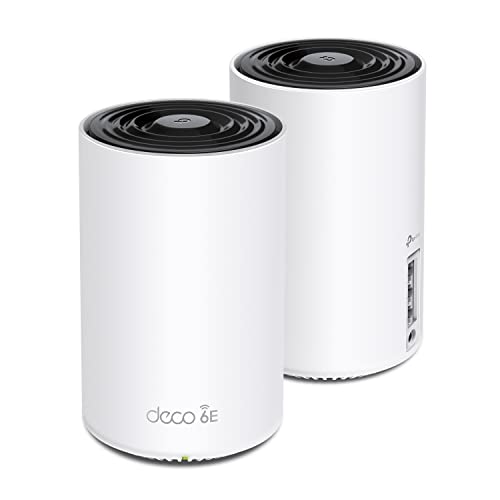
The Deco XE75 is a tri-band Wi-Fi 6E mesh system rated AXE5400, with a 6 GHz band alongside the usual 2.4 GHz and 5 GHz radios. TP-Link rates the two-pack for coverage up to 5,500 sq. ft. For CenturyLink fiber, the Deco app supports PPPoE sign-in and an IPTV/VLAN custom profile, which is where you enter VLAN 201 so the main unit can talk to the ONT directly. The 6 GHz band can serve as a clean wireless backhaul between units, which keeps speeds up in rooms far from the ONT.
Each unit has three Gigabit Ethernet ports, and setup and management run entirely through the Deco app. It suits fiber homes where one router cannot reach every room: houses with the ONT in a garage corner, multi-storey layouts, or thick walls that defeat a single access point.
The trade-offs are control and ports. There is no web interface, so every setting lives in the app, and advanced options are limited compared with a conventional router. Three ports per unit disappear quickly if you wire a TV, console, and PC in the same room, and there is no multi-gig port anywhere in the system, so wired speeds cap at gigabit even on the fastest fiber plan.
Best for: Fiber homes that need whole-home coverage more than deep network settings.
TP-Link Archer AX73 — best straightforward fiber router
The Archer AX73 is an AX5400 dual-band Wi-Fi 6 router (574 Mbps plus 4,804 Mbps) with six external antennas, a Gigabit WAN port, four Gigabit LAN ports, and a USB 3.0 port. Its firmware supports PPPoE and an IPTV/VLAN custom mode, which covers the two requirements for CenturyLink fiber: sign in with your account credentials and tag the WAN with VLAN 201. QoS by device and a VPN server are built in for households that need them.
It is the simple answer for a fiber apartment or small house: one box, current Wi-Fi 6 speeds, and enough LAN ports for a PC, console, and TV without adding a switch. OFDMA and MU-MIMO support help when many devices are active at once, which is the normal state of a connected home.
Its limits show up in the details. TP-Link’s HomeShield security suite reserves its fuller feature set for a paid tier, so the free router does not include everything the box advertises. There is no 2.5 Gbps port, so wired throughput tops out at gigabit. And like the ASUS, the VLAN option sits in an IPTV menu that never mentions CenturyLink by name, so first-time setup involves some menu hunting.
Best for: Fiber customers who want a single, capable Wi-Fi 6 router without mesh complexity.
Best modem-routers for CenturyLink DSL
ZyXEL C3000Z — for bonded and vectored DSL lines

The C3000Z is the gateway CenturyLink itself supplied to large numbers of DSL customers, and it remains the practical retail pick for the harder line types: it supports bonded VDSL2 with vectoring, the combination used by CenturyLink’s faster DSL tiers, as well as standard VDSL2 and ADSL2+ service. Wireless is dual-band AC2200 Wi-Fi 5, and the back panel carries four Gigabit LAN ports, a Gigabit port that can act as WAN, and a USB port. Because it also accepts an Ethernet WAN feed with PPPoE and VLAN settings, the same box can follow you if your street is upgraded from DSL to fiber.
It suits DSL households whose line is bonded or vectored, where a basic third-party modem simply will not train a connection. Buying the same model the installer would have left also means CenturyLink support scripts and setup guides match your hardware exactly.
Be clear about the compromises. The Wi-Fi is a generation old, so wireless speed and range trail any Wi-Fi 6 router; many owners pair it with a separate router or access point later. A large share of Amazon listings for this model are renewed or third-party units rather than new retail stock, so check the condition and seller on the listing before ordering. The interface is CenturyLink-branded and functional rather than friendly.
Best for: CenturyLink DSL lines that are bonded or vectored, and anyone who wants the exact gateway the ISP supports.
Motorola MD1600 — for non-bonded DSL lines

The MD1600 combines a VDSL2/ADSL2+ modem with an AC1600 dual-band Wi-Fi gigabit router in one upright box. Motorola rates it for DSL service up to 100 Mbps, which covers the non-bonded CenturyLink DSL plans it is built for. Around the back are four Gigabit Ethernet ports and a USB 2.0 port with DLNA media sharing; the feature list includes a firewall, WPA/WPA2 security, IPv4 and IPv6 support, and VPN capability. A setup wizard walks through entering your CenturyLink PPPoE credentials, and Motorola backs it with a two-year warranty.
It suits a smaller home on a standard single-line DSL plan that wants one tidy device instead of a rented gateway plus a separate router, and wired ports for a PC or console near the desk.
The limits are strict and come straight from Motorola’s own listing: the MD1600 does not work with bonded VDSL, bonded ADSL, or VDSL vectoring, so confirm your line type with CenturyLink before buying. There is no companion app, so management happens in a browser, and the Wi-Fi is Wi-Fi 5 class, adequate for DSL speeds but not a coverage champion in a large house.
Best for: Non-bonded CenturyLink DSL customers replacing a rental modem with a single combo unit.
Comparison table
| Model | Works with | Type | Wi-Fi | Key connection feature | Ports |
|---|---|---|---|---|---|
| ASUS RT-AX86U Pro | CenturyLink / Quantum Fiber | Router only | Wi-Fi 6 AX5700 dual-band | PPPoE + manual VLAN ID (IPTV menu) | 1x 2.5 Gbps, 4x Gigabit LAN, USB |
| TP-Link Deco XE75 (2-pack) | CenturyLink / Quantum Fiber | Mesh router | Wi-Fi 6E AXE5400 tri-band | PPPoE + IPTV/VLAN custom profile | 3x Gigabit per unit |
| TP-Link Archer AX73 | CenturyLink / Quantum Fiber | Router only | Wi-Fi 6 AX5400 dual-band | PPPoE + IPTV/VLAN custom mode | 1x Gigabit WAN, 4x Gigabit LAN, USB 3.0 |
| ZyXEL C3000Z | CenturyLink DSL (bonded/vectored), fiber via Ethernet WAN | Modem-router | Wi-Fi 5 AC2200 dual-band | Bonded VDSL2 with vectoring | 4x Gigabit LAN, 1x Gigabit WAN/LAN, USB |
| Motorola MD1600 | CenturyLink DSL (non-bonded only) | Modem-router | Wi-Fi 5 AC1600 dual-band | VDSL2/ADSL2+ modem, PPPoE | 4x Gigabit LAN, USB 2.0 |
FAQ
Do I need my PPPoE username and password?
In most CenturyLink fiber and DSL areas, yes. The credentials are tied to your account and can be retrieved from CenturyLink support or your account portal; they are not the same as your Wi-Fi password. Some fiber areas have moved to DHCP-based sign-in, in which case the router still needs the VLAN 201 tag but no login.
What is VLAN 201 and why does it matter?
CenturyLink’s fiber network expects the router to label its internet traffic with VLAN ID 201. If the tag is missing, the ONT will not pass traffic and the connection stays down even with correct login details. Any router in the fiber section above can set this tag, though the setting usually hides in an IPTV or VLAN menu.
Can I stop renting the CenturyLink gateway?
On fiber, yes: a compatible router connects straight to the ONT. On DSL, yes if you buy a modem-router that matches your line type, such as the two DSL picks above. Keep the rental unit until your own hardware is confirmed working, and check whether your plan bundles the gateway into the price.
Will these routers work if my service becomes Quantum Fiber?
Quantum Fiber is the successor brand for CenturyLink’s fiber network and uses the same ONT-based setup, so the fiber picks here carry over. In areas where Quantum Fiber uses DHCP sign-in instead of PPPoE, the same routers still apply; you simply skip the login step and keep the VLAN tag if your area requires it.
My DSL is bonded. Which pick works?
Of the DSL options here, only the ZyXEL C3000Z supports bonded VDSL2 with vectoring. The Motorola MD1600 is limited to non-bonded lines and will not sync on a bonded connection.
Conclusion
Start with your line, not the router. Fiber customers should pick between the ASUS RT-AX86U Pro for single-router performance, the Deco XE75 for whole-home mesh coverage, and the Archer AX73 for a straightforward Wi-Fi 6 setup; all three handle the PPPoE login and VLAN 201 tag that CenturyLink fiber requires. DSL customers should match the modem to the line: the ZyXEL C3000Z for bonded or vectored service, the Motorola MD1600 for standard non-bonded plans. Get that one decision right and any of these five will replace the rental gateway cleanly.
Related guides
More from Amazon
Programs that pair well with the guide above. Offers and eligibility are set by Amazon and may change.
Free shipping on eligible items, Prime Video and more. Eligible new members can start with a free trial.
Start a Prime free trialAd-free music streaming. Eligible new subscribers can start with a free trial.
Try Music Unlimited freeA Prime membership for ages 18-24 with a trial period. Eligibility is set by Amazon.
See Prime for Young AdultsAudiobooks and podcasts to listen to on the go. Eligible new members can start with a free trial.
Try Audible freeAs an Amazon Associate we earn from qualifying purchases.