
An RGB mouse pad is bought for the glow and lived with as a surface, and those two decisions can conflict. A hard pad glides faster and stops differently from cloth, an extended pad changes how your whole desk is laid out, and the lighting system decides whether the pad matches the rest of your setup or fights it. The right choice starts with how you actually move your mouse and how much desk the pad is allowed to own, then works backwards to the lighting.
This guide is for players building a lit desk setup, from a single glowing pad under the mouse to a full-width surface under keyboard and mouse alike. Every pick was chosen from its Amazon listing: the lighting zones, surface material, dimensions, ports and cable arrangements the manufacturer states, so the differences below are differences in published specifications rather than in photographs.
Our Top Picks
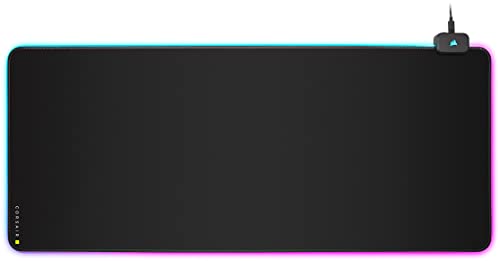 CORSAIR MM700 RGB Extended Cloth Gaming Mouse Pad36.6L x 15.8W inches36.6 x 15.8 x 0.1 inches0 poundsCheck on Amazon
 Razer Firefly Hard V2 RGB Gaming Mousepad15.2L x 12W inches10.84 x 13.99 x 0.14 inchesCheck on Amazon
Top 3 picks at a glance
Quick Picks
As an Amazon Associate we earn from qualifying purchases
| Product | Best for | Key spec from title |
|---|---|---|
| Razer Firefly V2 Pro | Fully lit hard surface | 15-zone Chroma lighting |
| Corsair MM700 RGB Extended | Full-desk cloth coverage | 930 x 400 mm, three-zone RGB |
| SteelSeries QcK Prism Cloth XL | Game-reactive cloth lighting | 2-zone RGB, 900 x 300 mm |
| Razer Firefly V2 Hard | Edge-lit hard glide | Chroma RGB edge lighting |
| BladeHawks BX04 | Simple extended LED pad | 31.5 x 11.81 in, 14 light modes |
How to Choose
Hard or Cloth Surface Comes First
Surface material decides glide before lighting decides anything. Hard pads, like the two Razer Firefly models here, use a rigid low-friction surface that starts and stops with very little resistance, which many shooter players prefer for quick corrections. Cloth pads add friction and cushioning; the mouse settles more predictably and long sessions are easier on the wrist resting at the pad’s edge. Neither is better in the abstract, but switching types changes your sensitivity feel overnight, so pick the surface you already aim well on and let the lighting follow.
Lighting Zones and How They Are Controlled
Count what actually lights up. The Firefly V2 Pro illuminates its whole surface across 15 zones, the MM700 wraps three zones around an extended cloth pad, the QcK Prism Cloth XL runs two zones, and the Firefly V2 Hard lights only its edge, leaving the mousing surface dark. Control matters as much as zone count: the SteelSeries listing describes real-time game and event lighting through its Engine software, while the BladeHawks pad simply cycles onboard light modes from the pad itself. Decide whether you want reactive, software-driven effects or a set-and-forget glow.
Size and Desk Coverage
Measure before you fall for a photograph. A standard pad around 360 x 278 mm, like the Firefly V2 Pro, covers mouse movement only and leaves the keyboard on the desk. Extended pads change the whole layout: the MM700 at 930 x 400 mm and the QcK Prism at 900 x 300 mm put keyboard and mouse on one continuous surface, which also levels out desk imperfections. Depth is the usual failure point; a 400 mm deep pad crowds smaller desks and pushes monitors back, so check the depth figure against your desk, not just the width.
Power, Cables and Extra Ports
Every pad here needs USB power, so a spare port and cable routing are part of the purchase. Some pads give ports back: the Firefly V2 Pro lists an integrated USB 2.0 passthrough, handy for a wireless mouse receiver kept close to the pad, and the MM700 includes a two-port USB hub in its control housing. Cable design varies too, from the V2 Pro’s detachable USB Type C cable to the BladeHawks pad’s fixed USB cable, listed at close to 1.8 m. Plan the cable run before choosing, especially on standing desks.
The 5 Best Options
Razer Firefly V2 Pro

The Firefly V2 Pro is the only pick here whose entire mousing surface lights up, with 15-zone Razer Chroma lighting spread across a hard, low-friction micro-textured surface. That makes it the showcase option: the glow is the desk, not a border around it. The listing also adds practical touches that pure light strips lack, an integrated USB 2.0 passthrough port for a receiver and a detachable USB Type C cable, on a footprint of 360 x 278 x 4.6 mm with an anti-slip base. It is a mouse-only pad, so the keyboard stays on the desk beside it.
Specs
- Lighting: fully illuminated surface, 15-zone Razer Chroma
- Surface: hard, low-friction micro-textured
- Size: 360 x 278 x 4.6 mm
- Port: integrated USB 2.0 passthrough
- Cable: detachable USB Type C
- Base: anti-slip
Best for: Players who want the pad itself to be the centrepiece of a lit setup.
Watch out for: The standard footprint covers mouse movement only, and the hard surface will not suit players who aim on cloth.
ASIN: B0CY6RJRBR
Corsair MM700 RGB Extended
The MM700 is the full-desk answer: 930 x 400 mm of cloth surface that swallows keyboard and mouse together, ringed by 360-degree three-zone RGB lighting. The cloth surface keeps the friction and cushioning most players are used to, and the listing specifies a 4 mm thick rubber construction that stays flat under both devices. Its control housing earns desk space back with a two-port USB hub, useful for receivers and charge cables. If your setup goal is one continuous lit surface rather than a glowing island under the mouse, this is the pick built for it.
Specs
- Lighting: 360-degree three-zone RGB
- Surface: cloth
- Size: 930 x 400 mm
- Ports: two-port USB hub
- Construction: 4 mm thick rubber
Best for: Desks with room for one surface under both keyboard and mouse.
Watch out for: The 400 mm depth crowds compact desks; measure before ordering, and note the larger 3XL version is a separate listing.
ASIN: B08QSNNV5H
SteelSeries QcK Prism Cloth XL
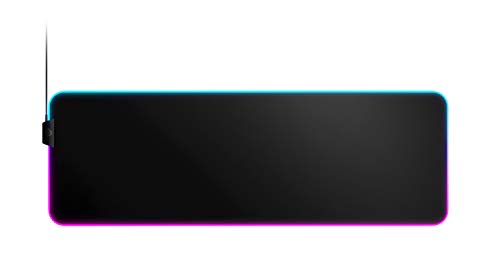
The QcK Prism Cloth XL pairs the familiar QcK micro-woven cloth surface with 2-zone RGB illumination across a 900 x 300 x 4 mm frame. Its distinguishing listing claim is reactive lighting: the pad works with SteelSeries Engine for real-time game and event lighting, so effects can respond to what is happening on screen rather than cycling a static pattern. The cloth surface keeps glide and stopping behaviour in the control-oriented range most players expect from the QcK line. It is the extended option for players who care more about what the lighting does than how many zones it has.
Specs
- Lighting: 2-zone RGB illumination
- Surface: micro-woven cloth
- Size: 900 x 300 x 4 mm
- Effects: real-time game and event lighting via SteelSeries Engine, as listed
Best for: Players who want lighting that reacts to games, on a cloth surface.
Watch out for: Two zones is the fewest here, and the 300 mm depth gives less wrist room than the deeper MM700.
ASIN: B07HYXKWS9
Razer Firefly V2 Hard
The Firefly V2 Hard takes the opposite lighting approach from its Pro sibling: Razer Chroma RGB runs around the edge of the pad while the hard mousing surface itself stays unlit. Players who find a glowing surface distracting under the mouse get the ambience without the glare, and the hard surface delivers the fast, low-friction glide this style of pad is bought for. The listing adds built-in cable management, which keeps the mouse cable from wandering across the pad, and a non-slip rubber base. It is the understated hard-pad option in this group.
Specs
- Lighting: Razer Chroma RGB edge lighting
- Surface: hard
- Cable: built-in cable management
- Base: non-slip rubber
Best for: Hard-surface players who want ambient edge glow rather than a lit surface.
Watch out for: If you want the mousing area itself illuminated, this is the wrong Firefly; that is the V2 Pro above.
ASIN: B07ZDWHL4M
BladeHawks BX04
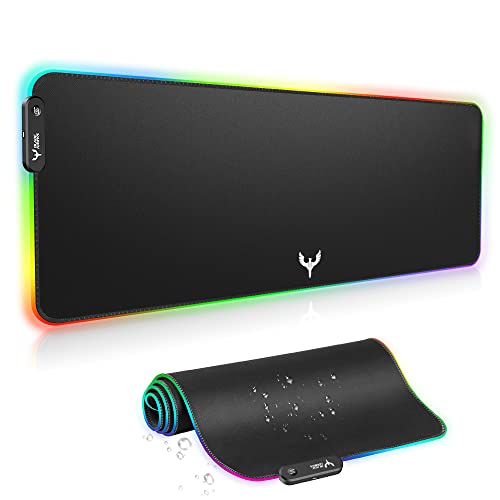
The BladeHawks BX04 is the straightforward extended pad: 31.5 x 11.81 inches of soft LED-lit surface sized to fit keyboard and mouse, with the listing title stating 14 light modes cycled from the pad itself, no software ecosystem involved. The listing also describes a waterproof surface and an anti-slip rubber base, and the pad is USB powered over a cable listed at close to 1.8 m. For a desk that simply needs a big, bright, self-contained light strip under both devices, it covers the brief without asking you to adopt a brand’s lighting platform.
Specs
- Lighting: 14 light modes, as stated in the listing title
- Surface: soft pad, waterproof as listed
- Size: 31.5 x 11.81 in, fits keyboard and mouse
- Power: USB powered, cable close to 1.8 m as listed
- Base: anti-slip rubber
Best for: A simple extended glow for desks that do not run brand lighting software.
Watch out for: The listing title states 14 light modes while its body text mentions 10, so confirm the current figure on the live page before buying.
ASIN: B07L4BGL3D
Which One Fits Your Situation
Your Desk Is a Showcase
If the setup is photographed as often as it is played on, the Firefly V2 Pro is the only pick whose surface itself is the light show, with 15 zones across the pad. Pair its standard footprint with a keyboard that has its own lighting, since the pad will not extend underneath it. The passthrough port keeps a wireless receiver tucked into the display instead of dangling off the PC.
Keyboard and Mouse Share One Surface
Extended pads change how a desk feels, levelling the transition between devices. The MM700 gives the deepest cloth coverage at 930 x 400 mm and returns two USB ports; the BladeHawks BX04 covers a similar footprint with simpler onboard modes. Choose the Corsair if you will use the hub, the BladeHawks if you just want the glow.
You Aim on Cloth and Always Will
Cloth players should not let lighting talk them onto a hard surface. The QcK Prism Cloth XL keeps a micro-woven cloth glide with reactive Engine lighting, and the MM700 offers the same surface family in a deeper, hub-equipped format. Both keep the friction and stopping feel your sensitivity is built on; they differ mainly in depth and lighting behaviour.
You Want Speed from a Hard Pad
Hard surfaces start and stop faster than cloth, and two picks here deliver that with different lighting philosophies. The Firefly V2 Pro lights the whole surface; the Firefly V2 Hard keeps light at the rim and adds cable management for wired mice. Pick based on whether the glow belongs under your hand or around it.
Common Mistakes
- Ordering an extended pad without measuring desk depth, then discovering the monitor has nowhere to sit.
- Expecting a fully lit surface from an edge-lit pad, or edge subtlety from a fully lit one.
- Forgetting the pad needs a USB port, and that its cable has to reach the PC from where the pad sits.
- Assuming every brand’s lighting syncs with every other brand’s software when planning a matched setup.
- Switching from cloth to hard, or the reverse, for the lighting and then blaming the mouse for the changed aim feel.
Frequently Asked Questions
Do RGB pads affect mouse tracking?
The lighting itself does not; the surface underneath it does. Hard and cloth pads present different friction, and that changes glide and stopping, which is why this guide treats surface as the first decision. Every pad here is sold as a gaming surface with the sensor in mind, so the practical step is to keep your sensitivity expectations tied to the surface type you choose, not to the lighting.
Is a hard or cloth pad better for shooters?
It depends on your correction style. Hard pads start moving with almost no resistance, which suits small, frequent adjustments, while cloth adds friction that helps stop a fast swipe on target. Players who arm-aim at low sensitivity usually prefer cloth’s control; fingertip players often prefer hard surfaces. Your current pad is the best guide: match its type unless you deliberately want a different feel.
How are RGB mouse pads powered?
By USB, in every case here, though the arrangements differ. The Firefly V2 Pro uses a detachable USB Type C cable and returns a USB 2.0 passthrough port, the MM700’s housing includes a two-port USB hub, and the BladeHawks pad runs from a fixed USB cable listed at close to 1.8 m. None of them needs a wall outlet, but each claims a port on your PC or hub.
Can the lighting react to what happens in a game?
On one pick, as listed: the SteelSeries QcK Prism Cloth XL describes real-time game and event lighting through SteelSeries Engine. The other pads offer zones, modes or effects you configure rather than game-driven reactions, and the BladeHawks simply cycles its onboard modes. If reactive alerts matter to you, that listing claim is the deciding specification in this group.
Related guides
More from Amazon
Programs that pair well with the guide above. Offers and eligibility are set by Amazon and may change.
Free shipping on eligible items, Prime Video and more. Eligible new members can start with a free trial.
Start a Prime free trialAd-free music streaming. Eligible new subscribers can start with a free trial.
Try Music Unlimited freeA Prime membership for ages 18-24 with a trial period. Eligibility is set by Amazon.
See Prime for Young AdultsAudiobooks and podcasts to listen to on the go. Eligible new members can start with a free trial.
Try Audible freeAs an Amazon Associate we earn from qualifying purchases.









