
Anyone who games after midnight in a shared flat knows the real problem is not lag or sensor spin-out. It is the sharp, repeated clicking that carries through a thin wall while a partner, roommate or baby sleeps in the next room. Here is the awkward truth this guide starts with: no gaming-branded wireless mouse on Amazon states silent or quiet clicks in its listing. Not one. The mice that do state it are productivity models, so this guide compares those instead, honestly labelled.
The four picks below were chosen because their Amazon listings put the quiet claim in writing: Quiet Clicks in the Logitech titles, silent mechanical switches in the Razer listing, and SilentTouch in the Logitech M650 listing. Each one also had to be wireless and carry a sensor and button layout that hold up for relaxed, everyday gaming rather than tournament play. If you need a mouse that stays quiet at 2 a.m. and still feels fine in a strategy game, a co-op session or a slower shooter, these are the listings that actually promise the quiet part.
Top 3 picks at a glance

Quick Picks
As an Amazon Associate we earn from qualifying purchases
| Product | Best for | Key spec from title |
|---|---|---|
| Logitech MX Master 3S | Desk-first gamers who want the fullest feature set | Quiet Clicks, 8K DPI, Bluetooth and Logi Bolt |
| Razer Pro Click Mini | Travellers and small desks needing a compact quiet mouse | Silent tactile clicks, connects up to 4 devices |
| Logitech Signature M650 | Budget-minded quiet clicking for small to medium hands | Silent Clicks with SilentTouch, 2-year battery |
| Logitech MX Master 3S for Mac | Mac players who want the quiet flagship in Apple trim | Quiet Clicks, 8K DPI, Bluetooth, made for Mac |
How to Choose
Start With the Stated Click-Noise Claim, Not the Marketing
Quiet is only real if the listing says so. Gaming mice talk about switch feel, actuation and durability, but their listings stay silent on noise, which is why none appear here. The four mice in this guide state the reduction on the page: Logitech prints Quiet Clicks in both MX Master 3S titles, Razer describes silent mechanical switches in the Pro Click Mini listing, and the M650 listing names its SilentTouch technology. Treat any mouse without that wording as a normal-volume clicker, however soft a reviewer calls it, because the manufacturer has not committed to the claim anywhere you can check before buying.
Match the Wireless Type to Your Setup
A quiet mouse still has to connect the way your desk works. The MX Master 3S covers both bases with Bluetooth and the included Logi Bolt USB receiver, so it can ride a laptop’s built-in radio or a dongle on a desktop. The Pro Click Mini pairs Bluetooth with its 2.4 GHz productivity dongle and can connect up to four devices, which suits a work laptop plus a personal machine. The M650 offers Bluetooth or its Logi Bolt receiver from a single AA battery. The Mac edition of the MX Master 3S is Bluetooth only, which is fine for Apple hardware but leaves no receiver fallback if Bluetooth gets crowded.
Be Honest About Sensor Demands
None of these listings leads with esports sensor figures, because none of these mice is built for ranked ladders. What they state is still plenty for casual play: both MX Master 3S editions list an 8K DPI sensor that tracks on glass, far beyond what strategy games, RPGs, simulation titles and relaxed shooters ask for. The Pro Click Mini and M650 listings do not headline a DPI figure at all, and that absence tells you where they sit. If your gaming is turn-based, story-driven or played on a controller-free laptop at night, the sensors here will not hold you back. If you flick-shot for rank, they are the wrong tool.
Weigh Comfort and Battery Habits for Long Sessions
Night sessions tend to run long, so shape and power matter as much as noise. The MX Master 3S pair use a sculpted ergonomic shell with an ultra-fast scroll wheel that suits big hands and long browsing between matches, and they recharge over USB-C. The Pro Click Mini is deliberately compact and AA powered, better for smaller hands and bags than for palm-grip marathons. The M650 is shaped for small to medium right hands and stretches a single AA battery to a listed two years, which removes charging from the routine entirely. Pick the shape you can hold for three hours, not the one with the longest feature list.
The 4 Best Options
Logitech MX Master 3S

This is the most complete quiet option because its listing pairs the Quiet Clicks claim with the strongest all-round specification of the four: an 8K DPI sensor, tracking on glass, ultra-fast scrolling and both Bluetooth and a Logi Bolt receiver in the box. Logitech sells it as a performance productivity mouse, and that is exactly the honest framing — it is a superb desk mouse whose clicks are stated to be quiet, which makes it the natural lead pick for someone whose PC time mixes work, browsing and evening gaming in a room where noise travels.
Specs
- Quiet Clicks stated in the listing title
- 8K DPI sensor with track-on-glass capability as listed
- Ultra-fast scrolling wheel
- Ergonomic shape
- Bluetooth and Logi Bolt USB receiver connectivity
- USB-C charging
- Listed for Windows, Linux and Chrome
- Colour: Graphite
Best for: Gamers who mostly play slower-paced titles and want one quiet mouse that also handles a full workday.
Watch out for: It is a productivity mouse, not a gaming mouse — there is no gaming sensor branding or high polling claim in the listing, so competitive FPS players should look elsewhere.
Razer Pro Click Mini
Razer is a gaming company, yet this mouse comes from its Pro line, which Razer markets for office and productivity use — the listing copy calls it a go-to mouse for productivity, and that honesty matters. What earns it a place here is that the listing states silent, tactile clicks and describes silent mechanical switches rated for up to 15 million clicks, a written quiet claim no Razer gaming mouse makes. The compact shell, HyperScroll wheel and seven programmable buttons give it enough control for casual gaming, and it can stay connected to up to four devices across Bluetooth and its dongle.
Specs
- Silent, tactile mouse clicks stated in the listing title
- Silent mechanical switches, listed as lasting up to 15 million clicks
- HyperScroll technology
- 7 programmable buttons
- Connects up to 4 devices
- Bluetooth and 2.4 GHz productivity dongle
- AA powered
- Sleek, compact portable design
Best for: Players with small desks or a laptop bag who want Razer build quality without the click noise, for light gaming after work.
Watch out for: Razer positions this line for the office, not the arena — expect a work mouse that games comfortably, not a gaming mouse that happens to be quiet.
Logitech Signature M650
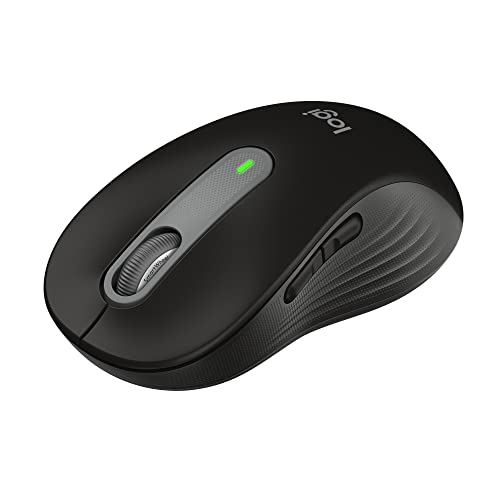
The M650 makes the clearest noise promise of the four: its listing states Silent Clicks in the title and credits SilentTouch technology with 90 percent less click noise in the body copy. That is a specific, checkable claim rather than a vague suggestion of softness. Around it sits a straightforward wireless mouse for small to medium right hands, with a SmartWheel for scrolling, customisable side buttons and Bluetooth or Logi Bolt connection. The listed two-year battery life from one AA cell means the quiet routine never gets interrupted by a charging cable mid-week.
Specs
- Silent Clicks stated in the listing title
- SilentTouch technology, listed as 90 percent less click noise
- Sized for small to medium hands, right handed
- SmartWheel scrolling
- Customizable buttons as listed
- Bluetooth and Logi Bolt receiver connectivity
- AA battery with 2-year battery life as listed
- Listed for PC, Mac and Chromebook
Best for: Shared-household gamers who want the strongest stated noise reduction and a battery they can forget about.
Watch out for: The listing does not headline a gaming-grade sensor figure, so treat it as a quiet everyday mouse that handles casual gaming, not a performance pick.
Logitech MX Master 3S for Mac
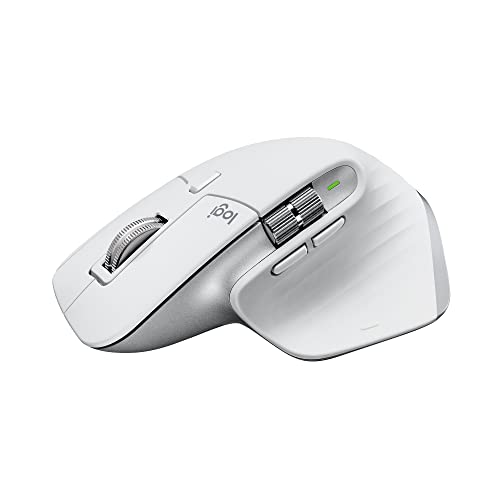
Apple players get the flagship quiet experience in a version tuned for their platform: this edition keeps the Quiet Clicks claim, the 8K DPI sensor and the track-on-glass ability from the standard model, and wraps them in a Pale Grey finish matched to Apple hardware. The listing names Apple and iPad support directly and connects over Bluetooth, which suits a MacBook or iMac desk with no spare ports for receivers. The ergonomic shell and ultra-fast scrolling carry over unchanged, so a Mac user loses nothing except the Windows-oriented receiver bundle of the standard edition.
Specs
- Quiet Clicks stated in the listing title
- 8K DPI sensor with track-on-glass capability as listed
- Ultra-fast scrolling wheel
- Ergonomic shape
- Bluetooth wireless connectivity
- USB-C charging
- Listed for Apple and iPad
- Colour: Pale Grey
Best for: Mac gamers who play in shared spaces and want the quiet flagship shaped and coloured for an Apple setup.
Watch out for: There is no USB receiver route in this listing — it is Bluetooth only, so a Windows desktop without Bluetooth cannot use it as easily as the standard edition.
Which One Fits Your Situation
You Game at Night While Others Sleep Nearby
Start with the Logitech Signature M650, because its listing makes the most explicit noise claim of the group through SilentTouch. If your hands are larger or you also work at the same desk all day, step up to the MX Master 3S, whose Quiet Clicks are stated in its title and whose ergonomic shell stays comfortable across a whole evening. Either way, the deciding factor is the written claim on the listing, and both of these mice carry one — that is what separates them from every gaming mouse that merely feels soft.
Your Desk Is a Laptop on a Shared Table
The Razer Pro Click Mini fits this life best. It is compact enough to live in a laptop sleeve, its silent mechanical switches are described in the listing itself, and it can stay paired with up to four devices, so the same mouse moves between a work laptop and a personal machine without re-pairing rituals. The seven programmable buttons cover the handful of shortcuts casual games actually need, and the AA battery removes one more cable from a table that has to be cleared for dinner.
You Play on a Mac in a Quiet House
Choose the MX Master 3S for Mac. Its listing is written for Apple hardware from the title onward, with Bluetooth connection, iPad support and the same Quiet Clicks and 8K DPI sensor as the standard edition. The Pale Grey finish matches Apple desktops and laptops, and the ergonomic shape with ultra-fast scrolling makes it as good for long strategy sessions as for the workday that precedes them. There is no receiver in the equation, which keeps a port-free MacBook setup clean.
You Want One Mouse for Work and Play, in Silence
The standard MX Master 3S is the single-desk answer. Bluetooth plus the Logi Bolt receiver means it connects to almost anything, the stated Quiet Clicks keep evening sessions neighbour-friendly, and the sensor and scroll wheel are more than enough for the relaxed end of a games library. It is a productivity mouse first, and this guide will not pretend otherwise — but for mixed use in a quiet home, that is precisely the combination that works.
Common Mistakes
- Assuming a gaming mouse with soft-feeling switches is quiet — if the listing never states silent or quiet clicks, the manufacturer has made no such promise.
- Buying the Mac edition of the MX Master 3S for a Windows desktop that lacks Bluetooth, since that listing offers no receiver connection.
- Expecting esports performance from productivity sensors — these mice suit casual and slower-paced gaming, not high-rank competitive play.
- Ignoring hand size: the M650 is shaped for small to medium right hands and the Pro Click Mini is a compact mouse, so large-handed palm grippers should choose the MX Master 3S shape instead.
- Forgetting that AA-powered models need spare batteries on hand, while the MX Master 3S pair need a USB-C cable nearby instead.
Frequently Asked Questions
Why are there no actual gaming mice in a guide about quiet gaming mice?
Because no gaming-branded mouse listing on Amazon states silent or quiet clicks, and this guide only recommends products whose listings make the claim in writing. Gaming mice advertise switch durability and feel instead. The four mice here are productivity models with stated quiet clicks that handle casual gaming well, which is the honest answer to the noise problem.
Will a quiet-click mouse feel mushy or unresponsive in games?
The listings describe deliberate switch designs rather than softness: Razer calls the Pro Click Mini switches silent and tactile, and Logitech builds the MX Master 3S and M650 clicks around its Quiet Clicks and SilentTouch designs. You still get a defined click for menus, abilities and everyday shooting in slower games. What you give up is the loud, sharp report — not the click itself.
Are these mice good enough for competitive shooters?
Not really, and their listings do not pretend otherwise. None of them advertises a gaming polling rate or an esports sensor story; the MX Master 3S pair list an 8K DPI sensor aimed at precision work. For ranked, reaction-driven play, a dedicated gaming mouse is the right tool and the noise is part of that trade. These picks are for everyone whose gaming is relaxed and whose room is shared.
Which of the four is quietest on paper?
The Logitech Signature M650, because it is the only listing that quantifies the reduction: its SilentTouch description states 90 percent less click noise. The other three state quiet or silent clicks without a figure. In practice all four are far quieter than a standard gaming mouse, but if you want the claim you can point to on the page, the M650 carries it.
Related guides
More from Amazon
Programs that pair well with the guide above. Offers and eligibility are set by Amazon and may change.
Free shipping on eligible items, Prime Video and more. Eligible new members can start with a free trial.
Start a Prime free trialAd-free music streaming. Eligible new subscribers can start with a free trial.
Try Music Unlimited freeA Prime membership for ages 18-24 with a trial period. Eligibility is set by Amazon.
See Prime for Young AdultsAudiobooks and podcasts to listen to on the go. Eligible new members can start with a free trial.
Try Audible freeAs an Amazon Associate we earn from qualifying purchases.









