
Buying a gaming mouse with your left hand is really a decision about button placement, not sensor bragging rights. A sculpted right-handed shell puts its thumb buttons on the wrong flank and its curve against your palm, so the honest shortlist is short: one true left-handed model and a handful of ambidextrous shells that carry buttons on both sides.
This guide is for left-handed FPS players, MMO players who need a thumb grid, and anyone switching their mouse hand after years on the right. Every pick below was chosen from the product name and specification details on its Amazon US listing, and each one states a left-handed or ambidextrous design on that page. Where a listing covers an older model still in circulation, the guide says so plainly instead of dressing it up as current stock.
Top 3 picks at a glance


Quick Picks
As an Amazon Associate we earn from qualifying purchases
| Product | Best for | Key spec from title |
|---|---|---|
| Razer Naga Left-Handed | Left-handed MMO players who want a full thumb grid | 12 programmable thumb buttons |
| Logitech G903 Lightspeed | Wireless play with buttons on both flanks | HERO 25K sensor, 25,600 DPI |
| Logitech G Pro Wireless | Lightweight wireless FPS play in a symmetrical shell | 80 g ambidextrous design |
| Razer Viper | Wired fingertip and claw grips at a low weight | 69 g ambidextrous design |
| SteelSeries Sensei Ten | A classic symmetrical shape with wired consistency | TrueMove Pro sensor, 18,000 CPI |
How to Choose
True left-handed shell or ambidextrous shape
Start by deciding which of the two families actually fits your hand. A true left-handed mouse mirrors the familiar ergonomic shape, so the palm swell, the finger grooves and the thumb rest all sit where a left hand expects them, and the Razer Naga Left-Handed is the standing example. An ambidextrous mouse instead uses a symmetrical shell that either hand can hold. Symmetry costs you the sculpted support of a mirrored shell, but it opens up far more choice, including most lightweight FPS models. Neither route is wrong; the mistake is buying a right-handed ergonomic mouse and hoping your hand adapts.
Where the side buttons actually sit
For a left-handed player, side buttons only count when they sit on the right flank of the mouse, under your thumb. Some symmetrical mice carry buttons on both sides, which is ideal: fit the right-side pair for your thumb and ignore or remove the pair your ring finger would brush. Others look symmetrical in photos yet carry buttons on the left flank only, which makes them right-handed in practice. Read the listing wording closely, look for removable or swappable side buttons in the specification details, and treat a mouse with left-flank-only buttons as a right-handed product, whatever the shape suggests.
Grip style and shell size against your hand
A symmetrical shell still has to match how you hold it. Palm grip players want a longer body with a hump that fills the hand, while claw and fingertip players usually prefer a shorter, lower shell they can steer with their fingers. Check the stated length and weight on the listing rather than judging from photos, because two mice that look alike can differ by several millimetres and twenty grams. Left-handed players with smaller hands should be especially careful: many ambidextrous flagships are full-size shells, and an oversized mouse forces your thumb away from the very buttons you bought it for.
Wired simplicity or wireless freedom
Connection shapes daily use more than most sensor differences. A wired mouse never needs charging, never pairs, and usually weighs less because there is no battery inside, which suits a fixed desk and fingertip aim. Wireless models clear the cable drag that pulls against a left-side desk setup, where the cable often has to cross the keyboard or route around a monitor stand. If you go wireless, check the stated battery life and whether the mouse also works over its charging cable, so a flat battery mid-session becomes a pause rather than a dead mouse.
The 5 Best Options
Razer Naga Left-Handed
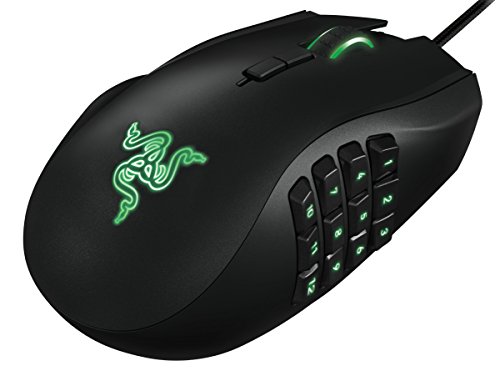
This is the one mouse in the roundup shaped for a left hand rather than adapted to it. Razer mirrored its MMO shell, so the thumb rest and the twelve-button grid sit on the right side of the mouse, exactly where a left thumb works. That grid is the reason to buy it: rotations, mounts, potions and macros all land under one thumb instead of spreading across the keyboard. The trade-offs are a wired connection and an older sensor design than the wireless picks here, but for ability-heavy games the button layout matters more than either.
Specs
- Hand orientation: left-handed, ergonomic MMO design as stated in the listing title
- Buttons: 12 programmable thumb buttons on the side grid
- Sensor: 8,200 adjustable DPI, as stated in the listing title
- Connection: wired
- Model number in title: RZ01-01050100-R3M1
Best for: Left-handed MMO and MOBA players who want a full thumb grid under their left thumb.
Watch out for: This listing is the earlier Naga left-handed model, so confirm the exact model and seller on the page before ordering.
ASIN: B00EO2ECUY
Logitech G903 Lightspeed
The G903 takes the configurable route to left-handed play. Its ambidextrous body accepts side buttons on either flank, so a left-handed player fits buttons under the thumb on the right side and can leave the other side blank or populated. Lightspeed wireless keeps the desk clear, the stated battery life stretches across long sessions between charges, and an optional extra weight lets you tune the balance if the stock feel is too light. It is a full-size, feature-heavy mouse rather than a stripped-down esports shell, which suits players who want one mouse for every genre on their drive.
Specs
- Hand orientation: ambidextrous, as stated in the listing title
- Sensor: HERO 25K, up to 25,600 DPI
- Battery life: 140+ hours with rechargeable battery, as stated in the listing title
- Weight: 107 g plus 10 g optional weight
- Features: LIGHTSYNC RGB and POWERPLAY compatibility, as stated in the listing title
- Connection: Lightspeed wireless
Best for: Left-handed players who want wireless freedom plus side buttons they can place on the right flank.
Watch out for: The optional weight and button layout need setting up out of the box, so allow time to configure it before a session.
ASIN: B07NSVMT22
Logitech G Pro Wireless
Logitech built this mouse with esports players, and the ambidextrous shell is why it works in a left hand. Four removable side buttons ship in the box, two for each flank, so you can run buttons under your left thumb, blank off the far side, or mix the layout as your games demand. The shell weighs little for a wireless model, the Lightspeed connection reports at one millisecond according to the listing details, and the primary switches are rated for fifty million clicks. It is the cleanest option here for competitive shooters played left-handed.
Specs
- Hand orientation: ambidextrous ergonomic design, as stated in the listing details
- Sensor: HERO 25K, up to 25,600 DPI through a G HUB software update
- Connection: Lightspeed wireless with a 1 ms report rate
- Weight: 80 g
- Buttons: four removable side buttons
- Switch durability: 50 million clicks, as stated in the listing details
Best for: Left-handed FPS players who want a light wireless mouse with a configurable button layout.
Watch out for: The sensor’s highest DPI figure arrives through a software update, so install G HUB and update before judging the settings.
ASIN: B07GCKQD77
Razer Viper

The wired Viper is the lightest mouse in this guide, and its symmetrical shell carries programmable buttons on both sides, which is the detail that earns it a place here. Left-handed claw and fingertip players get thumb buttons on the right flank without paying for a battery or a receiver, and the drag-free cord keeps cable pull low on wide mouse sweeps. Razer’s optical switches are the headline feature in the listing title, paired with a sixteen thousand DPI optical sensor. If your desk setup is fixed and your grip is fingertip-led, this is the straightforward pick.
Specs
- Hand orientation: ambidextrous, as stated in the listing title
- Sensor: 16,000 DPI optical sensor
- Switches: Razer optical mouse switches, described in the title as the fastest mouse switch in gaming
- Buttons: 8 programmable buttons
- Weight: 69 g
- Connection: wired with a drag-free cord
- Lighting: Chroma RGB
Best for: Left-handed claw and fingertip players who want the lightest wired option with buttons on both sides.
Watch out for: The shell is a low, flat shape, so committed palm grip players may find it offers less support than the G903.
ASIN: B07TT8G59J
SteelSeries Sensei Ten
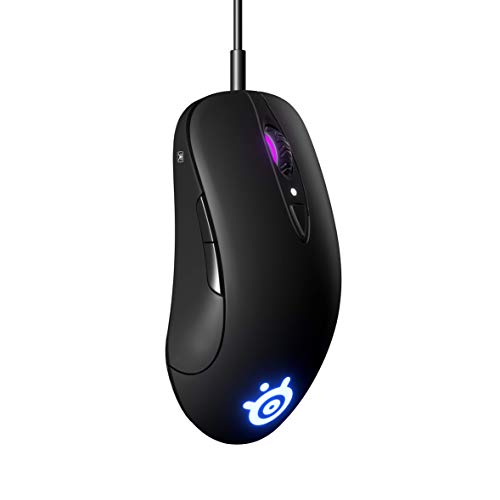
SteelSeries revived a shape that left-handed players have used for years. The Sensei Ten keeps the symmetrical Sensei outline, states an ambidextrous design in its title, and pairs it with a TrueMove Pro sensor rated to eighteen thousand CPI. Eight programmable buttons and mechanical switches rated for sixty million clicks cover the practical bases, and onboard storage means your CPI steps travel with the mouse between computers. It lacks the wireless options and the thumb grid found elsewhere in this guide, but as a wired, familiar, both-hands shape with a strong sensor, it earns its place honestly.
Specs
- Hand orientation: ambidextrous design, as stated in the listing title
- Sensor: TrueMove Pro optical sensor, 18,000 CPI
- Buttons: 8 programmable buttons
- Switches: mechanical switches rated for 60 million clicks, as stated in the listing title
- Weight: 92 g without cable
- Connection: wired
- Lighting: RGB
Best for: Left-handed players who want a proven symmetrical shape and wired consistency for mixed genres.
Watch out for: It is heavier than the Viper and wired only, so check the stated weight against your grip before choosing it for low-sensitivity FPS play.
ASIN: B07Y3Q2PYH
Which One Fits Your Situation
You play MMOs and need spells under your thumb
Choose the Razer Naga Left-Handed. Nothing else in this guide puts twelve buttons under a left thumb, and for raid rotations or MOBA item actives that grid replaces a whole row of keyboard reaches. Accept the wired connection and the older sensor as the price of the only true left-handed shell here, and map the grid in layers so your most-used abilities sit on the buttons your thumb finds without looking.
You play competitive shooters left-handed
Take the Logitech G Pro Wireless for ranked sessions, or the Razer Viper if you prefer a cable and the lowest weight. Both give you side buttons on the right flank for melee, push-to-talk or grenade keys, and both keep the shell symmetrical so your aim does not fight a right-handed curve. Fit only the buttons you use and blank the far side, because an accidental ring-finger press costs more rounds than an extra bind gains.
You want one wireless mouse for every game
The Logitech G903 Lightspeed is the generalist here. Its button layout reconfigures per genre, the battery stretches across long sessions, and the optional weight lets you settle the balance for slower strategy games or faster shooters. A left-handed player building a single-desk setup around one mouse gets the fewest compromises from this pick, provided the full-size shell suits your hand and grip.
Your left hand is small or your grip is fingertip-led
Start with the Razer Viper. At the weight stated in its title, with a low symmetrical shell, it asks the least from smaller hands and rewards fingertip steering. The Sensei Ten is the fallback if you want a slightly larger wired shape, but measure your current mouse first and compare its length with the dimensions on each listing rather than guessing from product photos.
Common Mistakes
- Buying a right-handed ergonomic mouse because the marketing photos look almost symmetrical, then finding the thumb buttons sit under your ring finger.
- Assuming every ambidextrous mouse has buttons on both sides, when some carry them on the left flank only and are right-handed in practice.
- Choosing by headline DPI while ignoring shell length and weight, the two figures that decide whether your thumb reaches the buttons at all.
- Forgetting to swap the primary click buttons in your operating system or game settings after moving the mouse to your left hand.
- Ordering the Naga Left-Handed without checking the exact model on the listing, since more than one generation of the mouse exists.
Frequently Asked Questions
Is a true left-handed mouse better than an ambidextrous one?
It depends on the game. A mirrored shell such as the Naga Left-Handed gives left-handed players sculpted support and a proper thumb rest, which matters in long MMO sessions. Ambidextrous mice trade that sculpting for symmetry, lighter shells and more choice, and most left-handed FPS players are better served by one of those instead.
Can I use side buttons with my left thumb on an ambidextrous mouse?
Yes, provided the mouse carries buttons on its right flank or lets you move them there. The G Pro Wireless ships with removable buttons for both sides, and the Viper and Sensei Ten place programmable buttons within reach of a left thumb. Always confirm the button layout in the listing details before ordering.
Should left-handed players swap the left and right click buttons?
Many do, because the index finger then handles the primary click just as it does for right-handed players. Games and operating systems both offer the swap, and most mice in this guide let you remap buttons in software as well. Try both arrangements for a week each; comfort and existing muscle memory should decide, not convention.
Why are there so few true left-handed gaming mice?
Manufacturers build for the larger right-handed market, and a mirrored ergonomic shell needs its own moulds and production run for a small audience. That is why the category leans on ambidextrous designs: one symmetrical shell serves both hands from a single production line. The Naga Left-Handed remains the exception that proves how rare a dedicated left-handed gaming mouse is.
Related guides
More from Amazon
Programs that pair well with the guide above. Offers and eligibility are set by Amazon and may change.
Free shipping on eligible items, Prime Video and more. Eligible new members can start with a free trial.
Start a Prime free trialAd-free music streaming. Eligible new subscribers can start with a free trial.
Try Music Unlimited freeA Prime membership for ages 18-24 with a trial period. Eligibility is set by Amazon.
See Prime for Young AdultsAudiobooks and podcasts to listen to on the go. Eligible new members can start with a free trial.
Try Audible freeAs an Amazon Associate we earn from qualifying purchases.









