As an Amazon Associate, we earn from qualifying purchases made through links on this page.
A rechargeable gaming mouse replaces disposable batteries with a built-in lithium cell you top up over USB-C, through a charging dock, or in Logitech’s case even while you play on a compatible charging mousepad. That changes the ownership experience completely: no drawer of AA cells, no mouse dying mid-match because a battery faded without warning, and no ongoing cost of replacements. It also changes the mouse itself, because a sealed internal battery lets designers build lighter, better-balanced shells than a battery compartment allows.
This guide only includes mice with built-in rechargeable batteries. Every pick below charges over USB-C or an optional dock, runs for days or weeks of gaming between charges depending on settings, and uses a flagship-grade optical sensor with low-latency 2.4 GHz wireless for competitive play. They differ in shape and philosophy: an ergonomic all-rounder with a thumb rest and extra buttons, a clean esports shape, a feature-loaded flagship with a scroll wheel that does everything, and an ultralight ergonomic mouse with an 8,000 Hz upgrade path. The buying notes explain the charging and battery trade-offs first, because with rechargeable mice those details matter as much as the sensor.
Our Top Picks
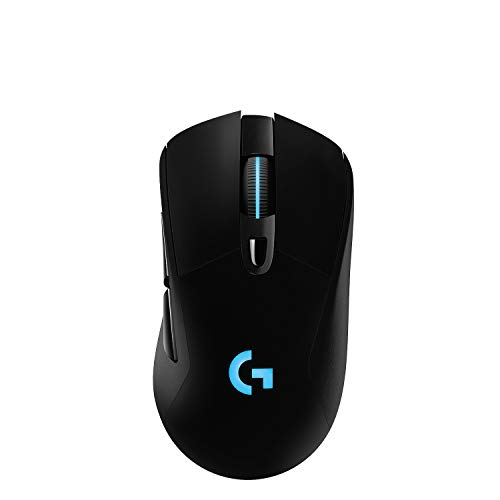
 Logitech G502 LIGHTSPEED Wireless Gaming MouseWireless5.19 x 2.95 x 1.57 inches0.81 poundsCheck on Amazon
Top 3 picks at a glance
What to look for in a rechargeable gaming mouse
Charging method. USB-C is the baseline to expect: one cable charges the mouse and lets you keep playing wired while it tops up. Two ecosystems go further. Logitech’s POWERPLAY system charges compatible mice continuously through the mousepad, and Razer offers an optional charging dock and a wireless charging puck for its flagship mice. If you dislike cables entirely, factor dock compatibility into your choice; if you are happy plugging in overnight once every week or two, plain USB-C is enough.
Battery life at your settings. Manufacturer figures are quoted at 1,000 Hz polling with lighting off or low. Raising polling to 4,000 or 8,000 Hz, or running bright RGB, can cut runtime to a fraction of the headline number. Look at the rated hours, then be honest about your settings: a mouse rated for 90 hours at standard polling is a charge-every-fortnight mouse for most players, while the same mouse at maximum polling becomes a charge-every-few-days mouse.
Weight and balance. Built-in batteries add fixed weight, and rechargeable flagships range from the low 60 gram range to well over 110 grams. Lighter suits fast-paced shooters and fingertip grips; heavier ergonomic models suit palm grips, productivity crossover use and players who simply prefer a planted feel. None of the picks here can swap to a lighter battery, so choose the weight class deliberately.
Sensor and switches. All four mice use top-tier optical sensors (Logitech HERO 25K, Razer Focus Pro 30K) that track flawlessly in games, and either optical or high-grade mechanical switches. Optical switches have the durability edge for very heavy click volumes; Logitech’s hybrid and mechanical switches have a more familiar tactile feel. At this level, shape fit should decide before spec sheets do.
Connectivity extras. Bluetooth is genuinely useful on a rechargeable mouse: it stretches battery life for work and travel, then you switch back to the 2.4 GHz dongle for gaming. The Razer Basilisk V3 Pro includes it; the Logitech pair and the DeathAdder V3 Pro are gaming-first connections with wired fallback while charging.
The picks
Razer Basilisk V3 Pro

ASIN: B0B6Y3XYFG — View on Amazon
The Basilisk V3 Pro is the most complete rechargeable mouse in this guide. Its right-handed ergonomic shell carries Razer’s Focus Pro 30K sensor, Gen-3 optical switches, and a HyperScroll tilt wheel that can free-spin for documents and ratchet for weapon switching. Battery life is rated up to 90 hours on HyperSpeed wireless and up to 100 hours over Bluetooth, and charging is flexible: USB-C on the front, or wirelessly with Razer’s optional charging puck and dock. Thirteen programmable controls, including a multi-function trigger near the thumb, make it the natural pick for players who split time between shooters, MMOs and desktop work.
Key specs:
- Weight: approximately 112 g
- Sensor: Razer Focus Pro 30K optical, up to 30,000 DPI
- Polling: 1,000 Hz standard, up to 4,000 Hz with optional HyperPolling dongle
- Connection: HyperSpeed 2.4 GHz, Bluetooth, USB-C wired
- Battery: up to 90 hours (HyperSpeed) or 100 hours (Bluetooth), manufacturer rating
- Charging: USB-C; optional Razer wireless charging puck and dock
- Switches: Razer Optical Gen-3
Best for: Palm-grip players who want one mouse for gaming and work, heavy button users, and anyone who wants dock charging on the desk.
Limitations: At about 112 grams it is far too heavy for players who prefer ultralight FPS mice. The wireless charging puck and the dock are separate purchases, and enabling high polling shortens the runtime considerably.
Logitech G502 LIGHTSPEED
ASIN: B07L4BM851 — View on Amazon
The G502 LIGHTSPEED takes Logitech’s best-known ergonomic gaming shape and cuts the cord, adding a rechargeable battery rated up to 60 hours with lighting off and full POWERPLAY compatibility, so on a POWERPLAY pad it effectively never needs a cable at all. The HERO 25K sensor is flawless, the metal scroll wheel switches between ratcheted and free-spin modes, and eleven programmable buttons plus a sniper button suit players who bind abilities, building pieces or push-to-talk to the mouse. It is a substantial mouse at about 114 grams, and that planted, feature-dense feel is exactly what its long-standing audience wants.
Key specs:
- Weight: approximately 114 g
- Sensor: HERO 25K optical, up to 25,600 DPI
- Polling: 1,000 Hz
- Connection: LIGHTSPEED 2.4 GHz wireless, wired while charging
- Battery: up to 60 hours with lighting off (manufacturer rating)
- Charging: USB cable; POWERPLAY wireless charging compatible
- Switches: mechanical, with metal spring button tensioning
- Buttons: 11 programmable
Best for: Players who love the G502 shape and button layout, MMO and MOBA players who use many binds, and POWERPLAY owners who want a mouse that is always charged.
Limitations: The weight rules it out for low-sensitivity FPS players who flick constantly. POWERPLAY requires Logitech’s own pad, which is an additional ecosystem purchase. The busy, angular design divides opinion and collects dust in its grooves.
Logitech G703 LIGHTSPEED
ASIN: B07NSSPV9S — View on Amazon
The G703 is the rechargeable option for players who find flagship feature mice overdone. It uses a clean, medium-large ergonomic shape with a smooth hump that suits palm and relaxed claw grips, the same flawless HERO 25K sensor as the G502, and a battery rated up to 60 hours with lighting off. Like its sibling it is POWERPLAY compatible, so it can charge through the pad while you play. At about 95 grams it sits in the middle ground: light enough for shooters, substantial enough to feel controlled in strategy and single-player games. Six buttons keep the layout simple and uncluttered.
Key specs:
- Weight: approximately 95 g
- Sensor: HERO 25K optical, up to 25,600 DPI
- Polling: 1,000 Hz
- Connection: LIGHTSPEED 2.4 GHz wireless, wired while charging
- Battery: up to 60 hours with lighting off (manufacturer rating)
- Charging: USB cable; POWERPLAY wireless charging compatible
- Switches: mechanical, with metal spring button tensioning
- Buttons: 6 programmable
Best for: Palm and relaxed-claw players who want a simple, comfortable rechargeable mouse for mixed gaming, and anyone who prefers a clean shape over extra buttons.
Limitations: Only six buttons, so bind-heavy players should look at the G502 or Basilisk. There is no Bluetooth for work laptops. The shape runs large for small hands and fingertip grips.
Razer DeathAdder V3 Pro with HyperPolling Dongle

ASIN: B0CQ715H98 — View on Amazon
This bundle pairs Razer’s ultralight ergonomic esports mouse with the HyperPolling wireless dongle, which unlocks true 8,000 Hz wireless polling. The DeathAdder V3 Pro itself weighs about 63 grams, uses the Focus Pro 30K sensor and Gen-3 optical switches, and its battery is rated up to 90 hours at standard polling — remarkable endurance for a mouse this light. Charging is over USB-C, and the mouse doubles as a wired one while it charges. The shape is a refined, smoother DeathAdder: a right-handed shell with a low front and gentle flare that has become a default choice for palm and claw players in tactical shooters.
Key specs:
- Weight: approximately 63 g
- Sensor: Razer Focus Pro 30K optical, up to 30,000 DPI
- Polling: up to 8,000 Hz wireless with the bundled HyperPolling dongle
- Connection: HyperSpeed 2.4 GHz wireless, USB-C wired
- Battery: up to 90 hours at 1,000 Hz (manufacturer rating)
- Charging: USB-C
- Switches: Razer Optical Gen-3
- Buttons: 5 programmable
Best for: Competitive FPS players who want an ergonomic shape without the weight penalty, and high-refresh players who will use the 8,000 Hz dongle.
Limitations: Running 8,000 Hz polling cuts battery life dramatically compared with the 90-hour headline figure. There is no Bluetooth and no dock charging in this bundle. The smooth shell offers little texture for players with dry hands.
Comparison table
| Mouse | Weight | Sensor | Charging | Battery (rated) | Extras | ASIN |
|---|---|---|---|---|---|---|
| Razer Basilisk V3 Pro | ~112 g | Focus Pro 30K | USB-C, optional dock/puck | 90 h (2.4 GHz) | Bluetooth, tilt wheel | B0B6Y3XYFG |
| Logitech G502 LIGHTSPEED | ~114 g | HERO 25K | USB, POWERPLAY | 60 h | 11 buttons, dual-mode wheel | B07L4BM851 |
| Logitech G703 LIGHTSPEED | ~95 g | HERO 25K | USB, POWERPLAY | 60 h | Simple 6-button layout | B07NSSPV9S |
| Razer DeathAdder V3 Pro bundle | ~63 g | Focus Pro 30K | USB-C | 90 h | 8,000 Hz dongle included | B0CQ715H98 |
FAQ
How long do rechargeable gaming mice actually last between charges?
At standard 1,000 Hz polling with lighting off or modest, the mice here are rated between 60 and 100 hours, which for most players means charging somewhere between weekly and monthly. High polling rates and bright RGB are the two biggest drains, so expect much shorter intervals if you run both.
Can I keep playing while the mouse charges?
Yes. All four mice work as wired mice over their USB-C or USB charging cable while the battery tops up. Logitech’s POWERPLAY-compatible models go further and charge through the mousepad during play, and the Basilisk V3 Pro can sit on an optional dock between sessions.
Do built-in batteries wear out?
Lithium cells gradually lose capacity over years of charge cycles, and unlike AA-powered mice the cell is not user replaceable. In practice these mice are built to last through several years of regular charging; using standard polling and avoiding constant maximum-brightness lighting also reduces how often you cycle the battery.
Is a rechargeable mouse better than one with AA batteries?
It depends on priorities. Rechargeable models offer cleaner shapes, no consumable cost, and charging ecosystems like docks and POWERPLAY. AA models can run for many months per cell and are instantly “recharged” by swapping. This guide covers the rechargeable side only, as intended; every pick uses a built-in battery by design.
Does high polling really need a special dongle?
On Razer’s mice, polling above 1,000 Hz requires the HyperPolling dongle, which is why it is bundled with the DeathAdder V3 Pro listing here and optional for the Basilisk V3 Pro. Logitech’s pair run at 1,000 Hz, which remains the competitive standard for most players.
Conclusion
If you want the most complete rechargeable gaming mouse, the Razer Basilisk V3 Pro (B0B6Y3XYFG) combines long battery life, Bluetooth, USB-C and optional dock charging in one feature-rich shell. Logitech fans should choose between the button-heavy G502 LIGHTSPEED (B07L4BM851) and the simpler, lighter G703 LIGHTSPEED (B07NSSPV9S), both of which add POWERPLAY charging. And if your priority is competitive FPS performance in a rechargeable package, the DeathAdder V3 Pro bundle (B0CQ715H98) delivers 90-hour endurance and an 8,000 Hz upgrade at only about 63 grams. Whichever you pick, you are done buying AA batteries for your mouse for good.
Related guides
More from Amazon
Programs that pair well with the guide above. Offers and eligibility are set by Amazon and may change.
Free shipping on eligible items, Prime Video and more. Eligible new members can start with a free trial.
Start a Prime free trialAd-free music streaming. Eligible new subscribers can start with a free trial.
Try Music Unlimited freeA Prime membership for ages 18-24 with a trial period. Eligibility is set by Amazon.
See Prime for Young AdultsAudiobooks and podcasts to listen to on the go. Eligible new members can start with a free trial.
Try Audible freeAs an Amazon Associate we earn from qualifying purchases.