
A keyboard and mouse set is the first thing your hands touch every time you sit down to play, and buying the two pieces separately often means mismatched lighting, two different software tools, and a second round of research. A combo set solves that in one box: one purchase, one look, and a keyboard and mouse designed to sit side by side. The real decision is not which brand looks best in a photo, but which set matches how you play, how much desk space you have, and whether you want cables or a wireless link.
This guide is for first-time PC gamers building a setup from scratch, students fitting a gaming desk into a small room, and players replacing a worn office keyboard and mouse with something built for games. Every set below was picked from the names and specifications on its Amazon listing, so the keyboard layout, mouse sensitivity, connection type and lighting all come from what the listing itself states.
Our Top Picks


Top 3 picks at a glance
Quick Picks
As an Amazon Associate we earn from qualifying purchases
| Product | Best for | Key spec from title |
|---|---|---|
| Redragon S101-3 PRO | A first gaming desk that also handles school or office work | RGB backlit programmable keyboard and mouse |
| Redragon Updated S107 | Fast shooters who want a high-sensitivity mouse | 10,000 DPI mouse combo with 25-key anti-ghosting |
| RedThunder K10 Wireless | A clean desk with no cables between keyboard, mouse and PC | LED backlit rechargeable 3800mAh battery |
| MSI FORGE GK110 Combo | Quiet late-night play from a familiar PC hardware brand | 26-key anti-ghosting, 12800 DPI optical sensor |
| Redragon S155-PRO Wireless | A small desk that needs a compact board and three ways to connect | Bluetooth, 2.4G and USB-C wired, 12800 DPI mouse |
How to Choose
Wired or Wireless First
Start with the connection, because it decides your whole desk layout. A wired set plugs in and works, with no battery to charge and no receiver to lose, which suits a fixed desk where the PC sits nearby. A wireless set frees the desk from cables and lets you pull the keyboard onto your lap, but it adds charging to your routine and a receiver that needs a spare USB port. The RedThunder K10 runs both devices from one shared receiver, while the Redragon S155-PRO gives you Bluetooth, 2.4G wireless and a wired USB-C connection in the same set, so you can switch between a desktop and a laptop without unplugging anything.
Keyboard Feel and Anti-Ghosting
Every set in this guide uses a membrane keyboard, which means quiet, soft keys rather than the click of mechanical switches. That matters for late-night play in a shared room, since membrane keys stay out of the microphone. What separates one membrane board from another is anti-ghosting, the number of keys the board can register at once. The Redragon S107 lists 25-key anti-ghosting, while the MSI FORGE GK110 and the Redragon S101-3 PRO each list 26 keys, so all three handle the usual gaming combinations of movement keys plus an ability or two. Check the layout too: a full-size board keeps the number pad, while the 75 percent S155-PRO drops it to save desk space.
Mouse Sensitivity and Shape
Mouse sensitivity is listed as DPI, and the spread across these sets is wide. The Redragon S101-3 PRO mouse adjusts from 800 to 7,200 DPI, the S107 reaches 10,000 DPI, and both the MSI FORGE GK110 and the Redragon S155-PRO list 12,800 DPI, while the RedThunder K10 tops out at 3,200 DPI. Higher DPI is not automatically better; it means the cursor covers more screen distance per inch of hand movement, and most players settle somewhere in the middle and change it with the DPI button mid-game. Shape matters just as much. A heavier mouse such as the 126 gram FORGE GK110 feels planted and steady for aiming, while the 65 gram mouse in the S155-PRO set suits fast flicks.
Lighting, Software and the Extras You Actually Use
RGB lighting is standard on every set here, but the useful question is how much control you get. The S101-3 PRO keyboard offers six backlight modes and its mouse ten lighting effects, while the FORGE GK110 lists thirteen lighting modes across the set. Software is the other half: the Redragon sets and the S107 include software for macros, DPI levels and lighting, and the S101-3 PRO saves your lighting and DPI settings to the hardware, so they stay put when you move the set to another PC. Look past the lights at the extras that change daily use, such as a wrist rest, dedicated macro keys, a volume wheel and multimedia keys.
The 5 Best Options
Redragon S101-3 PRO

The S101-3 PRO is the most complete starter set in this guide, and it earns that place by covering work and play in the same box. The full-size keyboard carries an integrated wrist rest, dedicated macro keys and multimedia controls, so it works for an evening of games and a day of typing without feeling like a single-purpose toy. The mouse adjusts from 800 to 7,200 DPI with a dedicated button, and the listing names ten lighting effects for the mouse alongside six backlight modes for the keyboard. Settings save to the hardware through the Redragon software, which means your lighting and DPI choices travel with the set.
Specs
- Full-size RGB backlit keyboard with 6 backlight modes
- 5 dedicated macro record keys and multimedia controls
- Integrated wrist rest
- Mouse adjustable from 800 to 7,200 DPI with on-the-fly DPI button
- Mouse with 10 lighting effects and programmable buttons
- Software for macros, DPI levels and lighting, with settings saved to hardware
- Wired USB connection, plug-and-play for Windows 10 and 11
Best for: A first gaming desk that also needs to handle typing, homework or office work.
Watch out for: The keyboard is membrane, not mechanical, so if you want clicky switches or hot-swappable keys, this set is the wrong starting point.
Redragon Updated S107
The updated S107 is the set to pick when the mouse matters more than the keyboard. Its mouse lists up to 10,000 DPI with a 1K Hz polling rate, the highest sensitivity pairing in this guide outside the two 12,800 DPI sets, and the listing names programmable mouse functions through the Redragon software. The keyboard keeps things simple with six RGB lighting modes, adjustable speed and brightness, and 25-key anti-ghosting for the key combinations that fast games demand. It is a wired, plug-and-play set, so there is nothing to charge and nothing to pair before a match starts.
Specs
- RGB gaming keyboard with 6 lighting modes and adjustable speed and brightness
- Mouse with up to 10,000 DPI and 1K Hz polling rate
- 25-key anti-ghosting on the keyboard
- Mouse with 8 lighting effects
- Programmable mouse functions through Redragon software
- Wired USB connection, plug-and-play for PC and laptop
Best for: Fast shooters and action games where a high-sensitivity mouse and quick DPI changes matter most.
Watch out for: The keyboard has no wrist rest and no dedicated macro keys, so long sessions and macro-heavy games get less support than the S101-3 PRO offers.
RedThunder K10 Wireless
The K10 is the only fully wireless set here, and it is the right pick when cables are the problem. Keyboard and mouse share a single 2.4G USB receiver stored in the bottom of the mouse, so one port covers both devices and there is nothing to plug in between rounds. The listing names a rechargeable battery setup with a 3000mAh keyboard battery and an 800mAh mouse battery, and both devices sleep after two minutes without use and wake on any key press or movement. The keyboard has a mechanical feel with anti-ghosting, and the 7D mouse lists 3,200 DPI, which covers everyday play and slower-paced games comfortably.
Specs
- 2.4G wireless connection with one shared USB receiver for keyboard and mouse
- Rechargeable batteries: 3000mAh keyboard battery and 800mAh mouse battery
- LED backlit keyboard with multiple backlight modes
- Mechanical-feel membrane keyboard with anti-ghosting
- 7D mouse with 3,200 DPI
- Keyboard and mouse sleep after 2 minutes idle and wake on use
- 1 year warranty
Best for: A clean, cable-free desk or a living-room setup where the keyboard and mouse sit away from the PC.
Watch out for: Both devices need charging, and the mouse tops out at 3,200 DPI, so players who rely on very high sensitivity settings should look at the wired S107 or FORGE GK110 instead.
MSI FORGE GK110 Combo

The FORGE GK110 is the quietest set in this guide, and it comes from a brand most PC gamers already know. The membrane keyboard is built for smooth, quiet keystrokes, and the dedicated volume wheel lets you change audio without leaving a game or reaching for on-screen controls. The mouse carries the strongest sensor numbers here, with an optical sensor rated up to 12,800 DPI, six DPI presets from 800 to 12,800, seven buttons and switches rated for 20 million clicks. The keyboard lists 26-key anti-ghosting, three height settings and thirteen RGB lighting modes, and the mouse reports at 1000Hz for near-instant response to movement.
Specs
- 97-key RGB membrane keyboard with volume scroll wheel
- 26-key anti-ghosting
- Three-stage adjustable keyboard height
- Mouse with optical sensor up to 12,800 DPI and 6 DPI presets
- 7-button mouse with switches rated for 20 million clicks
- 1000Hz mouse report rate
- 13-mode RGB lighting across keyboard and mouse
- Wired USB connection with 1.5 m cables
- 1 year manufacturer warranty
Best for: Quiet late-night play and buyers who want a known PC hardware brand behind the set.
Watch out for: The mouse weighs 126 grams, which feels heavy next to the ultra-light mice in other sets, and the listing names Windows 10 and above only, so check compatibility before buying for an older system.
Redragon S155-PRO Wireless
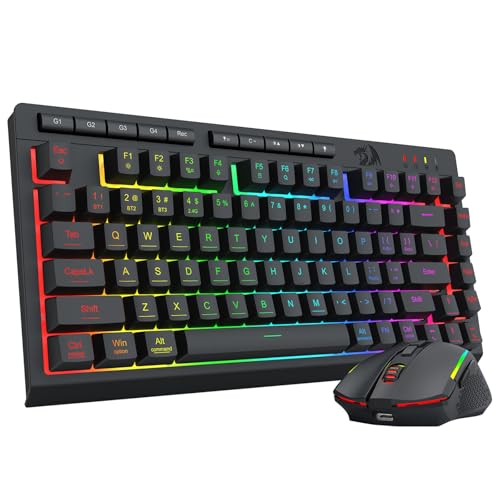
The S155-PRO is the most flexible set here, and it suits a desk that changes shape during the day. Its 75 percent keyboard drops the number pad, which frees space for wide mouse sweeps and fits small desks that a full-size board crowds. The set connects three ways, through Bluetooth, 2.4G wireless or a wired USB-C cable, so the same keyboard and mouse can move between a desktop and a laptop without re-pairing everything. The listing names a quiet, rechargeable membrane keyboard with macro support and a mouse rated up to 12,800 DPI with software, and it works with both Windows and Mac.
Specs
- 75 percent portable RGB backlit membrane keyboard
- Three connection modes: Bluetooth, 2.4G wireless and USB-C wired
- Quiet rechargeable keyboard with macro support
- Mouse with up to 12,800 DPI and software support
- RGB backlighting on keyboard and mouse
- Compatible with Windows and Mac
Best for: A small desk, a laptop setup, or anyone who switches the same keyboard and mouse between two computers.
Watch out for: The compact layout has no number pad, so if you use the numpad for work, strategy games or data entry, a full-size set like the S101-3 PRO fits better.
Which One Fits Your Situation
You Are Building Your First Gaming PC
Pick the Redragon S101-3 PRO. A first setup needs a keyboard and mouse that cover everything without a second purchase, and this set brings a full-size board, a wrist rest, macro keys and a mouse that adjusts from 800 to 7,200 DPI. The software saves your settings to the hardware, so the set keeps working the way you set it up even if you reinstall Windows or move it to another machine.
You Play Fast Shooters and Want the Mouse to Keep Up
Pick the Redragon Updated S107. Its mouse lists up to 10,000 DPI with a 1K Hz polling rate, and the keyboard backs it up with 25-key anti-ghosting for the movement and ability combinations that shooters demand. It is wired, so there is no battery to run down mid-match and no wireless delay to think about.
Your Desk Has No Room for Cables
Pick the RedThunder K10 Wireless. One shared receiver covers the keyboard and mouse, and the rechargeable batteries mean no cable runs between your hands and the PC at all. The keyboard and mouse sleep when idle and wake on use, which stretches the charge across several sessions without you managing it.
You Share a Room and Play Late at Night
Pick the MSI FORGE GK110 Combo. Its membrane keys are built for quiet strokes, and the volume wheel lets you turn the sound down without tabbing out of a game. The 26-key anti-ghosting and 12,800 DPI mouse keep it a real gaming set rather than a quiet office set with lights added on.
Common Mistakes
- Buying a separate keyboard and mouse when a combo set already matches them for look, lighting and software, and leaves a spare USB port free.
- Choosing the highest DPI number on the box instead of checking whether the mouse shape and weight suit your hand for long sessions.
- Picking a full-size keyboard for a small desk, then having no room left for the wide mouse movements that shooters need.
- Ignoring anti-ghosting and discovering mid-game that the keyboard drops keys when you press movement and ability keys together.
- Assuming a wireless set works with every device, without checking whether the listing names your operating system or needs a USB-C adapter.
Frequently Asked Questions
Is a keyboard and mouse combo good enough for gaming?
Yes, for most players a combo set covers everything that matters: anti-ghosting for key combinations, adjustable DPI for aiming, and RGB lighting that matches across both devices. The sets in this guide list 25 or 26-key anti-ghosting and mice from 3,200 to 12,800 DPI, which suits casual and competitive play alike. Separate peripherals only make sense for mechanical switches or ultra-light mice.
Should I buy a wired or wireless gaming keyboard and mouse combo?
Buy wired if your desk is fixed and you want zero charging and zero pairing, since a wired set works the moment it is plugged in. Buy wireless if you move the keyboard around or play away from the PC. The RedThunder K10 runs both devices from one receiver, and the Redragon S155-PRO adds Bluetooth and a wired USB-C mode, so you can switch between a desktop and a laptop.
What DPI should I look for in a gaming mouse?
Look for a mouse with a DPI button and a range that covers your style rather than the biggest number on the box. The sets here range from 3,200 DPI on the RedThunder K10 to 12,800 DPI on the FORGE GK110 and S155-PRO, and most players settle in the middle. A mouse with several DPI presets lets you switch between precise aiming and fast movement without opening software.
Do I need software for a gaming keyboard and mouse combo?
Not to start playing, since every set here is plug-and-play, but software unlocks the features that make a combo set worth owning. The Redragon sets include software for macros, DPI levels and lighting, and the S101-3 PRO saves those settings to the hardware. If you only want backlighting and a DPI button, you can skip the software entirely and use the keyboard shortcuts instead.
Related guides
More from Amazon
Programs that pair well with the guide above. Offers and eligibility are set by Amazon and may change.
Free shipping on eligible items, Prime Video and more. Eligible new members can start with a free trial.
Start a Prime free trialAd-free music streaming. Eligible new subscribers can start with a free trial.
Try Music Unlimited freeA Prime membership for ages 18-24 with a trial period. Eligibility is set by Amazon.
See Prime for Young AdultsAudiobooks and podcasts to listen to on the go. Eligible new members can start with a free trial.
Try Audible freeAs an Amazon Associate we earn from qualifying purchases.








