A cordless router earns its place by deciding how airtime gets shared when a console pulls a huge patch, a PC sits in a ranked match, and two TVs stream at once. The real choice is not raw speed on a box; it is whether your bands, backhaul and wired ports keep those jobs from colliding. One strong router suits an open floor plan, while walls and extra storeys push you toward mesh nodes placed where people actually play.
This guide is for PC gamers replacing an ageing router, households whose streams collide with game traffic, and anyone networking a new desk setup. Every pick is a current Amazon listing, selected from the Wi-Fi standard, band layout, port speeds and coverage figures printed on its own product page, then matched to the kind of home it genuinely serves.
Top 3 picks at a glance

Quick Picks
As an Amazon Associate we earn from qualifying purchases
| Product | Best for | Key spec from title |
|---|---|---|
| NETGEAR Nighthawk RS700S | Multi-gig plans and Wi-Fi 7 devices | Tri-band WiFi 7, up to 19 Gbps |
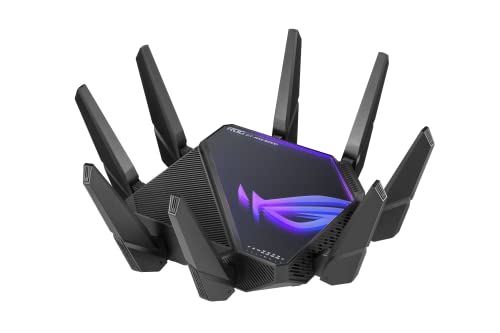
| ASUS ROG Rapture GT-AXE16000 | Gaming dens with a wired backbone | Quad-band WiFi 6E, dual 10G ports |
| ASUS RT-AX86U Pro | Single-router gaming on Wi-Fi 6 | AX5700 dual-band, 2.5G port |
| TP-Link Deco XE75 (3-pack) | Larger homes fighting dead zones | AXE5400 mesh, up to 7,200 sq ft |
How to Choose
Start with the Wi-Fi standard and band layout
Wi-Fi 6 splits traffic across 2.4 GHz and 5 GHz, Wi-Fi 6E adds a 6 GHz band that only newer devices can use, and Wi-Fi 7 widens channels further for the latest phones and laptops. More bands help only when your hardware can join them: a 6 GHz radio sits idle if every client in the house predates it. Check the standard printed on your main devices first, then pick a router whose bands they can actually use, instead of chasing the newest label on the shelf.
Decide between one router and a mesh system
A single router placed centrally covers most apartments and smaller houses, and it keeps wired gaming simple because every port sits in one box. Mesh systems trade that simplicity for reach: extra nodes relay traffic room to room, which suits long, split-level or thick-walled homes where one unit leaves the far bedroom stranded. Dedicated backhaul matters here. When nodes share the same band for relaying and for clients, each hop eats capacity; a separate backhaul band keeps the relay from competing with your games.
Match the wired ports to your internet plan
Wireless figures grab attention, yet the Ethernet ports decide what a wired gaming PC can actually pull. A gigabit WAN port caps any faster fibre plan at the wall, no matter what the wireless headline claims. Look for a 2.5 Gbps or 10 Gbps WAN port when your plan runs past gigabit, and count the LAN ports against what you want plugged in: PC, console, a small switch, network storage. Link aggregation on some models pairs two ports for one very fast wired device.
Check security and controls before they surprise you
Router security suites differ sharply in what stays switched on after setup. Some brands build network protection and parental controls into the firmware permanently, while others place the deeper features behind an ongoing subscription, so read the listing wording carefully before assuming a feature is yours for good. Gamers should also confirm the controls they rely on exist: a dedicated gaming port or traffic prioritisation, port forwarding for hosting, and a VPN option if the household shares one connection across work and play.
The 4 Best Options
NETGEAR Nighthawk RS700S

This is the forward-looking pick for homes that already own Wi-Fi 7 phones and laptops and sit on a multi-gig fibre plan. Its tri-band Wi-Fi 7 layout gives demanding devices a high-speed band of their own, and the listing rates the 12-stream design for up to 3,500 square feet and 200 devices, which suits a busy single-unit setup. Setup and day-to-day control run through the Nighthawk app, including guest networks and pausing individual devices from the sofa.
Specs
- WiFi 7 (802.11be) tri-band across 2.4 GHz, 5 GHz and 6 GHz
- Combined wireless speeds up to 19 Gbps
- 12-stream design, coverage up to 3,500 sq ft
- Supports up to 200 devices with MU-MIMO and OFDMA
- Managed through the Nighthawk app on iOS and Android
- Model RS700S-100NAS
Best for: Homes on multi-gig fibre with Wi-Fi 7 devices arriving now.
Watch out for: If your modem is a combined gateway unit, the listing notes it may need bridge mode to avoid two networks fighting.
ASIN: B0C9JQLDCG
ASUS ROG Rapture GT-AXE16000
Built for a gaming den where the router doubles as the wired backbone, this quad-band Wi-Fi 6E flagship pairs its wireless with dual 10G ports and a 2.5G WAN connection, so a gaming PC, console and network storage can all stay wired at full pace. The fourth band gives AiMesh nodes or busy clients extra room, and triple-level game acceleration prioritises packets from device to game server. A 2.0 GHz quad-core processor keeps those features running when the house is busy.
Specs
- WiFi 6E (802.11ax) quad-band with the 6 GHz band
- Combined wireless speeds up to 16,000 Mbps
- Dual 10G ports and a 2.5G WAN port, with dual WAN support
- 2.0 GHz quad-core 64-bit processor
- Triple-level game acceleration and VPN Fusion
- AiMesh compatible, with AiProtection and Instant Guard
Best for: Gaming rooms built around wired PCs, consoles and storage.
Watch out for: Four bands only pay off under real contention; confirm your key devices can use the 6 GHz band before choosing it over a dual-band model.
ASIN: B09Z792WWF
ASUS RT-AX86U Pro
For most gaming homes still on Wi-Fi 6 devices, this dual-band router concentrates its budget where it counts: a fast 5 GHz band with 160MHz channels, a 2.5 Gbps port for a wired rig, and a dedicated gaming port that prioritises whichever machine is plugged into it. Mobile Game Mode in the ASUS app trims lag for phone players, and AiProtection Pro security runs without a subscription. It also joins an AiMesh network later if the home outgrows one unit.
Specs
- WiFi 6 (802.11ax) dual-band AX5700, up to 5,700 Mbps
- 160MHz channels for wider 5 GHz throughput
- 2.5 Gbps port plus aggregated 2 Gbps WAN connections
- Dedicated gaming port and Mobile Game Mode
- AiProtection Pro powered by Trend Micro, subscription-free
- AiMesh compatible, with Instant Guard VPN
Best for: Apartments and smaller homes gaming on Wi-Fi 6 today.
Watch out for: There is no 6 GHz band, so Wi-Fi 6E and Wi-Fi 7 clients fall back to 5 GHz; plan the upgrade around your device list.
ASIN: B0BQ417K47
TP-Link Deco XE75 (3-pack)

When the problem is geography rather than speed, three mesh nodes spread Wi-Fi 6E across up to 7,200 square feet and erase the dead zone in the back bedroom or upstairs office. The 6 GHz band doubles as a dedicated backhaul between nodes by default, keeping relay traffic away from your games, and the AI-driven mesh steers devices between nodes as you move. Each unit also works alone, so a smaller home can start with one and grow into the set.
Specs
- WiFi 6E tri-band AXE5400 mesh, up to 5,400 Mbps combined
- Band speeds of 2,402 Mbps on 6 GHz, 2,402 Mbps on 5 GHz and 574 Mbps on 2.4 GHz
- Coverage up to 7,200 sq ft with three units, for up to 200 devices
- 6 GHz band works as backhaul or as a client network
- Gigabit Ethernet ports rated 10/100/1000 Mbps
- AI-Driven Mesh with seamless roaming, set up in the Deco app
Best for: Two- and three-storey homes with rooms a single router cannot reach.
Watch out for: The listing’s HomeShield wording puts its more advanced security tools in a paid tier, so confirm which controls are included before relying on them.
ASIN: B0B88T5RDY
Which One Fits Your Situation
A gaming room at the far end of the house
Distance and walls punish any single router, however strong its radios look on paper. Choose the Deco XE75 set and place one node in the gaming room itself, so the PC sits metres from its access point while the 6 GHz backhaul carries traffic back to the main unit. Wiring the PC into that node’s Ethernet port turns a weak wireless hop into a short, stable one.
A busy family home on a gigabit fibre plan
When streams, calls and downloads run alongside evening matches, band separation matters more than headline speed. The GT-AXE16000 spreads that load across four bands and keeps the gaming PC wired through its faster ports. Households with fewer simultaneous users can step down to the RT-AX86U Pro, which still prioritises the gaming machine without paying for radios nobody will use.
A new multi-gig plan and recent flagship devices
If your provider just upgraded the line past a gigabit and your phones and laptops already speak Wi-Fi 7, the RS700S is the pick that uses both. Its tri-band Wi-Fi 7 and 19 Gbps headline leave headroom for the next few device generations, and one unit covers a typical single-storey home without adding mesh hardware to manage.
A compact flat with one serious gaming setup
Small spaces reward one well-placed router and a short cable run. The RT-AX86U Pro covers a flat easily, gives the gaming PC a prioritised port, and leaves AiMesh expansion open if you move somewhere larger. Spend the remaining budget on the wired connection to the desk instead of extra nodes that would sit within sight of each other.
Common Mistakes
- Choosing a router by its combined Mbps figure, which adds every band together, instead of checking the speed of the band your devices will actually join.
- Buying Wi-Fi 7 or a 6 GHz model when no phone, laptop or console in the house can connect to those bands yet.
- Hiding a single router in a corner cupboard or behind the TV, then blaming the model when distant rooms drop out.
- Pairing a multi-gig internet plan with a router whose WAN port is gigabit, capping the whole home at the doorway.
- Leaving the provider gateway’s own Wi-Fi switched on alongside the new router, creating two competing networks and double address translation.
Frequently Asked Questions
Do I need Wi-Fi 7 for online gaming?
Not yet for most players. Games send small, steady streams of data, so latency and a clean signal matter far more than peak throughput. Wi-Fi 7 helps crowded homes by moving big downloads and streams onto wider, faster bands, which indirectly keeps queues short for the gaming device sharing the same router.
Is a mesh system slower than one powerful router?
A mesh hop adds a small delay, and systems that relay on the same band as clients lose capacity at each jump. A dedicated backhaul band, like the Deco XE75’s 6 GHz link, removes most of that penalty. For one wired gaming PC, a single router with the PC plugged in directly remains the simplest fast option.
Can one of these routers replace my modem?
No. Every pick here is a router only, and each connects by Ethernet to the modem or gateway your provider supplies. If that gateway also broadcasts its own network, put it in bridge mode or switch its wireless off, so your new router handles the home’s traffic alone and settings like port forwarding behave predictably.
What does the 6 GHz band actually change?
It adds a wide, lightly used stretch of spectrum that older devices cannot enter, so Wi-Fi 6E and Wi-Fi 7 clients get cleaner channels and higher speeds at shorter range. Walls weaken it faster than 5 GHz, which is why it shines for same-room gaming and as a mesh backhaul rather than whole-house coverage on its own.
Related guides
More from Amazon
Programs that pair well with the guide above. Offers and eligibility are set by Amazon and may change.
Free shipping on eligible items, Prime Video and more. Eligible new members can start with a free trial.
Start a Prime free trialAd-free music streaming. Eligible new subscribers can start with a free trial.
Try Music Unlimited freeA Prime membership for ages 18-24 with a trial period. Eligibility is set by Amazon.
See Prime for Young AdultsAudiobooks and podcasts to listen to on the go. Eligible new members can start with a free trial.
Try Audible freeAs an Amazon Associate we earn from qualifying purchases.