
A Mac gaming setup needs a keyboard and mouse that speak macOS fluently, because a Windows-layout set puts the wrong legends on the keys and forces the hand to relearn shortcuts. The real decision is how much of the Mac experience the buyer wants built in: a dedicated Mac layout with Command and Option keys in the right places, a mouse that scrolls fast through long inventories, and a connection that switches between a MacBook and an iPad without a dongle hunt. Gaming on a Mac is lighter than on Windows, yet the peripherals still have to keep up with fast sessions.
This guide is for MacBook and iMac owners who play games and work on the same desk, for players who switch between a Mac and an iPad, and for anyone replacing an Apple set with something more comfortable. The four combos below were chosen from the names and specifications on their Amazon product pages, and every one lists macOS compatibility, so no Windows-only set slipped into the list.
Top 3 picks at a glance


Quick Picks
As an Amazon Associate we earn from qualifying purchases.
| Product | Best for | Key spec from title |
|---|---|---|
| Logitech MX Keys S Combo for Mac | Mac power users who want the best typing and scrolling | MX Master 3S for Mac, 8K DPI sensor |
| Logitech MX Keys S Combo | Players who want the flagship combo with a receiver included | MX Keys S and MX Master 3S, Logi Bolt receiver |
| Logitech MK850 Performance | A Mac desk that needs a full-size ergonomic set | Full-size keyboard, 8-button mouse, multi-device |
| Arteck Universal Multi-Device | A Mac and iPad desk on a tighter budget | Bluetooth set for macOS, iOS and Windows |
How to Choose
Mac key layout
A Mac layout is the first thing to check, because the Command and Option keys sit where Alt and Windows keys sit on a PC board. The MX Keys S Combo for Mac ships with a dedicated Mac key layout, so shortcuts feel native. The standard MX Keys S Combo lists Mac among its supported systems, yet its legends are the multi-OS kind, so the Mac keys share legends with Windows keys. The MK850 lists macOS alongside Windows and ChromeOS, and the Arteck set prints system-specific function keys for each operating system. Favour Mac-first legends when the Mac is the main machine, and accept shared legends only when the set also serves a Windows PC.
Mouse sensor and scroll wheel
The mouse in a combo decides how gaming feels, because a slow sensor and a notched wheel make inventory and camera control clumsy. The MX Master 3S inside both MX Keys S combos uses an 8K DPI Darkfield sensor that tracks on glass, and its MagSpeed wheel scrolls 1,000 lines per second. The MK850 mouse is simpler, with an 8-button layout and a standard wheel that suits slower-paced games and daily work. The Arteck mouse adds adjustable DPI and seven buttons, which is enough for casual games. Match the mouse to the games: fast scrolling and a high-DPI sensor matter for action games, while a quiet wheel matters more late at night.
Connection and multi-device switching
A Mac desk often holds a MacBook, an iPad and a Windows laptop, so the combo has to switch between them without re-pairing. Both MX Keys S combos pair with up to three devices over Bluetooth Low Energy and switch with a button press, and the standard combo adds a Logi Bolt USB receiver in the box. The MK850 connects over Bluetooth or its 2.4 GHz receiver and switches between three devices. The Arteck set switches between three Bluetooth devices as well. Check whether the receiver is included: the Mac edition supports Logi Bolt yet leaves the adapter out of the box.
Battery and charging
Battery life decides how often the set interrupts a session. The MX Keys S keyboard runs for up to 10 days with its backlight on, or up to 5 months with the backlight off, while the MX Master 3S mouse runs for up to 70 days. The MK850 keyboard runs for up to 36 months on its batteries, and its mouse runs for up to 24 months, with no backlight. The Arteck set charges over USB-C and carries a rechargeable battery in both devices. A backlit keyboard looks better in a dark room, yet it trades months of battery for that glow, so buyers who hate charging should favour the MK850.
The 4 Best Options
Logitech MX Keys S Combo for Mac

The MX Keys S Combo for Mac is the set built specifically for Apple hardware, pairing the MX Keys S for Mac keyboard with the MX Master 3S for Mac mouse and a palm rest. The keyboard’s spherically dished keys give a fast, fluid typing feel, and the smart backlight wakes the moment the hands approach. The mouse’s MagSpeed wheel scrolls 1,000 lines per second, the 8K DPI sensor tracks on glass, and the sculpted shape supports long sessions. It pairs with up to three Macs and iPads over Bluetooth, and Logi Options+ unlocks Mac-specific shortcuts. Buy it when the Mac is the only machine that matters.
Specs
- MX Keys S for Mac keyboard with Mac key layout
- MX Master 3S for Mac mouse with 8K DPI sensor
- MagSpeed wheel scrolls 1,000 lines per second
- Smart backlight with proximity sensor
- Pairs with up to 3 Macs and iPads over Bluetooth
- MX Palm Rest included, Space Gray finish
Best for: Mac power users who want the best typing feel and the fastest scrolling in one set.
Watch out for: The Logi Bolt USB receiver is not included in the box, so Bluetooth is the only connection until one is bought separately.
Logitech MX Keys S Combo
The standard MX Keys S Combo is the same flagship pairing with a multi-OS layout, and it adds the Logi Bolt USB receiver that the Mac edition leaves out. The keyboard’s low-profile keys and smart illumination suit long typing sessions, the MX Master 3S mouse brings the same 8K DPI sensor and MagSpeed wheel, and the palm rest keeps wrists neutral. It connects over Bluetooth or the included receiver, pairs with up to three devices, and works across Windows, macOS, Linux and ChromeOS. This is the better pick when the desk also holds a Windows PC or when a receiver connection is preferred.
Specs
- MX Keys S keyboard with smart backlit keys
- MX Master 3S mouse with 8K DPI sensor
- Logi Bolt USB receiver included
- Pairs with up to 3 devices over Bluetooth or receiver
- USB-C charging
- MX Palm Rest included
Best for: Players who want the flagship combo with a receiver included and multi-OS support.
Watch out for: The key legends are shared between Mac and Windows, so the Mac layout is less native than the Mac edition.
Logitech MK850 Performance
The MK850 Performance is the full-size ergonomic set for a Mac desk that values comfort and battery life over backlighting. Its curved keyboard with a cushioned palm rest keeps wrists comfortable through long sessions, and the full-size mouse carries eight customisable buttons for shortcuts and macros. It connects over Bluetooth or the included 2.4 GHz receiver, switches between three devices, and lists macOS, Windows and ChromeOS in its compatibility. The keyboard runs for up to 36 months and the mouse for up to 24 months, which is the longest battery life in this guide by a wide margin.
Specs
- Full-size ergonomic keyboard with cushioned palm rest
- Full-size mouse with 8 customisable buttons
- Bluetooth and 2.4 GHz receiver, multi-device switching
- Compatible with Windows, macOS and ChromeOS
- Keyboard battery up to 36 months, mouse up to 24 months
- Logitech Flow cross-computer control
Best for: A Mac desk that needs a comfortable full-size set with years of battery life.
Watch out for: There is no backlight, so the keys are hard to read in a dark room, and the mouse sensor is basic beside the MX Master 3S.
Arteck Universal Multi-Device
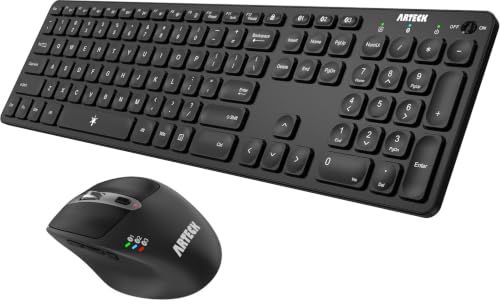
The Arteck Universal Multi-Device set is the affordable way to cover a Mac, an iPad and a Windows machine with one keyboard and mouse. Its full-size Bluetooth keyboard prints system-specific function keys for macOS, iOS, iPadOS, Android and Windows, so the legends match whichever device is active. The seven-button mouse adjusts its DPI for different tasks, and the set switches between three Bluetooth devices with a key press. Both devices charge over USB-C, and the set carries a 24-month warranty. It is the pick for a mixed-device desk where the budget matters.
Specs
- Full-size Bluetooth keyboard with system-specific function keys
- 7-button ergonomic mouse with adjustable DPI
- Compatible with macOS, iOS, iPadOS, Android and Windows
- Switches between 3 Bluetooth devices
- USB-C charging
- 24-month warranty
Best for: A Mac and iPad desk that needs one affordable set for every device.
Watch out for: The keys and mouse feel lighter and less substantial than the Logitech sets, and there is no 2.4 GHz receiver fallback.
Which One Fits Your Situation
A Mac-only desk that wants the best of everything
Pick the Logitech MX Keys S Combo for Mac. Its dedicated Mac layout, Space Gray finish, proximity backlight and 8K DPI mouse are built for Apple hardware, and the MagSpeed wheel clears long inventories in one flick. Buy a Logi Bolt receiver separately only when Bluetooth is not an option.
A desk with a Mac and a Windows PC
Pick the Logitech MX Keys S Combo. It carries the same flagship keyboard and mouse, adds the Logi Bolt receiver in the box, and works across Windows, macOS, Linux and ChromeOS. The multi-OS legends are a fair trade for a set that serves every machine on the desk.
A desk that values comfort and never charging
Pick the Logitech MK850 Performance. Its curved keyboard and cushioned palm rest suit long sessions, the eight-button mouse covers shortcuts, and the batteries run for years rather than weeks. It is the set for players who want to fit the hardware once and forget about it.
A mixed Mac and iPad desk on a budget
Pick the Arteck Universal Multi-Device set. It switches between three Bluetooth devices, prints the right function keys for each system, and charges over USB-C. The lighter build is the trade for a set that costs far less than the Logitech flagships.
Common Mistakes
- Buying a Windows-only combo for a Mac, then discovering the Command key sits in the wrong place and the shortcuts never feel right.
- Assuming a Mac edition includes the USB receiver, then finding Bluetooth is the only connection in the box.
- Choosing a backlit keyboard without checking battery life, then charging it every week instead of every few months.
- Ignoring the mouse sensor in a combo, and ending up with a mouse that cannot keep up with fast camera movement.
- Picking a full-size keyboard for a small desk, then having no room left for the mouse to move.
Frequently Asked Questions
Do I need a Mac-specific keyboard and mouse?
A Mac-specific set matters when the Mac is the main machine, because the Command and Option legends sit in the right places with native shortcuts. A multi-OS set still works, yet its shared legends slow down shortcut use and the layout never feels right. Windows PC owners can accept shared legends, while Mac-only players should buy the Mac edition.
Can these combos handle gaming on a Mac?
Yes, for the games Macs actually run. The MX Master 3S mouse inside the flagship combos tracks at 8,000 DPI and scrolls fast enough for action games, while the low-profile keys respond quickly. These are not esports shells with 8,000 Hz polling, so competitive shooter players should pair a dedicated gaming mouse with the combo keyboard instead.
Is Bluetooth reliable enough for gaming?
Bluetooth Low Energy is stable for casual and strategy games, and the combos here also give a receiver connection where one is included. The standard MX Keys S Combo includes a Logi Bolt receiver for a lower-latency link, while the Mac edition relies on Bluetooth unless a receiver is bought separately. Players who notice input delay should switch to the receiver connection.
How long do the batteries last?
It depends on backlighting. The MX Keys S keyboard runs up to 10 days with the backlight on, or 5 months with it off, and its mouse runs for up to 70 days. The MK850 has no backlight, so its keyboard runs up to 36 months and its mouse up to 24 months. Arteck charges over USB-C, so a short top-up keeps it going.
Related guides
More from Amazon
Programs that pair well with the guide above. Offers and eligibility are set by Amazon and may change.
Free shipping on eligible items, Prime Video and more. Eligible new members can start with a free trial.
Start a Prime free trialAd-free music streaming. Eligible new subscribers can start with a free trial.
Try Music Unlimited freeA Prime membership for ages 18-24 with a trial period. Eligibility is set by Amazon.
See Prime for Young AdultsAudiobooks and podcasts to listen to on the go. Eligible new members can start with a free trial.
Try Audible freeAs an Amazon Associate we earn from qualifying purchases.








