As an Amazon Associate, we earn from qualifying purchases made through links on this page.
Playing PC games from the sofa sounds simple until you try it. A normal keyboard slides off your knees, the mouse has nowhere to run, and a cable stretched across the living room lasts about one session before someone trips over it. Couch gaming needs purpose-built hardware: a keyboard and mouse that work as one unit on your lap, or a lapdesk that turns the sofa into a stable desk, with wireless range that comfortably covers the distance between the couch and a TV-connected PC.
This guide only covers true couch solutions: keyboard-and-mouse combos designed for the living room and lapboard systems built to hold a keyboard and mouse together on your lap. There are three distinct approaches below. Razer’s Turret is a single self-contained combo with a mouse that stores inside the keyboard and a pull-out mouse surface. The Couchmaster CYCON is a lapdesk system that gives your existing keyboard and mouse a proper desk on the sofa. Corsair’s K63 combo pairs a tenkeyless wireless mechanical keyboard with a lapboard that has a built-in mouse pad area and memory foam cushion. Read the buying notes first, because the right choice depends on your TV distance, the games you play, and whether you already own a keyboard and mouse you like.
Top 3 picks at a glance


What to look for in a couch gaming keyboard and mouse
A stable lap platform. The defining feature of couch gear is the surface. Integrated lapboards, retractable mouse mats and cushion-based lapdesks all solve the same problem: giving the mouse a flat, consistent tracking surface and the keyboard a base that does not rock when you lean. A combo without a real mouse surface will frustrate you in any game that needs aim.
Wireless range and connection type. Measure the distance from your sofa to the PC or console. Standard 2.4 GHz gaming wireless is designed for desk distances but generally covers a typical living room; a USB extension cable that brings the receiver closer to the sofa is a cheap fix if you get dropouts. Bluetooth has shorter practical range and higher latency, fine for strategy and menu-driven games, less ideal for shooters. All three picks here use 2.4 GHz as their primary gaming connection.
Keyboard size and switches. Full-size keyboards are awkward on a lap. Tenkeyless and compact boards balance better and leave room for the mouse surface. Mechanical switches, found on the Turret and the K63, give the tactile response PC players expect; the Couchmaster takes whatever keyboard you already own, which is its whole appeal.
Mouse performance. Couch play does not excuse a weak sensor. Look for a proper gaming optical sensor, a shape you can grip when the mouse sits beside your thigh rather than on a desk, and enough buttons for your games. The Turret’s bundled mouse is a genuine gaming mouse with a 16,000 DPI sensor; the K63 lapboard and Couchmaster rely on the mouse you pair with them, so budget your existing mouse’s quality into the decision.
Battery and charging. A couch combo lives away from the desk, so battery life measured in tens of hours and simple USB charging matter. You will charge these at the TV stand or a side table, not at your PC, so standard USB cables and long intervals between charges are worth prioritising.
Games and platforms. Fast shooters are playable from the sofa with a good lapboard, but this setup shines in strategy games, MMOs, RPGs, simulation titles and couch co-op. Check platform support too: the Turret was designed with Xbox One compatibility alongside PC, while the Corsair and Couchmaster are PC-focused.
The picks
Razer Turret Wireless Mechanical Keyboard and Mouse Combo
ASIN: B07QXLC24V — View on Amazon
The Turret is the most purpose-built couch gaming combo available: a mechanical keyboard and gaming mouse designed from the start to live on your lap in front of a TV. The keyboard hides a retractable magnetic mouse mat that slides out to the right, giving the mouse a hard, consistent surface, and the mouse itself docks into the keyboard body for storage and charging. The mouse uses a true gaming optical sensor rated to 16,000 DPI with mechanical switches, and the keyboard’s Razer Green mechanical switches deliver the clicky, tactile feel desktop players expect. A single 2.4 GHz dongle connects both devices, and the combo is rated for long sessions, with the keyboard running up to around 40 hours and the mouse up to around 50 hours depending on lighting and use. It works with PC and was also designed for Xbox One couch play.
Key specs:
- Type: integrated keyboard and mouse combo with retractable mouse mat
- Keyboard: Razer Green mechanical switches, tenkeyless-style layout
- Mouse: gaming optical sensor, up to 16,000 DPI; mechanical switches
- Connection: single 2.4 GHz USB dongle for both devices
- Battery: keyboard up to ~40 hours, mouse up to ~50 hours (manufacturer ratings)
- Extras: mouse stores and charges in the keyboard; magnetic mat keeps the mouse from sliding off
Best for: Living-room players who want one self-contained unit that lives by the sofa, works with a TV PC or Xbox, and needs no desk parts at all.
Limitations: The mouse mat area is compact, so low-sensitivity shooter players who make very large swipes will run out of surface. The mouse is a fixed part of the system, so you cannot swap in your favourite desktop mouse. Battery figures assume lighting is kept modest.
Couchmaster CYCON
ASIN: B00CCHRJ2Q — View on Amazon
The Couchmaster takes the opposite approach: instead of a combo, it is a lapdesk system — a wide board resting on two large side cushions — that turns your existing keyboard and mouse into a couch setup. The board is big enough for a full-size keyboard plus a mouse area to the side, with internal cable routing and pockets in the cushions for the mouse, a drink or the remote. Because the cushions sit on the sofa beside your legs rather than on them, the setup stays comfortable over long sessions and does not press on your lap. It works with wired or wireless peripherals; with a wireless keyboard and mouse there are no cables to the PC at all. For players who already own a mechanical keyboard and a gaming mouse they love, this is the couch upgrade that keeps both in service.
Key specs:
- Type: lapdesk system (board plus two support cushions)
- Compatibility: your own keyboard and mouse, wired or wireless
- Surface: wide board fits full-size keyboard and mouse side by side
- Extras: cushion pockets for mouse and accessories; internal cable management
- Connection: depends on your peripherals; pairs naturally with 2.4 GHz wireless sets
Best for: Players who already own a good keyboard and gaming mouse and simply need a stable, comfortable way to use them from the sofa for long sessions.
Limitations: It is a platform, not a combo: keyboard and mouse are not included, so the total cost depends on what you already own. The full system is bulky to store compared with a single folding combo. Fast competitive shooters remain more demanding on any lap surface than on a desk.
Corsair K63 Wireless Mechanical Keyboard and Lapboard Combo
ASIN: B078233TKB — View on Amazon
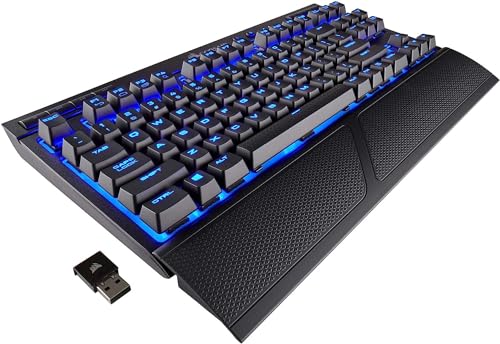
Corsair’s couch combo pairs the K63 Wireless tenkeyless mechanical keyboard with a dedicated lapboard. The keyboard uses Cherry MX Red linear switches, per-key blue backlighting, and three connection modes: low-latency 2.4 GHz wireless, Bluetooth, or wired USB. The lapboard holds the keyboard securely, adds a full-size cloth mouse pad surface to the right, and uses a memory foam cushion underneath so the whole assembly sits comfortably across your legs. Bring your own wireless or wired gaming mouse to complete the setup. It is a genuinely mechanical, genuinely game-capable keyboard rather than a living-room remote-style board, which makes it the pick for players who split time between the desk and the sofa with the same keyboard.
Key specs:
- Type: wireless mechanical keyboard plus lapboard
- Keyboard: K63 Wireless, Cherry MX Red switches, tenkeyless
- Connection: 2.4 GHz wireless, Bluetooth, or USB wired
- Lapboard: built-in cloth mouse pad surface, memory foam cushion
- Battery: up to 15 hours with backlighting, longer with lighting off (manufacturer rating)
- Mouse: not included; pair with your own gaming mouse
Best for: Players who want a real mechanical keyboard for the sofa and a lapboard with a proper mouse surface, and who already own a gaming mouse to pair with it.
Limitations: The mouse is not part of the combo, and the lapboard is shaped for the K63, so other keyboards may not seat as securely. Backlighting shortens battery life considerably. Availability note: this combo is an older product line, so check the listing carefully for the exact configuration before ordering.
Comparison table
| Product | Type | Keyboard | Mouse | Connection | ASIN |
|---|---|---|---|---|---|
| Razer Turret | All-in-one combo | Mechanical (Razer Green) | Included, 16,000 DPI | 2.4 GHz single dongle | B07QXLC24V |
| Couchmaster CYCON | Lapdesk system | Your own | Your own | Depends on your set | B00CCHRJ2Q |
| Corsair K63 Combo | Keyboard + lapboard | Mechanical (Cherry MX Red) | Not included | 2.4 GHz, Bluetooth, wired | B078233TKB |
FAQ
Can you really play shooters from the couch with a lapboard?
Yes, with the right expectations. A rigid lapboard or an integrated mat gives the mouse a consistent surface, and modern 2.4 GHz wireless has no meaningful lag at living-room distances. You will have less mouse room than at a desk, so medium and higher sensitivities work best. For ranked competitive play a desk still wins, but for casual and mid-level play these setups are entirely capable.
How far can the wireless connection reach?
In a typical living room, 2.4 GHz gaming wireless covers the sofa-to-TV distance without trouble. Walls, metal TV stands and USB 3.0 hubs can interfere; if you notice dropouts, move the receiver to a short USB extension cable positioned nearer the sofa. Bluetooth is the weaker option for fast games and is better kept for strategy titles and navigation.
Which games suit couch keyboard and mouse play best?
Strategy and real-time tactics games, MMOs, RPGs, city builders, simulation and management titles, and point-and-click adventures all play naturally from the sofa. Story-driven shooters and action games work well too. The setup is least suited to twitch competitive titles where desk players have a surface-area advantage.
Do I need a special mouse for couch gaming?
Only in the sense that it must track on the surface your setup provides. The Turret includes its mouse and mat as a matched pair. With the Couchmaster or the K63 lapboard, any good gaming mouse works; a wireless model keeps the setup clean, and a shape you can grip firmly helps because the mouse sits at a slightly different angle than on a desk.
What if my PC is in another room?
These combos assume the PC or console is within wireless range in the same room, typically under a TV. If your gaming PC lives elsewhere, you would need a streaming solution to the TV first; the keyboard and mouse then connect to the receiving device, and its wireless range is what matters.
Conclusion
For a single box that solves couch gaming outright, the Razer Turret (B07QXLC24V) is the standout: mechanical keys, a real gaming mouse, a built-in mouse surface and one dongle for both. If you already own peripherals you like, the Couchmaster CYCON (B00CCHRJ2Q) turns them into a comfortable sofa setup with the most generous surface of the three. And players who want a proper mechanical keyboard at the centre of the living room should look at the Corsair K63 combo (B078233TKB), adding their own mouse to its lapboard. Any of the three beats balancing a keyboard on a cushion — which is how most couch setups fail.
Related guides
More from Amazon
Programs that pair well with the guide above. Offers and eligibility are set by Amazon and may change.
Free shipping on eligible items, Prime Video and more. Eligible new members can start with a free trial.
Start a Prime free trialAd-free music streaming. Eligible new subscribers can start with a free trial.
Try Music Unlimited freeA Prime membership for ages 18-24 with a trial period. Eligibility is set by Amazon.
See Prime for Young AdultsAudiobooks and podcasts to listen to on the go. Eligible new members can start with a free trial.
Try Audible freeAs an Amazon Associate we earn from qualifying purchases.