
A loud mouse click is a small sound that causes a real problem. In a shared apartment, a dorm room, or a house where someone sleeps nearby, every click during a late session can wake people up or bleed into a microphone. The decision is not really about finding the quietest mouse on paper. It is about finding one whose clicks stay soft enough for the room you play in while the sensor, buttons, and connection still hold up in the games you actually play.
This guide is for late-night players, streamers who record with a live microphone, and anyone gaming in a shared bedroom or small apartment. The four mice below were picked from the names and specifications on their Amazon listings, keeping only models whose listings describe silent or near-silent clicks, so each recommendation starts from what the manufacturer itself claims about noise.
Top 3 picks at a glance
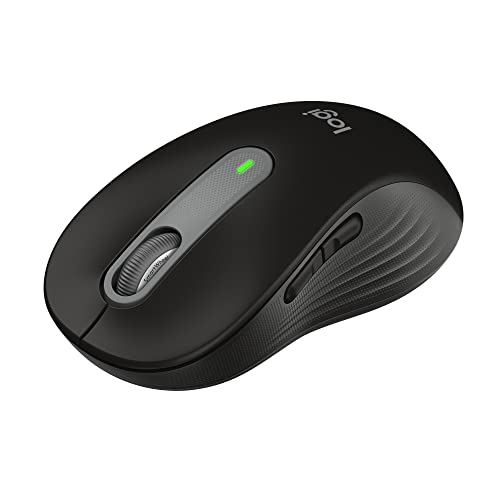

Quick Picks
As an Amazon Associate we earn from qualifying purchases.
| Product | Best for | Key spec from title |
|---|---|---|
| Logitech M330 Silent Plus | Casual late-night play on a tight setup | SilentTouch technology with 1000 DPI optical tracking |
| Logitech Signature M650 | Quiet everyday gaming with extra side buttons | SilentTouch silent clicks with SmartWheel scrolling |
| Razer Pro Click Mini | Portable quiet gaming with programmable buttons | Silent mechanical switches with 12000 DPI optical sensor |
| Logitech G PRO X2 SUPERSTRIKE | Competitive play with near-silent haptic clicks | Haptic Inductive Trigger System with HERO 2 sensor |
How to Choose
Start with how the click is made silent
Not every quiet mouse quiets its clicks the same way, and the method matters more than the marketing word. Some models use softened mechanical switches that keep a familiar click feel with less sound. Others replace the switch entirely, like a haptic system that senses finger movement and simulates the click with a small vibration. A softened switch usually feels closest to a normal gaming mouse, while a haptic system can feel almost silent but takes a few sessions to get used to. Read the listing for the switch description before anything else, because a mouse that only claims a quiet scroll wheel may still click loudly.
Match the sensor to the games you play
A quiet mouse is only useful if it tracks well enough for your games. Casual and single-player titles are forgiving, and a 1000 DPI optical sensor is enough for relaxed play and menu navigation. Faster shooters and competitive titles benefit from a higher ceiling, adjustable sensitivity, and a high polling rate that keeps cursor movement smooth during quick turns. Check the listing for the sensor name and maximum DPI, and be honest about whether you play fast-paced ranked matches or slower games where precision matters less than comfort.
Check the shape and size before the specs
Click noise gets the attention, but hand fit decides whether you can play for hours without strain. A compact travel mouse suits small hands and fingertip grips, while a full-size contoured mouse supports a palm grip and longer sessions. Large hands on a small mouse will cramp quickly, and a heavy mouse will tire a wrist during fast flicks. Compare the listed dimensions and weight with the mouse you use now, and look for a right-handed or ambidextrous shape that matches how you actually hold it.
Do not ignore battery life and connection type
Wireless quiet mice run on very different power setups, from a single AA battery that lasts for months to a rechargeable cell that needs a cable every few days. A mouse that dies mid-match is worse than a slightly louder one, so check the battery claim on the listing and whether it uses disposable or rechargeable power. Also confirm the connection: a 2.4 GHz receiver usually gives the most stable link for gaming, Bluetooth works well for casual play and switching between devices, and a wired option removes charging from the equation entirely.
The 4 Best Options
Logitech M330 Silent Plus

The M330 Silent Plus is the simplest answer to the late-night problem. Its SilentTouch technology is described on the listing as reducing click noise by over 90 percent compared with a standard mouse, while keeping the same click feel, so the main left and right clicks stay soft without changing how the mouse behaves. It is a full-size, right-handed wireless mouse with a 2.4 GHz nano receiver, which makes it easy to set up on a desktop or laptop. The modest sensor and three-button layout suit casual games, strategy titles, and single-player adventures far better than fast shooters, and that is exactly the trade this mouse makes.
Specs
- SilentTouch technology with over 90 percent less click noise per listing
- 1000 DPI optical tracking
- 2.4 GHz wireless connection with USB nano receiver
- Battery life up to 24 months per listing
- Full-size right-handed shape with 3 buttons
Best for: Casual players who want the softest clicks possible in a shared room.
Watch out for: The fixed 1000 DPI sensor and lack of side buttons limit it for fast competitive games.
Logitech Signature M650
The Signature M650 adds useful gaming features to the same quiet-click idea. Its listing highlights SilentTouch silent clicks with 90 percent less click noise, so the primary buttons stay soft during long sessions, and the SmartWheel scroll wheel switches between precise line-by-line scrolling and fast scrolling through long pages. Two customizable side buttons give you room for in-game actions or shortcuts, and the mouse connects by Bluetooth or the included Logi Bolt receiver for use across multiple devices. Built for small to medium hands with a contoured right-handed shape, it suits players who want a quiet mouse that also works well for everyday computing and slower-paced games.
Specs
- SilentTouch technology with 90 percent less click noise per listing
- SmartWheel for line-by-line and fast scrolling
- Bluetooth and Logi Bolt wireless connectivity
- Battery life up to 24 months per listing
- Customizable side buttons
- Designed for small to medium hands
Best for: Players who want quiet clicks plus side buttons for everyday and casual gaming.
Watch out for: The sensor ceiling is modest for high-sensitivity competitive play, and there is no dedicated DPI shift button on top.
Razer Pro Click Mini
The Pro Click Mini is the most portable option here, and the one that feels most like a gaming mouse in a small body. Its listing describes silent mechanical switches rated for 15 million clicks, so the main buttons stay quiet while keeping a tactile mechanical feel. A 12000 DPI optical sensor, HyperSpeed 2.4 GHz wireless, and Bluetooth with support for up to four devices cover both gaming and multi-device use, and seven programmable buttons give you room for macros and shortcuts. The HyperScroll tilt wheel switches between tactile and free-spin modes, and the compact ambidextrous shape slips easily into a bag for gaming on the go.
Specs
- Silent mechanical switches rated for 15 million clicks
- 12000 DPI optical sensor
- Razer HyperSpeed 2.4 GHz wireless and Bluetooth, connects to up to 4 devices
- 7 programmable buttons
- Battery life up to 725 hours on Bluetooth and up to 465 hours on 2.4 GHz per listing
- HyperScroll tilt wheel with tactile and free-spin modes
- 5 on-board memory profiles
Best for: Players who travel or switch devices and want quiet mechanical clicks with real gaming features.
Watch out for: The compact shape can feel cramped for large hands, and it runs on AA batteries rather than a built-in rechargeable cell.
Logitech G PRO X2 SUPERSTRIKE

The SUPERSTRIKE takes a different route to quiet clicks by removing the mechanical switch altogether. Its Haptic Inductive Trigger System tracks finger movement with inductive sensing and simulates the click with haptic feedback, so the main buttons can be set near-silent with no physical switch sound at all. That makes it the strongest option in this guide for competitive late-night play, backed by a HERO 2 sensor with up to 44000 DPI and LIGHTSPEED wireless polling up to 8000 Hz. The click is adjustable, with ten actuation points, five rapid trigger reset values, and six haptic strengths including off, all tuned through G HUB software.
Specs
- Haptic Inductive Trigger System with adjustable click haptics
- HERO 2 sensor with up to 44000 DPI
- LIGHTSPEED wireless with polling up to 8000 Hz
- 61 gram weight per listing
- Battery life up to 90 hours per listing
- 10 actuation points, 5 rapid trigger reset values, 6 haptic strengths including off
- USB-C charging and on-board memory
Best for: Competitive players who want near-silent clicks without giving up esports-grade speed.
Watch out for: The haptic click feels different from a mechanical switch and takes adjustment, and the advanced tuning features require G HUB software.
Which One Fits Your Situation
You play casual games after everyone is asleep
Choose the Logitech M330 Silent Plus. Its SilentTouch clicks are the softest straightforward option in this guide, and the simple three-button layout is all most casual and single-player games need. Set it up with the nano receiver, and the long battery life means you can leave it on the desk for months without thinking about power.
You want quiet clicks for gaming and daily work
Choose the Logitech Signature M650. The silent clicks keep late sessions soft, while the SmartWheel and customizable side buttons make it genuinely useful for work, browsing, and slower-paced games. Multi-device Bluetooth means one mouse can cover a gaming PC and a laptop without swapping receivers, and the contoured shape stays comfortable through long days at the desk.
You travel, switch devices, or have small hands
Choose the Razer Pro Click Mini. The compact ambidextrous body fits small hands and bags easily, the silent mechanical switches keep a familiar tactile feel, and the seven programmable buttons plus multi-device connection make it the most flexible pick here. Check the size against your grip first if your hands are large.
You play ranked shooters late at night
Choose the Logitech G PRO X2 SUPERSTRIKE. The haptic system can be set near-silent while the HERO 2 sensor and high polling rate keep up with fast competitive play. Spend time in G HUB tuning the actuation point and haptic strength before your first ranked session, since the feel is adjustable and personal.
Common Mistakes
- Buying a mouse marketed as quiet for its scroll wheel alone, then discovering the main clicks are still loud.
- Choosing a compact travel mouse for large hands and blaming the clicks when the real problem is cramping.
- Picking a low-DPI office mouse for fast shooters and running out of tracking speed during quick turns.
- Ignoring battery type and finding out mid-session that the mouse needs disposable batteries you do not have.
- Setting a haptic mouse to its strongest feedback and wondering why the clicks feel louder and the battery drains faster.
Frequently Asked Questions
Are silent gaming mice completely silent?
No mouse in this guide is completely silent. Silent switches and haptic systems reduce click noise a great deal compared with standard mechanical switches, but a soft tap or thud can still be heard in a very quiet room. The realistic goal is clicks that stay below the level that wakes someone nearby or shows up clearly on a microphone.
Do quiet clicks make a mouse slower for gaming?
Not by themselves. Click noise and click speed are separate qualities, and a quiet switch can register just as fast as a loud one. What matters for speed is the sensor, polling rate, and switch latency on the listing, so check those specifications rather than judging a mouse by how it sounds.
Can I use a quiet gaming mouse for work as well?
Yes, and most quiet mice are built for exactly that overlap. Models with silent clicks, multi-device Bluetooth, and programmable side buttons work well for office tasks, browsing, and creative software during the day, then switch to gaming at night without changing hardware.
What should I check on the listing before ordering?
Confirm the exact model name, the switch description, and the color or variant tied to the ASIN, since similar models often share a name with different switches. Also check the battery type, the connection options, and whether the listing describes silent clicks for the main buttons rather than only the scroll wheel.
Related guides
More from Amazon
Programs that pair well with the guide above. Offers and eligibility are set by Amazon and may change.
Free shipping on eligible items, Prime Video and more. Eligible new members can start with a free trial.
Start a Prime free trialAd-free music streaming. Eligible new subscribers can start with a free trial.
Try Music Unlimited freeA Prime membership for ages 18-24 with a trial period. Eligibility is set by Amazon.
See Prime for Young AdultsAudiobooks and podcasts to listen to on the go. Eligible new members can start with a free trial.
Try Audible freeAs an Amazon Associate we earn from qualifying purchases.









