“Pink” is not one colour. Razer’s Quartz Pink is a soft pastel, Glorious sells a matte pink and a deeper flamingo shade, and listings that look pink in photos sometimes turn out to be white shells with pink lighting. The real decision is three things at once: the exact shade you want on your desk, a shape that suits your grip, and a sensor tier that does not quietly drop a generation just because the shell changed colour. A pink setup should never mean giving up a proper gaming sensor.
This guide serves four kinds of buyers: competitive players who want a pink build without a performance compromise, ergonomic palm players, setup builders who want a charging dock as part of the look, and limited-edition hunters willing to re-check stock. Every pick below was chosen from the names and specifications on its Amazon product page, so shade, weight and sensor details come from the listing rather than from marketing copy.
Top 3 picks at a glance


Quick Picks
As an Amazon Associate we earn from qualifying purchases
| Product | Best for | Key spec from title |
|---|---|---|
| Razer Viper Ultimate Lightweight Wireless Gaming Mouse & RGB Charging Dock (Quartz Pink) | A dock-centred pink setup with a proven esports shape | Quartz Pink with RGB charging dock included, 20K optical sensor |
| Glorious Model O Wired Gaming Mouse (Matte Pink, Limited Edition) | Fingertip and claw players who want the lightest wired option | 67 g honeycomb shell, PixArt PMW-3360 |
| Glorious Model D PRO Wireless Forge Edition (Flamingo Pink) | Palm-grip players who want wireless freedom in an ergonomic shell | 58 g-class ergonomic wireless, Forge limited edition |
| DAREU A950 Wireless Gaming Mouse with RGB Charging Dock (Pink) | A tri-mode desk mouse that lives on its magnetic dock | Tri-mode wireless with magnetic RGB charging dock, up to 12K DPI |
How to Choose
Check the Colour Field, Not the Photos
A genuine pink shell is a different product from a white or black mouse with pink RGB lighting, and listing photos blur that line constantly. Before anything else, read the colour field on the product page and confirm it names the pink variant, because sellers often reuse one photo set across several colourways. Quartz Pink, matte pink and flamingo are visibly different shades once they sit next to pink keycaps or a pink desk mat, so decide which family your setup already leans toward. If the colour field says only “RGB” or names a different shade, the mouse in the box will not match the photo that sold you.
Do Not Let the Colourway Downgrade the Sensor
Colour editions sometimes sit on older hardware than the black flagship in the same line. Compare the sensor generation, switch type and polling rate of the pink listing against what you would accept in any other colour. A 20K optical sensor with optical switches is a different tier from an entry sensor paired with basic mechanical switches, even when both shells look identical in photos. The picks here span proven esports sensors and a capable mid-tier sensor, and each product section states exactly which one you get, so the shade never hides a specification cut you would not have accepted in black.
Match Weight and Shape to Your Grip
Pink gaming mice in this guide run from a 58 g ergonomic wireless shell to an 88 g dock mouse, and that spread matters more than the colour. Light ambidextrous shells suit fingertip and claw grips and fast, low-sensitivity swipes. A sculpted right-handed shape supports a palm grip through long sessions but locks left-handed players out entirely. Dock mice carry extra weight from their batteries and charging hardware, which some players like for control and others find tiring. Decide your grip first, note the weight you already play well at, and only then filter the pink options by shade.
Decide How You Want to Charge
Wireless pink mice charge three different ways, and the listing decides which one you live with. Two picks here include an RGB charging dock, so the mouse parks on display and tops up between sessions, but only if that exact dock bundle is the listing you order. Another charges over USB-C while you keep playing wired. A dock also claims permanent desk space and needs its contacts aligned to work. Check whether the dock is included or sold as a separate accessory, confirm the connection modes you actually need, and remember that a wired-only pick skips this whole question at the cost of a cable.
The 4 Best Options
Razer Viper Ultimate Lightweight Wireless Gaming Mouse & RGB Charging Dock (Quartz Pink)
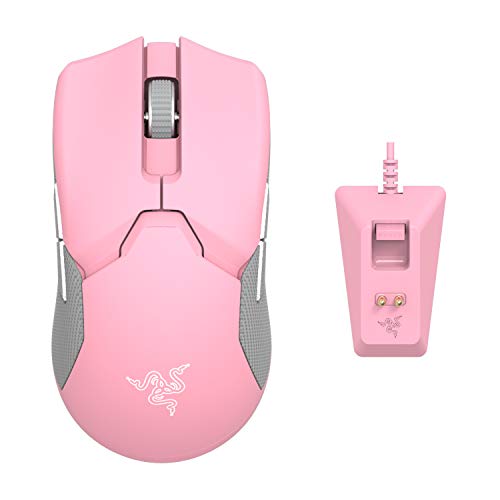
The Viper Ultimate in Quartz Pink is the pick for players who want the pink build to start from a shape competitive players already trust. The ambidextrous shell suits claw and fingertip grips, HyperSpeed wireless keeps it responsive without a cable, and the included RGB charging dock turns the mouse into part of the desk display when you are not playing. Optical switches and a 20K optical sensor mean the colourway costs nothing in performance. Palm players with large hands may find the low profile flat, but for a dock-centred pink setup this is the most complete package here.
Specs
- Focus+ 20K optical sensor
- HyperSpeed wireless connection
- 78 g weight per the listing title
- Optical switches
- Up to 70 hours of battery life
- 8 programmable buttons
- Ambidextrous shape
- RGB charging dock included
Best for: players building a pink setup around a charging dock who still want a proven esports shape and sensor.
Watch out for: the Viper Ultimate is a discontinued-generation model, so listings come and go — re-check this exact Quartz Pink and dock listing before ordering, and note the dock contacts must align for the mouse to charge.
ASIN: B08LYX5H6Y
Glorious Model O Wired Gaming Mouse (Matte Pink, Limited Edition)
The Model O in matte pink is the straightforward competitive pick: a 67 g honeycomb shell, a PixArt PMW-3360 sensor and PTFE feet, with nothing in the design asking you to trade speed for the colour. The ambidextrous shape works for claw and fingertip grips, the flexible Ascended cord drags far less than a standard rubber cable, and the Omron mechanical switches give a familiar, crisp click. Because it is wired, there is no battery to manage and no charging routine at all. Buyers who dislike honeycomb shells or need wireless should look at the other picks, but as a light wired pink mouse this is the benchmark here.
Specs
- 67 g with a matte finish
- PixArt PMW-3360 sensor, 12,000 DPI, 250+ IPS, 50G
- Honeycomb shell
- Omron mechanical switches rated for 20M clicks
- 6 buttons
- Ascended cord, 2 m
- G-Skates PTFE feet
- RGB lighting
- Dimensions 128 x 66 x 37.5 mm
Best for: fingertip and claw players who want the lightest wired pink mouse and zero battery management.
Watch out for: the pink limited editions were sold in limited runs, so make sure the listing selected is the pink one — the black Model O is a different listing — and remember this pick is wired only.
ASIN: B08778RNS8
Glorious Model D PRO Wireless Forge Edition (Flamingo Pink)
The Model D PRO Forge Edition is the ergonomic entry in this set, pairing a sculpted right-handed shell with a 58 g weight that undercuts most wireless palm-grip mice. The Flamingo Pink finish is deeper than the pastel shades elsewhere here, which suits setups built around stronger colour. Lag-free 2.4 GHz wireless handles play, USB-C covers charging and wired use, and the optical switches are rated far beyond the mechanical sets in this guide. Palm and relaxed claw grips get the most from the shape. Fingertip players and left-handed buyers are the exceptions, and the next section points them to better-fitting picks.
Specs
- Dimensions 128 x 67 x 42 mm
- Ergonomic right-handed shape
- Lag-free 2.4 GHz wireless plus wired USB-C
- Approximately 80 hours of battery life
- Glorious optical switches rated for 80M clicks
- 6 programmable buttons
- 100 Percent PTFE G-Skates
- Weight 58 g
- BAMF sensor, 19,000 DPI
Best for: right-handed palm-grip players who want a genuinely light wireless ergonomic mouse in a limited-edition pink.
Watch out for: the ergonomic right-handed shell excludes left-handed buyers, and fingertip grippers are better served by the Model O pick; Forge editions are limited runs, so confirm the Flamingo Pink listing before ordering.
ASIN: B0BK5C7LHD
DAREU A950 Wireless Gaming Mouse with RGB Charging Dock (Pink)

The A950 is the value-minded dock option: tri-mode connectivity, a magnetic RGB charging dock in the box and a 930 mAh battery that, per the maker’s copy, returns up to ten hours of play from a ten-minute dock charge. Bluetooth covers a laptop or tablet, 2.4 GHz covers the gaming PC, and the wired mode covers a flat battery mid-session. At 88 g it is noticeably heavier than the Glorious picks, which palm players who like a planted feel may prefer. Buyers chasing the lightest shell or the highest polling rates should weigh that trade before choosing it over the Model D PRO.
Specs
- Weight 88 g
- Dimensions 123 x 64 x 39 mm
- AIM-WL sensor up to 12,000 DPI, 300 IPS, 35G
- Tri-mode: wired, 2.4 GHz at 1000 Hz, and Bluetooth
- 6 programmable buttons
- KBS II switches
- 930 mAh battery
- Magnetic RGB charging dock included
Best for: a multi-device desk where one pink mouse hops between a gaming PC and a laptop and lives on its dock.
Watch out for: 88 g is heavy next to the 58 to 67 g Glorious picks, and 1000 Hz is the polling ceiling, so competitive players chasing 4K or 8K polling should take a Glorious pick instead; the dock also takes permanent desk space.
ASIN: B0BYDJ9LW5
Which One Fits Your Situation
You Play Competitively and Want the Setup Pink, Not Slower
Start with the Glorious Model O if a cable is acceptable: 67 g, a proven PMW-3360 and PTFE feet ask for no compromises. If you need wireless at a similar weight, the Model D PRO Forge Edition gives you 58 g and lag-free 2.4 GHz, as long as its ergonomic shape fits your grip. The Razer Viper Ultimate is the third route, trading a little weight for optical switches and dock charging.
Your Palm Grip Needs Real Ergonomic Support
The Model D PRO Forge Edition is the only true ergonomic shell here, sculpted for a right-handed palm grip at an unusually low 58 g. The DAREU A950 is the fallback: a conventional shape with more weight behind it, which some palm players find steadier. The ambidextrous Model O and Viper Ultimate sit flatter and suit palm grips less, especially for larger hands.
The Dock Is Part of the Desk Decor
Two picks include an RGB charging dock. The Razer Viper Ultimate pairs the dock with the Quartz Pink pastel and the strongest sensor in this guide, while the DAREU A950 costs the dock in at a heavier 88 g but adds Bluetooth for a second machine. Either way, reserve a fixed spot for the dock and keep its charging contacts clean and aligned.
You Hunt Limited Editions and Accept Re-Checking Stock
Three of these four picks are limited or discontinued runs: the Model O matte pink limited edition, the Model D PRO Forge Edition in Flamingo Pink, and the Quartz Pink Viper Ultimate from a discontinued generation. Confirm the exact colourway on the listing before ordering, expect listings to appear and disappear, and treat the standard-production A950 as the fallback if a limited run sells out.
Common Mistakes
- Buying from the photos alone and receiving a white or black shell with pink lighting, because the colour field named a different variant.
- Assuming every pink edition matches the current black flagship’s sensor, when some colourways sit on an older generation.
- Ordering a dock bundle listing that turns out to be the mouse-only version, then paying separately for the dock.
- Picking an ergonomic right-handed shell for a left-handed player, or a flat ambidextrous shell for a committed palm grip.
- Treating a limited-edition listing as permanently in stock and waiting until the colourway is gone.
Frequently Asked Questions
Is a pink gaming mouse worse than the black version?
Not by colour alone. What matters is whether the pink listing carries the same sensor, switches and polling rate as the standard version. The Razer and Glorious picks here keep proven gaming hardware under the pink shell, while the DAREU runs a mid-tier sensor. Always compare the specification list of the exact colourway before assuming it matches the flagship.
Which pink shade should I choose for my setup?
Match the shade family first. Quartz Pink is a pale pastel, the Model O’s matte pink sits in the middle, and Flamingo Pink is the deepest of the three. Put the mouse next to your keycaps and desk mat in your mind: pastel peripherals clash with saturated ones. When in doubt, the colour field on the listing, not the photo, is the shade you will receive.
Are charging docks worth it for a gaming mouse?
A dock removes the charging cable routine and keeps the mouse parked in a fixed, visible spot, which suits setup-focused builds. The trade is desk space, contact alignment and extra weight in the mouse itself. If you play at one desk and like the display effect, the Viper Ultimate or A950 bundles make sense. Travelling players are better served by USB-C charging.
Can I use one of these mice left-handed?
Two of the four picks are ambidextrous: the Razer Viper Ultimate and the Glorious Model O, both with symmetrical shells suited to either hand. The Model D PRO is a right-handed ergonomic shell and cannot be mirrored. The DAREU A950 uses a conventional right-handed shape as well, so left-handed players should stay with the two ambidextrous options.
Related guides
More from Amazon
Programs that pair well with the guide above. Offers and eligibility are set by Amazon and may change.
Free shipping on eligible items, Prime Video and more. Eligible new members can start with a free trial.
Start a Prime free trialAd-free music streaming. Eligible new subscribers can start with a free trial.
Try Music Unlimited freeA Prime membership for ages 18-24 with a trial period. Eligibility is set by Amazon.
See Prime for Young AdultsAudiobooks and podcasts to listen to on the go. Eligible new members can start with a free trial.
Try Audible freeAs an Amazon Associate we earn from qualifying purchases.