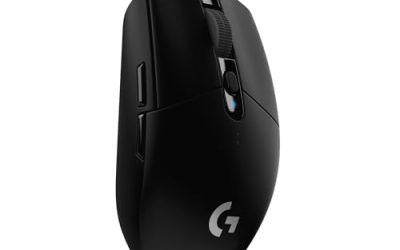
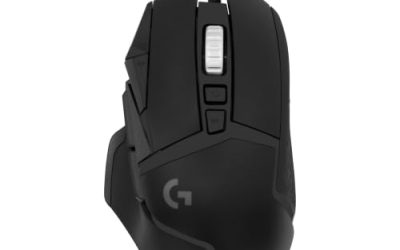
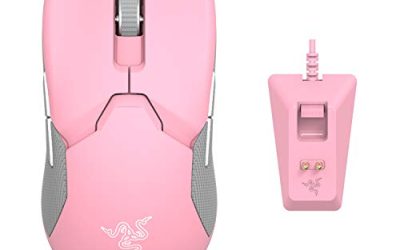
Finding the best gaming mouse for MacBook Pro use means looking past the usual Windows-first gaming checklist. A MacBook Pro has USB-C ports and runs macOS, so the mouse needs the right connection, the right sensor, and software that works on a Mac. This guide focuses on mice with macOS support stated in their Amazon listings, Bluetooth or USB-C charging, and specifications taken from manufacturer and listing text. The picks cover different hands and play styles: a full-size precision mouse, a dedicated wireless gaming mouse, a compact travel mouse, and a vertical ergonomic mouse.
Disclosure: As an Amazon Associate, we earn from qualifying purchases.
Our Top Picks
 Razer Basilisk V3 X HyperSpeed Customizable Wireless GamingStandard5.12 x 2.96 x 1.67 inches0.2 poundsCheck on Amazon
Top 3 picks at a glance

How to Choose a Gaming Mouse for a MacBook Pro
Begin with macOS compatibility, not only DPI. Bluetooth is the simplest path on a MacBook Pro, because it uses no port at all. A mouse that pairs over Bluetooth Low Energy can connect directly, switch between devices, and keep the USB-C ports free for charging, a monitor, or an external drive. Some gaming mice use a 2.4 GHz wireless dongle instead of, or in addition to, Bluetooth. That dongle often uses a USB-A connector, while current MacBook Pro models use USB-C ports, so check the dongle type and plan for a USB-C adapter or hub if the mouse will be used in its low-latency mode. A mouse with both Bluetooth and a 2.4 GHz mode gives more flexibility: Bluetooth for travel, and the dongle mode for gaming at a desk. A mouse that charges over USB-C can share the same cable type as a MacBook Pro charger, while a mouse that uses a replaceable AA battery needs no charging cable.
DPI describes sensitivity, not quality on its own. A higher maximum DPI lets the cursor cover a large external display with a small hand movement. The useful range is usually far below the maximum figure, so the sensor type, the DPI adjustment steps, and the surface tracking matter as much as the headline number. Several mice in this guide use a sensor rated for tracking on glass and other smooth surfaces. Polling rate is the other number that shapes responsiveness: a higher polling rate means the mouse reports its position more often. Gaming-focused mice in this guide list a 1,000 Hz polling rate. For casual and story-driven games, a lower polling rate is often unnoticeable. For competitive play, a gaming-focused sensor and a higher polling rate are a better match.
Shape, size, grip, and weight deserve as much attention as the sensor. A full-size sculpted mouse supports the palm and suits a palm grip at a desk. A compact mouse suits smaller hands and travel. A vertical mouse holds the hand in a handshake position, which some people prefer for long sessions. The listings in this guide give weights from 99 grams to 141 grams. Count the programmable controls, and check whether the extra buttons sit where the thumb and fingers can reach them. A wheel that can switch between precise stepped scrolling and fast free-spinning scrolling helps with long documents and inventory lists. Logitech mice in this guide use Logi Options+ on macOS for button assignment, DPI adjustment, and Flow. Razer mice use Razer software for deeper customization, so check current macOS software support before buying if remapping buttons or lighting is a priority. Battery life is a manufacturer rating, and Bluetooth mode usually lasts longer than a 2.4 GHz dongle mode.
Comparison Table
| Product | Key specs | Best for |
|---|---|---|
| Logitech MX Master 3S for Mac | 8,000 DPI Darkfield sensor, Bluetooth, USB-C, rechargeable battery rated up to 70 days, 141 g, MagSpeed scroll wheel | Full-size precision and long desk sessions |
| Razer Basilisk V3 X HyperSpeed | 18,000 DPI 5G Advanced optical sensor, HyperSpeed Wireless and Bluetooth, 1,000 Hz polling, 9 programmable controls, AA battery | Dedicated wireless gaming with fast aim |
| Logitech MX Anywhere 3S for Mac | 8,000 DPI Darkfield sensor, Bluetooth Low Energy, USB-C, rechargeable battery rated up to 70 days, 99 g | Travel and small desks |
| Logitech Lift for Mac | 4,000 DPI adjustable sensor, Bluetooth, 57-degree vertical shape, 4 customizable buttons, 1 AA battery rated up to 24 months | Comfort-first play and long work sessions |
1. Logitech MX Master 3S for Mac
ASIN: B09HMV6K1W
View on Amazon: https://www.amazon.com/dp/B09HMV6K1W
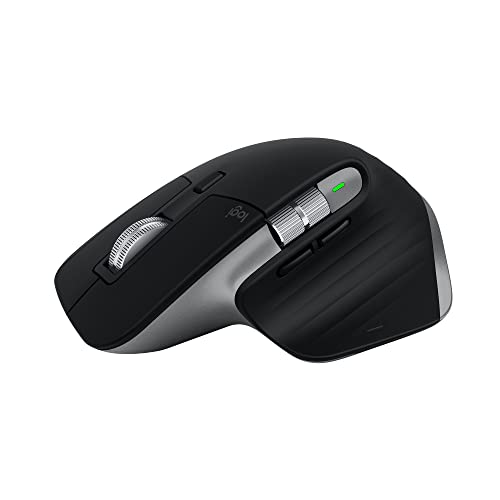
The Logitech MX Master 3S for Mac is the full-size pick in this guide, and the mouse to consider first for a MacBook Pro that spends most of its time at a desk. The Mac edition is finished in Space Grey and is optimized for macOS, with iPadOS compatibility also listed. It pairs over Bluetooth, charges over USB-C, and is designed for a palm grip with a sculpted shape, a thumb wheel, and buttons that can be assigned through Logi Options+ on macOS. The sensor is an 8,000 DPI Darkfield sensor that tracks on virtually any surface, including glass with a minimum thickness of 4 mm. DPI is adjustable from 200 to 8,000 DPI in steps of 50 DPI through Logi Options+. The MagSpeed scroll wheel uses an electromagnetic mechanism to switch between precise stepped scrolling and fast free-spinning scrolling, and the listing describes scrolling up to 1,000 lines per second in hyper-fast mode.
Key specifications
- Sensor: Darkfield high-precision optical sensor, 200 to 8,000 DPI
- Connectivity: Bluetooth Low Energy; compatible with Logi Bolt USB receiver, receiver not included with the Mac edition
- Charging: USB-C, USB-C to USB-C cable included
- Battery: Rechargeable Li-Po, 500 mAh, rated up to 70 days on a full charge, with up to 3 hours of use from a 1-minute quick charge
- Buttons: 7 buttons, plus scroll wheel, thumb wheel, and gesture button; Clicks: Quiet Clicks
- Dimensions: 124.9 x 84.3 x 51 mm; Weight: 141 g
- System requirements: macOS 10.15 or later, iPadOS 14 or later
- Software: Logi Options+, for button assignment, DPI adjustment, Flow, and app-specific customizations; Multi-device: up to 3 devices, with Easy-Switch
For MacBook Pro gaming, the MX Master 3S for Mac suits story-driven games, strategy games, simulation games, and casual play where precision, comfort, and a quiet click matter more than a high polling rate. The main trade-off is that this is a productivity-first mouse, not a dedicated esports mouse, so competitive players may prefer a mouse with a 1,000 Hz polling rate and a lighter body. Check the exact variant in the listing before buying: Space Grey, model number 910-006569, ASIN B09HMV6K1W.
2. Razer Basilisk V3 X HyperSpeed
ASIN: B0BXBC26X8
View on Amazon: https://www.amazon.com/dp/B0BXBC26X8
The Razer Basilisk V3 X HyperSpeed is the dedicated gaming pick in this guide, and the mouse to consider first for fast-paced play on a MacBook Pro. It uses the Razer 5G Advanced 18K optical sensor, with a maximum sensitivity of 18,000 DPI, a maximum speed of 450 IPS, and a maximum acceleration of 40 G. That sensor range, combined with a 1,000 Hz polling rate, gives the responsiveness that competitive and action games reward. Dual-mode wireless is the other core feature. Razer HyperSpeed Wireless uses a 2.4 GHz dongle for low-latency gaming, while Bluetooth mode extends battery life and connects directly to a MacBook Pro without a dongle. A button on the underside switches between modes. The shape is right-handed and ergonomic, with a thumb rest and a multi-function trigger. The listing describes 9 programmable controls, Razer Chroma RGB lighting, and Razer Mechanical Switches Gen-2, rated for up to 60 million clicks.
Key specifications
- Sensor: Razer 5G Advanced 18K optical sensor, maximum sensitivity 18,000 DPI
- Maximum speed: 450 IPS; Maximum acceleration: 40 G; Polling rate: 1,000 Hz
- Connectivity: Razer HyperSpeed Wireless, 2.4 GHz, and Bluetooth
- Buttons: 9 programmable controls, including multi-function trigger; Switches: Razer Mechanical Switches Gen-2, rated for up to 60 million clicks
- Lighting: Razer Chroma RGB
- Battery: 1 AA battery, rated up to 285 hours on HyperSpeed Wireless and up to 535 hours on Bluetooth
- Dimensions: 130.1 x 75.1 x 42.5 mm; Weight: 110 g, with battery
- Operating system: Windows and macOS listed on the Amazon listing, with macOS 10.15 Catalina listed as a minimum in the listing details
- Form factor: Right-handed ergonomic, with thumb rest
For MacBook Pro gaming, the Basilisk V3 X HyperSpeed suits shooters, action games, and any game where fast aim, rapid clicks, and a high polling rate matter. The main trade-off is the dongle. The HyperSpeed dongle uses a USB-A connector, so a MacBook Pro with only USB-C ports needs a USB-C adapter or hub to use HyperSpeed mode. Bluetooth mode avoids that issue, but it is better suited to casual play than to competitive sessions. Full button remapping and lighting customization also depend on Razer software, so a Mac user who wants deep customization should check current macOS software support for this model before buying. Check the exact variant in the listing before buying: Classic Black, model number RZ01-04870100-R3U1, ASIN B0BXBC26X8, and confirm the listing describes the new wireless mouse, not a renewed variant.
3. Logitech MX Anywhere 3S for Mac
ASIN: B0CVFJ1YSX
View on Amazon: https://www.amazon.com/dp/B0CVFJ1YSX
The Logitech MX Anywhere 3S for Mac is the travel pick in this guide, and the mouse to consider first for a MacBook Pro that moves between home, office, cafe, and travel. It keeps the same 8,000 DPI Darkfield sensor as its larger sibling, but in a compact body that weighs 99 grams and measures 100.5 x 65 x 34.4 mm. That size suits smaller hands and a fingertip or claw grip. The Mac edition is designed for macOS and iPadOS, with Space Gray and Pale Gray finishes intended to complement Apple hardware. It pairs over Bluetooth Low Energy with up to three devices, and Logi Options+ works on macOS, so DPI, button assignments, and Flow cross-computer control can be set up on a Mac. The MagSpeed scroll wheel switches between precise stepped scrolling and fast free-spinning scrolling, and Quiet Clicks give a softer click that helps in quiet rooms and shared spaces.
Key specifications
- Sensor: Darkfield high-precision optical sensor, 200 to 8,000 DPI, tracking on virtually any surface, including glass
- Connectivity: Bluetooth Low Energy; compatible with Logi Bolt USB receiver, receiver sold separately for this Mac edition
- Charging: USB-C, USB-C to USB-C cable included
- Battery: Rechargeable Li-Po, 500 mAh, rated up to 70 days on a full charge, with up to 3 hours of use from a 1-minute quick charge
- Buttons: 6 buttons, including left and right click, back and forward, wheel mode-shift, and middle click; Clicks: Quiet Clicks
- Dimensions: 100.5 x 65 x 34.4 mm; Weight: 99 g
- System requirements: macOS 10.15 or later, iPadOS 14 or later
- Software: Logi Options+, for DPI adjustment, button assignment, and Flow; Multi-device: up to 3 devices, with Easy-Switch
For MacBook Pro gaming, the MX Anywhere 3S for Mac suits portable play, strategy games, casual games, and games that use a compact mouse well. The light weight makes it easy to lift and reposition, and the compact shape suits a claw grip for fast clicks. The main trade-off is size. A compact mouse gives less palm support than a full-size mouse, so players with large hands may find it cramped during long sessions. The button count is also lower than the other picks, with 6 buttons instead of 7 or 9, so there are fewer controls to assign to in-game actions. Check the exact variant in the listing before buying: MX Anywhere 3S for Mac, Space Grey, ASIN B0CVFJ1YSX.
4. Logitech Lift for Mac
ASIN: B098JK5T78
View on Amazon: https://www.amazon.com/dp/B098JK5T78
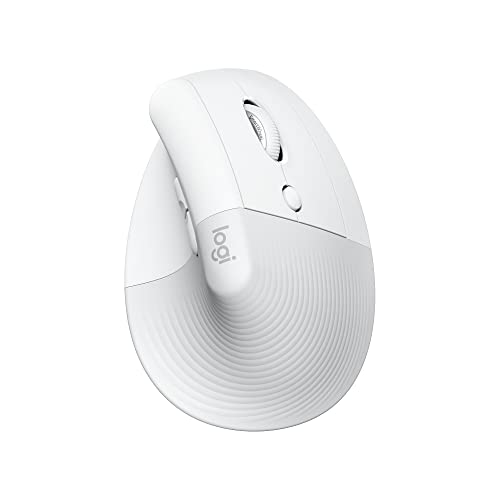
The Logitech Lift for Mac is the comfort pick in this guide, and the mouse to consider first for a MacBook Pro user who wants a vertical shape for long sessions. The mouse holds the hand at a 57-degree angle in a natural handshake position, which the listing describes as aligning the forearm comfortably and reducing strain in the arm and upper body. That shape suits small to medium hands. The Mac edition is fully compatible with macOS and compatible with iPadOS, and the listing names MacBook Pro, MacBook Air, iMac, and iPad models directly. It connects over Bluetooth Low Energy, with a compatible Logi Bolt USB receiver available separately and not included. The sensor is rated at 4,000 DPI, fully adjustable. The SmartWheel is silent and shifts between precision scrolling and speed scrolling, and the mouse has 4 customizable buttons that can be assigned through Logi Options+ on macOS, including a DPI button for switching cursor speed.
Key specifications
- Sensor: 4,000 DPI, fully adjustable
- Connectivity: Bluetooth Low Energy; compatible Logi Bolt USB receiver, receiver not included
- Shape: Vertical ergonomic, 57-degree angle, designed for small to medium hands
- Buttons: 4 customizable buttons, assigned through Logi Options+; Clicks: Quiet Clicks
- Scroll wheel: Silent SmartWheel, with precision and speed-scroll modes
- Battery: 1 AA battery, rated up to 24 months; Battery life varies by use and computing conditions
- Dimensions: 108 x 70 x 71 mm; Weight: 125 g; Wireless range: 10 m
- System requirements: macOS and iPadOS
- Multi-device: Pairs with up to 3 devices, with Easy-Switch between them, and Flow cross-computer control
For MacBook Pro gaming, the Lift for Mac suits relaxed play, strategy games, simulation games, and casual games where comfort matters more than a high DPI ceiling or a large button count. The main trade-off is the gaming ceiling. With a 4,000 DPI sensor, 4 customizable buttons, and no dedicated gaming sensor or high polling rate listed, the Lift for Mac is not the pick for competitive shooters or fast-paced action games. Check the exact variant in the listing before buying: Lift for Mac, Off White, model number 910-006471, ASIN B098JK5T78.
Which One to Pick
Choose the Logitech MX Master 3S for Mac if the MacBook Pro spends most of its time at a desk and the hand is medium to large. Choose the Razer Basilisk V3 X HyperSpeed if gaming comes first, especially fast-paced and competitive play, and use HyperSpeed Wireless at a desk with a USB-C adapter for the dongle if the MacBook Pro has only USB-C ports. Choose the Logitech MX Anywhere 3S for Mac if the MacBook Pro travels often, the desk is small, or the hand is small to medium. Choose the Logitech Lift for Mac if comfort is the priority, the hand is small to medium, and long sessions are the norm.
Frequently Asked Questions
Can a gaming mouse work with a MacBook Pro?
Yes, if macOS is listed as a supported operating system in the listing. Bluetooth is the simplest connection, because it pairs directly with a MacBook Pro and uses no port. A mouse with a 2.4 GHz dongle can also work, but the dongle type should be checked, since many dongles use USB-A and a MacBook Pro uses USB-C ports. Basic pointing, clicking, and scrolling should work over Bluetooth, while advanced features may need companion software that supports macOS.
Is Bluetooth good enough for gaming on a MacBook Pro?
Bluetooth is good enough for casual, story-driven, strategy, and simulation games, where latency differences are less noticeable. For competitive and fast-paced games, a 2.4 GHz wireless mode such as Razer HyperSpeed Wireless gives lower latency and a higher polling rate than Bluetooth, so it is the better choice at a desk. A mouse with both modes gives the most flexibility.
What DPI should I use for gaming on a MacBook Pro?
There is no single DPI that suits every player, every game, and every display. A range of 200 to 8,000 DPI, as listed for the Logitech MX mice in this guide, gives ample room to tune sensitivity. A higher maximum, such as the 18,000 DPI listed for the Razer Basilisk V3 X HyperSpeed, gives more headroom, but most players use a setting far below the maximum. Begin with a middle setting and adjust in small steps.
Do I need a USB-C adapter for a wireless gaming mouse on a MacBook Pro?
It depends on the connection. A Bluetooth mouse needs no adapter, because it pairs directly with a MacBook Pro. A mouse that uses a 2.4 GHz dongle with a USB-A connector does need a USB-C adapter or hub to use the dongle mode on a MacBook Pro with only USB-C ports. Check the dongle type and the charging method in the listing before buying.
A MacBook Pro deserves a mouse that respects how it is used: USB-C ports, macOS software, a portable form when it travels, and a comfortable shape when it stays at a desk. Choose by hand size, grip, connection, and the games that will be played most, and confirm the exact variant and macOS support in the listing before buying.
Related guides
More from Amazon
Programs that pair well with the guide above. Offers and eligibility are set by Amazon and may change.
Free shipping on eligible items, Prime Video and more. Eligible new members can start with a free trial.
Start a Prime free trialAd-free music streaming. Eligible new subscribers can start with a free trial.
Try Music Unlimited freeA Prime membership for ages 18-24 with a trial period. Eligibility is set by Amazon.
See Prime for Young AdultsAudiobooks and podcasts to listen to on the go. Eligible new members can start with a free trial.
Try Audible freeAs an Amazon Associate we earn from qualifying purchases.