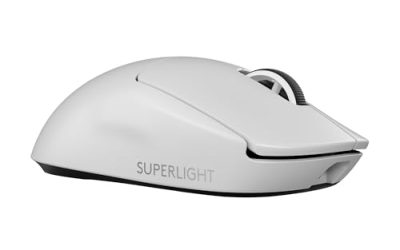
A white gaming mouse ties a bright setup together in a way a black mouse never does. Against a light mousepad, a white keyboard, and a white case, it completes the look. It also shows every speck of dust and every smudge, so the finish has to hold up, the shape has to fit your hand, and the sensor has to keep up with fast flicks. This guide covers five white gaming mice with real Amazon listings: wireless flagships, a button-heavy wired option, and a budget honeycomb pick.
As an Amazon Associate, we earn from qualifying purchases.
Top 3 picks at a glance


Quick Answer
If you want one answer, pick the Razer Viper V3 Pro in white for featherweight esports speed, or the Logitech G Pro X Superlight 2 in white for a proven all-round wireless flagship. The DeathAdder V3 Pro suits larger hands, the G502 X suits button-heavy play, and the Glorious Model O suits wired value.
How to Choose
Start with shape, because no sensor makes up for a mouse that fights your hand. Symmetrical mice such as the Viper V3 Pro and the Model O suit claw and fingertip grips, while right-handed ergonomic shapes such as the DeathAdder V3 Pro and the G502 X suit palm grips and larger hands. Compare the length and height with the mouse you use now. A mouse that is too flat will tire your wrist, and one that is too tall will cramp your fingers.
Weight comes next. Competitive players tend to favor mice under 70 grams, and three of the five picks here land in that range. A lighter mouse needs less effort to stop and start, which helps with fast flicks and long tracking movements. Heavier mice are not automatically worse, though. Some players like a bit of mass for control, and a wired mouse with extra buttons can still feel great if its weight is balanced toward the middle.
Sensor quality is the third thing to check. Every mouse in this guide uses a modern optical sensor with a high maximum sensitivity, so the differences are smaller than the marketing suggests. What matters more is a sensor that tracks cleanly at low sensitivity and holds steady during fast swipes. A polling rate of 8,000 Hz sounds impressive, but it also drains battery faster on a wireless mouse, so treat it as a bonus rather than a must-have.
Wireless or wired is a real fork in the road. Wireless mice keep a white setup clean, with no cable dragging across the desk, and modern wireless links are fast enough for competitive play. They do need charging, and battery life varies with the model and the polling rate. A wired mouse never needs charging and usually costs less for the same sensor, but the cable needs to be light and flexible or it will tug during play.
Finally, think about the white finish itself. A matte white shell hides fingerprints better than a glossy one, while a glossy shell wipes clean more easily. White plastic can pick up stains from dyes and dirty hands, so a quick wipe with a dry cloth once a week keeps it looking fresh. Mice with RGB lighting glow through a white shell more brightly than through a black one, which is a bonus if you like light effects. Check whether the cable and dongle match the white shell too, since some mice ship with black accessories that break the theme.
1. Logitech G Pro X Superlight 2 (White)
The Logitech G Pro X Superlight 2 in white is the safe flagship pick in this guide. It weighs 60 grams, uses the HERO 2 sensor with up to 32,000 DPI, and runs for up to 95 hours on a single charge. That mix of low weight, long battery life, and a proven sensor is why it shows up in so many competitive loadouts, and the white finish is clean and understated, with no RGB glow to distract from a bright setup.
The shape is a plain symmetrical design that works for claw and fingertip grips and for right-handed palm players who like a smaller mouse. There are five buttons in total, with two side buttons on the left, so it stays simple. The LIGHTFORCE hybrid switches combine optical actuation with a mechanical feel, giving clicks that are fast and crisp. Zero-additive PTFE feet help it glide smoothly across cloth pads, and the shell has no holes, which keeps dust and sweat away from the internals.
LIGHTSPEED wireless is the main connection, and the included USB-C cable charges the mouse and lets you play wired while it tops up. The mouse also works with POWERPLAY wireless charging if you already own a compatible pad. Onboard memory stores your settings, so the mouse keeps its configuration when you move it between machines.
The main trade-off is the small button count. If you need extra side buttons for abilities or macros, this mouse will feel limiting. It suits competitive shooters most, and the long battery life means charging becomes a rare chore rather than a daily one.
Specs
| Spec | Detail |
|---|---|
| Sensor | HERO 2 |
| Max sensitivity | 32,000 DPI |
| Weight | 60 g |
| Battery life | Up to 95 hours |
| Polling rate | Up to 2,000 Hz |
| Buttons | 5 |
| Switches | LIGHTFORCE hybrid optical-mechanical |
| Connectivity | LIGHTSPEED wireless, USB-C wired |
| Color | White |
2. Razer Viper V3 Pro (White)
The Razer Viper V3 Pro in white is the lightest mouse in this guide at 55 grams, and it is built for players who want maximum speed. It uses the Focus Pro 35K optical sensor with up to 35,000 DPI, true 8,000 Hz wireless polling, and Gen-3 optical switches. The symmetrical shape suits claw and fingertip grips, and the low weight makes fast flicks and micro-adjustments feel almost effortless.
Razer built this mouse with esports players in mind. The shell is smooth and free of holes, the side buttons sit flush enough to avoid accidental presses, and the sensor tracks cleanly even during very fast swipes. Battery life runs up to 95 hours at the standard polling rate and drops at maximum polling, a fair trade for the extra responsiveness. HyperSpeed wireless keeps the connection stable, and the included cable lets you play wired while charging.
One detail worth knowing is that the white Viper V3 Pro has no RGB lighting. The clean white shell is the whole look, which suits a bright setup perfectly but gives you nothing to customize with light effects. The shape is also on the smaller side, so players with very large hands may find it cramped during long palm-grip sessions.
The Viper V3 Pro is the pick for competitive first-person shooter players who want the lightest, fastest mouse available in white. It has only eight programmable buttons and no extra side controls, but for aim-focused play it is hard to beat.
Specs
| Spec | Detail |
|---|---|
| Sensor | Focus Pro 35K optical |
| Max sensitivity | 35,000 DPI |
| Weight | 55 g |
| Battery life | Up to 95 hours |
| Polling rate | Up to 8,000 Hz wireless |
| Buttons | 8 programmable |
| Switches | Gen-3 optical |
| Connectivity | HyperSpeed wireless, wired |
| Color | White |
3. Razer DeathAdder V3 Pro (White)
The Razer DeathAdder V3 Pro in white is the ergonomic pick in this guide. It weighs 64 grams, uses the Focus Pro 30K optical sensor with up to 30,000 DPI, and runs for up to 90 hours on a charge. The right-handed shape is the classic DeathAdder curve, refined over many generations, and it is the most comfortable option here for palm grips and larger hands.
The shape is the reason to buy this mouse. The high back fills the palm, the thumb rest is generous, and the side buttons fall naturally under the thumb. Players who found symmetrical mice cramped or flat tend to settle on the DeathAdder shape and stay there. The white finish has no RGB lighting, so the look is clean and plain. Gen-3 optical switches are rated for a 90-million click lifecycle with fast 0.2 ms actuation and no debounce delay, which keeps clicks consistent over long use.
Tracking is handled by the Focus Pro 30K sensor, which works on a wide range of surfaces, including glass, and holds steady during fast movements. HyperSpeed wireless keeps latency low, and the mouse can also run wired over the included Speedflex USB-C cable. Five programmable buttons keep the layout simple.
The main drawback is the small button count for a mouse of this size. If you play MMOs or games that need many bound keys, five buttons will feel thin. The mouse is also larger than the other wireless picks here, so small-handed players may find the shape too long.
Specs
| Spec | Detail |
|---|---|
| Sensor | Focus Pro 30K optical |
| Max sensitivity | 30,000 DPI |
| Max speed | 750 IPS |
| Max acceleration | 70 G |
| Weight | 64 g |
| Battery life | Up to 90 hours |
| Buttons | 5 programmable |
| Switches | Gen-3 optical, 90-million click lifecycle |
| Connectivity | HyperSpeed wireless, USB-C wired |
| Color | White |
4. Logitech G502 X (White)

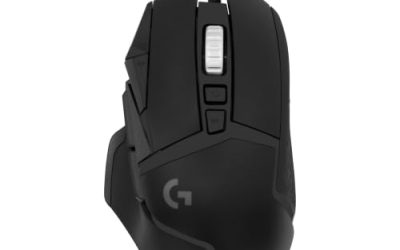
The Logitech G502 X in white is the wired workhorse of this guide. It uses the HERO 25K sensor with up to 25,600 DPI, LIGHTFORCE hybrid optical-mechanical switches, and 13 buttons, giving it far more controls than any other mouse here. If your games need many bound keys, or you like having DPI shift, macros, and shortcuts under your fingers, this is the pick.
The shape is the familiar G502 ergonomic design, with a thumb rest, a wide body, and a dual-mode scroll wheel that switches between a notched ratchet and a free-spinning infinite scroll. That wheel is a genuine quality-of-life feature. The notched mode suits weapon switching and precise scrolling, while the free-spin mode flies through long documents and web pages. The 13 buttons include a DPI shift button near the thumb and a sniper button that drops sensitivity while held, which shooter players use for long-range aiming.
Being wired, the G502 X never needs charging and never runs dry mid-match. The white finish looks sharp against a light mousepad, and the shape suits palm and claw grips for medium to large hands. Small-handed players may find the wide body a stretch, and the mouse is heavier than the wireless flagships here, which is the natural cost of all those extra buttons.
Specs
| Spec | Detail |
|---|---|
| Sensor | HERO 25K |
| Max sensitivity | 25,600 DPI |
| Buttons | 13 |
| Switches | LIGHTFORCE hybrid optical-mechanical |
| Scroll wheel | Dual-mode infinite scroll |
| Connectivity | Wired |
| Compatibility | PC and Mac |
| Color | White |
5. Glorious Model O (Matte White)

The Glorious Model O in matte white is the value pick in this guide. It weighs 67 grams, uses the Pixart 3360 sensor with up to 12,000 DPI, and has a honeycomb shell with RGB lighting that glows through the perforations. It is a wired mouse, it costs less than the wireless flagships here, and it delivers the core gaming experience without extras you may not need.
The honeycomb design is the defining feature. The holes cut weight without shrinking the mouse, and they let the RGB lighting shine through the shell in a way that looks striking on a white desk. The shape is symmetrical and ambidextrous, with two side buttons on the left, and it suits claw and fingertip grips best. Omron switches give the clicks a crisp mechanical feel, and the braided cable is flexible enough to stay clear during play.
The Pixart 3360 sensor is an older design than the sensors in the other picks, but it still tracks accurately for most players, with a 12,000 DPI ceiling that is far above what anyone uses in practice. The matte white finish hides fingerprints better than a glossy shell, which helps a white mouse stay looking clean between wipes.
The honeycomb shell is also the main drawback. Dust and crumbs can collect in the holes, and the shell is less resistant to spills than a solid one. If you want a light, bright, affordable white gaming mouse and you are happy with a wire, the Model O is the pick.
Specs
| Spec | Detail |
|---|---|
| Sensor | Pixart 3360 |
| Max sensitivity | 12,000 DPI |
| Weight | 67 g |
| Buttons | 6 |
| Switches | Omron mechanical |
| Lighting | RGB |
| Shell | Honeycomb |
| Connectivity | Wired |
| Color | Matte White |
Who Should Skip It
A white gaming mouse is not for everyone. If you eat at your desk, handle your mouse with dirty hands, or never clean your gear, a white shell will show every mark within weeks. A black mouse hides all of that, and if low maintenance matters more to you than looks, black is the better call.
Players with very small hands should also be careful. Three of the five mice here are medium to large, and a mouse that is too long will strain your fingers during long sessions. If your hand measures under 16 centimeters from wrist to fingertip, check the dimensions of each pick and lean toward the smaller symmetrical models.
Budget is another reason to pause. White colorways sometimes carry a premium over black versions of the same mouse, and the wireless flagships here are serious purchases. If money is tight, the wired picks in this guide give you most of the performance for less. Finally, skip the white theme if your room is dark. White peripherals look their best in bright rooms with natural light.
FAQ
Do white gaming mice turn yellow over time?
White plastic can yellow with age, heat, and sunlight, but modern gaming mice use coatings that resist it well. Keeping the mouse away from direct sunlight and wiping it down regularly slows the process.
Are white gaming mice harder to keep clean?
They show dirt more easily than black mice, but they are not harder to clean. A dry microfiber cloth once a week handles dust and fingerprints. For stubborn marks, a cloth lightly dampened with water works on most shells. Avoid harsh cleaners and solvents, which can damage the coating.
Should I buy a wireless or wired white gaming mouse?
Wireless keeps a white setup cleaner, since there is no cable crossing the desk, and modern wireless mice are fast enough for competitive play. Wired mice cost less for the same sensor, never need charging, and suit players who want maximum buttons. Pick wireless for a clean look and wired for value.
Do white gaming mice cost more than black ones?
Sometimes. White versions of popular mice can carry a small premium because they are produced in lower volumes, and limited white colorways can sell out faster. The gap is usually modest, and the wired picks in this guide show that a white gaming mouse does not have to be expensive.
Final Verdict
The best white gaming mouse for most players is the Razer Viper V3 Pro in white. At 55 grams with a top-tier sensor and true 8,000 Hz wireless polling, it is the fastest and lightest option here, and its plain white shell suits a bright setup perfectly. If you prefer a proven all-rounder with a slightly more forgiving shape, the Logitech G Pro X Superlight 2 in white is the safer flagship, with long battery life and a sensor that never lets you down.
Large-handed players should look at the Razer DeathAdder V3 Pro in white, the most comfortable ergonomic shape in this guide. Players who need many buttons should take the wired Logitech G502 X in white, and if you want the white look with RGB glow on a smaller budget, the Glorious Model O in matte white is the value pick. Match the mouse to your grip and your games first, and let the white finish be the reward, not the reason.
Product and ASIN Reference
| Product | ASIN |
|---|---|
| Logitech G Pro X Superlight 2 (White) | B09NBWQDKX |
| Razer Viper V3 Pro (White) | B0CW25XR5S |
| Razer DeathAdder V3 Pro (White) | B0B6Y52YXB |
| Logitech G502 X (White) | B0943J7HJG |
| Glorious Model O (Matte White) | B07MGDRBBF |
Related guides
More from Amazon
Programs that pair well with the guide above. Offers and eligibility are set by Amazon and may change.
Free shipping on eligible items, Prime Video and more. Eligible new members can start with a free trial.
Start a Prime free trialAd-free music streaming. Eligible new subscribers can start with a free trial.
Try Music Unlimited freeA Prime membership for ages 18-24 with a trial period. Eligibility is set by Amazon.
See Prime for Young AdultsAudiobooks and podcasts to listen to on the go. Eligible new members can start with a free trial.
Try Audible freeAs an Amazon Associate we earn from qualifying purchases.