As an Amazon Associate we earn from qualifying purchases
A good gaming mouse already does the hard work of tracking your hand. The accessories around it solve the smaller problems that still get in the way: a cable that drags across the desk, a shell that slips when your palm gets warm, feet that have worn thin and started to scratch, or a wireless mouse that is always running low just before a session. None of these upgrades changes the sensor, and none of them should be bought on the assumption that they will. What the best gaming mouse accessories do is remove friction, in the literal and the everyday sense, so the mouse you already own behaves more consistently.
That distinction matters when you shop. Accessory listings often bundle very different jobs together, and it is easy to end up with a charging dock for a mouse that cannot charge wirelessly, grip tape cut for a shell you do not own, or skates shaped for a different model. This guide keeps the focus narrow and practical. Every pick below is a gaming mouse accessory, not a mouse itself. Each one is matched to a clear use case, its compatibility limits are stated plainly, and the right order to buy them is explained so you can fix the problem you actually have first.
Top 3 picks at a glance


How to Choose Gaming Mouse Accessories
Start by naming the annoyance in one sentence. If the cable catches on the edge of your pad or pulls sideways during wide swipes, you need cable management. If your fingers slide on the buttons or the sides during longer sessions, you need grip. If movement feels scratchy, uneven, or slower in one direction than another, look underneath the mouse first, because worn feet are a common and inexpensive cause. If you use a compatible wireless Razer mouse and you are tired of plugging in a cable to charge, a dock is the relevant accessory. Treating accessories as answers to specific problems keeps a small purchase useful instead of decorative.
Compatibility is the second filter, and it is stricter than many buyers expect. Grip tape and skates are often cut for one exact shell. A set shaped for a Glorious Model O will not sit correctly on a differently shaped mouse just because both are gaming mice, and skates for the original Logitech G Pro X Superlight are not the same shape as skates for its successor. Pulsar itself notes that those two Logitech models use different feet shapes and that their skates are not interchangeable. Check the exact model name, including generation and size variant, before you order any pre-cut part.
The third filter is your surface and play style. Glass skates feel very fast on many pads and are prized for micro-adjustments and tracking, but speed is not automatically better. Players who rely on hard stopping power for tactical shooters may prefer the feel of conventional feet on a control pad. Grip tape helps most for players whose hands sweat or who use a fingertip or claw grip that puts more load on the sides of the shell. A bungee helps only if you play wired. A charging dock helps only if your mouse supports that dock and its charging puck. There is no single accessory kit that suits every desk, which is why the picks below are presented by job rather than as a bundle to buy all at once.
1. Razer Mouse Bungee V3 Chroma — Best for Wired Cable Drag
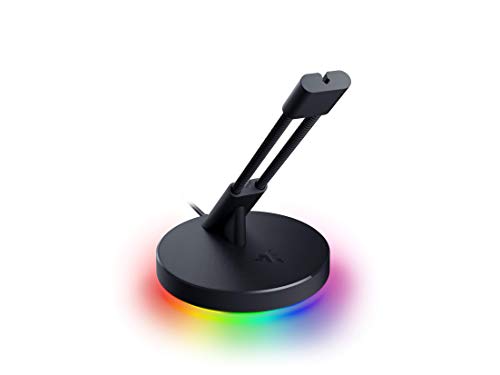
The Razer Mouse Bungee V3 Chroma on Amazon addresses the oldest wired-mouse problem: the cable itself. A bungee lifts the cable off the desk on a spring arm and holds it in a clip-on cable catch, so the length of cable between the bungee and the mouse can move freely instead of dragging, snagging on a pad edge, or pulling against a monitor stand. The aim described in the listing is a drag-free, wireless-like feel while keeping the reliability of a wired connection.
The details that matter here are in the base and the catch. The listing describes a weighted base with anti-slip feet, with an integrated weight listed at 240 grams, and dimensions of 3.55 by 4.83 by 4.74 inches. That footprint is small enough for most desks, while the weight is what keeps the bungee planted when the cable is pulled at an angle during a fast flick. The cable catch is rubber-coated and is described as fitting rubber, braided, and paracord cables, which covers most stock gaming mouse cables without forcing you to match the bungee to one cable style.
The Chroma version adds RGB underglow lighting to the base, with the listing describing customisation across a wide colour range and effects through Razer’s ecosystem. Lighting does not improve aim, and it should be treated as a cosmetic extra for players who already like a lit desk. The core purchase reason remains the spring arm, the weighted base, and the cable catch. If you play wireless, skip this pick entirely, because a bungee has nothing to manage once the cable is gone. If you play wired and your cable regularly catches, this is usually the first accessory to consider, because it changes how every movement feels rather than fixing a problem that only appears occasionally.
Placement makes a real difference. Put the bungee behind your mouse pad, roughly centred on your natural range of movement, and leave enough free cable between the bungee and the mouse that you can reach the far corners of your pad without the cable going taut. Too little slack recreates the pulling feeling you bought the bungee to remove. Too much slack lets the cable loop down onto the pad. A short adjustment session before you play is normal, and once the length is right most players stop thinking about the cable at all, which is exactly the point.
2. Razer Mouse Dock Pro with Wireless Charging Puck — Best for Compatible Wireless Razer Mice
The Razer Mouse Dock Pro with Wireless Charging Puck on Amazon is the wireless counterpart to the bungee, but only for a specific group of owners. The listing describes magnetic wireless charging through an included charging puck, an integrated HyperPolling 8K Hz transceiver, an anti-slip base, and Chroma RGB lighting. The model number in the listing is RZ81-01990100-B3M1. In plain terms, the puck fits to a compatible Razer mouse, the mouse sits magnetically on the dock to charge, and the dock also houses the high-polling wireless transceiver so the dock is part of the connection as well as the charger.
That combination is convenient when it applies to your mouse, and irrelevant when it does not. This is not a universal wireless charger for any gaming mouse, and it should not be bought for a mouse that is not listed as compatible with the dock and puck. Check Razer’s compatibility for your exact model before ordering, including whether your mouse needs the puck at all and how the transceiver setup works with your current receiver. Players who charge happily with a cable every few days gain only tidiness here. Players with a compatible mouse who play daily gain a routine: mouse on the dock when you finish, charged mouse when you sit down, and no cable trailing across the desk in between.
The anti-slip base matters for the same reason it matters on a bungee. A dock that slides when you drop the mouse onto it one-handed quickly becomes annoying, and magnetic alignment only helps if the dock stays where you left it. The RGB lighting around the base can also serve as a visible charge-status cue in a Razer setup, which is a small practical benefit alongside the cosmetic one. As with the bungee, treat lighting as a bonus, not the reason to buy. The reason to buy is supported magnetic charging plus the integrated transceiver for a mouse you already own and know is compatible.
3. Pulsar Superglide Glass Mouse Skates for Logitech G Pro X Superlight — Best Glide Upgrade for That Exact Mouse
Worn or draggy feet can make a good mouse feel tired long before its sensor or switches give up. The Pulsar Superglide glass mouse skates on Amazon are replacement feet made for one specific mouse: the original Logitech G Pro X Superlight. The listing describes them as mouse feet and skates made with ultra-strong flawless glass, with a super fast, smooth, and durable sole, and a polished round edge. The model number given for this set is LGSSGB, under Pulsar’s Superglide line, made by AplusX Inc.
Material is the whole story here. Conventional mouse feet are usually PTFE, a soft plastic that glides well but wears over time, especially on hard or textured pads. The Superglide set uses aluminosilicate glass, which the listing presents as far more durable than conventional feet, alongside that polished round edge intended to avoid a scratchy or catching feel at the edge of each skate. Glass also changes the character of the glide. It tends to feel faster and freer, with less initial resistance when you start a movement, which suits players who make constant small tracking corrections in fast-paced games.
That speed comes with two cautions. First, fit is absolute. This set is shaped for the G Pro X Superlight named in the listing, and Pulsar warns that the Superlight and the Superlight 2 use different feet shapes, so do not order this set for the newer mouse expecting it to fit. Second, faster is a preference, not an upgrade for everyone. If you play on a very fast pad already, or you value a strong, predictable stop after each flick, glass skates can feel like too much freedom at first and may take adjustment. If your current feet are worn, uneven, or damaged, though, replacing them restores the base the rest of your aim is built on, and this glass set is the durable, speed-focused way to do it for this mouse.
Fitting replacement skates rewards patience. Remove the old feet fully, clean away old adhesive from the recesses, and align the new skates before pressing them down, because misaligned feet can rock or catch. Keep the sensor area clean while you work. None of this is difficult, but rushing it is the main way a simple feet swap goes wrong.
4. Hotline Games 2.0 Plus Grip Tape for Model O — Best Grip for Model O Owners

Grip tape sounds minor until your fingers start sliding off the buttons in a warm room. The Hotline Games 2.0 Plus Mouse Anti Slip Grip Tape on Amazon is a pre-cut grip upgrade made for the Glorious Model O and Model O Wireless. The listing describes it as sweat resistant, cut to fit, and easy to apply, as a professional mice upgrade. CamelCamelCamel’s record for this exact listing uses the same product title and compatibility, which is a useful cross-check that the code and the named mouse match.
Pre-cut tape earns its place through fit. Pieces shaped for the Model O follow the buttons and sides of that shell, so you are not trimming around curves and switch gaps yourself. Applied to the sides, tape gives claw and fingertip players a more secure hold with less squeeze force, which can reduce hand fatigue over a long session because you are not gripping harder just to keep the mouse from rotating. Applied to the main buttons, it gives your fingers a more positive surface, particularly if the stock shell feels smooth or glossy to you.
Sweat resistance is the other practical claim to understand correctly. Grip tape does not stop your hands sweating. It gives that moisture a textured, absorbent-feeling surface to work against instead of a slick plastic shell, so the mouse stays more predictable as a session goes on. Tape does wear and can eventually peel at the edges, especially where your thumb works hardest, so treat it as a consumable upgrade rather than a permanent modification. It is also specific: this set is for the Model O family named in the listing, not a universal solution for other shells. Model O owners with grip complaints should look here first. Everyone else should look at the next pick instead of forcing a pre-cut set onto the wrong mouse.
5. Hotline Games 2.0 Plus DIY Grip Tape — Best Grip for Other Mouse Shapes

The Hotline Games 2.0 Plus DIY Version Anti Slip Grip Tape on Amazon solves the problem the pre-cut set cannot: what to do when your mouse is not one of the popular shells with a dedicated kit. The Amazon listing describes this DIY version as anti-slip grip tape for a gaming mouse, sweat resistant, and easy to apply, as a professional mice upgrade kit. Instead of arriving shaped for one model, a DIY kit is meant to be cut to fit the areas of your own mouse where your fingers actually make contact.
That flexibility is both the strength and the work involved. You decide whether you need material only on the sides, only on the buttons, or in both places, and you trim each piece to your shell. Players with less common mice, left-handed shells, or unusual grip positions often have no pre-cut option at all, so a cut-to-fit kit is the honest route rather than a compromise. Take your time with the trimming, round the corners of each piece so they are less likely to lift, and clean the shell first so the adhesive bonds to the mouse rather than to dust or skin oil.
Think about placement in terms of your grip. Fingertip players usually benefit most from side coverage where the thumb and ring finger steer the mouse. Palm players may want less, or none, because a full palm already spreads contact across the shell and added texture can feel busy. Claw players often fall in between, with side pieces doing most of the useful work. Starting with the sides only is a sensible approach for any style: you can add button pieces later if your fingers still slide, but you cannot easily judge tape fairly if you cover every surface at once and change the feel of the whole mouse in one step.
Which Accessory Should You Buy First?
Order your purchases by how often the problem interrupts you. Cable drag interrupts every swipe, so wired players who feel it should start with the bungee. A mouse that will not hold a charge routine interrupts every day, so compatible Razer wireless owners should look at the dock. Worn feet affect every movement too, but they deteriorate gradually, which makes them easy to overlook; turn your mouse over and look for feet that are thinned, torn, lifting, or shiny in patches, and replace them before you blame your pad or your settings. Grip problems tend to build during a session rather than appearing in the first minute, so grip tape is often the second or third purchase, after the constant problems are fixed.
It is also worth saying what not to buy. Do not buy skates or pre-cut tape for a mouse you are about to replace, because both are model-specific and will not transfer. Do not buy a charging dock as a gift without confirming the exact mouse model, because compatibility decides everything. Do not stack every glide change at once, such as new glass skates and a new fast pad on the same day, and then try to judge either one; change one variable, play for a few sessions, and keep or reverse that change with a clear head.
Finally, keep expectations in proportion. The best gaming mouse accessories make a good mouse easier to live with: less drag, a more secure hold, a smoother glide, and a simpler charging habit. They do not change your sensor, your switches, or your skill, and any listing that promises otherwise is overselling a piece of tape, glass, or plastic. Bought in the right order and matched carefully to the mouse you own, though, these small parts are some of the most satisfying upgrades in a gaming setup, because you feel them every single time you sit down to play.
Related guides
More from Amazon
Programs that pair well with the guide above. Offers and eligibility are set by Amazon and may change.
Free shipping on eligible items, Prime Video and more. Eligible new members can start with a free trial.
Start a Prime free trialAd-free music streaming. Eligible new subscribers can start with a free trial.
Try Music Unlimited freeA Prime membership for ages 18-24 with a trial period. Eligibility is set by Amazon.
See Prime for Young AdultsAudiobooks and podcasts to listen to on the go. Eligible new members can start with a free trial.
Try Audible freeAs an Amazon Associate we earn from qualifying purchases.