
Building a first gaming desk usually hits the same wall: the keyboard and mouse together have to fit inside a firm ceiling of one hundred dollars, and buying them separately at that level often means compromising twice. Combo sets exist for exactly this problem. A matched keyboard and mouse in one box, from one maker, with one software package and one lighting style, stretches a fixed budget further than two separate purchases usually can.
This guide compares three wired combos that comfortably live in that bracket. One is a fully mechanical set for players who want real switches, one is an updated value set with a high-spec mouse and deep software support, and one is the long-running budget benchmark with a wrist rest and everything a new setup needs. All three are sold as genuine keyboard-and-mouse sets, and all three leave room in the same budget for a pad or a headset.
As an Amazon Associate, we earn from qualifying purchases.
Our Top Picks

Top 3 picks at a glance

Quick Picks
| Product | Best for | Key point |
|---|---|---|
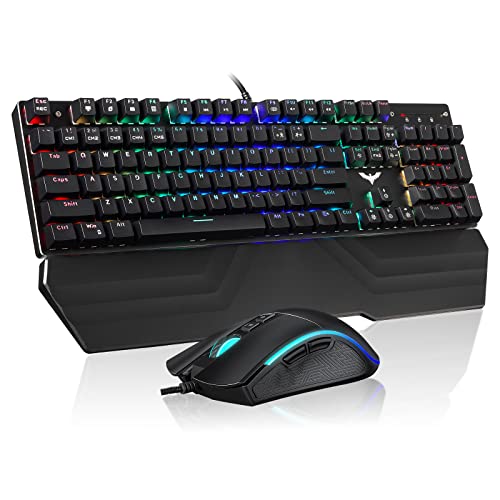
| Havit Mechanical Keyboard and Mouse Combo (HV-KB389L) | Players who want true mechanical switches in the set | Blue-switch mechanical keyboard plus a programmable mouse |
| Redragon S107 Updated Combo | Players who want the strongest mouse spec in the box | Mouse rated up to 10,000 DPI with software and 1K Hz polling |
| Redragon S101-3 PRO Combo | New setups that want comfort and simplicity | Full-size backlit keyboard with wrist rest and macro record keys |
How to Choose
Begin with the keyboard’s switch type, because that is the real divide. Mechanical keyboards use individual switches under every key and feel distinct, durable and repairable. Membrane keyboards press a key onto a rubber dome layer; they are quieter, lighter and cheaper, and modern gaming membranes feel far better than the office boards of old. The Havit set is the mechanical option here; both Redragon sets are membrane designs with gaming tuning.
Then judge the mouse as a mouse, not as a free extra. Combo mice range from afterthoughts to genuinely good gaming mice. Check the sensor ceiling, whether the buttons are programmable, and whether software exists to set DPI steps. The S107’s mouse, rated up to 10,000 DPI with programmable buttons and software support, is unusually serious for a set at this level.
Anti-ghosting is the keyboard spec that matters most in games. It describes how many simultaneous key presses register correctly — essential when a game asks you to sprint, strafe and reload at once. Look for 19-key or 25-key anti-ghosting in the listing, as the Redragon sets here offer, rather than a vague claim of gaming design.
One box means one ecosystem. A combo shares lighting controls and usually one software download, which keeps a first setup simple and visually matched. It also means the keyboard and mouse age together; if you later upgrade one, the matched look goes with it. Most players find that a fair trade at this budget.
Wired is the right call in this bracket. Every set here is wired USB, which is how the money reaches the switches and sensors instead of radios and batteries. Wired also means both devices simply work on any PC, school machine or console that accepts keyboard and mouse input, with nothing to charge.
Plan the upgrade path before you buy. A combo is a foundation, not a life sentence. Think about which half you will outgrow first. Shooter players usually upgrade the mouse within a year or two as their aim develops, which argues for the S107 set, whose mouse delays that day. Typists and MMO players tend to upgrade the keyboard, which argues for the Havit set, whose mechanical board is the half most likely to stay on the desk for years. Buying with the second purchase already in mind is how a one hundred dollar foundation becomes a setup that grows instead of a setup that gets replaced.
Best Options
Havit Mechanical Keyboard and Mouse Combo (HV-KB389L)
The Havit set is the pick for players who refuse to compromise on the keyboard. Its 104-key board uses real mechanical blue switches — tactile and clicky, with the feedback typists and strategy players love — set in a metal panel with a detachable wrist rest. The matching mouse is programmable with sensitivity up to 4,800 DPI, and the keyboard’s floating keycap design makes cleaning out a gaming desk’s worth of crumbs genuinely easy.
Specs
- 104-key mechanical keyboard with blue switches; wired USB connection for both devices; RGB backlighting with multiple modes; detachable wrist rest; programmable gaming mouse, up to 4,800 DPI; metal keyboard panel; plug and play on Windows PCs.
Best for: Players who type as much as they game and want the mechanical feel to be the centrepiece of the setup, with a competent mouse included rather than bought later.
Watch out for: Blue switches are loud. In a shared room or a quiet house at night, the click will carry, and membrane sets exist in this guide for a reason. The mouse, while programmable, is the simplest of the three here.
Redragon S107 Updated Combo
The updated S107 set flips the usual combo logic: the mouse is the headline. It pairs an RGB keyboard with 25-key anti-ghosting and multimedia controls with a programmable mouse rated up to 10,000 DPI and 1,000 Hz polling, backed by Redragon software for macros, DPI steps and lighting. For shooter players building on a budget, this is the set whose mouse will not need replacing first.
Specs
- Wired USB keyboard and mouse set; RGB backlit keyboard with 25-key anti-ghosting; programmable mouse, up to 10,000 DPI with 1,000 Hz polling; Redragon software support for macros and lighting; plug and play on PC and laptop; model S107-RGB-BA.
Best for: FPS and MOBA players who want the strongest mouse in the box and plan to keep it while the rest of the setup grows around it.
Watch out for: The keyboard is a membrane design, so players set on mechanical switches should choose the Havit set. The software, while capable, has a learning curve for first-time macro users.
Redragon S101-3 PRO Combo
The S101 line is one of the best-known budget sets in PC gaming, and the S101-3 PRO update keeps the formula: a full-size RGB keyboard with a wrist rest, independent macro record keys and multimedia controls, plus an RGB gaming mouse adjustable up to 7,200 DPI with its own software support. It is the comfort-and-completeness pick — the set that makes a bare desk feel finished in one purchase.
Specs
- Wired USB keyboard and mouse set; full-size RGB backlit keyboard with wrist rest; independent macro record keys; programmable mouse, adjustable up to 7,200 DPI; software support for keyboard and mouse; multimedia shortcut keys; model S101-3.
Best for: First setups, family PCs and younger players, where comfort, a wrist rest and simple setup matter as much as raw specifications.
Watch out for: Like the S107, the keyboard is membrane rather than mechanical. The full-size board also needs a generous desk, so small workspaces should measure before ordering.
Which One Fits
Choose the Havit combo if your fingers care most about the keyboard and you want genuine mechanical switches under the one hundred dollar ceiling. Choose the Redragon S107 Updated if your games are mouse-led — shooters and MOBAs — and you want the mouse to be the last part you upgrade. Choose the Redragon S101-3 PRO if the setup is shared, comfort-led or a gift, and a wrist rest plus simple completeness beat spec-sheet bragging.
If the desk is small, note that the S101 is a full-size board while the Havit’s detachable wrist rest can be removed to save depth. Every set here is wired, so also check that your PC has two free USB ports within cable reach. Players in shared bedrooms or quiet flats should weigh the membrane Redragon sets more heavily than the spec sheet alone suggests, because a loud mechanical board at midnight is a household problem, not a gaming one, and the person in the next room will have opinions about your switch choice.
Common Mistakes
Buying a combo for the lighting and ignoring the switches. RGB is the easiest spec to sell and the least important to how a set plays. Decide mechanical versus membrane first; the lighting will look fine either way.
Assuming the mouse in a combo is always weak. That was true of older sets. The S107’s mouse carries a 10,000 DPI sensor and real software, and even the simpler mice here track fast flicks cleanly. Read the mouse spec before writing the set off.
Spending the whole ceiling on the combo alone. A setup also needs a pad, and ideally leaves something for a headset. The sets in this guide sit comfortably inside the bracket precisely so the rest of the desk does not have to be an afterthought.
Forgetting to check what is actually in the box. Some bundles sold alongside these sets add headsets or pads under different listings. The three ASINs in this guide are keyboard-and-mouse sets; if you want the extras, make sure the listing you open says so.
FAQ
Are combo sets worse than buying a keyboard and mouse separately?
At this budget, usually not. Separately bought gear at the same total cost tends to mean two compromised products; a combo concentrates the money and adds matched software and lighting. Separates pull ahead only when the budget grows enough to buy each device on its own merits.
Mechanical or membrane for a first gaming keyboard?
Mechanical, as in the Havit set, feels better and lasts longer, and most players who try it stay with it. Membrane sets are quieter and gentler on a shared room, and the Redragon boards here are tuned to feel responsive rather than mushy.
Can these combos work on consoles or laptops?
Yes. All three are wired USB sets that work as standard input devices on laptops and on consoles for games that support keyboard and mouse play. Software customisation is done on a Windows PC.
What else should the same budget cover?
A cloth mouse pad large enough for your sensitivity, and if anything remains, a basic headset. The combos here leave room for both because they sit well inside the ceiling rather than at its edge.
Final Verdict
Under one hundred dollars, the smart buy is a set that refuses to waste the money. The Havit combo spends it on mechanical switches, the Redragon S107 Updated spends it on the mouse, and the Redragon S101-3 PRO spends it on comfort and completeness. Pick the priority that matches your games, and a single box will carry your setup further than you expect.
Related guides
More from Amazon
Programs that pair well with the guide above. Offers and eligibility are set by Amazon and may change.
Free shipping on eligible items, Prime Video and more. Eligible new members can start with a free trial.
Start a Prime free trialAd-free music streaming. Eligible new subscribers can start with a free trial.
Try Music Unlimited freeA Prime membership for ages 18-24 with a trial period. Eligibility is set by Amazon.
See Prime for Young AdultsAudiobooks and podcasts to listen to on the go. Eligible new members can start with a free trial.
Try Audible freeAs an Amazon Associate we earn from qualifying purchases.









