
As an Amazon Associate we earn from qualifying purchases at no extra cost to you.



Choosing a power supply feels like the least glamorous part of building a gaming PC, but it’s the one component that quietly decides whether everything else runs smoothly. The real decision most buyers face isn’t “which brand” — it’s whether an 80 Plus Gold unit is good enough or whether the premium for an 80 plus platinum power supply for gaming setups is money well spent. The answer depends on your wattage needs, how long you plan to keep the machine, how sensitive you are to noise, and frankly, how much room is in your budget after the GPU. Let’s break down what you actually get when you step up from Gold to Platinum, and when the upgrade genuinely pays for itself.
Our Top Picks
 Thermaltake Toughpower GX2 80+ Gold 600W SLI/Crossfire Ready600W9.3 x 7.7 x 4.6 inchesCheck on Amazon


Top 3 picks at a glance
Quick Verdict
For most gamers building or upgrading a mainstream rig — something in the 500W to 850W range with a mid-to-high-end GPU — an 80 Plus Gold unit is the sweet spot. Modern Gold units routinely hit 90% efficiency at typical loads, come fully modular, and carry 7 to 10 year warranties at prices that leave money for better components elsewhere.
Platinum earns its keep when you’re running a high-wattage system (1,000W or more), you want the lowest possible heat and fan noise, or you’re building a long-term machine you won’t touch for five-plus years.
If you game a few hours a night on a 400–600W system, Gold. If you’re pushing an RTX-class flagship GPU with serious overclocking, or you simply want the quietest, most efficient build money can buy, Platinum.
Side by Side
| Factor | 80 Plus Gold | 80 Plus Platinum |
|---|---|---|
| Efficiency at 50% load | ~92% | ~94% |
| Typical price range | Varies | Varies |
| Typical warranty | 5–10 years | 7–10 years |
| Heat output | Moderate; fan runs more often | Lower; fan stays off or slow at low loads |
| Noise | Audible under heavy gaming loads on budget models | Usually near-silent at typical gaming loads |
| Modularity | Full and semi-modular widely available; non-modular at the low end | Almost always fully modular |
| Maintenance | Dust the intake grille every few months | Same routine, less heat stress on the fan |
| Common size | Standard ATX, roughly 5.9 x 5.5 x 3.4 inches; compact SFX options exist | Standard ATX; high-wattage units can run slightly longer |
| Look & build quality | Solid, flat black cables common; premium finishes on higher-end Gold | Premium finishes, embossed or sleeved cables, upscale internals |
| Resale value | Moderate; widely available used | Holds value better; enthusiast buyers seek them out |
| Best for | Mainstream gaming builds and upgrades | High-end, quiet, or long-term flagship systems |
Where 80 Plus Gold Wins
Price per watt is the headline. Gold units deliver roughly 90–92% efficiency at typical gaming loads for 40–50% less money than comparable Platinum models.
Gold also wins on selection. Because it’s the most popular efficiency tier, you’ll find Gold units in every wattage from 450W to 1,200W+, in every form factor from full ATX to compact SFX for small-form-factor cases, and with warranty lengths that now routinely hit 10 years — the MSI MAG A750GL being a case in point. If you need a specific wattage, cable configuration, or a short chassis under 140mm, Gold almost always has more options at friendlier prices.
Finally, modern Gold units have adopted ATX 3.1 and PCIe 5.1 standards with native 12V-2×6 connectors, so you’re not sacrificing modern GPU compatibility by skipping Platinum. The efficiency gap — about 2 percentage points at load — simply doesn’t translate into meaningful performance differences in games.
Where Platinum Power Supply for Gaming Wins
Heat and noise are Platinum’s strongest arguments. At 94% efficiency under load, a Platinum unit converts less energy into waste heat, which means the fan spins slower or stays off entirely during light and moderate loads. In a quiet living room or a bedroom streaming setup, that difference is audible. High-end Platinum units like the ASUS ROG Strix take it further with GaN MOSFETs that run cooler and allow smaller, quieter internal designs, plus features like GPU-first voltage stabilization for cleaner power delivery to graphics cards.
Platinum also tends to be where manufacturers put their best internals — server-grade or Japanese capacitors, better soldering, more rigorous binning. That matters when you’re feeding a power-hungry flagship GPU where transient spikes demand clean, stable delivery.
Wattage headroom is another point in Platinum’s favor: the tier is concentrated in the 850W–1,200W range, exactly where high-end gaming systems with power-draw spikes live.
Cost Over 5 Years
Let’s run realistic numbers for a gaming PC drawing about 400W during typical play, four hours a day.
A Gold unit at 92% efficiency draws roughly 435W from the wall. A Platinum unit at 94% draws about 426W. That’s a difference of roughly 9W — call it 13 kWh per year, or about 65 kWh over five years. At the U.S.
So the efficiency savings alone never justify the price gap on a typical gaming rig.
Where the math shifts: if you run your PC 8–12 hours daily (streaming, folding, working from home), the savings roughly triple. And if Platinum lets you buy one 1,000W unit now instead of replacing a 750W Gold later when you upgrade GPUs, the effective cost difference narrows further.
Which One for Your Home
Small Apartment or Studio
Space and noise both matter here. A compact, fully modular Gold unit like the 750W MSI MAG A750GL keeps cable clutter down in a small ITX or micro-ATX build, and its short 140mm-depth-friendly design fits compact cases. Compromise pick: Gold for daytime gaming, or Platinum if the PC shares your sleeping space.
Family with Kids or Pets
Reliability and safety first. Both tiers are fine here, but spend on name-brand units with strong protection circuitry (OVP, UVP, OCP, OTP, SCP) rather than chasing efficiency badges. A Gold unit with a 10-year warranty covers the lifespan of two GPU generations. Avoid the absolute cheapest non-modular units only if you have pets that chew cables — modular setups let you run only the cables you need, keeping the mess behind the panel.
Rental or Temporary Living Situation
If you move frequently or rebuild often, don’t over-invest in Platinum. A mid-range Gold unit in the 650–850W range covers most rental-era builds, and if you sell the PC later, Gold units resell easily because demand is broad. Keep receipts for warranty claims — most brands’ warranties follow the unit, not the buyer, which preserves resale value.
Long-Term Home Build
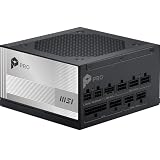
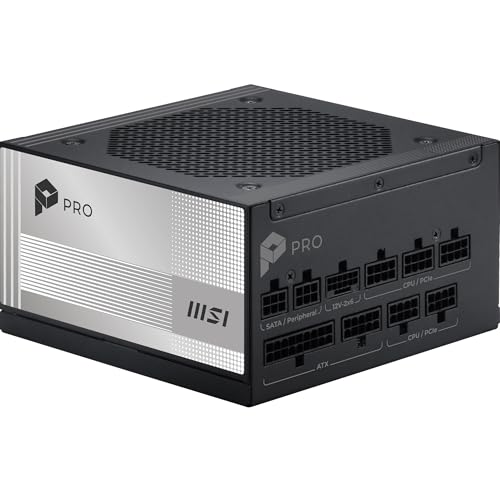
This is where Platinum justifies itself. If you’re building a machine you expect to keep five to ten years, upgrade the GPU once or twice, and run it daily in a shared living space, a Platinum unit like the ASUS ROG Strix 1000W or MSI PRO A1000PL gives you the headroom, acoustics, and component longevity to outlast multiple upgrade cycles. Pay once, forget about it for a decade.
FAQ
Does an 80 Plus Platinum power supply improve gaming FPS?
No. Efficiency ratings measure how much wall power is lost as heat, not performance delivered to components. A Platinum unit and a Gold unit of the same wattage will produce identical frame rates. The differences show up in heat, noise, and electricity bills — not in-game numbers.
Is 80 Plus Gold enough for a high-end GPU in 2026?
Yes, provided the wattage is appropriate. Modern ATX 3.1 Gold units with native 12V-2×6 cables handle transient power spikes from current flagship GPUs without issue. Match the wattage to your GPU’s recommended requirement with roughly 100–150W of headroom, and Gold is fully sufficient. Platinum is a comfort and longevity upgrade, not a requirement.
How much electricity does Platinum actually save?
rates. Treat efficiency savings as a tiebreaker, never the primary reason to buy.
Should I prioritize wattage or efficiency rating?
Wattage, always. A 750W Gold unit is a better purchase than a 650W Platinum for the same money if your system needs 700W. Running a PSU at 50–70% of its rated capacity maximizes efficiency and longevity regardless of badge, so size the unit first, then choose the efficiency tier your budget allows.









