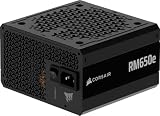
The Corsair RM850e (2025) is the best overall 850W power supply for most gaming PCs on this list: it is fully modular, ATX 3.1 and PCIe 5.1 ready, certified 80 Plus Gold and comes with a native 12V-2×6 cable and a 7-year warranty. If you want a compact, fully modular alternative, the MSI MAG A850GL PCIE5 is a strong second. An 850W power supply (PSU) delivers up to 850 watts continuously, which suits a single high-end graphics card and a fast CPU with room to spare.
Our Top Picks
Pros & cons
- 80 Plus Gold certification reaches up to 90 percent efficiency
- Zero Fan mode keeps the unit silent at low loads
- Fully modular flat cables simplify case cable management
- Native PCIe 5.1 connector still needs GPU compatibility checked
- 850W capacity may be more than smaller builds need


Top 3 picks at a glance
Quick List
- Corsair RM850e (2025) – best overall for a fully modular, quiet gaming build
- MSI MAG A850GL PCIE5 – best for compact cases and builders who want a dual-color 12V-2×6 cable
- ASRock PRO 850G – best for a single-GPU build where cable count and a non-modular design are acceptable
- Thermaltake Toughpower GT 850W – best for buyers who want a Smart Zero fan and a fully modular design
- Auotac 850W Fully Modular – best for RGB-fan builds from a lesser-known brand
- 850W Gold ATX 3.1 unit (brand not named in the listing title) – best for spec-sheet shoppers who will check the details
Which One Is Right for You?
| If you… | Choose |
|---|---|
| want the most proven pick with a native 12V-2×6 cable and a long warranty | Corsair RM850e (2025) |
| need a short, compact PSU for a smaller case | MSI MAG A850GL PCIE5 |
| want a fully modular unit with a fan that stays off at low load | Thermaltake Toughpower GT 850W |
| build a single-GPU PC and want the simplest cabling | ASRock PRO 850G |
| want an RGB fan on the PSU and accept a lesser-known brand | Auotac 850W Fully Modular |
| want a modern feature list and will verify the brand and warranty first | 850W Gold ATX 3.1 unit (brand not named) |
For a card that draws up to roughly 450W, an 850W unit with a native 12V-2×6 cable is a sound match. If your graphics card is rated well above that, or if you run a very power-hungry CPU too, step up to 1000W. The ASRock PRO 850G is the one pick here that is not fully modular, so treat it as a runner-up for builders who need many cables.
All 6 Picks in Detail
1. Corsair RM850e (2025) – Best Overall for a Modular Gaming Build
As an Amazon Associate we earn from qualifying purchases at no extra cost to you.

The 2025 RM850e is a mainstream workhorse with ATX 3.1 and PCIe 5.1 readiness stated in the listing. It suits most single-GPU gaming builds that want clean cables and low noise.
Corsair’s e-series is a safe default because the support network is large and the cable set is well documented: expect one 12V-2×6 cable plus several 8-pin PCIe and EPS leads. The compact body leaves room behind the motherboard tray, and the zero-RPM mode keeps the PC quiet during light use. If you plan to run two older graphics cards or many drives, count the connectors in the product manual first.
Who should skip it: anyone planning a card above roughly 450W with a power-hungry CPU, or a multi-GPU workstation, who would be better served by a 1000W unit.
- 850W, 80 Plus Gold, fully modular
- Native 12V-2×6 cable rated for 600W
- 120mm rifle-bearing fan with a zero-RPM mode, per Corsair’s materials
- Compact body, about 140mm long
- 7-year warranty per Corsair; connector counts are in the product manual
Pros
- Short chassis and tidy cabling
- Good fit for mainstream and high-end single-GPU builds
Cons
- Rifle bearing is less premium than fluid or magnetic bearings
- Three PCIe 8-pin connectors limit older multi-cable cards
Compared with the MSI MAG A850GL, it has a longer-established support network but a smaller number of PCIe plugs.
2. MSI MAG A850GL PCIE5 – Best for Compact Cases

MSI describes this model as fully modular and compact, 80+ Gold, ATX 3.1 and PCIe 5.1 ready, with a native dual-color 12V-2×6 cable. It suits small cases and clean builds.
MSI’s flat cables are easier to bend into tight spaces, and the chassis stays short for small cases. The listing mentions a dual-color 12V-2×6 cable, which is a cosmetic touch that also makes plug orientation easier to check. One reviewer reported that the fan has no semi-passive mode, so it will spin even at idle; if you prefer silence at light load, the Corsair and Thermaltake units suit you better.
Who should skip it: buyers who want a fan that stops completely at idle, or who plan to rely on a specific warranty length without checking the seller’s terms first.
- 850W, 80 Plus Gold, fully modular with flat cables
- Native dual-color 12V-2×6 cable
- About 140mm long; single 12V rail per MSI’s specifications
- 120mm fan; one review found it does not have a semi-passive mode
- Warranty: the listing text appears to reference 10 years; sources vary, so confirm on listing
Pros
- Flat cables are easy to route in small cases
- Plenty of PCIe and SATA connectors
Cons
- Fan runs continuously rather than stopping at idle
- Warranty terms differ across sources
Compared with the Corsair RM850e, it has more connectors but no zero-RPM mode.
3. ASRock PRO 850G – Best Value-Minded Single-GPU Pick (Runner-Up)

The PRO 850G is the one unit here that is not fully modular, and its listing states 80 Plus Gold, ATX 3.1, PCIe 5.1, a native 12V-2×6 connector, a 120mm low-noise fan and a 3-year warranty. It suits single-GPU builds, and we place it as a runner-up because its cable set is fixed.
Non-modular means every cable is permanently attached and you must stow what you do not use. In a roomy mid-tower with a rear cable channel, that is manageable. The unit’s two 6+2-pin PCIe leads and one 12V-2×6 cable cover a single modern GPU, but it is not the best base for upgrading to multiple older cards. The 3-year warranty is shorter than the others, so treat it as a budget-minded option.
Who should skip it: builders who like tidy back-panel cabling, plan to add storage drives or accessories, or may move to a card that needs several 8-pin PCIe plugs.
- 850W, 80 Plus Gold
- Non-modular design, per ASRock’s specification
- One native 12V-2×6 cable and two 6+2-pin PCIe cables
- 120mm fan; about 140mm long
- 3-year warranty per the listing
Pros
- Simple, compact cabling for a single GPU
- Native 12V-2×6 connector
Cons
- Non-modular, so unused cables must be tucked away
- Only a few PCIe plugs and a shorter warranty
Compared with the Thermaltake Toughpower GT, it gives up modular cabling and warranty length.
4. Thermaltake Toughpower GT 850W – Best for a Smart Zero Fan

The Toughpower GT 850W lists 80 Plus Gold, Smart Zero Fan operation and a native PCIe 5.1 connector. It suits builders who want a fan that stays off at low load in a fully modular design.
Thermaltake’s Smart Zero Fan keeps the fan stopped until load or temperature rises, so light work is silent. The listing describes the native 12V-2×6 connector as 450W, which is enough for most cards that suit an 850W unit, but you should compare that number with your GPU’s maximum before choosing. A 5-year warranty and a compact 140mm body make it a good fit for mainstream builds.
Who should skip it: owners of the most power-hungry graphics cards, since the 450W connector rating leaves less margin than a 600W cable, and anyone who wants the longest warranty.
- 850W, 80 Plus Gold, fully modular
- Smart Zero Fan stops the fan at low loads
- Native 12V-2×6 connector; the listing states a 450W rating for that connector
- About 140mm long; single 12V rail per Thermaltake’s specifications
- 5-year warranty per retailer data
Pros
- Zero-fan mode for quiet idle
- Generous modular connector set
Cons
- The 450W connector rating is lower than the 600W figure on some rivals
- Shorter warranty than some Gold units
Compared with the Corsair RM850e, it has a shorter warranty but a similar mix of features.
5. Auotac 850W Fully Modular – Best for RGB Fans on a Lesser-Known Brand

The listing advertises a fully modular 80+ Gold PSU with ATX 3.1 and PCIe 5.1 readiness, a dual-color 12V-2×6 cable, an RGB low-noise smart fan and 105C-rated capacitors. It suits RGB builds, and as a lesser-known brand it needs extra checking.
The RGB fan is the main differentiator, and it adds nothing to electrical performance. The listing states 80+ Gold and 105C-rated capacitors, but such claims are only as reliable as the maker. Find the manufacturer’s own specification sheet and the warranty length, and check that the product has standard protections. Black and white versions exist, so select the finish you need before ordering.
Who should skip it: buyers who want long-established support, published lab measurements or a clearly documented warranty before trusting an expensive graphics card to the unit.
- 850W, 80+ Gold, fully modular
- Native dual-color 12V-2×6 cable
- RGB smart fan; size is stated as 140mm in some listings
- 105C-rated capacitors per the listing
- Warranty and independent efficiency or noise data: confirm on listing
Pros
- Modern connector and standards on paper
- RGB fan adds a visual accent
Cons
- Little independent lab data found for this model
- RGB fan adds nothing to electrical performance
Compared with the Corsair RM850e, it matches the spec list but has far less published evidence.
6. 850W Gold ATX 3.1 Unit (Brand Not Named in the Title) – Best for Spec-Sheet Shoppers

The listing title advertises an 850W fully modular PSU with 80+ Gold certification, ATX 3.1 and PCIe 5.1 readiness, a 12V-2×6 connector, a 140mm low-noise fan and 105C Japanese capacitors. It suits buyers who will confirm the maker and warranty first.
Like its 1000W counterpart, this listing leaves the brand out of the title. It lists a 140mm fan and Japanese 105C capacitors, which are good signs on paper, and it claims ATX 3.1 and PCIe 5.1. Before using it with an expensive GPU, check the maker’s specification page, the warranty term and the protections list. If you cannot find them, an established unit is the more careful buy.
Who should skip it: anyone who cannot confirm the manufacturer, warranty period and protection features, and builders who want independent efficiency or noise data on the PSU they buy.
- 850W, 80+ Gold, fully modular
- ATX 3.1 and PCIe 5.1 readiness claimed
- 12V-2×6 connector
- 140mm low-noise fan
- Warranty and independent lab data: confirm on listing
Pros
- Large fan helps with low noise
- Modern standard and connector
Cons
- Maker and warranty are not stated in the title
- No independent efficiency or noise data found
Compared with the Auotac, it has the same headline spec set and the same need for verification.
Specs Compared
| Model | Wattage | Efficiency (listing) | Modularity | ATX / PCIe | Fan | 12V-2×6 |
|---|---|---|---|---|---|---|
| Corsair RM850e (2025) | 850W | 80 Plus Gold | Fully modular | ATX 3.1 / PCIe 5.1 | 120mm, zero-RPM mode | Native cable |
| MSI MAG A850GL PCIE5 | 850W | 80+ Gold | Fully modular | ATX 3.1 / PCIe 5.1 | 120mm (confirm) | Native dual-color |
| ASRock PRO 850G | 850W | 80 Plus Gold | Non-modular | ATX 3.1 / PCIe 5.1 | 120mm | Native |
| Thermaltake Toughpower GT 850W | 850W | 80 Plus Gold | Fully modular (confirm on listing) | ATX 3.1 | Smart Zero Fan | Native, 450W |
| Auotac 850W Fully Modular | 850W | 80+ Gold | Fully modular | ATX 3.1 / PCIe 5.1 | RGB, size confirm | Native dual-color |
| 850W Gold unit (brand not named) | 850W | 80+ Gold | Fully modular | ATX 3.1 / PCIe 5.1 | 140mm | Native |
How We Chose These
We selected from the catalog’s current 850W listings and compared them using manufacturer specification pages, retailer listing fields and published independent reviews and lab certifications. We checked wattage, efficiency certification, ATX 3.1 and PCIe 5.1 support, modularity, fan behavior, size and warranty. We have not run our own bench measurements and we do not claim any. A unit that did not meet the fully modular standard, the ASRock, is labeled as a runner-up. Where sources disagreed on a detail such as warranty or fan size, we flag it and recommend confirming on the product page.
What to Look For
Is 850W the right size?
Add your graphics card’s rated board power, your CPU’s maximum power and about 100W for the motherboard, memory, drives and fans, then leave 20 to 30 percent of headroom. For example, a 350W graphics card, a 200W CPU and 100W for the rest is about 650W, which is comfortable on 850W. A 450W card with a 250W CPU reaches roughly 800W, which is too close to the limit, and 1000W is the better fit. Running a PSU near its limit adds heat and noise and leaves no room for short power spikes.
ATX 3.1, PCIe 5.1 and 12V-2×6 safety
ATX 3.1 and PCIe 5.1 are the current standards that govern how a PSU handles brief power excursions from modern graphics cards. The 12V-2×6 connector carries up to 600W through one cable, but some units rate it lower, such as the 450W figure on one listing here. Match the connector rating to the card’s maximum draw. Push the plug in until fully seated with no gap, and keep the cable straight for about 35mm from the connector before any bend. Always use the cable from your own PSU, because modular cable pinouts differ between brands and a mismatched cable can damage components. Avoid adapters and daisy-chained plugs when a native cable is available.
Modular versus non-modular
Fully modular units let you attach only the cables you need, which improves airflow and cable routing in small cases. Non-modular units have fixed cables and are fine in roomy cases, but the unused leads need tucking away. If you use only one graphics cable, one CPU cable and a handful of SATA plugs, a non-modular unit can be adequate.
Efficiency, fans and noise
80 Plus Gold requires roughly 87 to 90 percent efficiency at typical loads on 115V input. The difference to other tiers is small in practice. More relevant are fan size and control. A 120mm fan with a zero-RPM mode is quiet at idle, but some units run the fan all the time. If you game in a quiet room, favor zero-RPM modes and check that the unit still has overheating protection.
Installing safely
Switch the PSU off at its rear switch and unplug the cord before installing or changing cables. Never open the PSU, because its capacitors can store charge. Use a wall outlet or surge protector rated for the load, and avoid thin extension cords on a gaming PC.
Warranty, protections and ripple
A well-built PSU includes over-current, over-voltage, under-voltage, short-circuit and over-temperature protection. Warranty length shows how long the maker expects it to last: 3 years is basic, 5 to 7 is solid and 10 is premium. Independent labs also measure ripple, the voltage wobble on each rail, and lower values are better for component life. If a listing does not name the maker, you cannot confirm any of this, so favor established brands for an expensive graphics card.
Cables and connector counts
Count what you need: one 24-pin motherboard cable, one or two 8-pin EPS CPU cables, enough 8-pin PCIe or one 12V-2×6 for the graphics card, and SATA plugs for drives. Most 850W units supply enough for a single-GPU system. If your card uses 8-pin PCIe plugs instead of 12V-2×6, use separate cables for each plug rather than one cable that splits in two, since each lead then carries less current.
Questions
Is 850W enough for an RTX-class high-end graphics card?
For many cards in the 300W to 450W range with a mainstream CPU, yes. Check the card maker’s recommended PSU wattage and add headroom if your CPU is a high-power model. For the most power-hungry flagship cards, 1000W is the safer choice.
Does a lesser-known brand PSU matter?
It can. Unbranded or lesser-known units may lack published lab data, and the warranty terms can be unclear. Look for independent reviews, clear warranty terms and standard protections such as over-current and over-temperature shutdown before buying.
Can I reuse my old PSU cables?
No, not between different units. Modular cables look similar but can have different pin assignments at the PSU end. Use only the cables that came with your PSU or a manufacturer-approved replacement.
Do I need ATX 3.1 for an older GPU?
No, an older GPU works fine with any compatible PSU. ATX 3.1 matters mostly for newer cards that use the 12V-2×6 connector and have large power spikes.
What does the 450W connector rating mean?
It means the manufacturer rates that cable for up to 450W, which is lower than the 600W capacity of the connector standard. For a card under 450W it is fine; for a card above that, choose a unit with a 600W cable.
How long should an 850W PSU last?
Warranties on units like these run from 3 to 10 years, and a typical PSU in a clean, ventilated case can last many years. Replace it if you notice burning smells, repeated shutdowns or a failed fan.
Update History
- October 14, 2026 – Initial publication; product set drawn from current catalog listings.
- Check the product page for current specifications and availability before buying.
Sources
- Manufacturer product and specification pages for Corsair, MSI, ASRock and Thermaltake
- Retailer listing titles and specification fields
- Independent published hardware reviews from KitGuru and Hardware Busters
- 80 Plus and Cybenetics certification programs