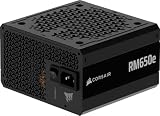
For most gaming builds, the Corsair RM850e (2025) is the best all-round ATX 3.1 power supply in this group: 850 watts, fully modular cabling, a quiet 120mm fan, and enough headroom for a high-end graphics card plus a modern CPU. If you run a flagship GPU or plan to upgrade, step up to one of the 1000-watt units. “ATX 3.1” is Intel’s current power supply design standard; it adds the safer 12V-2×6 graphics connector and keeps the requirement that a unit ride through short GPU power spikes. Below you will find six picks compared by wattage, connector and features.
Our Top Picks
 CORSAIR RM750e ATX 3.1 PCIe 5.1 Ready 750W750 watts5.91 x 5.51 x 3.35 inches3.3 poundsCheck on Amazon



Top 3 picks at a glance

Quick List
- Corsair RM850e (2025) – best for a balanced high-end gaming build that wants quiet, modular cabling
- Corsair RM1000e (2025) – best for flagship GPUs and heavy overclocked CPUs that need 1000W of headroom
- Corsair RM1000x – best for high-wattage builds that want a native 12V-2×6 connector and neat embossed cables
- MSI MAG A850GL PCIE5 – best for compact cases and buyers who value a long warranty
- Corsair RM750e – best for mid-range gaming rigs with a single mainstream GPU
- Corsair RM850x – best for 850W builds that want the x-series feature set, including a native 12V-2×6 connector
Which One Is Right for You?
| If you… | Choose |
|---|---|
| want one sensible 850W unit for a mainstream high-end build | Corsair RM850e (2025) |
| run or plan to buy a flagship graphics card | Corsair RM1000e (2025) or Corsair RM1000x |
| care most about a native 12V-2×6 plug and tidy cable looks | Corsair RM1000x or Corsair RM850x |
| are building in a smaller or shallower case | MSI MAG A850GL PCIE5 (confirm the case clearance first) |
| want a long warranty period printed right in the product name | MSI MAG A850GL PCIE5 |
| pair a mid-range GPU with a mainstream CPU | Corsair RM750e |
| want the x-series features at 850W | Corsair RM850x |
Wattage should follow your graphics card first and your CPU second. The “e” and “x” Corsair series differ mainly in how they are specified and finished, so read the detail sections before you pay extra for the x label. Whatever you choose, confirm the connector count and the cable length against your case before ordering.
All 6 Picks in Detail
1. Corsair RM850e (2025) – Best for a balanced high-end gaming build
As an Amazon Associate we earn from qualifying purchases at no extra cost to you.

The RM850e is the unit most builders will land on. At 850 watts it covers a power-hungry graphics card, a current-generation CPU and a handful of drives and fans without running near its limit, which keeps fan speed and noise lower. The listing describes it as Intel ATX 3.1 certified and PCIe 5.1 ready, so it is built to cope with the brief transient spikes modern GPUs produce. Corsair’s manufacturer page also lists a 12V-2×6 graphics cable with this unit; confirm that on the product page you are buying from.
- 850W output, fully modular cabling
- ATX 3.1 certified, PCIe 5.1 ready, with the 2x transient excursion capability described in the listing
- 120mm rifle bearing fan with a tuned fan curve
- 105°C-rated capacitors
- Modern Standby compatible for faster wake from sleep
- Compact body of about 5.9 x 5.5 x 3.4 inches per the listing
Pros
- Right-sized for most high-end gaming builds
- Fully modular, which makes cable management easier
Cons
- Listing text does not state an efficiency tier; manufacturer pages describe Cybenetics Gold, so confirm before buying
- Less headroom than the 1000W models for flagship GPUs
Compared with the RM850x further down, it gives up the x-series styling and listed native connector in exchange for a simpler, usually easier-to-justify unit.
2. Corsair RM1000e (2025) – Best for flagship graphics cards

The RM1000e is the same platform as the RM850e with 1000 watts of capacity. That extra 150 watts matters if you run a top-tier GPU that draws well over 400 watts under load, or if you pair a mid-range card with an overclocked high-core-count CPU. The headroom also means the unit rarely works near its rated limit, which helps both noise and long-term stress on the components.
- 1000W output, fully modular
- Intel ATX 3.1 certified with PCIe 5.1 support, per the listing
- 120mm rifle bearing fan with a calculated fan curve
- 105°C-rated capacitors
- Modern Standby compatible
- Same compact 5.9 x 5.5 x 3.4 inch body as the 850W model, per the listing
Pros
- Plenty of headroom for flagship GPUs
- Same small footprint as its 850W sibling
Cons
- Overkill for a single mid-range card
- Efficiency tier is not stated in the listing text; confirm on the product page
Next to the RM1000x, it is the more straightforward choice; the x model adds a listed Cybenetics Gold rating and a native 12V-2×6 connector.
3. Corsair RM1000x – Best for high-wattage builds with a native 12V-2×6 plug
The RM1000x is the feature-rich 1000-watt option. Its listing calls out Cybenetics Gold certification with efficiency rated up to 91 percent, ATX 3.1 compliance, and a native 12V-2×6 connector so a recent graphics card can connect directly to the power supply without an adapter. The embossed, flexible cables with low-profile combs are aimed at people who care how the inside of the case looks.
- 1000W, fully modular
- Cybenetics Gold, rated up to 91% efficiency per the listing
- ATX 3.1 compliant, PCIe 5.1 supported
- Native 12V-2×6 connector, no adapter needed
- Embossed cables with low-profile combs
- Listed as low-noise; fan details are not given, so confirm on the product page
Pros
- Native connector removes the adapter question for new GPUs
- Efficiency tier is stated clearly
Cons
- More capacity than many builds will ever use
- Listed dimensions are inconsistent, so check the real depth before fitting it in a small case
It is a more refined choice than the RM1000e, but the e model is the simpler pick if you do not need the premium cable finish.
4. MSI MAG A850GL PCIE5 – Best for compact cases and long warranty coverage

MSI’s A850GL is the only non-Corsair unit here. It is an 850-watt, fully modular, 80 PLUS Gold power supply that the listing describes as compact, ATX 3.1 and PCIe 5.1 ready, with a native dual-color 12V-2×6 cable. A 10-year limited warranty is listed, the longest period named among these six picks, which is a reassuring detail for a part you will keep through several upgrades.
- 850W, fully modular, described as compact
- 80 PLUS Gold certified
- ATX 3.1 and PCIe 5.1 ready
- Native dual-color 12V-2×6 cable
- 10-year limited warranty per the listing
- Fan size and noise figures are not stated; confirm on the product page
Pros
- Long warranty and a native 12V-2×6 cable
- Compact design suits smaller cases
Cons
- The listing gives no fan or noise details
- Listed dimensions look unusual, so verify length against your case
Compared with the RM850x, it matches the wattage and connector but offers a different warranty story and a different brand ecosystem.
5. Corsair RM750e – Best for mid-range gaming rigs

The RM750e is the sensible pick when your build is a mainstream CPU with a mid-range or upper-mid-range graphics card. It carries the same ATX 3.1 certification, fully modular cabling and quiet fan design as the larger e models, only at 750 watts, and it weighs about 3.3 pounds according to the listing. If your GPU’s maker recommends 750W or less, this avoids paying for capacity you will not use.
- 750W, fully modular
- Intel ATX 3.1 certified, PCIe 5.1 platform support
- 120mm rifle bearing fan
- 105°C-rated capacitors
- Modern Standby compatible
- Body of about 5.9 x 5.5 x 3.4 inches per the listing
Pros
- Right-sized for mid-range builds
- Same compact body and modular cabling as larger siblings
Cons
- Little headroom for a flagship GPU or big overclocks
- Whether it includes a 12V-2×6 cable is not stated in the listing; confirm on the product page
Moving up to the RM850e buys extra headroom for upgrades and is worth it if your next GPU may draw more.
6. Corsair RM850x – Best for 850W builds that want x-series features

The RM850x brings the x-series feature list to the 850-watt tier: fully modular cabling, Cybenetics Gold efficiency rated up to 91 percent, ATX 3.1 compliance, a native 12V-2×6 connector and embossed low-profile cables. The listing also calls it low-noise. If you like the idea of the RM1000x but your build does not need 1000 watts, this is the version to consider.
- 850W, fully modular
- Cybenetics Gold, up to 91% efficiency per the listing
- ATX 3.1 compliant with PCIe 5.1 support
- Native 12V-2×6 connector
- Embossed cables with low-profile combs
- Low-noise operation as described in the listing title
Pros
- Clear efficiency tier and native connector
- Good fit for a high-end gaming build at 850W
Cons
- The RM850e covers the same wattage for builds that do not care about the premium finish
- Listed dimensions are inconsistent; verify depth before buying for a small case
It is the closest alternative to the RM850e, differing mainly in listed efficiency tier, connector and cable finish.
Specs Compared
| Model | Wattage | ATX 3.1 / PCIe 5.1 | Modularity | Efficiency (as stated) | Native 12V-2×6 | Other listed points |
|---|---|---|---|---|---|---|
| Corsair RM850e (2025) | 850W | Yes / ready | Fully modular | Confirm on listing | Confirm on listing | 120mm rifle bearing fan, 105°C capacitors |
| Corsair RM1000e (2025) | 1000W | Yes / ready | Fully modular | Confirm on listing | Confirm on listing | 120mm rifle bearing fan, 105°C capacitors |
| Corsair RM1000x | 1000W | Yes / supported | Fully modular | Cybenetics Gold | Yes | Embossed cables, low-profile combs |
| MSI MAG A850GL PCIE5 | 850W | Yes / ready | Fully modular | 80 PLUS Gold | Yes (dual-color cable) | 10-year limited warranty, compact design |
| Corsair RM750e | 750W | Yes / ready | Fully modular | Confirm on listing | Confirm on listing | 120mm rifle bearing fan, 105°C capacitors |
| Corsair RM850x | 850W | Yes / ready | Fully modular | Cybenetics Gold | Yes | Embossed cables, low-profile combs, low-noise |
How We Chose These
We built this list from the current catalog listings rather than from our own bench work. Every model had to state ATX 3.1 compliance and PCIe 5.1 readiness in its listing title or description, and we kept only fully modular designs so cable management stays practical. We then compared wattage steps from 750W to 1000W, the stated efficiency certification, the presence of a native 12V-2×6 connector, and warranty and fan details where the listing provides them. Where a listing is silent on a value, we say so instead of guessing. We cross-checked what ATX 3.1 requires against published explainers and manufacturer pages. We do not run electrical or noise measurements, so you will not find measured figures here.
What to Look For
What ATX 3.1 actually changes
ATX 3.1 is an update of the ATX 3.0 power supply standard, and the two share the same headline requirement: a unit must tolerate power excursions up to 200 percent of its rated output for 100 microseconds, which matches the way modern graphics cards spike when they ramp up. The most visible change is the graphics connector. The older 12VHPWR plug was reworked into the 12V-2×6, which keeps the same shape and the same 600-watt rating but uses longer power pins and shorter sense pins, so a card only draws full current when the plug is seated all the way in. Hold-up time, the period a unit keeps running after losing mains power, is specified at 12 milliseconds at full load in ATX 3.1, down from 17 milliseconds in ATX 3.0, with 17 milliseconds recommended at 80 percent load. In practice, an ATX 3.1 unit is a safe choice for any new build, and buying one costs nothing in compatibility.
Choosing the right wattage
Start with your graphics card’s board power, add the CPU’s maximum draw, then add roughly 100 to 150 watts for the motherboard, memory, drives and fans. Multiply that total by about 1.2 to leave headroom for spikes and component aging. For example, a card drawing 360 watts plus a 170-watt CPU plus 120 watts for everything else comes to 650 watts; with headroom that points to a 750W or 850W unit. A flagship card with a board power of 450 watts or more pushes the same math into 850W to 1000W territory. Also check your graphics card maker’s published PSU recommendation, because it sets a floor you should not drop below. A larger unit rarely costs you anything in efficiency at typical loads, but it should not be bought blindly; paying for 1000 watts you never use is wasted budget.
Connectors, cables and case fit
A native 12V-2×6 cable runs straight from the power supply to the card, which removes the adapter that older setups needed. Check three things: the number of PCIe 8-pin connectors you need if your card is older, the number of SATA and 4+4 EPS CPU connectors, and the cable length to your GPU in a tall case. For fit, read the unit depth carefully. The Corsair e-series listings give a body of about 5.9 x 5.5 x 3.4 inches, while some listings show odd dimension fields, so confirm the true length on the manufacturer page before buying for a small-form-factor chassis. Fully modular designs let you leave unused cables out, which helps airflow in cramped cases.
Efficiency tiers and noise
Two programs rate power supply efficiency: 80 PLUS and Cybenetics. Gold-level units are commonly considered a sweet spot, wasting less energy as heat than Bronze or Standard models. The Cybenetics scheme also publishes a separate noise rating. A unit that runs at a lower share of its capacity usually spins its fan more slowly, which is one argument for modest headroom. Note that an efficiency badge describes performance at specific load points, not an overall guarantee, and that the listing text for some models in this list does not name a tier at all, which is why the comparison table says to confirm on the listing.
Warranty and longevity
The warranty period is a rough signal of the manufacturer’s confidence. The MSI A850GL lists a 10-year limited warranty, and Corsair’s manufacturer page lists a multi-year warranty for the RM850e; confirm the exact term for whichever model you pick. Capacitor temperature rating, such as the 105°C capacitors named for the e-series, is another detail that hints at build quality, although it is not a complete picture.
Questions
Is ATX 3.1 worth it over ATX 3.0?
For a new build, yes, because there is no price or compatibility reason to choose the older standard on purpose. The main benefit is the improved 12V-2×6 connector design, which is meant to prevent partial insertion. If you already own a working ATX 3.0 unit, there is no urgent reason to replace it.
Do I need a native 12V-2×6 cable?
You need a way to connect a card that uses the 12V-2×6 or 12VHPWR socket, and a native cable avoids an adapter with extra connection points. If a listing does not state that a cable is included, confirm it on the product page. Older cards that use 8-pin connectors need the right number of PCIe cables instead.
Is 850W enough for a high-end gaming PC?
For many high-end builds it is, particularly with a card around 360 watts and a CPU under 200 watts. Flagship cards that draw 450 watts or more are better matched with 1000W. Check your GPU maker’s recommendation and add headroom for upgrades.
What is the difference between the Corsair e and x series here?
From the listings, the x models call out Cybenetics Gold efficiency, a native 12V-2×6 connector and embossed low-profile cables. The e models call out a 120mm rifle bearing fan, 105°C capacitors and Modern Standby compatibility. Both are ATX 3.1 and fully modular, so the choice is largely about features and finish.
Can I reuse my old power supply cables?
No. Modular cable pinouts differ between brands and sometimes between series from the same brand, and mixing them can damage components. Use only the cables supplied with, or specified for, your exact unit.
How long should a power supply last?
Warranty periods of seven to ten years are common on quality units, and many last through several builds. Keep dust out of the fan, avoid running at the limit of capacity, and replace the unit if you see instability, fan failure or any burning smell.
Update History
- October 14, 2026 – Initial publication; product set drawn from current catalog listings.
- Check the product page for current specifications and availability before buying.
Sources
- Manufacturer product and specification pages for Corsair
- Retailer listing titles and specification fields for all six products
- Published explainers comparing ATX 3.0 and ATX 3.1 requirements and the 12V-2×6 connector
- Independent hardware reviews and spec summaries of the Corsair RM850e (2025)