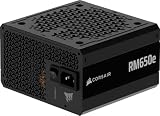
The best power supply for an X570 motherboard in this group is the be quiet! Pure Power 13 M 750W, a fully modular ATX 3.1 unit with 80 PLUS Gold efficiency, a Cybenetics Platinum rating, semi-passive cooling and a 10-year warranty in most listings. X570 is AMD’s PCIe 4.0 chipset for AM4 processors, and it asks for a standard 24-pin cable plus an 8-pin processor cable, so the choice comes down to wattage, noise and how easily the unit can feed a future graphics card. Pick the Corsair RM850x if you plan a power-hungry GPU, and the ASRock PRO 750G for a plain, compact build.
Our Top Picks
 Thermaltake GF1 Fully Modular ATX 750W Power Supply750W5.9 x 5.5 x 3.4 inches3.37 PoundsCheck on Amazon



Top 3 picks at a glance
Quick List
- Thermaltake GF1 750W – best for a fully modular Gold unit with a Zero RPM fan and a long warranty
- Generic 750W 80 Plus Gold modular PSU – runner-up; brand is not named in the listing, so check details first
- ASRock PRO 750G – best for a simple ATX 3.1 build with a native 12V-2×6 cable
- be quiet! Pure Power 13 M 750W – best overall for quiet, modular, future-ready X570 systems
- Thermaltake Toughpower GT 750W – best for an ATX 3.1 unit with Smart Zero Fan and a native PCIe 5.1 cable
- Corsair RM850x – best for X570 builds with a high-power graphics card or heavy overclocking
Which One Is Right for You?
| If you… | Choose |
|---|---|
| want the most complete 750W unit for a quiet X570 system | be quiet! Pure Power 13 M 750W |
| plan to upgrade to a graphics card that draws well over 300 W | Corsair RM850x |
| want a fully modular Gold unit with a long warranty and standard PCIe 8-pin cables | Thermaltake GF1 750W |
| want a simple ATX 3.1 supply with a native 12V-2×6 cable | ASRock PRO 750G |
| want ATX 3.1 with a Smart Zero Fan and are comfortable verifying modularity first | Thermaltake Toughpower GT 750W |
| found an unbranded 750W unit and want a reality check on what to verify | Generic 750W 80 Plus Gold modular PSU |
For most X570 builds, 750W is the comfortable middle: enough for a Ryzen 5000 processor and a high-end graphics card, with headroom for efficiency and low fan speed. Go to 850W only if the graphics card calls for it, and do not pay for ATX 3.1 features if you will keep an older graphics card, although they are useful insurance for a later upgrade.
All 6 Picks in Detail
1. Thermaltake GF1 750W – Best for a Modular Gold Unit with a Zero RPM Fan
As an Amazon Associate we earn from qualifying purchases at no extra cost to you.

The GF1 is a plain, fully modular 750W unit with 80 PLUS Gold efficiency and a fan that stays off at low load, as the listing states. It suits an X570 build that uses PCIe 8-pin cables, which covers a large share of existing graphics cards. Retailer pages list a 10-year warranty and a 140 mm unit length, and describe the fan as 120 mm, although one listing says 140 mm, so confirm on listing.
- 750W, 80 PLUS Gold, fully modular
- Zero RPM fan mode, so the fan does not spin at light load
- Connectors per retailers: 24-pin, two 4+4 pin processor cables, four 6+2 pin PCIe, eight SATA
- Single 12V rail rated at 62.5 A per retailer specifications
- Retailers list ATX12V compliance; no native 12VHPWR cable was found
Fit and setup notes: Thermaltake sells two different versions under the GF1 750W name with different part numbers and lengths, so match the model number in your listing with the version you want. If you later buy a graphics card that uses the 16-pin 12V-2×6 connector, you would use the adapter supplied with the card, which is a reason to prefer a native cable if you expect to upgrade soon. For a standard X570 build with an existing card, the PCIe 8-pin cables are all you need.
Pros
- Fully modular cabling and a Zero RPM fan
- Long warranty according to retailer listings
Cons
- No native 12V-2×6 cable found, so it is less future-ready
- Two product versions share the name, so check the part number
Compared with the be quiet! Pure Power 13 M, it matches on modularity and Gold efficiency but lacks the native modern GPU cable.
2. Generic 750W 80 Plus Gold Modular PSU – Runner-Up Pending Brand Verification

This listing does not name a brand in its title: it describes a 750W, 80 Plus Gold, fully modular, standard ATX unit with active power factor correction. The power class fits an X570 build, but the listing name does not tell you who made it, which protections it has, or what warranty applies. That is why it appears as a runner-up. The product page describes a 130 mm fluid dynamic bearing fan, but confirm on listing before trusting that detail.
- 750W, standard ATX size
- 80 Plus Gold efficiency as stated in the listing
- Fully modular cabling
- Active PFC with wide input voltage range per the product page
- Brand, warranty, ATX version and protections: confirm on listing
Fit and setup notes: before you buy any unbranded or lightly branded supply, look for the 80 PLUS certificate under the stated model name, a named manufacturer, a stated warranty length and the standard protections (overvoltage, undervoltage, overcurrent, short-circuit and overtemperature). A power supply feeds every component in your system, and a low-quality unit can damage them. If you cannot confirm these points, choose one of the named-brand units in this list instead.
Pros
- Modular cabling at the 750W class
- Active PFC and a wide input range described on the product page
Cons
- Brand and warranty are not named in the listing
- No stated ATX 3.1 or native modern GPU connector
Who should skip it: anyone who cannot verify the maker, the warranty and the certification. If you can confirm a named manufacturer, a published warranty and an 80 PLUS listing under the same model, the specifications are reasonable for an X570 build with a mid-range or high-end graphics card. If any of those points stays unclear, the cost of a failed supply, which can take other parts with it, outweighs any convenience.
Next to the Thermaltake GF1 750W, the specs sound similar on paper, but the GF1 comes with a known brand and a stated warranty.
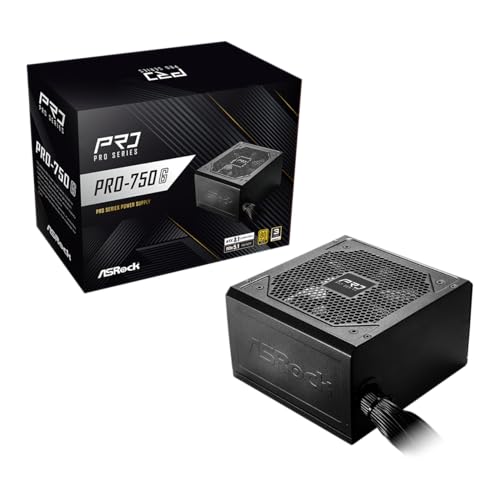
3. ASRock PRO 750G – Best for a Simple ATX 3.1 Build

The ASRock PRO 750G is an ATX 3.1 and PCIe 5.1 ready 750W supply with 80 PLUS Gold certification, a native 12V-2×6 connector, a 120 mm low-noise fan and a three-year warranty, as the listing states. ASRock’s own page lists it as a non-modular unit with flat cables, which keeps the design simple. It suits a straightforward X570 build where you want a modern GPU cable and are happy to route the fixed cables.
- 750W, 80 PLUS Gold, ATX 3.1 and PCIe 5.1 ready
- Native 12V-2×6 connector rated for 450W per ASRock
- 120 mm fan; 140 x 150 x 86 mm size
- Flat cables and a three-year warranty
- Protections include overcurrent, short-circuit, overvoltage and overtemperature
Fit and setup notes: do not confuse it with the PRO-M750G, a separate fully modular model with a longer warranty. At least one retailer lists the PRO 750G as modular, while ASRock’s page shows non-modular, so confirm on listing. With fixed cables you will have extra connectors to tuck away, so check that your case has room behind the motherboard tray.
Pros
- Native 12V-2×6 cable for future graphics cards
- Compact size suits smaller X570 cases
Cons
- Non-modular design adds cable clutter
- Shorter warranty than most others here
Who should skip it: builders who want to hide cables in a small case or expect to change parts often, since fixed cables are harder to manage. It is a good match for a roomy case where cable bundles disappear behind the tray, and for an owner who wants current standards at the 750W level with the smallest possible footprint.
Compared with the Pure Power 13 M, it has the modern GPU cable but gives up modular cables, a longer warranty and the quieter semi-passive design.
4. be quiet! Pure Power 13 M 750W – Best Overall for Quiet, Future-Ready X570 Systems

This unit is the best all-round choice here for most X570 builders. The listing names 80+ Gold efficiency with a Cybenetics Platinum rating, PCIe 5.1, ATX 3.1, a fully modular design and LLC topology. be quiet! describes semi-passive cooling, and independent reviewer Hardware Busters reported a Cybenetics A++ noise rating. It has plenty of cables for an X570 board and a graphics card.
- 750W, 80 PLUS Gold with a Cybenetics Platinum efficiency rating
- ATX 3.1 with a 12+4 pin PCIe connector rated for 600W
- Two processor cables, four 6+2 pin PCIe cables, six SATA and two Molex per retailer data
- 120 mm fan with semi-passive operation
- Ten-year warranty in most listings (one retailer lists five, so confirm on listing)
Fit and setup notes: the casing is about 160 mm deep according to reviewers, so check your case’s PSU space if you use a compact tower. The semi-passive mode keeps the fan off at light load, which suits an idle desktop. Use only the cables supplied with this unit, because modular pinouts differ between models.
Pros
- Modular cables, ATX 3.1 and a high efficiency rating in one package
- Quiet, semi-passive cooling and a long warranty
Cons
- Warranty length varies by listing
- Deeper than the most compact units, which matters in small cases
Who should skip it: builders with a very small case, since the unit is deeper than the most compact supplies, and anyone who needs more than 750W for a power-hungry graphics card. For a typical X570 desktop with a Ryzen 5000 processor and a mainstream or high-end card, it leaves a healthy margin, which keeps the fan off more of the time.
Next to the Corsair RM850x, it offers similar features at a lower wattage, which is the right size for most X570 systems.
5. Thermaltake Toughpower GT 750W – Best for ATX 3.1 with a Smart Zero Fan

The Toughpower GT combines ATX 3.1, 80 Plus Gold efficiency, a Smart Zero Fan and a native PCIe 5.1 connector, as the listing says. The listing describes the unit as a standard power supply and states the cable rating as 300W, while another listing of the white version states 600W, so confirm which version you are buying. Retailers list a five-year warranty and a 120 mm fan.
- 750W, 80 Plus Gold, ATX 3.1
- Smart Zero Fan with a 120 mm hydraulic bearing fan per retailers
- Native PCIe 5.1 (12V-2×6) connector; rating varies by listing
- Connectors per retailers: two processor, four PCIe, six SATA
- Five-year warranty according to retailers
Fit and setup notes: Thermaltake describes the series as fully modular with low-profile flat cables, but the listing wording is less clear, so confirm modularity on the product page before you plan your cable routing. The unit is a good match for an X570 build that you may later pair with a PCIe 5.1 graphics card, since the cable is already included.
Pros
- ATX 3.1 and a native modern GPU cable
- Zero-fan mode reduces noise at low load
Cons
- Cable rating and modularity differ across listings, so confirm on listing
- Shorter warranty than the Pure Power 13 M
Who should skip it: shoppers who need a guaranteed modular design, since the wording differs between sources, and anyone who wants the longest warranty. It remains attractive for an X570 owner who expects to move to a newer graphics card, because the connector is already in the box and no adapter is required.
Compared with the ASRock PRO 750G, it adds the Smart Zero Fan and a longer warranty, which suits builders who want a quiet system.
6. Corsair RM850x – Best for High-Power Graphics Cards and Overclocking

The Corsair RM850x is the biggest unit here, at 850W. The listing names ATX 3.1, PCIe 5.1, a fully modular design, a low-noise fan, Cybenetics Gold efficiency and a native 12V-2×6 connector. Corsair’s product data lists a 10-year warranty and a 140 mm fluid dynamic bearing fan with a Zero RPM mode, though some listings show 135 mm from the older version.
- 850W, Cybenetics Gold efficiency, fully modular
- ATX 3.1 with a native 12V-2×6 connector
- +12V rail rated at about 70.8 A per the manufacturer
- Size of 160 x 150 x 86 mm; Japanese 105 C capacitors per retailers
- Ten-year warranty
Fit and setup notes: older versions of the RM850x are still sold, so make sure the listing shows the ATX 3.1 model, and do not confuse it with the RM850x SHIFT, which uses a different side-mounted connector layout. An 850W unit is worth the extra only if you plan to run a high-end graphics card, because a 750W unit is enough for most X570 systems.
Pros
- Extra headroom for powerful graphics cards and overclocking
- Native 12V-2×6, modular cables and a long warranty
Cons
- More wattage than most X570 builds need
- Older versions are still sold under the same name
Who should skip it: owners of mainstream systems, who gain little from the extra 100W and can spend the difference elsewhere in the build. It is the right choice if your graphics card is rated for a high board power, if you run several drives and fans, or if you like to keep the supply well below its limit so the fan stays slow and quiet.
Against the Pure Power 13 M, it gives up nothing in features and adds 100W of output, which only matters if your graphics card needs it.
Specs Compared
| Power supply | Wattage | Efficiency (as listed) | Modularity | ATX version / GPU cable | Fan and warranty |
|---|---|---|---|---|---|
| Thermaltake GF1 750W | 750W | 80 Plus Gold | Fully modular | ATX12V per retailers; no native 12V-2×6 found | Zero RPM; 10-year per retailers |
| Generic 750W 80 Plus Gold PSU | 750W | 80 Plus Gold | Fully modular | Confirm on listing | Confirm on listing |
| ASRock PRO 750G | 750W | 80 Plus Gold | Confirm on listing (ASRock shows non-modular) | ATX 3.1, native 12V-2×6 | 120 mm; 3-year |
| be quiet! Pure Power 13 M 750W | 750W | 80+ Gold, Cybenetics Platinum | Fully modular | ATX 3.1, 12+4 pin PCIe | Semi-passive 120 mm; 10-year in most listings |
| Thermaltake Toughpower GT 750W | 750W | 80 Plus Gold | Confirm on listing | ATX 3.1, native PCIe 5.1 connector | Smart Zero Fan; 5-year per retailers |
| Corsair RM850x | 850W | Cybenetics Gold | Fully modular | ATX 3.1, native 12V-2×6 | Zero RPM mode; 10-year |
How We Chose These
We built this list from the products named in the catalog and compared them using manufacturer specification pages, retailer listing titles and fields, and independent power supply coverage where it existed. For X570 builds we looked for 750W or higher, 80 PLUS Gold or equivalent efficiency, an ATX form factor, the cables an X570 board and a modern graphics card need, a named brand with a stated warranty and, where possible, a low-noise fan design. We rewarded modular cabling and native 12V-2×6 connectors as conveniences, not necessities. Where listing details conflicted, such as fan size or modularity, we flagged the conflict and asked you to confirm on the product page. We did not use any claims we could not trace to a manufacturer or retailer listing.
What to Look For
Choosing the Right Wattage for X570
The X570 chipset itself is a modest load; your processor and graphics card decide the wattage. AM4 processors in the 105 W class, such as the Ryzen 9 5950X, can draw about 142 W under heavy load, and a high-end graphics card can draw 300 W or more. Here is a worked example. Suppose you pair that processor with a graphics card rated at 320 W, and allow about 100 W for the board, memory, drives and fans. The total is roughly 560 W. Power supplies run most quietly and efficiently at around 40 to 60 percent load, and you want headroom for spikes, so a 750W unit is a comfortable match. With a 200 W graphics card and a mid-range processor, a 650W unit is often enough, and an 850W unit makes sense only for overclocked, high-power systems.
Remember that graphics cards can draw brief power spikes well above their rated board power, which is why ATX 3.1 units are built to tolerate short excursions. A supply sized with 30 to 40 percent headroom over your estimated load handles those spikes without tripping its protections. Also consider the age of the system: capacitors in any supply wear over time, so a unit that is barely big enough on day one may struggle in a few years. Choosing the next wattage step up costs little in efficiency, because supplies are efficient across a wide middle range of load.
Connectors an X570 Board Needs
Every X570 board needs the 24-pin main cable and at least one 8-pin (4+4) processor cable. Many mid-range and high-end boards add a second 4-pin or 8-pin processor connector, so check your board manual and use all the connectors provided if you plan to overclock. For graphics cards, count the 6+2 pin PCIe cables you need: many cards use two or three, and some newer cards use a single 12V-2×6 connector. If you may upgrade, a unit with a native 12V-2×6 cable avoids adapters. Also count SATA and Molex connectors if you use several drives or fans, and remember that a modular unit lets you remove what you do not need.
Efficiency, Noise and Cooling
80 PLUS grades measure efficiency at set loads. A Gold unit must reach at least 87 percent at 20 percent load, 90 percent at 50 percent load and 87 percent at full load on 115 V input. Cybenetics uses a different scale and also grades noise. Higher efficiency means less wasted heat and usually a quieter fan. Look for a fan with a fluid dynamic or hydraulic bearing, which tends to last longer than a plain sleeve bearing, and a semi-passive or Zero RPM mode that keeps the fan off at light load. Note that X570 boards often have an active chipset fan, which can be audible, so a quiet power supply helps but does not remove all noise.
ATX 3.1, 12V-2×6 and Safe Cable Use
ATX 3.1 is Intel’s latest power supply specification. It includes tolerance for short power spikes and the 12V-2×6 graphics connector. X570 boards do not need it, but a later graphics card might. If you use a 12V-2×6 cable, push the connector in fully until it clicks and avoid bending the cable sharply right at the plug, because a loose or strained connection can overheat. Never mix modular cables from different brands or different models, since the pinout at the power supply end can differ and a wrong cable can damage components. Do not open a power supply, since its capacitors can hold a dangerous charge even when unplugged.
Warranty, Certification and Brand Checks
A power supply failure can take other parts with it, so treat the warranty and certification as part of the specification. Look for a named manufacturer, a stated warranty of five years or more, and an efficiency certificate that matches the exact model. Compare protections too: overvoltage, undervoltage, overcurrent, short-circuit, overpower and overtemperature are standard on quality units. Be careful with listings that omit the brand or use vague wording, because a high wattage label on a poorly built supply can be misleading. When listing details disagree, such as fan size or whether a unit is modular, trust the manufacturer’s page over a retailer’s summary.
Questions
How many watts do I need for an X570 motherboard?
The motherboard needs little; the processor and graphics card decide the total. A 650W unit suits a mid-range card, 750W suits most high-end builds and 850W suits very powerful cards or overclocking. Add up your components and allow headroom.
Do I need an ATX 3.1 power supply for X570?
No, X570 boards work with standard ATX supplies. ATX 3.1 matters if you plan to install a newer graphics card with a 12V-2×6 connector. It is useful insurance for a later upgrade.
Is a modular power supply worth it?
It helps with cable management and airflow, especially in small cases. Non-modular units work just as well electrically. Choose modular if you want a tidy build and have spare cables you do not need.
Can I use the cables from an old power supply?
No. Modular cable pinouts differ between brands and models, and a wrong cable can damage your parts. Use only the cables supplied with your power supply.
Should I connect both processor power connectors?
If your board has two, connecting both is the safer choice, especially when overclocking. One 8-pin connector is often enough for normal use on a mid-range board, but check the manual.
Does a power supply affect the X570 chipset fan noise?
Not directly. The chipset fan is controlled by the motherboard. A quiet power supply reduces overall noise, but you may need a BIOS update or fan curve change to quiet the chipset fan.
Update History
- October 14, 2026 – Initial publication; product set drawn from current catalog listings.
- Check the product page for current specifications and availability before buying.
Sources
- Manufacturer product and specification pages for ASRock, be quiet!, Thermaltake and Corsair
- Retailer listing titles and specification fields
- Independent power supply coverage from Hardware Busters and KitGuru
- 80 PLUS and Cybenetics efficiency certification programs