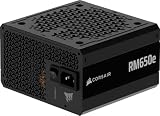
The best 650W power supply in this group is the ASRock PRO-650G, because it combines 80 PLUS Gold efficiency, an ATX 3.1-ready design and a stated 54.1A on the +12V rail in a compact body. If you want to keep the build cost down, the MSI MAG A650BE adds semi-modular cabling to 80 PLUS Bronze, and the MSI MAG A650BN is the no-frills non-modular version. A 650W supply is the sweet spot for a mainstream gaming PC with a mid-range graphics card and a midrange processor.
Our Top Picks




Top 3 picks at a glance
Quick List
- MSI MAG A650BN – best for a compact, non-modular Bronze build with a 5-year warranty
- ASRock PRO-650B – best for an ATX 3.1-ready Bronze unit
- ASRock PRO-650G – best overall for Gold efficiency and ATX 3.1 readiness
- Rosewill VNW 650W – best for a small chassis and entry-level builds
- MSI MAG A650BE – best for tidier cabling with a semi-modular design
- ARESGAME AGV 650W – best for an all-black cable set on a tight budget
Which One Is Right for You?
| If you… | Choose |
|---|---|
| want the best efficiency and newest standard in the set | ASRock PRO-650G |
| want fewer cables to hide behind the motherboard tray | MSI MAG A650BE |
| want a long warranty and a straightforward non-modular unit | MSI MAG A650BN |
| are building a small case and need a short body | Rosewill VNW 650W |
| want ATX 3.1 readiness without paying for Gold | ASRock PRO-650B |
| care most about black sleeved-look cables and a five-year term | ARESGAME AGV 650W |
Decide on efficiency and cabling first, because those two features change heat, noise and the ease of your build. Then check the physical size against your case and the connectors against your graphics card. If two units look equal on paper, lean toward the one with the longer warranty and the clearer protection list, since those are the two details a listing cannot easily exaggerate. Remember too that a 650W label describes what the supply can deliver, not what your PC will pull from the wall; a typical gaming system idles far below that figure and spends most of its time at a fraction of it.
All 6 Picks in Detail
1. MSI MAG A650BN – Best for a no-frills compact build
As an Amazon Associate we earn from qualifying purchases at no extra cost to you.

The MSI MAG A650BN is a non-modular 650W supply with 80 PLUS Bronze efficiency, an active PFC design, a DC-DC circuit layout and a low-noise fan. The listing names OVP, OCP, OPP, OTP and SCP protections and a 5-year warranty. It suits builders who want a known brand and do not mind routing every cable. The listing does not state the fan size or the connector count, so confirm those on the product page.
This is the safe, boring pick, and in a power supply that is a compliment. The listing describes a DC-DC design, which converts the main output to lower voltages in separate stages, and a full set of protection circuits against over-voltage, over-current, over-power, over-temperature and short circuits. A fixed cable bundle is fine in a case with a rear cable channel and some spare room. If you are building in a compact or glass-sided case, think about how much cable you will need to hide before committing to non-modular.
- Output: 650W
- Efficiency: 80 PLUS Bronze
- Cabling: non-modular
- Design: active PFC with DC-DC circuitry
- Protections: OVP, OCP, OPP, OTP, SCP
- Warranty: 5 years per the listing
Pros
- Five-year warranty from a known brand
- Full set of protection circuits
Cons
- Every cable is attached, which clutters small cases
- Connector count and 12V-2×6 availability are not stated
Compared with the MSI MAG A650BE, it is the same family without the semi-modular convenience.
2. ASRock PRO-650B – Best for an ATX 3.1-ready Bronze unit

ASRock’s PRO-650B is an 80 PLUS Bronze unit marketed as ATX 3.1 ready, with a 120mm fan and a stated 54.1A on the +12V rail, which works out to about 649W of 12V capacity. The listing names OCP, OVP, UVP, OPP, OTP and SCP, and a 3-year warranty. It is a good fit for builders who want the latest standard. Whether it includes a native 12V-2×6 cable is not stated in the listing name, so confirm before pairing it with a graphics card that uses one.
The stated 54.1A on the +12V rail matters because modern CPUs and graphics cards draw almost all of their power from that rail. At 12V, 54.1A is about 649W, so essentially the full 650W is available there. That is the direction ATX power supplies have moved, and it suits a gaming system better than a design with a large share of capacity on lower rails.
- Output: 650W, 54.1A on +12V
- Efficiency: 80 PLUS Bronze
- Standard: ATX 3.1 ready, with 200% power excursion capability claimed
- Fan: 120mm
- Protections: OCP, OVP, UVP, OPP, OTP, SCP
- Warranty: 3 years
Pros
- Newer standard than most Bronze units
- Strong 12V capacity
Cons
- Shorter warranty than the MSI and Rosewill models
- Cabling type not stated in the listing name
Step up to the PRO-650G if you want the same platform with Gold efficiency.
3. ASRock PRO-650G – Best overall

The PRO-650G is the Gold version of the same design: 80 PLUS Gold efficiency (the listing says up to 90%), ATX 3.1 readiness, a 120mm fan, 54.1A on the +12V rail and the full protection list including UVP. It suits most mainstream gaming builds and is the pick if you want the lowest heat and wasted power. Cabling type and connector counts are not stated in the listing name, so confirm those on the product page.
Gold certification matters most for people who run their PC for long hours. A Gold unit must reach 87% efficiency at 20% and 100% load and 90% at 50% load on 115V, so less of the wall power becomes heat inside the supply. In practice that means a little less fan work and a slightly lower energy bill. It does not guarantee better build quality on its own, but combined with the ATX 3.1 positioning and the full protection list in the listing it is the strongest all-round specification sheet here.
- Output: 650W, 54.1A on +12V
- Efficiency: 80 PLUS Gold
- Standard: ATX 3.1 ready
- Fan: 120mm, balanced for low noise per the listing
- Protections: OCP, OVP, UVP, OPP, OTP, SCP
- Warranty: 3 years
Pros
- Gold efficiency reduces heat and wall draw
- Current ATX 3.1 positioning
Cons
- Only a 3-year warranty
- Modularity not stated
It beats the PRO-650B on efficiency and the MSI units on standard, while the MSI warranty is longer.
4. Rosewill VNW 650W – Best for a small chassis
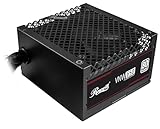
Rosewill’s VNW is the most basic of the group: 80 PLUS White certified, non-modular, active PFC, a DC-DC high-amperage +12V rail design and a 120mm fluid dynamic bearing fan. The chassis is listed at 140 x 150 x 86mm, described as 35% smaller than a standard supply, and the warranty is five years. It uses electrolytic capacitors, per the listing. It suits small builds with a modest graphics card where efficiency matters less.
The Rosewill is a utility choice. White certification is the lowest efficiency tier, which is fine for a modest build that rarely runs at high load, and the compact body leaves more room for cabling inside small cases. The fluid dynamic bearing fan is a plus for long-term noise, and the five-year warranty is as long as the MSI models. Because it uses a fixed cable set, count the connectors you need, especially graphics card power leads, before choosing it for anything with a power-hungry card.
- Output: 650W
- Efficiency: 80 PLUS White
- Cabling: non-modular
- Fan: 120mm FDB
- Size: about 140 x 150 x 86mm
- Protections: UVP, OVP, OPP, SCP, OCP
Pros
- Compact size aids small cases
- Five-year warranty and FDB fan
Cons
- Lowest efficiency class here
- Non-modular cable bundle
It is the pick if size is the constraint; the ASRock models make more sense if efficiency is.
5. MSI MAG A650BE – Best for semi-modular cabling

The MSI MAG A650BE keeps the A650BN’s 80 PLUS Bronze efficiency, active PFC, DC-DC design and 5-year warranty and adds a semi-modular cable layout with a 120mm low-noise fan. With semi-modular units, the essential motherboard and CPU cables are fixed and the rest detach, so you can leave unused leads out of the case. It suits anyone who wants neat cabling without paying for a fully modular unit. The listing dimension fields look inconsistent, so confirm the physical size before buying for a small case.
Semi-modular units are a middle path between fixed and fully detachable cables. The main 24-pin motherboard cable and the CPU cable stay attached since every build needs them, while SATA, peripheral and often graphics card leads plug in only if you need them. That keeps clutter down and improves airflow in small cases. Match the cable count to your parts list before you buy: two PCIe power connectors suffice for most mid-range graphics cards, but verify the number in the box on the product page.
- Output: 650W
- Efficiency: 80 PLUS Bronze
- Cabling: semi-modular
- Fan: 120mm low-noise
- Protections: OVP, OCP, OPP, OTP, SCP
- Warranty: 5 years
Pros
- Detachable peripheral cables
- Five-year warranty
Cons
- Not ATX 3.1 labeled in the listing name
- Size and connector count must be confirmed
Compared with the A650BN, the only change that matters is the detachable cables.
6. ARESGAME AGV 650W – Best for black cables on a budget
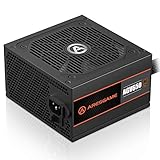
The ARESGAME AGV is a non-modular 650W supply with 80 PLUS Bronze, a 120mm fan and a 5-year warranty. The listing highlights all-black cables and names OVP, UVP, OPP and SCP protections, but it does not list OCP or OTP, so confirm the full set on the product page. It suits a basic gaming build where the budget is tight. The brand is less established than MSI or ASRock, which makes the warranty and protections worth reading closely.
This model leans on cosmetic and warranty selling points: black cables and a five-year term. The Bronze certification and 120mm fan are standard for the class. The thing to check is the protection list, since the listing mentions over-voltage, under-voltage, over-power and short-circuit protection but not over-current or over-temperature. A mainstream brand will usually state the whole set, so read the spec sheet carefully before you commit. If in doubt, one of the MSI or ASRock units is easier to vet.
- Output: 650W
- Efficiency: 80 PLUS Bronze
- Cabling: non-modular, black cables
- Fan: 120mm
- Size: about 5.9 x 5.5 x 3.3 inches
- Protections: OVP, UVP, OPP, SCP
Pros
- Black cables look tidier
- Five-year warranty
Cons
- Shorter protection list in the listing
- Less established brand
Next to the MSI MAG A650BN, it offers a similar spec sheet with less documented protection.
Specs Compared
| Model | Wattage | 80 PLUS level | Modularity | Fan | Warranty | Standard / notes |
|---|---|---|---|---|---|---|
| MSI MAG A650BN | 650W | Bronze | Non-modular | Low-noise, size: confirm on listing | 5 years | Active PFC, DC-DC |
| ASRock PRO-650B | 650W | Bronze | confirm on listing | 120mm | 3 years | ATX 3.1 ready, 54.1A +12V |
| ASRock PRO-650G | 650W | Gold | confirm on listing | 120mm | 3 years | ATX 3.1 ready, 54.1A +12V |
| Rosewill VNW 650W | 650W | White | Non-modular | 120mm FDB | 5 years | Active PFC, small chassis |
| MSI MAG A650BE | 650W | Bronze | Semi-modular | 120mm | 5 years | Active PFC, DC-DC |
| ARESGAME AGV | 650W | Bronze | Non-modular | 120mm | 5 years | Black cables |
How We Chose These
This list is based on listing titles, bullet points and specification fields, not on bench measurements. We looked for 650W units with an 80 PLUS certification, active PFC, a 120mm fan where stated, and a clear protection list, then compared warranty length, modularity, size and any ATX 3.1 claims. Where a listing omits something important, such as connector counts or cable types, the table says to confirm on the listing. We did not assess ripple, hold-up time or noise, because those require lab equipment, and we do not claim measured results for any unit. Because the weakest part of any listing is what it leaves out, we treated missing information as a reason to ask the buyer to verify, never as a reason to assume the best.
What to Look For
Sizing the wattage
Add up the maximum draw of the processor and graphics card, add about 50 to 100W for the motherboard, drives, fans and memory, and leave headroom. Worked example: a 125W processor, a 220W graphics card and 75W for everything else comes to 420W, so a 650W supply runs at about 65% load, comfortably inside its efficient range and with room for transient spikes. A graphics card that lists 300W or more usually calls for 750W or above, so check the card maker’s recommendation.
Efficiency levels and what they mean
80 PLUS certification sets minimum efficiency at 20%, 50% and 100% load on 115V. White requires 80% at all three points. Bronze requires 82%, 85% and 82%. Gold requires 87%, 90% and 87%. Better efficiency wastes less energy as heat, which can mean a quieter fan, but the difference in wall draw for a 400W load is typically tens of watts, not hundreds. Efficiency does not guarantee quality of components or voltage regulation.
ATX 3.1, connectors and cabling
ATX 3.1 is an Intel specification that covers items such as the 12V-2×6 connector and tolerance for short power excursions. “ATX 3.1 ready” in a listing does not by itself tell you which cables are included, so check for the connectors your graphics card needs: usually one to three 8-pin PCIe connectors or a 12V-2×6 cable. Non-modular units attach all cables, modular units detach all, and semi-modular units fix only the main ones. Use only the cables supplied with that exact supply, because modular connectors from different brands can look identical but use different wiring.
Installation and electrical safety
Switch the supply off and unplug the power cord before touching any cable. Never open the supply case, because capacitors can hold a dangerous charge for some time after unplugging. Match the 115V and 230V switch, if present, to your wall outlet. Seat every connector fully and avoid bending cables sharply at the connector, particularly the graphics card’s 12V connector, which should be pushed in until it clicks. Do not use cable extensions of unknown quality or daisy-chain splitters to run a high-power graphics card, and plug the supply into a grounded outlet or a quality surge protector rated for the load. Mount the fan facing the vent in your case and keep the intake clear of dust.
A short compatibility checklist before you buy
Check five things against your parts list. First, the graphics card’s recommended supply size and the number and type of power connectors it needs. Second, the case’s maximum power supply length and whether it mounts the supply at the bottom with an intake vent. Third, the motherboard’s power headers: one 24-pin and one 8-pin CPU connector at minimum, sometimes two on high-end boards. Fourth, the number of SATA and Molex leads if you use old drives or accessories. Fifth, the warranty and the maker’s registration process. Keep the box and cables in case you need to return the supply. If you ever notice a burning smell, buzzing, repeated shutdowns or discolored connectors, power the PC off, unplug it and stop using that supply until you have had it checked or replaced.
When you replace a supply in an existing PC, photograph the old cable layout first, then disconnect one cable group at a time. Never connect a new modular supply to the old supply’s cables. After installing, power on with the case still open and watch that the fans spin and no connector sparks or smells, then close the case. Keep the packaging for the warranty period in case you need to ship it back.
Questions
Is 650W enough for a gaming PC?
For most builds with a mid-range graphics card and a mainstream processor, yes. If your graphics card is rated for 300W or more, check the card maker’s recommended supply size and consider a larger unit. Also allow for upgrades: a supply that is already near its limit leaves no room for a stronger graphics card later.
Does 80 PLUS Gold matter for gaming?
It lowers heat and wall draw somewhat, which helps with noise and running cost. It does not make a PC faster, so choose it if the extra efficiency is worth it to you.
What does ATX 3.1 ready mean?
It means the supply is designed to meet the ATX 3.1 specification, which covers items such as the 12V-2×6 connector and power excursions. Confirm which cables come in the box.
Is non-modular a problem?
Not for function. It only makes cable management harder, since unused cables must be tucked away. In a small case that can limit airflow, and loose bundles of cable can end up pressed against fans, so secure them with ties and keep them clear of moving parts.
Can I reuse old cables with a new supply?
No. Modular cable pinouts are not standardized across brands, and a mismatch can damage components. Use only the cables supplied with the new unit.
How long should a power supply last?
The warranty is a rough guide. Five years is common on mid-range units, and a supply that runs at moderate load with clean airflow generally lasts longer than one pushed near its limit. Cleaning dust from the intake every few months and replacing the supply if it develops a burning smell, a rattling fan or random shutdowns are sensible habits.
Update History
- October 14, 2026 – Initial publication; product set drawn from current catalog listings.
- Check the product page for current specifications and availability before buying.
Sources
- Retailer listing titles, feature bullets and specification fields for each supply
- Manufacturer-supplied descriptions as quoted in those listings (MSI, ASRock, Rosewill, ARESGAME)
- 80 PLUS efficiency level tables for 115V desktop supplies, as found through web search