
When designing a modern home office or a dedicated gaming corner, we often obsess over the visible elements: the warm grain of an oak desk, the ergonomic curve of a task chair, or the ambient glow of smart LED strips. Yet, the true anchor of any high-performance workspace is the desktop computer, and more specifically, how we manage the silent chaos of cords inside it. A cluttered PC case isn’t just an eyesore behind a tempered glass panel; it is a dust trap that compromises the peaceful, clean environment of your home.
For anyone building or upgrading a home computer, the hardware decision eventually boils down to a fundamental choice: fully modular vs semi modular power supply cable management. This choice dictates how much clutter you will have to tuck away, how easily you can clean your system, and how much time you will spend routing stiff black wires through tight metal compartments. While tech enthusiasts argue over voltage ripple and capacitor brands, the real-world home user needs to look at this decision through the lens of space optimization, acoustic comfort, maintenance, and long-term value.
As an Amazon Associate we earn from qualifying purchases at no extra cost to you.




Our Top Picks
 CORSAIR RM750e ATX 3.1 PCIe 5.1 Ready 750W750 watts5.91 x 5.51 x 3.35 inches3.3 poundsCheck on Amazon


Top 3 picks at a glance
Quick Verdict
If you are building a compact, whisper-quiet system for a minimalist home office or a small apartment, a fully modular power supply is worth the slight price premium. It allows you to plug in only the exact cables you need, leaving your chassis free of unused, dust-collecting wire bundles. However, if you are building a standard mid-tower family PC on a budget and don’t mind spending an extra fifteen minutes stuffing a few pre-attached cables into a hidden shroud, a semi-modular power supply delivers identical electrical performance while keeping your upfront costs down.
Side by Side
To help you visualize how these two power supply architectures impact your daily home life, maintenance schedule, and workspace aesthetics, we have broken down their key characteristics below:
| Feature | Fully Modular Power Supply | Semi-Modular Power Supply |
|---|---|---|
| Ease of Installation | Excellent; plug in cables to the PSU first, then route them easily. | Moderate; fixed motherboard cables must be managed from the start. |
| Cable Customization | Complete; compatible with custom colored, sleeved, or shorter cables. | Limited; main power cables are permanently attached and black/standard. |
| Price Range | ||
| Maintenance & Dust | Very easy; fewer cables mean less surface area to catch household dust. | Moderate; unused permanently attached cables can gather dust in the basement. |
| Chassis Space Needed | Minimal; ideal for small form factor (SFF) and Mini-ITX cases. | Standard; requires a power supply shroud or basement to hide excess wires. |
| Aesthetic Cleanliness | Sleek, clean, and highly professional; perfect for glass-panel desks. | Clean in the main chamber, but cluttered behind the back panel. |
| Resale & Reusability | High; highly desirable for builders upgrading to different case sizes. | Moderate; fixed cables limit use in ultra-compact custom builds. |
| Best For | Premium home offices, compact living rooms, and design enthusiasts. | Budget-conscious families, student desks, and hidden-chassis setups. |
Where Fully Modular Wins
The primary appeal of a fully modular unit is absolute control. In a fully modular power supply, every single cable—from the thick 24-pin motherboard connector to the smallest SATA power wire—can be unplugged from the power supply housing. Premium units like the MSI MAG A750GL PCIE5 or the CORSAIR RM750e showcase this design philosophy beautifully, offering neat, plug-and-play interfaces on the back of the unit.
For a home environment, this layout provides three major design advantages:
- Unmatched Physical Space Savings: Standard power supplies come with a massive octopus of cables, many of which are legacy connectors you will never use. In a small home office setup where space is at a premium, being able to leave those extra cables in the box saves roughly 30 to 40 cubic inches of space inside your computer case. This translates to better airflow, which in turn keeps your PC fans running slower and quieter during quiet evening hours.
- Simplified Cleaning and Dust Management: Computers act like small vacuum cleaners, pulling in household dust, pet dander, and lint. A dense nest of unused cables acts as a physical filter, trapping this debris and choking your system. With a fully modular unit, the interior of your case remains open and streamlined, allowing you to quickly clear out dust with a single, periodic blast of compressed air.
- Custom Home Office Aesthetics: If your PC sits on top of your desk as a design centerpiece, visual presentation matters. Fully modular units allow you to replace stiff, factory-issued cables with custom-sleeved, flexible cables that match your room’s color palette—whether that is a warm minimalist beige, a moody obsidian black, or a clean Scandinavian white.
Where Semi Modular Power Supply Cable Management Wins
While fully modular designs offer ultimate flexibility, they are often an over-engineered solution for standard household computers. This is where semi modular power supply cable management shines as a highly practical, budget-friendly alternative. In a semi-modular configuration, the only cables that are permanently soldered to the internal circuit board are the ones that every single computer absolutely requires to function: the main 24-pin motherboard power cable and the 8-pin CPU power cable.
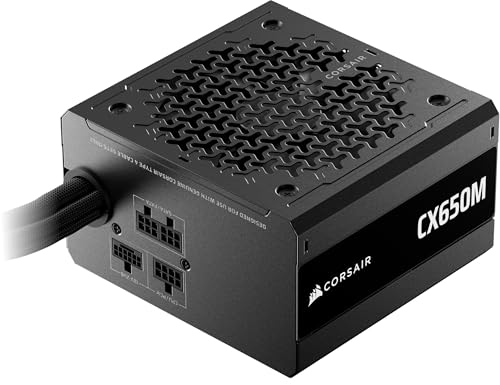
Opting for a semi-modular model like the CORSAIR CX650M Semi Modular ATX 3.1 PCIe 5.1 Low-Noise 650W Power Supply or the highly affordable ARESGAME AGV Series 750W offers distinct real-world benefits:
- Zero Loss in Practical Cable Management: Since you must plug in the motherboard and CPU cables anyway for the computer to turn on, having them permanently attached doesn’t actually add any extra clutter to your main viewing chamber. The cables you do get to add or remove are the secondary ones—such as PCIe cables for graphics cards or SATA cables for storage drives.
- Fewer Connection Points: From an engineering standpoint, every plug-and-socket connection introduces a tiny amount of electrical resistance and a potential point of physical failure if a cable isn’t seated properly. Solder joints on semi-modular units are incredibly robust, meaning your core power cables are physically incapable of wiggling loose over years of desk vibrations or during a move to a new home.
Cost Over 5 Years
When calculating the true cost of fully modular vs semi modular power supply cable management, you have to look beyond the initial checkout price. A power supply is a long-term investment that typically outlives most other components in your home office, often running for five to ten years.
Consider the math over a five-year period for a typical home office or family computer used for remote work, school, and moderate gaming (averaging 5 hours of active use per day):
Which One for Your Home
To determine which power supply architecture fits your household, find the scenario below that best matches your living space and lifestyle.
Small Apartment or Shared Living Space
In a small apartment, studio, or shared dorm room, space is your most valuable asset. Computers in these environments are often built using compact Mini-ITX or Micro-ATX cases that sit directly on small desks or media consoles. For these tight spaces, a fully modular power supply is practically mandatory. Trying to stuff the excess cables of a semi-modular unit into a compact chassis is an exercise in frustration, often blocking the limited airflow paths and causing the system fans to whine loudly to keep components cool.
Family Home with Kids and Pets
If your household includes curious children, shedding dogs, or cats that love to sit on warm electronics, your primary enemy is dust and pet hair. In this scenario, a fully modular power supply is highly beneficial because it keeps the interior of your PC case as empty and aerated as possible. With fewer cables blocking the path, your case’s built-in dust filters can do their job effectively, and a quick bi-monthly cleanup takes less than two minutes with a simple handheld vacuum or air duster.
Rental Property or Temporary Workspace
If you live in a rental property where you anticipate moving every year or two, durability and ease of packing are key. A semi-modular power supply is an excellent, rugged choice here. Because the heaviest, most critical cables are permanently soldered to the unit, there is zero risk of losing your essential power cords in a moving box or having them shake loose from the power supply housing during transit in the back of a moving truck.
Long-Term Home Office
For a permanent home office designed to stand the test of time, future-proofing is the name of the game. Looking ahead to 2026 and beyond, hardware standards will continue to evolve, requiring cleaner power delivery and new cable configurations. A premium, fully modular power supply ensures that your system can adapt to new motherboard layouts, next-generation graphics cards, and advanced cooling systems without requiring you to tear out your entire cable routing setup and start from scratch.
FAQ
Is a fully modular power supply safer than a semi-modular one?
Both designs are incredibly safe and undergo the exact same rigorous safety certifications (such as UL, CE, and FCC). The physical difference in how the cables connect does not impact the electrical safety of the unit, provided you use the high-quality cables that came in the box with your specific power supply model.
Can I use cables from an old modular power supply on a new one?
No! This is one of the most common and dangerous mistakes builders make. While the end of the cable that plugs into your motherboard or graphics card is standardized, the end that plugs directly into the power supply is not. Using modular cables from a different brand or even a different model from the same brand can lead to incorrect voltage delivery, permanently frying your expensive computer components.
Does cable management actually affect my computer’s performance?
Directly, no; a neat cable layout won’t magically give you more processing power. However, indirectly, it has a massive impact. Poor cable management blocks the natural airflow path through your computer chassis. This causes heat to build up, forcing your graphics card and processor to automatically throttle their performance down to prevent overheating, while also causing your cooling fans to run at loud, distracting speeds.
How much physical space do I actually save by going fully modular?
On average, a fully modular setup allows you to leave out two to three bulky cables (such as unused Molex or secondary SATA cables). This removes a bundle of stiff, insulated wire roughly the size of a standard rolling pin from your case’s lower compartment, giving you significant breathing room to organize your remaining wires neatly behind the motherboard tray.









