
Building or upgrading a mid-to-high-end gaming PC in 2026 almost always means one thing: your graphics card wants a 12V-2×6 connector, and your old power supply probably doesn’t have one. That’s the core problem this roundup solves. Every power supply below is ATX 3.1 and PCIe 5.1 ready, delivers 750 watts — enough for cards like an RTX 5070 Ti or RX 9070 XT with comfortable headroom — and every one of them rings in under $100.
Whether you want the cheapest compliant option, the quietest build, or the longest safety net, there’s a pick here for you.
As an Amazon Associate we earn from qualifying purchases at no extra cost to you.



Our Top Picks
 CORSAIR RM750e ATX 3.1 PCIe 5.1 Ready 750W750 watts5.91 x 5.51 x 3.35 inches3.3 poundsCheck on Amazon



Top 3 picks at a glance
Quick Picks
| Product | Best for | Price |
|---|---|---|
| CORSAIR RM750e (Black) | Best overall | Check on Amazon |
| MSI MAG A750GL PCIE5 | Best warranty-to-price ratio | Check on Amazon |
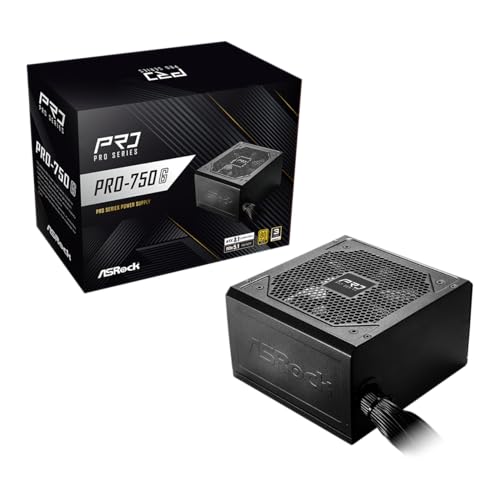
| ASRock PRO 750G | Best budget pick | Check on Amazon |
| be quiet! Pure Power 13 M | Quietest modern platform | Check on Amazon |
| Thermaltake Toughpower GT 750W | Best semi-passive cooling | Check on Amazon |
| be quiet! Pure Power 12 | Best for silent builds on a budget | Check on Amazon |
| Rosewill VMG 750W | Best Japanese capacitor value | Check on Amazon |
| CORSAIR RM750e (White) | Best for white-themed builds | Check on Amazon |
How We Compared
Our criteria were simple and strict. First, compliance: every unit had to be ATX 3.1 with PCIe 5.1 support and a native 12V-2×6 connector, since adapters and dongles defeat the purpose of upgrading. Second, efficiency: we only included 80 Plus Gold-rated units, which typically convert 90% or more of input power at typical loads, cutting heat and fan noise.
Beyond the spec sheet, we weighted modularity (fully modular cables make small-case builds dramatically easier), fan behavior (semi-passive modes matter for noise-sensitive setups), and warranty length, which ranges from just 3 years on the budget pick up to a full decade. We deliberately avoided inventing lab numbers — instead, we tell you who each unit suits and where the compromises are, based on published specifications and design choices you can verify before buying.
The 8 Best Picks
1. CORSAIR RM750e ATX 3.1 PCIe 5.1 Ready 750W Power Supply – Black — around $89
The RM750e in black is our best overall pick because it hits every requirement without an obvious weak spot: full ATX 3.1 and PCIe 5.1 compliance, a native 12V-2×6 cable, fully modular cabling, and Corsair’s mature RM platform design. It’s the unit we’d hand to a first-time builder who wants a no-drama installation in a standard ATX mid-tower.
- Fully modular design keeps cable clutter and case airflow issues to a minimum
- Native 12V-2×6 output means no awkward adapters for modern GPUs
2. MSI MAG A750GL PCIE5 Fully Modular Compact Gaming 750W Power Supply — around $89
MSI’s MAG A750GL is built for compact gaming rigs: the chassis is shorter than a standard ATX PSU, which frees up room in small-form-factor and micro-ATX cases where every millimeter counts. It’s fully modular, 80 Plus Gold certified, ATX 3.1 and PCIe 5.1 ready, and includes a native dual-color 12V-2×6 cable — handy if you can’t decide between black and sleeved aesthetics.
- Compact footprint makes it one of the easiest fits for SFF and mesh-style cases
- 10-year warranty is outstanding at this price point
Skip it if you have a full-size case with no clearance concerns — you’re paying partly for the compact design.
3. ASRock PRO 750G Power Supply — around $54
It pairs a 120mm low-noise fan with a straightforward, non-modular cable set, which is the obvious place the cost was saved.
- Unbeatable entry price for a fully ATX 3.1-compliant 750W Gold unit
- Native 12V-2×6 connector without paying a compliance premium
The fixed cables add bulk, and the 3-year warranty is the shortest on this list. Skip it if you want modularity or long-term peace of mind — but for a budget build with a mid-range GPU, it’s the smart money pick.
4. be quiet! Pure Power 13 M 750W — around $89
be quiet! built its reputation on silence, and the Pure Power 13 M is the newest expression of that: a fully modular 80 Plus Gold platform with ATX 3.1 support and a 120mm fan tuned to stay inaudible under typical gaming loads. If your PC sits on your desk rather than under it, this is the unit most likely to disappear acoustically.
- Fully modular with be quiet!’s characteristically restrained fan acoustics
- Current-generation Pure Power platform with ATX 3.1 compliance baked in
5. Thermaltake Toughpower GT 750W ATX 3.1 — around $79
The Toughpower GT 750W brings Smart Zero Fan technology to the sub-$100 tier: the fan stops entirely at low and moderate loads, only spinning up when thermals demand it. It’s 80 Plus Gold certified, fully ATX 3.1 standard compliant, and features a native 300W-rated PCIe 5.1 connector, so it’s ready for current and upcoming graphics cards.
- Smart Zero fan mode delivers true silence at idle and light loads
- Native 300W PCIe 5.1 connector comfortably handles high-draw GPUs
The 5-year warranty is solid but trails the 10-year coverage from MSI and be quiet!’s Pure Power 12. Skip it if a decade of coverage matters more to you than semi-passive cooling.
6. be quiet! Pure Power 12 750W PSU — around $79
The Pure Power 12 is last generation’s chassis still very much worth buying, now updated for ATX 3.1 and PCIe 5.1 GPU support.
- 10-year warranty at a mid-tier price is the best long-term value here
- High-performance 12V rail design suits power-hungry modern GPUs
It’s the older platform, so it lacks some refinements of the 13 M, and availability in black only limits white-build options. Skip it if you want the newest revision; otherwise it’s a superb buy.
7. Rosewill VMG 750W — around $79
Add full modularity, a low-noise 120mm fluid dynamic bearing fan, a PCIe 5.1 12V-2×6 connector, and compatibility with both ATX 3.0 and 3.1, and you have a quietly excellent unit.
- FDB fan runs quiet and should outlast sleeve-bearing designs
The brand carries less prestige than Corsair or be quiet!, which matters for resale more than reliability. Skip it if brand recognition and a longer warranty history are priorities.
8. CORSAIR RM750e ATX 3.1 PCIe 5.1 Ready 750W Power Supply – White — around $89
Functionally identical to our top pick — same RM750e platform, same ATX 3.1 and PCIe 5.1 compliance, same fully modular cabling — but finished in white for themed builds. If you’ve invested in a white case, white GPU, and white cables, a black PSU glowing through a tempered-glass side panel is the one detail that ruins the look.
- Genuine white finish (not just white-sleeved cables) for cohesive build aesthetics
- Same proven RM750e platform as our best overall pick
Skip it if your build is black — there’s no reason to pay a premium here.
Buying Guide
Why ATX 3.1 and a Native 12V-2×6 Cable Matter
ATX 3.1 is the Intel-led standard that formalizes the 12V-2×6 connector (the safety-refined successor to 12VHPWR) and requires the PSU to handle transient power spikes from modern GPUs — some cards briefly draw well above their rated wattage. A native 12V-2×6 cable routes power directly from the PSU rather than through 2-to-1 pigtail adapters, reducing connection resistance and heat. All eight units here are compliant, so you’re covered either way.
How Much Wattage and What Efficiency Grade Do You Need?
750W is the sweet spot for GPUs in the 220–300W class paired with a modern 8-core CPU; it leaves 30–40% headroom, which keeps the fan slow and efficiency high. On efficiency, 80 Plus Gold (roughly 90% conversion at typical loads) is the standard at this price and worth insisting on — a Bronze unit wastes more power as heat and runs louder. Don’t pay extra for Platinum in this bracket; the savings on your electric bill won’t cover the premium.
Modularity, Noise, and Warranty
Fully modular PSUs let you use only the cables you need, which matters in compact cases and improves airflow. Seven of our eight picks are fully modular — only the budget ASRock uses fixed cables. For noise, look for semi-passive fan modes (Thermaltake’s Smart Zero, be quiet!’s tuned acoustics) if your PC lives on your desk. Finally, treat warranty length as a proxy for manufacturer confidence: it ranges from 3 years (ASRock) to 10 years (MSI and be quiet! Pure Power 12) in this lineup.
Our Verdict
It’s the most balanced package of compliance, modularity, and platform maturity on this list. For compact cases, the MSI MAG A750GL’s shorter chassis and 10-year warranty justify its price, and silence-focused builders should choose between the be quiet! Pure Power 13 M and the older-but-warranteed Pure Power 12. White build? The white RM750e closes the loop.
FAQ
Is 750W enough for an RTX 5070 Ti or RX 9070 XT?
Yes. Cards in this class typically draw 220–300W, and a quality 750W Gold unit leaves ample headroom for a modern CPU and transient spikes — which ATX 3.1 units are specifically rated to absorb. Only step up to 850W if you’re running an overclocked flagship CPU plus a top-tier GPU.
Can I use an ATX 3.0 power supply with a new GPU?
Generally yes — the Rosewill VMG in this list is ATX 3.0 and 3.1 compatible, for example. ATX 3.0 units already support 12VHPWR/12V-2×6-class power delivery and transient handling. ATX 3.1 refines the connector’s safety latching, but a 3.0 unit with a proper PCIe 5.1 connector remains a safe pairing.
Do I need a fully modular power supply?
Not strictly, but it makes installation much cleaner. Fixed cables (like on the ASRock PRO 750G) work fine if your case has room to stash unused wires behind the motherboard tray.
What you give up is modularity and warranty length. Avoid no-name brands at any price — the PSU is the one component that can take the rest of your build down with it.









