A 144Hz monitor only earns its premium when the graphics card behind it can deliver frames that keep pace. Feed it 60 frames a second and you have bought a very expensive 60Hz panel. The decision implied by this keyword is therefore about frame budget: which resolution, which games, and which settings you want to hold near 144 frames per second. Competitive shooters at 1080p ask very little of a GPU, while a recent open-world title at high settings asks a great deal, and the same card can feel brilliant in one and strained in the other.
This guide is for gamers who already own, or are about to buy, a 144Hz display and want a graphics card that suits it without overspending. We compare six cards from their listings: three GeForce RTX 3060 12GB variants, two RTX 3050 6GB variants, and one Intel Arc B570. We stick to the specs stated in each title, explain what they mean for high-refresh play, and sort the cards by use case. Pricing moves too often to quote, so we describe budget, mid-range, and premium tiers instead.
Our Top Picks
 msi Gaming RTX 3050 Ventus 2X 6G OC1.7" x 4.3" x 7.4"7.4 x 4.3 x 0.1 inches1.3 poundsCheck on Amazon
 GIGABYTE GeForce RTX 3050 WINDFORCE OC V2 6GStandard7.5 x 4.4 x 0.1 inches0.88 PoundsCheck on Amazon




Top 3 picks at a glance
Quick Picks
As an Amazon Associate we earn from qualifying purchases at no extra cost to you.





| Product | Best for | Key spec from the title |
|---|---|---|
| MSI RTX 3060 Ventus 2X 12G OC | Compact 1080p high-refresh builds | 12G GDDR6, 15 Gbps, 192-bit, boost 1807 MHz |
| MSI RTX 3050 Ventus 2X 6G OC | Esports titles on a tight budget | 6GB GDDR6 14 Gbps, 96-bit, boost 1492 MHz |
| GIGABYTE RTX 3060 Gaming OC 12G | Cooler, quieter 1080p and light 1440p | 3X WINDFORCE fans, 12GB 192-bit GDDR6 |
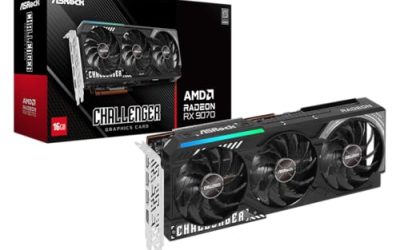
| ASRock Arc B570 Challenger 10GB OC | Buyers who want modern outputs and more memory | 10GB GDDR6, 2600 MHz, 19 Gbps, HDMI 2.1a, DisplayPort 2.1 |
| GIGABYTE RTX 3050 WINDFORCE OC 6G | Entry-level builds with a 144Hz screen | 2X WINDFORCE fans, 6GB 96-bit GDDR6 |
| GIGABYTE RTX 3060 WINDFORCE OC 12G | Value 12GB card for general gaming | 2X WINDFORCE fans, 12GB 192-bit GDDR6 |
How to Choose
Start from your resolution and your games
At 1920 by 1080, reaching 144 frames per second is realistic for esports and older titles on a modest card, and achievable in many newer games once you lower a few settings. At 2560 by 1440 the load is roughly 1.8 times higher, which pushes you toward the stronger cards in this list or toward turning settings down. Decide which games matter most; a card that holds 144 in a competitive shooter may fall short in a demanding single-player title. Aim for a card that clears your most-played game with a margin, not one that barely scrapes by.
Memory size and bus width matter more than the label
Capacity listed in these titles runs from 6GB to 12GB. Six gigabytes can run short at high texture settings in recent games, while 10GB and 12GB offer more headroom. The memory bus is the other number to read: a 96-bit bus on the RTX 3050 models is narrower than the 192-bit bus on the RTX 3060 cards, which limits bandwidth. Ignore small differences in boost clock between factory-overclocked variants of the same chip, because they rarely change what you feel on screen.
Check the outputs and the cable you will use
To drive 144Hz you must connect with the right cable and port. DisplayPort is the safest choice for 1440p at 144Hz; HDMI can work, but only if both the card and the monitor support a high enough HDMI version. The ASRock listing mentions HDMI 2.1a and DisplayPort 2.1, which provides plenty of bandwidth for future displays. The others list HDMI and DP outputs generally. Always verify in the monitor settings that the refresh rate is actually set to 144Hz, since many displays default to 60Hz.
Cooling, size, and power
Fan count and cooler length affect noise and temperatures. Twin-fan designs fit smaller cases; triple-fan models run cooler but are longer. Measure your case clearance in millimeters before ordering, and check the manufacturer’s suggested power supply wattage on the product page. Budget cards sometimes use basic coolers and plastic backplates, which is fine for modest power draw but can mean more fan noise. A card with a zero-fan mode can stay silent at idle, helpful in a quiet room.
The 6 Best Options
MSI RTX 3060 Ventus 2X 12G OC
This MSI card pairs 12GB of GDDR6 at 15 Gbps with a 192-bit bus and a 1807 MHz boost clock on the Ampere architecture, cooled by a Torx twin-fan design. It sits in the mid-range tier of this group, and its factory overclock label tells buyers it is tuned slightly above reference speeds. The Ventus name usually points to a no-frills, compact cooler rather than a showpiece design.
- Strength: 12GB of memory on a 192-bit bus leaves room for newer games at high texture settings.
- Strength: Twin-fan design suits compact cases and standard power supplies.
- Trade-off: It is an older generation, so it lacks features found on newer cards.
Skip it if you want the newest outputs or plan to push 1440p at maximum settings. It suits 1080p high-refresh builders who want a dependable, widely sold design and does not need much case space to install.
MSI RTX 3050 Ventus 2X 6G OC
The RTX 3050 here carries 6GB of GDDR6 at 14 Gbps on a 96-bit bus with a 1492 MHz boost clock, in a twin-fan cooler. It is the entry tier of the group, and the narrow bus is the detail that most clearly separates it from the 12GB cards above.
- Strength: Suited to esports titles where frame rate matters more than visual detail.
- Strength: Twin-fan format fits small cases without extra clearance concerns.
- Trade-off: 6GB and a 96-bit bus limit what you can do in demanding newer games.
Skip it if you want to run 1440p or maximum textures. It suits a first build where the screen is 144Hz but the games are lighter, such as popular competitive shooters and older favorites that scale well to high frame rates.
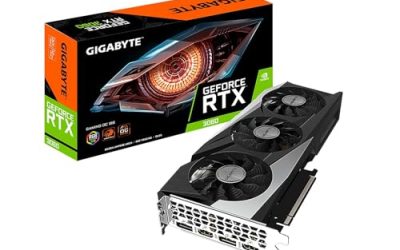
GIGABYTE RTX 3060 Gaming OC 12G
This revision 2.0 card uses three WINDFORCE fans with 12GB of 192-bit GDDR6. The triple-fan cooler is the standout detail in the listing, and it is the main reason to choose this card over its two-fan sibling with the same memory setup.
- Strength: Three fans typically help keep temperatures and noise lower under sustained load.
- Strength: 12GB on a 192-bit bus matches the stronger RTX 3060 tier.
- Trade-off: Triple-fan coolers are longer, so check your case clearance.
Skip it if you own a small case. It suits buyers who play for long sessions and care about cooling, noise, and steady clocks across an evening of play.
ASRock Arc B570 Challenger 10GB OC
The Intel Arc B570 offers 10GB of GDDR6 at 19 Gbps, a 2600 MHz GPU clock, dual fans, a metal backplate, HDMI 2.1a, DisplayPort 2.1, and a 0dB fan mode. It is the newest design here, and the listing leans on features such as the metal backplate and dual fans to signal a sturdier build than typical budget cards.
- Strength: 10GB of memory and modern HDMI and DisplayPort versions give room to grow.
- Strength: A 0dB mode and metal backplate point to quiet, sturdy build quality.
- Trade-off: As a different GPU brand, driver maturity and game support may differ from GeForce cards.
Skip it if you depend on features exclusive to another vendor. It suits builders who want forward-looking outputs and extra memory, and who are comfortable checking driver notes for the games they play most.
GIGABYTE RTX 3050 WINDFORCE OC 6G
A twin-fan RTX 3050 with 6GB of 96-bit GDDR6, this model targets entry-level systems. It shares its core limits with the MSI RTX 3050 above, so the choice between them usually comes down to cooler preference and case fit rather than expected speed.
- Strength: A straightforward two-fan cooler suits modest power and case space.
- Strength: Enough for esports at 144Hz when settings are managed.
- Trade-off: 6GB and a narrow bus can run short in modern games.
Skip it if your library is made up of recent demanding titles. It suits budget builds and older games, or a secondary gaming PC where a 144Hz screen is paired with undemanding titles.
GIGABYTE RTX 3060 WINDFORCE OC 12G
This revision 2.0 RTX 3060 uses two WINDFORCE fans, 12GB, and a 192-bit bus. It is the value counterpart to Gigabyte’s triple-fan model, giving up some cooling surface in exchange for a shorter card.
- Strength: 12GB of memory gives headroom for newer texture packs.
- Strength: Two-fan design keeps length manageable for mid-size cases.
- Trade-off: Less cooling capacity than the triple-fan version, so expect more fan activity under long loads.
Skip it if silence is your top priority. It suits general 1080p high-refresh players on a mid-range budget who prefer a shorter card and can live with a little more fan noise.
Which One Fits Your Situation
You mostly play esports shooters at 1080p
Pick the MSI RTX 3050 Ventus 2X. Competitive titles are light on hardware, so the entry tier can still reach high frame rates without wasting money. Pair it with sensible settings and a 1080p screen, and the monitor’s 144Hz ceiling stays within reach.
You want 144Hz in recent single-player games
Choose the GIGABYTE RTX 3060 Gaming OC 12G. The 12GB of memory and triple-fan cooling suit long sessions in heavier titles, where a cooler card holds its clocks better as the case warms up.
You build in a compact case
The MSI RTX 3060 Ventus 2X 12G is the fit: twin fans, a more modest length, and the same 12GB class as larger cards, so you give up little beyond cooling surface.
You want newer connections and more memory than a 3050 offers
Go for the ASRock Arc B570 Challenger. Its HDMI 2.1a and DisplayPort 2.1 outputs suit future monitors, and 10GB of memory helps in 2026 releases.
Whichever card you pick, cap the frame rate just below your monitor’s refresh rate with the driver or in-game limiter. That keeps temperatures and fan noise down and avoids wasted work above 144 frames per second.
Common Mistakes
- Buying a 144Hz monitor and forgetting to set the refresh rate in the operating system.
- Choosing a card by boost clock alone and ignoring memory size and bus width.
- Skipping a case-clearance measurement before ordering a triple-fan card.
- Using an HDMI cable that cannot carry the resolution and refresh you want.
- Overpaying for headroom you will never use on lightweight games.
Related guides
- Noctua Nh-D15 Vs Thermalright Peerless Assassin 120
- Sustainable Gaming Pc Power Supply Efficiency Guide
- Thermal Paste Application Method For Lga1851
Frequently Asked Questions
Do I need a top-end card for 144Hz gaming?
No. At 1080p, mid-range and even entry cards reach 144 frames per second in many popular games. Demanding titles at high settings or 1440p call for stronger hardware.
Is 6GB of video memory enough?
It is workable for esports and older games, but recent titles at high textures can exceed it. Buyers who want longevity should lean toward 10GB or 12GB.
Does the fan count change performance?
Not directly. More fans usually mean lower temperatures and quieter operation under load, which helps sustain clocks over long sessions.
HDMI or DisplayPort for 144Hz?
DisplayPort is the safer choice, especially at 1440p. HDMI works when both the card and monitor support the required version, so check both spec sheets.