Gaming at 4K asks a graphics card to push roughly four times the pixels of a 1080p screen, about 8.3 million per frame, and that single fact reshapes every purchase decision. Memory capacity, memory bus width, and cooling headroom start to matter far more than they do at lower resolutions, and a card that looks like a bargain on a 1080p chart can run out of video memory the moment textures climb. If a 4K television or a 3840 by 2160 monitor is already on your desk, the card is the component that decides whether it looks smooth or struggles.
This guide is for players building or upgrading around a 4K display, and for anyone eyeing one in 2026. It focuses on current-generation cards from both AMD and Nvidia that carry 12GB to 16GB of fast memory, PCIe 5.0 connectivity, and HDMI and DisplayPort 2.1 outputs where the listing states them. Older and entry-level cards that appeared in the research set, including a GeForce RTX 3060, an RTX 3050, and a 16GB Radeon RX 9060 XT, were left out because they are better suited to 1080p or 1440p play than to a native 4K target.
Our Top Picks
 ASUS Prime Radeon RX 9070 XT 16GB GDDR6RX9070XT|OC|Black12.3 x 5.1 x 2 inches3.3 PoundsCheck on Amazon
 ASUS Dual Radeon RX 9060 XT 16GB GDDR6RX9060XT|16GB|Black8 x 4.7 x 1.9 inches1.3 PoundsCheck on Amazon


Top 3 picks at a glance
Quick Picks
As an Amazon Associate we earn from qualifying purchases at no extra cost to you.




| Product | Best for | Key spec from the title |
|---|---|---|
| ASRock Radeon RX 9070 Challenger OC | Value-minded 4K with ample memory | 16GB GDDR6, 256-bit, 2520MHz boost |
| ASUS PRIME Radeon RX 9070 XT OC | Strongest AMD pick for 4K | 16GB GDDR6, HDMI/DP 2.1, 2.5-slot |
| ASUS Prime GeForce RTX 5070 OC | Compact 4K-capable Nvidia build | 12GB GDDR7, SFF-Ready, dual BIOS |
| MSI GeForce RTX 5080 Gaming Trio OC | Maximum 4K headroom | 16GB GDDR7, 30Gbps, 256-bit |
| ASUS TUF Gaming GeForce RTX 5070 OC | Durable, roomy-cooler 4K Nvidia card | 12GB GDDR7, 3.125-slot, military-grade parts |
How to Choose
Video memory and bus width come first
At 4K, high-resolution texture packs and ray tracing eat memory quickly. Treat 16GB as the comfortable target and 12GB as the practical minimum for new releases; 8GB cards will force you to lower texture quality in recent games. Bus width matters too: a 256-bit bus feeds a 4K workload better than a 128-bit one, which is why the 256-bit listings stand out. Memory type is also worth reading, since GDDR7 moves data faster than GDDR6 at the same width. A useful rule of thumb when comparing two listings: if the capacity is equal, favor the wider bus and the faster memory type; if the capacity differs by four gigabytes or more, the larger pool usually wins at 4K, because running out of memory causes stutter that no clock speed can hide.
Match the outputs to your display
To run a 4K screen at a high refresh rate you need the right ports. Look for HDMI 2.1 or DisplayPort 2.1 on the card, and confirm your monitor or television accepts the same standard. A 4K panel at 120Hz or higher cannot be driven properly over an older HDMI 2.0 connection, so the card and the screen have to agree. Also confirm that your cable is certified for the standard; a cheap cable is a common hidden bottleneck. If your screen is a television, check which of its HDMI ports carries the full-bandwidth input, because many sets enable the top mode on only one port, and you may need to change a setting in the menu to switch it on.
Size, slots, and power are part of the spec
Cooler designs here range from a 2.5-slot body to a 3.125-slot body, and the tri-fan models are longer still. Measure the clearance in your case, check for a front radiator or drive cage in the way, and confirm your power supply wattage and connector type against the manufacturer’s recommendation for the specific GPU. Smaller builds can look for the SFF-Ready tag that appears on some listings. Remember that a thick card also changes airflow: a case with only one intake fan may run hotter with a three-fan cooler than a well-ventilated case does with a two-fan model, so think about the whole enclosure, not just the card.
Ignore the small overclock, watch the cooling
Factory “OC” labels add a modest boost that most players will never notice. Better cooling hardware, such as larger heatsinks, quality fan bearings, and a zero-RPM mode that stops the fans at idle, has more effect on long-session noise and stability. Budget cards cut corners on cooler mass and fan quality, so a cheaper model can end up louder under a 4K load. Skip the temptation to choose by color scheme or lighting features alone; these add cost without changing how the game looks on screen.
The 5 Best Options
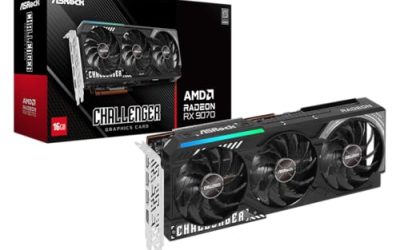
ASRock Radeon RX 9070 Challenger 16GB OC
This card pairs AMD’s RDNA 4 architecture with 16GB of GDDR6 on a 256-bit bus and a stated 2520MHz boost clock. A PCIe 5.0 interface, triple fans, and a 0dB mode round out the listing. It is aimed at players who want generous video memory for 4K textures without stepping up to the highest tier.
- Strength: 16GB on a 256-bit bus is a roomy configuration for 4K textures.
- Strength: triple fans with a 0dB mode point to quiet operation at idle.
- Trade-off: GDDR6 is a slower memory type than the GDDR7 used on the Nvidia cards in this list.
Skip it if you want ray tracing performance from the Nvidia ecosystem or the very top performance tier. It also sits in a different class than the XT model below, so buyers who plan to hold the card through several years of heavier releases may prefer to step up rather than economize here.
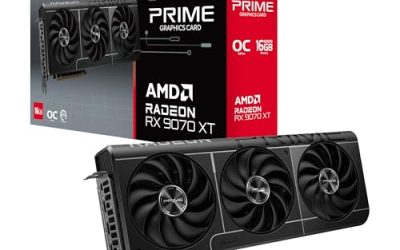
ASUS PRIME Radeon RX 9070 XT 16GB OC
The title lists 16GB of GDDR6, PCIe 5.0, HDMI and DisplayPort 2.1, and a 2.5-slot body with Axial-tech fans and dual-ball fan bearings. It is the step-up AMD option for 4K, appropriate for buyers who want the full set of modern connections and a cooler design that fits mid-size cases.
- Strength: HDMI/DP 2.1 outputs suit high-refresh 4K displays.
- Strength: dual-ball bearings and Axial-tech fans are durability-oriented cooler features.
- Trade-off: the 2.5-slot body still needs real case clearance and a capable power supply.
Skip it if your priority is a compact, small-form-factor build. The XT suffix signals a higher tier within the same generation, so it is the one to shortlist when the plan is a long-lived 4K machine rather than a stopgap.
ASUS Prime GeForce RTX 5070 12GB OC
This Nvidia card carries 12GB of GDDR7 with PCIe 5.0 and HDMI/DP 2.1, and the listing highlights an SFF-Ready design, a 2.5-slot body, Axial-tech fans, and a Dual BIOS switch. It makes sense for a 4K player who wants Nvidia features in a smaller chassis and is willing to tune a few settings in the heaviest games.
- Strength: SFF-Ready sizing helps in compact cases.
- Strength: GDDR7 memory and a Dual BIOS switch add flexibility.
- Trade-off: 12GB is the tightest memory budget in this guide for demanding 4K texture settings.
Skip it if you want to max every texture slider at native 4K without compromise. Upscaling features on the Nvidia side can help here, but they are a tool for stretching a card, not a reason to ignore the memory ceiling.
MSI GeForce RTX 5080 16G Gaming Trio OC
The top card here lists 16GB of GDDR7 at 30Gbps on a 256-bit bus, PCIe 5.0, and a TRI FROZR 4 cooler with three STORMFORCE fans. For players who treat 4K as the baseline and want the most headroom from this group, this is the listing built for that goal. It is a premium product with a matching footprint.
- Strength: 16GB of GDDR7 on a wide 256-bit bus is the strongest memory setup in this group.
- Strength: a three-fan cooler gives a large thermal budget for long sessions.
- Trade-off: the highest cost tier and the largest cooler to fit.
Skip it if you play mostly at 1440p, where a lower tier will do the job. Because the listing is a flagship-class part, it also assumes a power supply and case that can feed and cool it, so budget for those before committing.
ASUS TUF Gaming GeForce RTX 5070 12GB OC
The TUF edition lists 12GB of GDDR7, PCIe 5.0, HDMI/DP 2.1, a 3.125-slot cooler, military-grade components, and a protective feature set. That oversized cooler is the main difference from the Prime model, trading compactness for durability and thermal room. It suits a 4K player with a spacious case.
- Strength: a 3.125-slot cooler offers extra heat-dissipation room.
- Strength: military-grade components target long-term durability.
- Trade-off: it occupies more than three slots, so smaller cases are out.
Skip it if your case is compact or you want the lowest cost among the 5070 variants. Since it shares its core memory configuration with the Prime model, the choice between them is about size and build quality rather than raw capability.
Which One Fits Your Situation
You want native 4K with every texture setting raised
Choose the MSI GeForce RTX 5080 Gaming Trio OC. Its 16GB of GDDR7 and wide bus give the most room of the five, and a player who keeps a graphics card for several generations of games gets the most out of that headroom. Pair it with a monitor that has a high refresh rate so the extra capability is visible.
You prefer AMD and want the best balance
The ASUS PRIME Radeon RX 9070 XT is the pick, with 16GB and modern display outputs; the ASRock RX 9070 Challenger is the gentler alternative.
You are building in a small case
The ASUS Prime GeForce RTX 5070 is the SFF-Ready listing, and it keeps you inside a 2.5-slot envelope. Living-room console-style PCs that feed a 4K television are the classic home for this kind of card, as long as the TV supports the matching HDMI standard.
You have a big airflow case and want durability
The ASUS TUF Gaming GeForce RTX 5070 offers the roomiest cooler of the 12GB cards.
Common Mistakes
- Buying an 8GB or entry-level card for a 4K display and then lowering textures just to stay inside memory limits.
- Forgetting to confirm that the monitor or television supports HDMI 2.1 or DisplayPort 2.1 before expecting high refresh at 4K.
- Measuring the case length but not the slot thickness, then discovering a 3.125-slot cooler blocks another expansion slot.
- Underestimating power supply needs and connector types for a modern high-end card.
- Paying extra for a small factory overclock while ignoring the cooler quality that actually shapes noise.
Related guides
- Noctua Nh-D15 Vs Thermalright Peerless Assassin 120
- Sustainable Gaming Pc Power Supply Efficiency Guide
- Thermal Paste Application Method For Lga1851
Frequently Asked Questions
Is 12GB enough for 4K gaming?
It works for many titles, especially with some tuning, but newer games with high-resolution textures can exceed it. If you want to avoid compromises over the next few years, 16GB is the safer target.
Do I need PCIe 5.0 for 4K?
No. A PCIe 5.0 card also runs in older slots, and the performance difference at 4K is small for most games. Do not upgrade a motherboard purely for this.
Should I choose AMD or Nvidia for 4K?
Both families here offer capable options. AMD’s listings emphasize 16GB of memory, while the Nvidia cards use GDDR7 and the brand’s feature ecosystem. Decide by memory needs, the features you use, and your case size.
What does a 0dB mode do?
It stops the fans entirely when the card is lightly loaded, such as during desktop use or video playback. The fans spin up once the temperature rises under a game. For anyone who works and plays at the same desk, this makes the machine nearly silent most of the day.