Counter-Strike: Global Offensive has always been a game that rewards frame rate over visual detail. Players who care about aim and reaction time run low settings, often at a competitive resolution, and want the highest, steadiest frame rate their monitor can show. That has made the game famous for running on modest hardware. It has since been succeeded by Counter-Strike 2, which asks more of a graphics card, so anyone searching for a card for the older title is usually building a budget or secondary PC, or upgrading an old office machine into something that can play.
The five cards here span a wide range. At one end sits a modern 8GB card with current display outputs. At the other are very old, entry-level cards that are really display adapters. The dividing line is simple: the better cards are for playing, and the weaker ones are for getting a picture on a screen in a small case. Pay attention to the memory type, the bus width, and the slot, since those details separate a card that plays from one that merely displays.
Our Top Picks




Top 3 picks at a glance
Quick Picks
As an Amazon Associate we earn from qualifying purchases at no extra cost to you.




| Product | Best for | Key spec from the title |
|---|---|---|
| XFX Speedster SWFT 210 Radeon RX 6600 CORE | Highest frame rates and future-proofing | 8GB GDDR6, RDNA 2, HDMI and 3 DisplayPort |
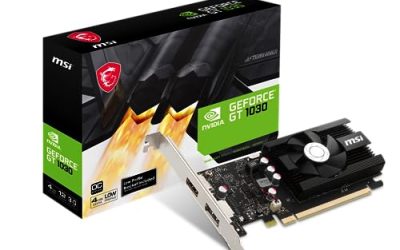
| msi Gaming GeForce GT 1030 4GB DDR4 | Low-profile budget gaming | 4GB DDR4, 64-bit, DP and HDMI, single fan |
| QTHREE GeForce GT 730 4GB | Small-case builds with many outputs | 4GB DDR3, 64-bit, 2 HDMI, DP, VGA |
| ARDIYES GT 730 4GB 4X HDMI | Multi-monitor office use | 4 independent displays, 4GB GDDR3 |
| GeForce GT 610 2G DDR3 | Basic display output in a tiny case | 2GB DDR3, low profile, HDMI and VGA |
How to Choose
Aim for the monitor’s refresh rate, not the highest settings
Competitive players tune a card to the monitor. A 60Hz panel needs a steady 60 frames per second, a 144Hz panel needs 144, and so on. Because this game is light on graphics demands, a modern entry-level or mid-range card can reach high refresh rates at low settings, while the oldest cards struggle. Decide your monitor’s refresh rate first, then pick a card in the right tier. A card that cannot hold your panel’s refresh rate wastes the panel.
Memory type and bus width tell you about speed
Look at the memory type. GDDR6 on the RX 6600 CORE is far faster than the DDR3 or DDR4 listed on the others, and DDR3 on a 64-bit bus is a bottleneck. Four gigabytes of slow DDR3 is not better than two gigabytes of faster memory; capacity matters less here than bandwidth. Where budget cards cut corners is exactly this: a large memory number paired with a narrow bus and slow memory chips.
Match the card to the case and the power supply
Several of these cards are low profile, designed for small form factor cases and home theater PCs. Check that your case takes a low-profile bracket if you pick one, and that the card comes with the right bracket. Full-size cards need an open slot and adequate power. Entry-level cards often draw so little power they run from the slot alone, which is useful if the power supply is weak. A full-size card like the RX 6600 CORE may require a PCIe power connector, so verify before buying.
Check the outputs and the slot
Match the outputs to your monitor: HDMI, DisplayPort, VGA, or DVI. The old GT 610 lists a PCIe 1.1 x16 interface, and one GT 730 lists PCIe x8, so confirm your motherboard has a compatible slot. Also read the driver notes: very old chips may have ended mainstream driver support, which is a reason to prefer newer silicon. Ignore marketing claims about DirectX 12 on weak cards; supporting the API is not the same as running it well.
It also helps to be honest about the processor and memory. A graphics card can only deliver frames as fast as the rest of the system feeds it. This game leans on the processor more than most, so a fast card paired with an old dual-core chip and a single stick of slow memory will disappoint. If you are upgrading an old office PC, plan to check system memory first: two matched sticks in dual-channel mode make a visible difference in minimum frame rates, which are what you feel when a fight starts.
Two more details are easy to miss. First, listings for very cheap cards sometimes use similar names for different products, with different memory types under the same model number. Read the specification line, not just the model name. Second, look at the cooler: a single small fan on a low-profile card works fine for light loads, but a passive heatsink in a case with no airflow can run hot. If your case is cramped, confirm there is some airflow across the expansion slots.
The 5 Best Options
XFX Speedster SWFT 210 Radeon RX 6600 CORE
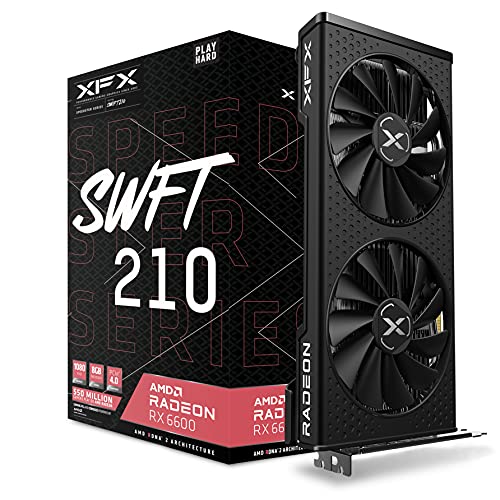
This is the card for someone who wants high frame rates now and room to grow. It lists 8GB of GDDR6 on AMD’s RDNA 2 architecture, with an HDMI port and three DisplayPort outputs. For a game as light as this one, it leaves ample headroom for a high-refresh monitor, and it can handle the newer sequel as well.
- Strength: 8GB GDDR6 on RDNA 2, a modern architecture.
- Strength: four outputs for multi-monitor setups.
- Trade-off: full-size card needing case space and a suitable power supply.
Skip it if your case needs a low-profile card or your power supply is a basic office unit.
msi Gaming GeForce GT 1030 4GB DDR4
The GT 1030 4GB DDR4 is a low-profile, single-fan card with DisplayPort and HDMI. It is the sensible step for someone upgrading an office PC to play older esports titles at modest settings. The title lists a 64-bit bus and DDR4 memory, so expect it to be a budget card for light gaming, not a high-refresh machine.
- Strength: low-profile design with DP and HDMI.
- Strength: 4GB of DDR4, newer memory than the GT 730 cards.
- Trade-off: 64-bit bus and DDR4 limit its speed.
Skip it if you own a high-refresh monitor and want to use it fully.
QTHREE GeForce GT 730 4GB
This GT 730 offers 4GB of DDR3 on a 64-bit bus, with two HDMI ports, a DisplayPort, and VGA. It is low profile and listed for small form factor builds. The output mix helps connect a mix of old and new monitors, which suits an older office PC repurposed for light gaming.
- Strength: four output types including VGA for older displays.
- Strength: low-profile design for small cases.
- Trade-off: DDR3 on a 64-bit bus is a clear bottleneck for gaming.
Skip it if you want smooth play on a high-refresh monitor.
ARDIYES GT 730 4GB 4X HDMI
The ARDIYES card is built around multi-monitor use, with four HDMI ports driving four independent displays. It lists 4GB of GDDR3 on a 64-bit bus, in an ITX single-slot design. It is better as a trading desk or information-display card than a gaming card, though it can run light titles on a single screen.
- Strength: four independent HDMI outputs.
- Strength: single-slot ITX design for small cases.
- Trade-off: GDDR3 on a 64-bit bus is slow for games.
Skip it if gaming performance is the goal.
GeForce GT 610 2G DDR3
The GT 610 is an entry-level, low-profile card with 2GB of DDR3 and HDMI and VGA outputs. The title pitches it at small form factor and home theater PCs, and says it is compatible with Windows 11. It is a display adapter that happens to produce 3D graphics, not a competitive gaming card.
- Strength: low-profile design for tiny cases.
- Strength: HDMI and VGA outputs for old and new displays.
- Trade-off: PCIe 1.1 x16 and DDR3 point to very limited gaming ability.
Skip it if you want to play at anything beyond the lowest settings.
Which One Fits Your Situation
You own a 144Hz or faster monitor
The XFX Speedster SWFT 210 Radeon RX 6600 CORE is the only card here with the memory and architecture to chase high refresh rates.
You are upgrading a small office PC
The msi Gaming GeForce GT 1030 4GB DDR4 is low profile and has DisplayPort and HDMI. For extra video outputs, the QTHREE GeForce GT 730 4GB adds VGA.
You need many screens
The ARDIYES GT 730 4GB 4X HDMI drives four displays and works for monitoring walls, though not for competitive play.
You only need a picture
The GeForce GT 610 2G DDR3 handles basic output in a small case. Treat it as a display adapter, not a gaming card.
If you are torn between two of these, spend on the better memory and architecture first, because those decide how the game feels. A card with fast GDDR6 will stay useful for the newer sequel and for other titles, while a card built around slow DDR3 is limited in nearly every game. Used or older stock can be tempting, but check the connectors and the power requirements against your supply before you commit. Whatever you buy, install the current driver from the manufacturer, set the game to a low-detail competitive profile, and cap the frame rate slightly under the monitor’s refresh rate for the smoothest result.
One last practical point: keep expectations tied to the listing. None of the entry-level cards here is described with any frame-rate claim, and a card’s job in a budget build is to be a reliable, supported part that fits the case. Buyers who are unsure should pick the stronger of two candidates they can afford and spend the saved time tuning settings, which has a larger effect on the experience than a small difference in model number.
Common Mistakes
- Buying on memory capacity alone while ignoring memory type and bus width.
- Pairing a 144Hz monitor with a card that cannot hold that frame rate.
- Forgetting to check whether the case needs a low-profile bracket.
- Assuming DirectX 12 support means a card runs modern games well in 2026.
- Skipping the power connector check on a full-size card and the slot check on an old board.
Related guides
- Noctua Nh-D15 Vs Thermalright Peerless Assassin 120
- Sustainable Gaming Pc Power Supply Efficiency Guide
- Thermal Paste Application Method For Lga1851
Frequently Asked Questions
Is this game still playable?
The older title has been succeeded by Counter-Strike 2, which is more demanding. If you plan to play the newer game, buy a stronger card than the older title alone would need.
Do I need a powerful card for competitive play?
Not a flagship, but a modern card helps hold high refresh rates. Fast memory matters more than raw memory size for this kind of game.
Can a GT 730 run this game?
It may launch at low settings, though DDR3 on a 64-bit bus limits frame rates. Treat it as a minimum.
Does the monitor matter?
Yes. A 60Hz panel cannot show more than 60 frames per second, so a high-end card gains nothing on a basic display.