Blender users shop for a graphics card differently from gamers. A game only needs the frame that is on screen, while a Cycles render has to hold the whole scene (geometry, textures, volumes and denoising data) in video memory at once. When the scene does not fit, a render slows down sharply or fails outright, so the question behind “best graphics cards for Blender” is how much memory, how much compute and how much cooling you can fit into one machine, not how many frames per second a title can reach.
This guide is for hobbyists, freelancers and small studios building a workstation that also plays games. It covers five NVIDIA GeForce RTX 50 series cards from the listing: three RTX 5080 boards, an RTX 5070 Ti and an RTX 5070. The source list also contained a pair of GPU support brackets and a pack of blank ID cards, which are not graphics cards, so they are left out of the reviews. Everything below is drawn from the product titles, so confirm details on the product page before you commit in 2026.
Our Top Picks
 ZOTAC Gaming GeForce RTX 5070 Ti Solid SFFGraphics Card12 x 1.6 x 0.1 inches3.75 PoundsCheck on Amazon



Top 3 picks at a glance
Quick Picks
As an Amazon Associate we earn from qualifying purchases at no extra cost to you.





| Product | Best for | Key spec from the title |
|---|---|---|
| MSI RTX 5080 SUPRIM Liquid SOC | Long renders with a cool, quiet card | 16GB GDDR7, 2760 MHz boost |
| ZOTAC RTX 5070 Ti Solid SFF OC | Compact cases that still need 16GB | 16GB GDDR7, 256-bit, PCIe 5.0 |
| MSI RTX 5080 Ventus 3X OC | Mixed gaming and 3D rendering | 16GB GDDR7, PCIe Gen 5, 3D rendering |
| ZOTAC RTX 5070 Twin Edge OC | Entry point for Blender on a tight budget | 12GB GDDR7, 192-bit, SFF-ready |
| MSI RTX 5080 Gaming Trio OC | All-round power with many outputs | 16GB GDDR7, 2715 MHz, DP 2.1a |
How to Choose
Video memory is the first filter
Treat memory capacity as a hard limit rather than a nice extra. The RTX 5070 in the listing carries 12GB of GDDR7, while the RTX 5070 Ti and all three RTX 5080 boards carry 16GB. Simple scenes, product visualization and modest character work usually fit in 12GB. Large environments, high-resolution texture sets, dense particle systems and heavy sculpting benefit from 16GB. If your projects regularly come close to the limit of your current card, move up a tier rather than hoping to optimize every scene by hand.
Compute, bus width and memory speed
Blender’s Cycles renderer scales with GPU compute, and NVIDIA RTX cards are commonly used with its OptiX backend. The RTX 5080 is the faster class in this list, the 5070 Ti sits between the 5080 and the 5070, and the 5070 is the entry tier. Bus width and memory speed influence how quickly data moves: the 5070 Ti title lists 256-bit and 28 Gbps, while the 5070 shows 192-bit. Boost clocks, such as 2760 MHz on the SUPRIM Liquid or 2715 MHz on the Gaming Trio, matter much less than the choice of GPU tier.
Cooling and size for long renders
A render can run for an hour or more at full load, so sustained cooling matters more than it does for a gaming session. A liquid-cooled design like the SUPRIM Liquid moves heat to a radiator, which needs a mounting point in the case. Air-cooled triple-fan designs are easier to install but larger. Cards marked SFF-ready, such as the ZOTAC 5070 and 5070 Ti, aim at small cases. Measure your case, confirm the power supply headroom, and plan for airflow, because throttling quietly lengthens render times.
What to ignore and where budget cards cut corners
Ignore RGB lighting and cosmetic branding when your priority is rendering. Be wary of terms such as DLSS 4 and 4K Ultra Gaming, since those describe play rather than viewport or render speed. The main compromise in the cheaper cards is memory: a 12GB board saves money but offers less room for large scenes. Also remember that a GPU support bracket helps with the weight of a large card but does nothing for performance, so treat it as an accessory rather than part of the card decision.
It also pays to think about the rest of the workflow. Viewport sculpting, simulation caching and texture painting all lean on system memory and a fast drive as well as on the GPU, so a powerful card inside a machine with a small amount of RAM will still feel slow. Check that your motherboard offers a PCIe slot that can carry a card of this class, that the power supply has the connectors the card needs, and that the case has a clear path for fresh air. Spending a little on those basics protects the investment in the card itself.
Finally, plan for how the machine will be used day to day. If it doubles as a gaming rig, features like DLSS 4 and high refresh outputs have real value. If it is a pure work machine, a quieter card that stays cool under a long load is worth more than a decorative one. Write down the largest scene you expect to open this year, and choose the card whose memory sits comfortably above it.
The 5 Best Options
MSI GeForce RTX 5080 SUPRIM Liquid SOC
This is the pick for artists who want RTX 5080 class compute with lower noise and temperatures over long renders. It suits animators who leave the machine working overnight. The title lists 16GB of GDDR7, a 256-bit interface, a 2760 MHz boost clock, three DisplayPort 2.1a outputs and HDMI 2.1b, which covers nearly any monitor arrangement.
- Strength: liquid cooling suits multi-hour render sessions that keep the GPU at full load.
- Strength: the highest listed clock in the group, with a full set of modern display outputs.
- Trade-off: it needs a radiator mounting point in the case and a more involved installation.
Skip it if your case is small or lacks radiator space, or if you prefer a simple drop-in air-cooled card.
ZOTAC Gaming GeForce RTX 5070 Ti Solid SFF OC
A smaller-footprint card for builders who want 16GB of memory without a giant cooler. It fits freelancers who work from a compact desktop but still open big scenes. The title confirms 16GB of GDDR7, a 256-bit bus, 28 Gbps memory, PCIe 5.0, DLSS 4 and IceStorm 2.0 advanced cooling.
- Strength: 16GB of memory at a tier below the RTX 5080, which can keep costs lower.
- Strength: the SFF design fits compact builds that cannot take a triple-fan board.
- Trade-off: it sits a step below the RTX 5080 in compute, so heavy scenes render more slowly.
Skip it if you want the maximum render speed in the group and have the space for a larger card.
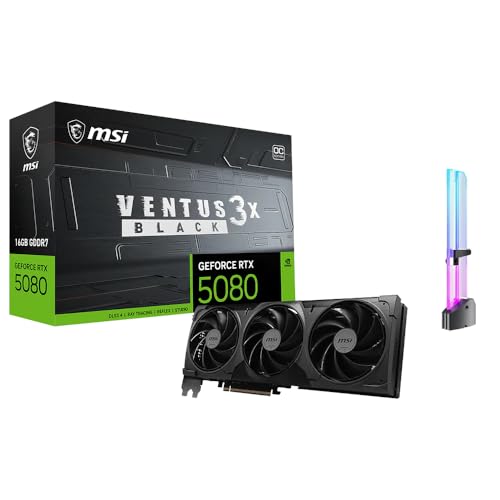
MSI GeForce RTX 5080 Ventus 3X OC Black
The Ventus is the one listing that names 3D rendering and AI content creation in its title, alongside 4K gaming and streaming. It is the natural match for someone who models in the morning and games in the evening. It lists 16GB of GDDR7, PCIe Gen 5 and RGB lighting.
- Strength: RTX 5080 class with 16GB of memory for large scenes.
- Strength: positioned for creators who also game and stream from the same PC.
- Trade-off: the title gives few clock or output details, so verify the port layout and size.
Skip it if you want liquid cooling, a compact form factor, or a spec-heavy headline to compare.
ZOTAC Gaming GeForce RTX 5070 Twin Edge OC
The entry option for Blender in this group, aimed at students and hobbyists who are learning modeling and lighting. It lists 12GB of GDDR7 on a 192-bit bus, 28 Gbps memory, PCIe 5.0, DLSS 4, IceStorm 2.0 cooling and an SFF-ready design.
- Strength: the lowest tier here, with fast GDDR7 memory and PCIe 5.0.
- Strength: a compact twin-fan design suits smaller cases and modest power supplies.
- Trade-off: 12GB limits the size of scenes and texture sets before the card runs out of room.
Skip it if your projects already fill 12GB or you expect them to grow quickly.
MSI Gaming RTX 5080 Gaming Trio OC
A conventional air-cooled RTX 5080 with a high listed boost of 2715 MHz, for buyers who want top-tier compute without a liquid loop. The title gives 16GB of GDDR7, a 256-bit bus, three DisplayPort 2.1a outputs and HDMI 2.1b.
- Strength: RTX 5080 compute with 16GB of memory for demanding renders and large textures.
- Strength: four modern display outputs make multi-monitor modeling comfortable.
- Trade-off: a large triple-fan style card that needs plenty of case room and power.
Skip it if you have a compact case or want liquid cooling for quiet operation under long loads.
Which One Fits Your Situation
You render long animations overnight
The MSI SUPRIM Liquid is built for sustained load and keeps temperatures in check, provided your case has radiator space. Its high clock and 16GB of memory also let it hold larger scenes than the 12GB card.
You work in a small case
The ZOTAC 5070 Ti Solid SFF gives you 16GB in a compact design. If budget matters more than memory, the ZOTAC 5070 Twin Edge shrinks the cost further while keeping the SFF footprint.
You split time between games and Blender
The MSI Ventus 3X OC is aimed at that mix, and the MSI Gaming Trio OC is a strong alternative if you want a high-clock option with abundant outputs for a multi-monitor desk.
You are just starting with 3D
The ZOTAC 5070 Twin Edge is the lower-commitment tier, and you can upgrade later when projects outgrow 12GB. Starting here avoids paying for headroom you may not need for several months.
Common Mistakes
- Buying for gaming frame rates while ignoring how much memory a large scene needs.
- Assuming a bracket or an ID card pack from a mixed search result is part of a GPU purchase.
- Forgetting radiator space before ordering a liquid-cooled card.
- Running a long render without checking case airflow and power supply headroom.
- Paying extra for RGB and a higher boost clock instead of a higher GPU tier.
Related guides
- Noctua Nh-D15 Vs Thermalright Peerless Assassin 120
- Sustainable Gaming Pc Power Supply Efficiency Guide
- Thermal Paste Application Method For Lga1851
Frequently Asked Questions
How much video memory do I need for Blender?
It depends on scene size. Light scenes can fit within 12GB, but large environments and texture-heavy projects benefit from 16GB. If you are unsure, choose more memory over a slightly higher clock speed, because running out of memory is far more disruptive than rendering a little slower.
Does DLSS 4 help with Blender rendering?
DLSS 4 is a gaming feature for upscaling and frame generation. It does not change how Cycles renders, so treat it as a bonus for play rather than a reason to buy for modeling work.
Is a liquid-cooled card necessary?
No. Air-cooled cards handle most workloads with adequate case airflow. Liquid cooling is mainly useful for long, heavy sessions and for people who want lower noise and temperatures.
Can a small case hold an RTX 5080?
Some can, but the three listed RTX 5080 boards are either large or need a radiator. The SFF-ready ZOTAC cards are better suited to compact builds, so check dimensions first.