A hard cap of under 200 dollars changes how you shop for a graphics card. You are no longer comparing the newest architectures; you are choosing which compromise to live with. One card gives you more video memory but older silicon, another offers modern features with a narrow memory bus, and a third comes from a lesser-known seller with a lower sticker and fewer guarantees. The question behind “best graphics cards under 200” is which trade-off suits the games you play at the resolution you use.
This guide is for people building or upgrading a 1080p gaming PC on a tight budget in 2026, and for anyone replacing a dead card in an older desktop. One honest caveat comes first: product titles do not state prices, and card prices move constantly, so the cards below are chosen for their entry-level class, not for a guaranteed cost. The faster cards here may land above the cap at some times, so check the live listing against your limit. A flagship-class Radeon from the original shortlist was removed because it sits far outside this budget tier.
Our Top Picks
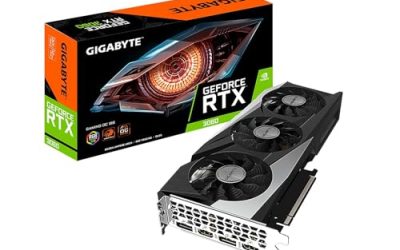
 GIGABYTE GeForce RTX 3050 WINDFORCE OC V2 6GStandard7.5 x 4.4 x 0.1 inches0.88 PoundsCheck on Amazon


Top 3 picks at a glance
Quick Picks
As an Amazon Associate we earn from qualifying purchases at no extra cost to you.



| Product | Best for | Key spec from the title |
|---|---|---|
| GIGABYTE GeForce RTX 3050 WINDFORCE OC V2 6G | Modern features on a budget | 6GB GDDR6, 96-bit, 2x fans |
| MSI GeForce RTX 3060 Ventus 2X 12G OC | Most memory per card | 12GB, 192-bit, boost clock 1807 MHz |
| MOUGOL Radeon RX 580 8GB | Lowest-tier 8GB option | 8GB GDDR5, 256-bit, HDMI/DP/DVI |
| ASRock Intel Arc A580 Challenger 8GB OC | Newer architecture with 8GB | 8GB GDDR6, PCIe 4.0, DisplayPort 2.0 |
| AISURIX RX 5500 XT 8GB | PCIe 4.0 entry card | 8GB GDDR6, 128-bit, 3x DP and HDMI |
| XFX Speedster SWFT210 Radeon RX 7600 | Newest AMD architecture here | 8GB GDDR6, RDNA 3, HDMI and 3x DP |
How to Choose
Video memory: 6GB, 8GB, or 12GB
Memory is the first limit you hit on a budget card. Six gigabytes works for esports titles and older games at 1080p, but newer releases with high-resolution textures can exceed it. Eight gigabytes is a safer middle, and twelve gigabytes, as on the MSI RTX 3060, leaves the most room for textures. Do not read the bus width in isolation. A narrow 96-bit or 128-bit bus can hold back an otherwise capable chip, while a 192-bit or 256-bit bus gives more memory bandwidth. A practical way to use this: decide your target resolution first. At 1080p, eight gigabytes covers the large majority of current games at medium to high settings. If you plan to step up to a 1440p monitor within a year or two, favor the cards with more memory and a wider bus, even if they cost slightly more now, because a budget card that runs out of memory stutters in ways no driver update can fix.
Architecture and features
The cards span several generations. The RX 580 is an older Polaris design with GDDR5 memory, the RX 5500 XT uses an earlier RDNA generation, and the RX 7600 uses RDNA 3. The RTX 3050 and 3060 are Ampere cards from NVIDIA, and the Arc A580 is from Intel’s Xe HPG family. Newer architectures bring better efficiency and support for newer features, while older cards can offer more raw memory for the money. Match the card to your games, not to the generation label. A review of the games you actually play, including how heavily they use ray tracing or upscaling, tells you more than a spec comparison. Cards in this class are generally aimed at rasterized 1080p play, so treat advanced lighting effects as optional extras rather than reasons to buy. If a game you care about supports one vendor’s upscaler better than another’s, let that tip the choice between otherwise similar cards.
Power connectors and PSU headroom
Budget cards often need an eight-pin PCIe connector, and the AISURIX listing explicitly mentions one. Check your power supply for the right connector and enough wattage before ordering, especially if you are upgrading an older prebuilt PC with a small power supply. Also check the slot: PCIe 4.0 cards still work in PCIe 3.0 slots, but the PCIe 4.0 x8 interface on the RX 5500 XT can lose some performance on an old PCIe 3.0 board.
Outputs, cooling, and what to ignore
Count the ports you need. The RX 580 lists HDMI, DisplayPort, and DVI, which helps with older monitors. Most others use HDMI and DisplayPort. Dual-fan designs are standard, and the ASRock Arc card adds a 0dB mode that stops fans at idle. Ignore overclock labels such as “OC” when comparing cards; factory boosts are small. Where low-priced cards cut corners is backplates, fan quality, and warranty clarity, especially from lesser-known sellers. Also measure your case before ordering: dual-fan cards vary in length, and a small tower with a drive cage close to the slot can block a longer model. A thirty-second check of the clearance in your case avoids an awkward return.
The 6 Best Options
GIGABYTE GeForce RTX 3050 WINDFORCE OC V2 6G
This is the entry point into NVIDIA’s Ampere line. The title lists two WINDFORCE fans, 6GB of GDDR6 on a 96-bit bus, and a factory overclock, from a well-known board partner.
- Strength: A recognized brand and a dual-fan design make it a low-risk purchase.
- Strength: NVIDIA’s feature set comes with it, which suits players who want that ecosystem.
- Trade-off: Six gigabytes on a 96-bit bus can limit newer games at higher texture settings.
It fits someone replacing a failed card in a family PC who wants a familiar brand and few surprises. Skip it if you want future-proof memory capacity, because six gigabytes is the smallest amount in this group.
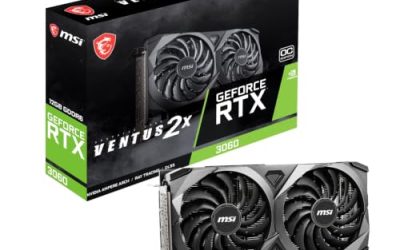
MSI GeForce RTX 3060 Ventus 2X 12G OC V1
A step up in capability and memory. The title lists 12GB of GDDR6 at 15 Gbps, a boost clock of 1807 MHz, a 192-bit bus, HDMI and DisplayPort outputs, PCIe 4, and a Torx twin-fan cooler.
- Strength: Twelve gigabytes leaves more room for textures than any other card here.
- Strength: The 192-bit bus delivers more memory bandwidth than the 3050 and 5500 XT.
- Trade-off: It is the most expensive-tier card in the group, so it may exceed a strict cap.
It suits players who care more about texture headroom than about squeezing under a limit by a small margin. Skip it if your limit is firm and listings land above it, because there are cheaper cards in this guide.
MOUGOL Radeon RX 580 8GB
An older Polaris card sold by a lesser-known brand. The title lists 8GB of GDDR5, a 256-bit bus, 2048 stream processors, and triple outputs, with a dual-fan white design.
- Strength: Eight gigabytes on a 256-bit bus is generous for a budget-tier card.
- Strength: HDMI, DisplayPort, and DVI outputs cover many monitors.
- Trade-off: The older architecture and lesser-known seller raise questions about efficiency and support.
It appeals to someone upgrading an old desktop who mainly needs more memory and a few video outputs. Skip it if you want a recognized brand or modern features, since both are weaker here than on the newer cards.
ASRock Intel Arc A580 Challenger 8GB OC
Intel’s entry in this group, from a familiar board partner. The title lists the Xe HPG architecture, 8GB of GDDR6, PCIe 4.0, dual fans, 0dB silent cooling, and DisplayPort 2.0.
- Strength: Eight gigabytes of GDDR6 and a modern architecture offer a good spec for the tier.
- Strength: The 0dB mode keeps the fans off at idle for quiet use.
- Trade-off: Intel Arc cards can behave differently from NVIDIA and AMD in older games, so buyers should read driver notes.
It suits builders who enjoy trying a newer vendor and keep their drivers current. Skip it if you mostly play older titles and want the safest driver history, since the established GeForce and Radeon cards have a longer record.
AISURIX RX 5500 XT 8GB
A lesser-known brand’s take on the 5500 XT. The title lists 8GB of GDDR6, a 128-bit bus, three DisplayPort outputs plus HDMI, a PCIe 4.0 x8 interface, and an eight-pin power connector.
- Strength: Eight gigabytes of GDDR6 and several outputs suit multi-monitor setups.
- Strength: PCIe 4.0 helps on newer boards.
- Trade-off: The seller is not a major brand, and the x8 interface can lose speed on older PCIe 3.0 boards.
It works for someone with a recent motherboard who wants several outputs for a multi-monitor desk. Skip it if you have an older motherboard or want a well-known warranty, since both concerns apply here.
XFX Speedster SWFT210 Radeon RX 7600
The newest AMD design in the group. The title lists 8GB of GDDR6, HDMI and three DisplayPort outputs, and the RDNA 3 architecture from an established card maker.
- Strength: RDNA 3 brings a more modern design than the RX 580 and 5500 XT.
- Strength: Four outputs cover multi-monitor setups.
- Trade-off: Prices may exceed the cap depending on the listing, since it is a newer card.
It fits anyone who wants the most current architecture in the group and has a little flexibility on the limit. Skip it if your cap is strict and the live listing runs above it, because older cards here cost less.
Which One Fits Your Situation
You play esports and older games at 1080p
The GIGABYTE RTX 3050 WINDFORCE OC V2 6G is enough for lighter games and brings a known brand. Its memory limit matters less in older titles.
You want the most memory for the money
The MOUGOL RX 580 8GB and the MSI RTX 3060 12G sit at opposite ends. The MOUGOL is cheaper and older, while the MSI gives the most memory and the strongest feature set.
You want a modern design and quiet idle operation
The ASRock Arc A580 Challenger 8GB OC pairs a newer architecture with 8GB of GDDR6 and a 0dB fan mode.
You need several monitor outputs
The XFX Speedster RX 7600 and the AISURIX RX 5500 XT both list HDMI plus three DisplayPort connectors.
Common Mistakes
- Trusting the cap from memory instead of checking the live listing, since graphics card prices change often.
- Buying on memory size alone while ignoring the memory bus width and architecture.
- Forgetting to check the power supply for an eight-pin connector and enough wattage.
- Assuming an older GDDR5 card matches the efficiency of newer GDDR6 designs.
- Skipping seller and warranty details on cards from lesser-known brands.
Related guides
- Noctua Nh-D15 Vs Thermalright Peerless Assassin 120
- Sustainable Gaming Pc Power Supply Efficiency Guide
- Thermal Paste Application Method For Lga1851
Frequently Asked Questions
Is 6GB of video memory enough?
For esports and older games at 1080p, yes. Newer games with large textures can exceed it, so 8GB or more is safer if you plan to play recent releases.
Do these cards work in older PCIe 3.0 slots?
Yes, PCIe 4.0 cards remain compatible with older slots. The RX 5500 XT uses an x8 interface, which can lose some speed on PCIe 3.0, so check your motherboard.
Should I choose a lesser-known brand?
It can lower the cost, but warranty support and cooling quality are less certain. Look for clear return terms and consider a major brand if the price gap is small.
Why was a flagship Radeon left out?
It belongs to a much higher tier than a cap of under 200 dollars allows, so it does not fit the keyword.