The Noctua NL-LC1-36 is the best overall pick for a Ryzen 9 build: it pairs a 360mm radiator and three NF-A12x25 G2 fans with AM5 support and a six-year warranty, and it is built around low noise rather than lighting. A 360mm all-in-one cooler is a sealed liquid loop with a cold plate on the processor, a pump, and a radiator that fits three 120mm fans, which gives a high-core-count Ryzen 9 chip more heat-shedding area than most air coolers offer. If you want a bright display or lighting on the pump, the Thermalright and Cooler Master models below are better matches.
All six are 360mm designs that list AM5 support, so the real choice is noise, thickness, looks and how much each listing actually tells you.
Our Top Picks



Top 3 picks at a glance
Quick List
- Noctua NL-LC1-36 – best for quiet operation and a slim 30mm radiator with no RGB
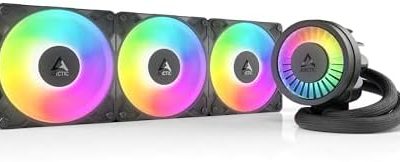
- Cooler Master 360 Atmos – best for strong airflow and a dual-chamber pump with ARGB lighting
- Thermalright FW360 SE ARGB V2 – best for a pump-head LCD screen and a high fan-speed ceiling
- Cooler Master 360 Core II – best for a white build with an Infinity Mirror pump cap
- Minorsonic 360mm AIO (ceramic bearing pump) – best for a plain ARGB cooler with a high-speed pump
- Minorsonic 360mm AIO (low-noise listing) – best for a basic 360mm option when detailed specs are not a priority
Which One Is Right for You?
| If you… | Choose |
|---|---|
| Want the quietest fans and the longest warranty, and do not need lighting | Noctua NL-LC1-36 |
| Want a screen on the pump head to show temperatures or custom images | Thermalright FW360 SE ARGB V2 |
| Care most about airflow and a pump design built for hot Ryzen 9 chips | Cooler Master 360 Atmos |
| Are building in white and like a mirror-effect pump cap | Cooler Master 360 Core II |
| Want ARGB fans and a three-phase pump motor from a smaller brand | Minorsonic 360mm AIO (ceramic bearing pump) |
| Just need a 360mm radiator and fans that list AM5 support | Minorsonic 360mm AIO (low-noise listing) |
Before comparing looks, measure your case. A 360mm radiator needs a front or top mount that takes three 120mm fans in a row, plus room for the extra fan thickness. Once clearance is confirmed, pick on noise preference first and lighting second, because every cooler on this page can handle a 170W-class Ryzen 9 with the fans set sensibly.
All 6 Picks in Detail
1. Minorsonic 360mm AIO (ceramic bearing pump) – Best for a plain ARGB cooler with a fast pump
As an Amazon Associate we earn from qualifying purchases at no extra cost to you.

This listing puts the pump up front: a ceramic-bearing pump running at a quoted 3,000 RPM, driven by a three-phase, four-pole motor meant to cut vibration and noise. It ships with three PWM ARGB 120mm fans that daisy-chain to one fan header and one lighting header, and the listing names Intel LGA 1851 and 1700 plus AMD AM5 and AM4. The brand is far less established than Noctua or Cooler Master, so rely on the listing text and confirm the warranty terms before buying.
- Radiator: 360mm, 12-channel design per the listing; thickness, confirm on listing
- Pump: ceramic bearing, quoted 3,000 RPM, three-phase motor
- Fans: 3 x 120mm PWM ARGB, daisy-chained
- Sockets: AMD AM5/AM4, Intel LGA 1851/1700
- Manufacturer page rating: about 320W cooling capacity, confirm on listing
Pros
- Daisy-chained fans keep cable clutter low
- Quoted cooling rating comfortably above a Ryzen 9 default power limit
Cons
- Radiator thickness and fan RPM range are not stated clearly
- Limited brand history makes long-term support harder to judge
Compared with the other Minorsonic listing, this one gives you the more detailed pump description and the explicit rating. Because a pump failure is the most common reason an all-in-one cooler is replaced, the length of the seller’s warranty and how easily you can reach support matter more here than with the established brands.
2. Thermalright FW360 SE ARGB V2 – Best for an LCD pump head

Thermalright’s listing leads with a 2-inch LCD on the pump cap that can show temperatures, usage and custom pictures. Retailers describe the panel as 320×240, though one European seller lists a slightly different size, so confirm on the product page. The kit includes three TL-M12Q 120mm PWM fans that daisy-chain, a pump quoted at 3,000 RPM and support for AM5, AM4, LGA 1851 and LGA 1700. Retailer data lists a 27mm-thick radiator, a five-year warranty and a fan ceiling of 2,000 RPM, which means it can move more air than the quietest picks here but will be louder at full speed.
- Radiator: 360mm, about 397mm long and 27mm thick per retailer data
- Pump: quoted 3,000 RPM
- Fans: 3 x TL-M12Q 120mm PWM, up to about 2,000 RPM
- Display: 2-inch LCD on the pump head
- Sockets: AMD AM5/AM4, Intel LGA 1851/1700
Pros
- Live temperature readout without extra software overlays
- Standard 27mm radiator fits most cases that take 360mm coolers
Cons
- Fans reach higher noise levels than the Noctua at full speed
- LCD customization may rely on vendor software
Choose it over the Cooler Master Atmos when the screen matters more than a branded pump design. If you plan to use the display, install the vendor’s software early and check that the fan and pump curves can be set in the BIOS as a fallback, so the cooler still behaves well if the app is not running.
3. Minorsonic 360mm AIO (low-noise listing) – Best for a basic 360mm option

This second Minorsonic listing is written around low noise, liquid cooling and AMD AM5 and AM4 plus Intel LGA 1851 and 1700 support, with three 120mm PWM fans. Beyond that, the listing says little about the pump, radiator thickness or fan speed range, so most values should be confirmed on the product page. It suits a builder who wants a no-frills 360mm cooler and is comfortable accepting a brand with limited published documentation.
- Radiator: 360mm, thickness confirm on listing
- Fans: 3 x 120mm PWM
- Pump specifications: confirm on listing
- Sockets: AMD AM5/AM4, Intel LGA 1851/1700
- Lighting: confirm on listing
Pros
- Lists AM5 support and 360mm cooling area for a Ryzen 9 chip
- Simple three-fan layout
Cons
- Sparse specification detail
- Noise claims cannot be checked against published figures here
The first Minorsonic listing is the better documented of the two if you prefer the brand. Treat this one as a shortlist candidate only after you have read the full product page, because the details that decide a purchase, such as radiator thickness, fan speed range and warranty length, are left open in the title.
4. Cooler Master 360 Atmos – Best for airflow and a dual-chamber pump

The 360 Atmos is Cooler Master’s performance-focused 360mm loop. Its dual-chamber pump keeps the cold liquid separate from the hot return, and the three Sickleflow Edge 120mm ARGB fans are quoted at 690 to 2,500 RPM with up to about 70.7 CFM each. The listing names R9 and Ultra 9 processors directly. Cooler Master’s data gives a 394mm by 119.6mm by 27.2mm aluminum radiator, supports AM5, AM4 and recent Intel sockets and carries a five-year warranty.
- Radiator: 360mm aluminum, about 27.2mm thick
- Pump: dual-chamber design; maximum speed varies between sources (roughly 3,200 to 3,400 RPM), confirm on listing
- Fans: 3 x Sickleflow Edge 120mm ARGB, 690-2,500 RPM
- Sockets: AMD AM5/AM4, Intel LGA 1851/1700/1200
- Warranty: five years per the manufacturer
Pros
- Strong airflow ceiling for a 170W-class processor
- Established brand with published specifications
Cons
- Fans can be audible at their top speed
- Radiator and fan stack needs the same clearance as any 27mm 360mm unit
It is louder at the limit than the Noctua but gives more headroom under sustained all-core loads. Many owners cap the fans well below the 2,500 RPM ceiling in the BIOS, which keeps the noise close to the Core II while still leaving the extra speed available for rendering and compile jobs.
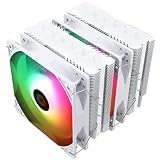
5. Cooler Master 360 Core II – Best for white builds with an Infinity Mirror cap

This listing is the white Core II with an Infinity Mirror ARGB pump cover, supporting AM5, AM4, LGA 1851 and LGA 1700. Cooler Master’s materials describe a dual-chamber pump rated for a maximum of 280W, a 27.2mm-thick aluminum radiator and three 120mm daisy-chain fans running about 650 to 1,750 RPM. The lower fan ceiling makes it calmer than the Atmos, though it also leaves less room for extreme loads. It fits a Ryzen 9 chip at stock settings comfortably.
- Radiator: 360mm aluminum, about 27.2mm thick
- Pump: dual-chamber, about 2,800 RPM, rated up to 280W
- Fans: 3 x 120mm ARGB, roughly 650-1,750 RPM
- Sockets: AMD AM5/AM4, Intel LGA 1851/1700
- Warranty: five years per the manufacturer
Pros
- Distinct pump cap suits a showcase build
- Lower fan ceiling keeps noise moderate
Cons
- Less headroom than the Atmos if you overclock
- White version listings vary on fan count, so confirm three fans on the page
Step up to the Atmos if you plan to push power limits. The Core II is also the model where listing wording differs most between retailers, so double-check the colour, fan count and bundled accessories on the page you buy from.
6. Noctua NL-LC1-36 – Best for quiet, no-frills cooling

Noctua’s first 360mm AIO is distinctive in two ways. The radiator is slimmer than most, at 30mm in the fin stack for a total assembly near 59mm with fans, and it uses three NF-A12x25 G2 fans rated up to 1,800 RPM and about 63 CFM. The pump is an Asetek-based unit with ceramic bearings and a bundled noise absorber, with three speed modes. Noctua lists AM5, AM4, LGA 1700 and LGA 1851 support under its SecuFirm2+ mounting system, with a six-year warranty. There is no RGB lighting.
- Radiator: 400 x 120 x 30mm, 410mm tubing
- Fans: 3 x NF-A12x25 G2, up to 1,800 RPM, about 22.5 dB(A)
- Pump: Asetek Emma V2 design, speed modes up to 3,400 RPM in manual mode
- Sockets: AMD AM5/AM4, Intel LGA 1700/1851 (check Noctua’s page for newer sockets)
- Warranty: six years
Pros
- Lowest noise rating and longest warranty here
- Pump noise absorber and detailed mounting hardware
Cons
- No lighting or display of any kind
- Extra fan thickness can cause clearance problems in tight cases
Pick the Atmos instead if you want more airflow headroom and lighting. Noctua’s own documentation lists the supported sockets and case clearance in detail, so it is also the easiest listing here to verify against your motherboard and case before you order.
Specs Compared
| Cooler | Radiator | Fans | Pump | Sockets listed | Lighting / display | Warranty |
|---|---|---|---|---|---|---|
| Minorsonic (ceramic bearing pump) | 360mm, thickness confirm on listing | 3 x 120mm PWM, daisy-chained | Ceramic bearing, quoted 3,000 RPM | AM5, AM4, LGA 1851, 1700 | ARGB | confirm on listing |
| Thermalright FW360 SE ARGB V2 | 360mm, about 27mm thick | 3 x TL-M12Q, about 2,000 RPM max | Quoted 3,000 RPM | AM5, AM4, LGA 1851, 1700 | ARGB plus 2-inch LCD | Five years (retailer data) |
| Minorsonic (low-noise listing) | 360mm, confirm on listing | 3 x 120mm PWM | confirm on listing | AM5, AM4, LGA 1851, 1700 | confirm on listing | confirm on listing |
| Cooler Master 360 Atmos | 360mm, about 27.2mm thick | 3 x Sickleflow Edge, 690-2,500 RPM | Dual-chamber | AM5, AM4, LGA 1851, 1700, 1200 | ARGB | Five years |
| Cooler Master 360 Core II | 360mm, about 27.2mm thick | 3 x 120mm, about 650-1,750 RPM | Dual-chamber, about 2,800 RPM | AM5, AM4, LGA 1851, 1700 | ARGB, Infinity Mirror cap | Five years |
| Noctua NL-LC1-36 | 360mm, 30mm fin stack | 3 x NF-A12x25 G2, up to 1,800 RPM | Asetek-based, ceramic bearing | AM5, AM4, LGA 1700, 1851 | None | Six years |
How We Chose These
This is a research-based guide, not a lab write-up. We started from the six cooler listings supplied for this page and checked each against the manufacturer’s specification page where one exists, plus retailer data fields for radiator size, fan speed and sockets. We weighed socket support for AM5, radiator thickness, fan speed range, pump design, warranty length and how clearly each listing documents its specifications. Where sources disagreed or the listing was silent, we say to confirm on the product page rather than guess. We did not run thermal or noise measurements, and the figures quoted above are manufacturer or retailer values, not our own readings. Preference went to listings that publish radiator size, fan range and warranty terms.
What to Look For
How much cooling a Ryzen 9 chip needs
AMD lists a 170W default TDP for the Ryzen 9 9950X, and reports of its package power limit range from 200W to 230W depending on the source. Ryzen 9 chips run hot at stock because boost clocks climb until the thermal limit, so more cooling area translates into longer sustained boost. A 360mm radiator has roughly 50 percent more fin area than a 240mm and is a sensible match for a 16-core part, though a 280mm can also be enough for lighter workloads.
Radiator thickness, tubing and case fit
Most 360mm radiators here are 27mm thick, and with fans the stack grows to about 52mm. The Noctua’s fin stack is 30mm and its full assembly is near 59mm. Add the height of memory modules if you top-mount, and check that tubing around 400mm long reaches the pump block from your chosen mount. Front mounting avoids memory clearance issues but can send warm air to the graphics card. The usual rule: allow at least 55 to 60mm for the radiator and fans, plus clearance for the tubes.
Fan speed, noise and pump behavior
A 360mm radiator spreads the load across three fans, so they can spin slowly and quietly. A fan quoted at 2,000 RPM or 2,500 RPM is about what it can do, not what it will do in daily use. Aim for a fan curve that stays under about 1,200 RPM during gaming and ramps only in all-core loads. Pumps run at fixed or PWM-controlled speeds; a pump that is always at full speed produces a constant hum, so use the motherboard’s pump header settings if the cooler allows PWM control.
Socket and mounting hardware
The AM5 socket keeps a built-in backplate, and the cooler clamps onto the retention frame. All six listings name AM5. Intel sockets are noted for readers who may reuse the cooler later, but the Ryzen 9 build depends on the AMD bracket. AM5 kept the same cooler hole spacing as AM4, which is why many AM4 brackets carry over, but you should still confirm that the box includes the bracket and backplate hardware your listing describes.
Orientation, air and long-term upkeep
Air collects at the highest point of a loop, so mount the radiator with its fittings at the bottom or with the pump below the radiator’s top edge. Otherwise trapped air can reach the pump and cause a rattling noise. Dust is the other long-term enemy: a radiator fin stack clogs slowly, so clean the dust filters every few months and blow out the fins with compressed air. Check mounting screws once after the first week of use because thermal cycling can loosen them slightly, and watch idle temperatures for a slow rise that would point to pump aging.
Lighting, displays and software
ARGB lighting is controlled from a 5V three-pin header on the motherboard or by the vendor’s software. The LCD on the Thermalright cooler may need its own app to change images. If you do not want extra software running at startup, pick a cooler without a screen. A worked example: a build using a mid-tower with a front 360mm mount, three case fans on the back and top, and a Ryzen 9 at stock settings will do well with any of these coolers; the difference is mostly noise and appearance.
Questions
Is a 360mm AIO overkill for a Ryzen 9 processor?
For a 16-core chip under long all-core loads it is a good match, but not required. A good 280mm or large air cooler can handle normal gaming. A 360mm helps most when you render, compile or leave a processor at its full power limit for long periods.
Should I mount the radiator at the top or front?
Top mounting exhausts hot air from the case and is often the best fit for the processor. Front mounting is preferable when memory clearance blocks the top. Either works in practice if you keep the pump block lower than the highest point of the radiator, so air bubbles collect in the radiator, not the pump.
How long do AIO coolers last?
Manufacturers typically cover them for five or six years, and many run longer without problems. The liquid slowly permeates through tubing and the pump can wear, so watch for rising temperatures or a noisy pump. When that happens, replace the unit.
Do I need to replace the thermal paste that comes pre-applied?
No, pre-applied paste works fine for a first install. Reapplying is only necessary when you remove the cooler. Use a pea-sized dot or thin line of good paste and avoid reusing the old layer.
Will these coolers work on future AMD sockets?
Each listing names AM5 and AM4 only. AMD has kept the AM5 mounting pattern across generations so far, but confirm future compatibility on the manufacturer page before a new platform purchase.
Does the LCD screen affect cooling?
No. The display sits on the pump head and is separate from the cooling path. It adds software and a bit of power draw, so decide whether you will actually use the readout.
Update History
- October 14, 2026 – Initial publication; product set drawn from current catalog listings.
- Check the product page for current specifications and availability before buying.
Sources
- Manufacturer product and specification pages for Noctua, Cooler Master, Thermalright and Minorsonic
- AMD processor specification pages for Ryzen 9 default TDP and socket details
- Retailer listing titles and specification fields
- Independent hardware publications’ coverage of the Noctua NL-LC1-36 and Cooler Master Atmos and Core II coolers