A flash drive is a handy tool for a PC backup, but only for the right job. It is excellent for copying documents, save games, browser profiles, config files and a Windows installer you may need one day. It is a poor choice for the only copy of irreplaceable family photos or a full system image of a gaming rig with several terabytes. The keyword implies a decision about capacity, speed and how many drives you need, not about glamour.
The eight listings below span 8GB bargain sticks, 32GB basics, and 64GB to 128GB drives with USB 3.0 or USB-C connectors, sold singly and in multi-packs. Use the sections that follow to match the capacity and interface to what you actually want to save, and to avoid the common trap of buying a very slow, very small drive in 2026 and expecting it to hold a whole library.
Our Top Picks




Top 3 picks at a glance
Quick Picks
As an Amazon Associate we earn from qualifying purchases at no extra cost to you.





| Product | Best for | Key feature from the title |
|---|---|---|
| Lexar D40E 128GB | Laptops and PCs with USB-C | Dual USB 3.2 Gen 1 Type-C, swivel metal |
| SanDisk 32GB Cruzer Blade | Small document backups | USB 2.0, compact |
| PNY 128GB Turbo Attache 3 (2-Pack) | Primary plus off-site copy | USB 3.0, up to 100MB/s read |
| SanDisk 128GB Ultra Flair | Faster larger backups | Up to 150MB/s read, password protection |
| 8GB Flash Drive 10 Pack | Distributing small files | USB 2.0, bulk pack with indicator |
| Lexar D40E 64GB | Mid-size backups on USB-C | Dual USB 3.2 Gen 1 Type-C, metal housing |
| PNY 128GB Turbo Attache 3 (5-Pack) | Several machines or offices | USB 3.0, 5 drives in one pack |
| ENUODA 8GB (1 Pack) | One-off file transfers | USB 2.0, black memory stick |
How to Choose
Pick capacity from what you will actually copy
Add up the folders you want to protect. Documents, spreadsheets and config files fit on 8GB or 32GB. Game save folders and photo collections push toward 64GB or 128GB. A full system image needs far more than a flash drive offers, so an external SSD or hard drive is a better fit. Buying one size above your total gives you room for a second copy. It also helps to sort files first: a clean folder of only what matters copies faster and restores faster than a whole user profile with caches and temporary files.
Interface and speed matter more than the capacity label
USB 2.0 drives are slow, and copying tens of gigabytes can take a very long time. USB 3.0 and USB 3.2 Gen 1 drives are noticeably quicker, and listings mentioning figures like 100MB/s or 150MB/s read show the maximum speed, not a guarantee of sustained writes. For backups, write speed matters most and is rarely stated, so treat read numbers as a rough guide. Plugging a USB 3.0 drive into a USB 2.0 port also caps it at the slower speed, so use a blue or labeled port on the back of the PC when you can.
Connector type and build
Many desktops still have more USB-A ports than USB-C, but newer laptops lean the other way. A dual-connector drive solves both. Metal housings and swivel or sliding collars protect the plug and avoid lost caps, while plastic bodies keep cost down. Look for indicator lights if you want to know when a copy is still in progress before pulling the drive out.
What to ignore and where budget models cut corners
Ignore bulk-pack marketing words such as “data storage and transfer” that appear in every listing. Budget sticks tend to cut corners on sustained write speed and long-term reliability, so keep important files in at least two places and never treat one drive as your only backup. Password-protection software, where listed, is a convenience feature, not a guarantee of security.
The 8 Best Options
Lexar D40E 128GB Dual USB-C Drive
This Lexar drive has a metal housing, a swivel design and dual USB 3.2 Gen 1 connectors, including Type-C. It is a convenient backup stick for modern laptops that also need to plug into an older desktop, and 128GB gives room for save files and project folders. The swivel design means the connector you are not using folds away instead of snagging in a pocket.
- Dual connectors for USB-C and USB-A devices
- Metal housing with swivel design
- Trade-off: a single drive, so there is no second copy in the box
Skip it if you want multiple drives for off-site backups.
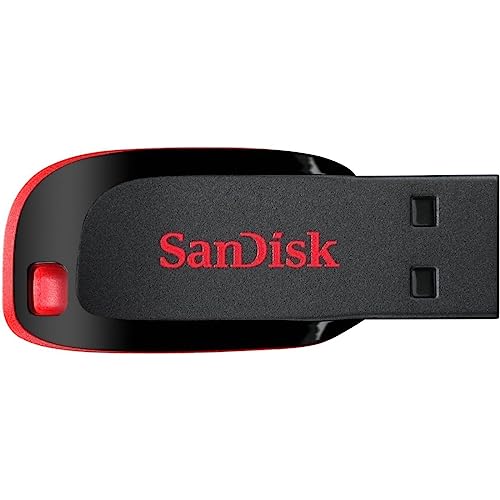
SanDisk 32GB Cruzer Blade USB 2.0
The Cruzer Blade is a small, plain USB 2.0 stick from a well-known brand. At 32GB it covers documents and a few game save folders, and it is easy to keep as a spare in a desk drawer.
- Recognized brand and modest capacity
- Compact design
- Trade-off: USB 2.0 is slow for anything large
Skip it if you plan to copy large video files or game libraries.
PNY 128GB Turbo Attache 3, 2-Pack
The two-pack lists up to 100MB/s read speed, USB 3.0, a sliding collar and lightweight construction. Two drives let you alternate backups or keep one at a second location.
- Two 128GB drives in one pack
- USB 3.0 interface
- Trade-off: the stated speed is for reads, not writes
Skip it if you only need one drive and want the extra expense avoided.
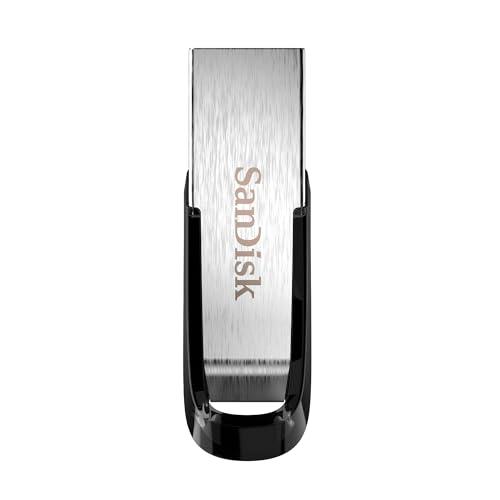
SanDisk 128GB Ultra Flair USB 3.0
A metal-cased USB-A drive listed with up to 150MB/s read, USB 3.0 and password-protection software. It stands out as the quickest-reading drive in this roundup, which helps when restoring files.
- Up to 150MB/s read speeds
- Metal casing and password-protection option
- Trade-off: USB-A only, so a USB-C laptop will need an adapter
Skip it if your main machine has only USB-C ports.
8GB Flash Drive 10 Pack, USB 2.0
This bulk pack offers ten 8GB sticks with indicator lights and a swivel design. It is better suited to handing out small files, like drivers or a configuration bundle, than to serious PC backups.
- Ten drives in a single order
- Swivel design with an indicator light
- Trade-off: 8GB and USB 2.0 limit it to small backups
Skip it if you want one dependable drive for a large backup.
Lexar D40E 64GB Dual USB-C Drive
The same design as the 128GB model at half the capacity. It keeps the dual USB 3.2 Gen 1 connectors, metal housing and swivel, which suits users with moderate backup needs.
- Dual USB-C and USB-A support
- Metal housing, swivel design
- Trade-off: only 64GB, which fills fast with games or media
Skip it if you plan to keep several full backups on one drive.
PNY 128GB Turbo Attache 3, 5-Pack
Five 128GB USB 3.0 drives in one pack, sharing the 100MB/s read figure and sliding collar with the two-pack. It fits families or small offices that want one drive per computer.
- Five drives in one box
- Same USB 3.0 interface as the two-pack
- Trade-off: more drives than most single users need
Skip it if you just want to back up one PC.
ENUODA 8GB USB 2.0 Flash Drive
A single black 8GB USB 2.0 stick intended for file storage and data transfer. It works for moving a handful of documents or a Windows tool between computers.
- Single drive, low capacity
- Simple memory stick design
- Trade-off: low capacity and slow USB 2.0 speed
Skip it if you need a real backup of anything bigger than documents.
Which One Fits Your Situation
Laptop with USB-C and a desktop with USB-A
The Lexar D40E, in 64GB or 128GB, covers both port types on one drive, so you do not need to carry an adapter. Choose 128GB if your backup includes game saves, screenshots and a few project folders, and 64GB if it is mostly documents.
Regular backups with a copy stored elsewhere
The PNY 128GB 2-Pack suits this routine. One drive stays at home, the other at work or with a relative, and you swap them after each backup. That rotation protects against a fire, a theft or a surge that hits the PC and the drive plugged into it.
Quick restores and larger folders
The SanDisk Ultra Flair lists the highest read speed here, which helps when moving gigabytes back onto a PC after a reset or a drive swap. Its metal casing also suits a drive that lives on a keychain or in a bag, where plastic bodies tend to crack.
Common Mistakes
- Treating one flash drive as the only copy of important files.
- Buying 8GB drives for photo or game backups.
- Reading a read speed on the label as a write speed.
- Pulling the drive out before the copy finishes.
- Leaving a drive plugged in permanently, where it is exposed to malware and surges.
Related guides
- How To Set Up Computer Speakers For Better Sound At Your Desk
- How To Check Whether Your Ram Is Running At Its Rated Speed
- How To Choose The Right Monitor Riser Height For Your Desk
Frequently Asked Questions
Are flash drives reliable for long-term backups?
They are suited to short and medium-term copies. For long-term storage, keep a second copy on a hard drive or cloud service.
How much capacity do I need?
Add up the folders you intend to copy and buy one size larger. For documents, 32GB is ample; for save files and photos, go to 64GB or 128GB.
Is USB 3.0 worth it for backups?
Yes, for anything beyond a few gigabytes. USB 2.0 is slow enough to make larger copies tedious.
Can I encrypt the drive?
Some listings mention password-protection software, and Windows includes its own encryption tools. Neither replaces keeping a second backup.
Related guides
More from Amazon
Programs that pair well with the guide above. Offers and eligibility are set by Amazon and may change.
Free shipping on eligible items, Prime Video and more. Eligible new members can start with a free trial.
Start a Prime free trialAd-free music streaming. Eligible new subscribers can start with a free trial.
Try Music Unlimited freeA Prime membership for ages 18-24 with a trial period. Eligibility is set by Amazon.
See Prime for Young AdultsAudiobooks and podcasts to listen to on the go. Eligible new members can start with a free trial.
Try Audible freeAs an Amazon Associate we earn from qualifying purchases.