
The Apricorn Aegis Padlock 1TB is the best overall encrypted external hard drive in this group. It encrypts everything in hardware with 256-bit AES-XTS, unlocks with a keypad on the drive itself, and needs no software or drivers, so it works on Windows, macOS and Linux alike. A hardware-encrypted drive scrambles data inside the enclosure so a lost or stolen unit is unreadable without the PIN. Choose the Aegis Fortress L3 if you need FIPS 140-2 Level 3 validation, and treat the Seagate and SanDisk options as non-keypad alternatives that rely on operating-system or software protection.
Our Top Picks
 Apricorn 500GB Aegis Padlock USB 3.0 256-bit AES500 GB4.5 x 0.75 x 3.25 inches0.5 poundsCheck on Amazon


Top 3 picks at a glance
Quick List
- Apricorn Aegis Padlock 1TB – best for an all-round PIN-protected drive
- Seagate Portable 2TB – best for a plain drive you encrypt with BitLocker or FileVault
- SanDisk Extreme Portable SSD 2TB – best for a fast, rugged SSD with password protection
- Apricorn Aegis Padlock 500GB – best for a small, light secure backup
- Apricorn Aegis Padlock 2TB – best for large encrypted archives
- Apricorn Aegis Fortress L3 2TB – best for regulated or high-sensitivity data
Which One Is Right for You?
| If you… | Choose |
|---|---|
| need strong protection for a lost drive with no setup software | Apricorn Aegis Padlock 1TB |
| work in a regulated field that asks for FIPS validation | Apricorn Aegis Fortress L3 2TB |
| want fast transfers of large video or photo files with software password protection | SanDisk Extreme Portable SSD 2TB |
| already use BitLocker or FileVault and want a plain drive | Seagate Portable 2TB |
| only need to protect a few documents and want to travel light | Apricorn Aegis Padlock 500GB |
| keep a large archive or image library to protect | Apricorn Aegis Padlock 2TB |
Decide first whether you want hardware encryption you can unlock anywhere or software encryption tied to your computers. Hardware keypad drives are simple and portable, but they are slower than SSDs. SSDs are faster but the one here relies on software for its password feature.
Whatever you choose, keep a second copy of important data. Encryption protects against theft and not against drive failure, and a forgotten PIN on a hardware-encrypted drive cannot be recovered.
Think about where the drive will travel. A keypad drive is the easiest to hand to a colleague or plug into a shared computer, since nothing needs installing. A software-protected SSD is more convenient on your own machines but depends on the app being available, and an operating-system-encrypted drive depends on the right Windows edition or macOS version being present.
All 6 Picks in Detail
1. Apricorn Aegis Padlock 1TB – Best for an all-round PIN-protected drive
As an Amazon Associate we earn from qualifying purchases at no extra cost to you.

Who it suits: anyone who wants strong protection with the least fuss. The listing names a 1TB portable drive with USB 3.0, 256-bit AES XTS hardware encryption and the model number A25-3PL256-1000.
Apricorn’s design uses a built-in keypad to enter a PIN before the drive will mount, so no software touches the computer and the same drive works across operating systems. Apricorn describes a wear-resistant keypad, auto-lock, a drive reset feature and brute-force protection that wipes the key after repeated wrong guesses, along with an epoxy coating over the encryption chip. It runs on USB bus power and has an integrated cable. As a hard disk drive, it is limited to hard-drive speeds, so it suits backups and archives more than active editing.
- Capacity: 1TB per the listing
- Encryption: 256-bit AES-XTS in hardware
- Interface: USB 3.0 with an integrated cable
- Unlock method: onboard keypad, no software needed
- Security features: auto-lock, reset and brute-force protection per Apricorn
Pros
- Works on any system without drivers
- Hardware encryption with PIN access
Cons
- Spinning disk speeds
- A lost PIN means lost data
Compared with the 2TB Aegis Padlock, it offers the same security at half the capacity.
2. Seagate Portable 2TB – Best for a plain drive you encrypt with BitLocker or FileVault

Who it suits: people who want inexpensive bulk storage and will add encryption through their operating system. The listing describes a 2TB USB 3.0 portable hard drive for Windows and macOS with plug-and-play backup, and it does not state any hardware encryption.
This drive does not match the encrypted-drive facet on its own, so it is placed here as a runner-up. Independent reviews report that it has no built-in hardware encryption, which means you would protect it with BitLocker on Windows or the encryption option in macOS. That works well if the drive stays with computers you control. It does not unlock on a machine without those tools, and a BitLocker-encrypted drive will not mount natively on a Mac. Seagate lists dimensions of about 4.6 by 3.15 by 0.58 inches and a weight under half a pound.
- Capacity: 2TB per the listing
- Interface: USB 3.0 with an 18-inch cable per Seagate
- Encryption: none built in; use operating-system tools
- Compatibility: Windows and macOS per the listing
- Size: about 4.6 by 3.15 by 0.58 inches
Pros
- Plenty of capacity in a small enclosure
- Simple plug-and-play setup
Cons
- Not hardware encrypted
- Cross-platform use gets awkward once encrypted
It is the choice over the Apricorn Padlock drives only when you value capacity and operating-system integration above standalone protection.
3. SanDisk Extreme Portable SSD 2TB – Best for a fast, rugged SSD with password protection

Who it suits: creators and travelers who move large files and need a drive that survives bumps. The listing describes a 2TB portable SSD with read speeds up to 1050MB/s, USB-C, USB 3.2 Gen 2 and IP65 water and dust resistance.
Its security comes from SanDisk’s password protection software, which SanDisk’s data sheet describes as 256-bit AES for supported Windows and macOS versions. That is software-based protection, so it needs the app on the computer to unlock and is not a keypad drive. In exchange you get SSD speed and a rugged shell: SanDisk lists drop and shock protection, and IP65 resistance. Speed figures are manufacturer maximums based on SanDisk’s own testing, so real-world copies will often be lower.
- Capacity: 2TB per the listing
- Speed: up to 1050MB/s per the listing
- Interface: USB-C, USB 3.2 Gen 2 (10 Gbps)
- Durability: IP65 water and dust resistance per the listing
- Security: software password protection with 256-bit AES per SanDisk
Pros
- Much faster than any hard drive here
- Rugged and compact
Cons
- Software-based protection, not hardware keypad encryption
- Password features need compatible operating systems
Next to the Apricorn Padlock 2TB, it wins on speed and ruggedness and loses on standalone, driver-free protection.
4. Apricorn Aegis Padlock 500GB – Best for a small, light secure backup
Who it suits: people who carry a modest amount of sensitive data such as documents, scans and a few project folders. The listing names a 500GB portable drive with USB 3.0, 256-bit AES XTS hardware encryption and the model number A25-3PL256-500.
It shares the Padlock family’s keypad design, so you unlock it with a PIN and need no drivers. The smaller capacity keeps the cost of a lost drive down and is plenty for essential records. Specifications such as exact weight, rotation speed and drive size for this capacity should be confirmed on the product page, because Apricorn’s published figures vary across capacities. As a spinning drive, transfers are modest, which is fine for periodic backups.
- Capacity: 500GB per the listing
- Encryption: 256-bit AES-XTS in hardware
- Interface: USB 3.0, bus powered
- Unlock method: onboard keypad
- Platform: works with Windows, macOS and Linux per Apricorn
Pros
- Small capacity suits focused backups
- Same hardware security as larger Padlock models
Cons
- Limited space for photo or video libraries
- Spinning-disk speed
Choose it over the 1TB version only when you truly need less than 500GB.
5. Apricorn Aegis Padlock 2TB – Best for large encrypted archives
Who it suits: photographers, small offices and anyone archiving a lot of data who still wants hardware-level protection. The listing names a 2TB drive with USB 3.0, 256-bit AES XTS hardware encryption and the model number A25-3PL256-2000.
It has the same keypad unlock, auto-lock and brute-force defenses as the other Padlock drives, plus the capacity to hold a full image library or several system backups. Reseller summaries of the Padlock family list the 2TB version as a 5400 rpm drive with an 8 MB buffer, and some resellers mark it as an older product, so check availability. Because it is a hard disk, treat it as storage and not as a working drive for editing. Keep it away from drops while it is spinning.
- Capacity: 2TB per the listing
- Encryption: 256-bit AES-XTS in hardware
- Interface: USB 3.0 with an integrated cable
- Unlock method: onboard keypad, no drivers
- Drive type: 5400 rpm hard disk per reseller summaries (confirm on the product page)
Pros
- Large capacity with keypad hardware encryption
- No software to install
Cons
- Hard-disk speed and shock sensitivity
- Larger loss if the PIN is forgotten
It is the natural pick over the Aegis Fortress L3 when you want the same capacity without the validated hardware tier.
6. Apricorn Aegis Fortress L3 2TB – Best for regulated or high-sensitivity data
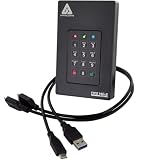
Who it suits: government contractors, healthcare and legal users, or anyone whose organization asks for validated cryptography. The listing describes a 2TB drive with FIPS Level 3 validation, USB 3.0 and hardware encryption, with the model number AFL3-2TB.
FIPS 140-2 Level 3 is a formal validation of the cryptographic module with added physical tamper resistance. Retailer information for the Fortress L3 line describes 256-bit AES-XTS encryption, a 10-digit keypad, an aluminum shell, forced PIN enrollment, read-only modes and brute-force protection. The drive needs formatting before first use, and it includes both Type-A and Type-C cables per retailer information, though you should confirm package contents.
- Capacity: 2TB per the listing
- Validation: FIPS 140-2 Level 3 per the listing
- Encryption: 256-bit AES-XTS with keypad PIN access
- Features: read-only modes, admin PIN options and auto-lock per Apricorn
- Interface: USB 3.0 per the listing
Pros
- Validated hardware tier for compliance needs
- Rugged metal enclosure
Cons
- More expensive tier than the basic Padlock
- Requires formatting and setup before use
Over the standard Aegis Padlock 2TB, you pay for formal validation, tamper protection and extra PIN controls.
Specs Compared
| Drive | Capacity | Type | Interface | Encryption | Unlock method |
|---|---|---|---|---|---|
| Apricorn Aegis Padlock 1TB | 1TB | Hard disk (confirm on listing) | USB 3.0 | 256-bit AES-XTS hardware | Onboard keypad |
| Seagate Portable 2TB | 2TB | Hard disk | USB 3.0 | None built in (use BitLocker or FileVault) | OS password |
| SanDisk Extreme Portable SSD 2TB | 2TB | Solid state | USB-C, USB 3.2 Gen 2 | Software password protection (256-bit AES per SanDisk) | Software on host computer |
| Apricorn Aegis Padlock 500GB | 500GB | Hard disk (confirm on listing) | USB 3.0 | 256-bit AES-XTS hardware | Onboard keypad |
| Apricorn Aegis Padlock 2TB | 2TB | Hard disk (confirm on listing) | USB 3.0 | 256-bit AES-XTS hardware | Onboard keypad |
| Apricorn Aegis Fortress L3 2TB | 2TB | Hard disk (confirm on listing) | USB 3.0 | FIPS 140-2 Level 3 validated hardware encryption | Onboard keypad |
How We Chose These
This list is based on research into manufacturer descriptions, retailer listing text and published reviews. We have not run the drives ourselves. The criteria were whether encryption is done in hardware or software, the key length and mode, how the drive unlocks, the interface and capacity, durability, and any formal validation such as FIPS. We also looked at cross-platform use and whether you need software on the host computer. One listed drive does not include hardware encryption at all, and the article states that plainly and ranks it accordingly. Where details differed between sources, we flagged them for you to confirm on the product page.
What to Look For
Hardware versus software encryption
Hardware encryption runs inside the drive’s own controller, so the key never has to touch your computer and the drive works the same on any system. Software encryption, such as BitLocker, FileVault or a vendor password app, runs on the host and depends on the operating system or app being present. Hardware is simpler to move between computers and avoids drivers. Software is easy to set up and tends to cost less.
For a lost or stolen drive, both can be strong if configured properly. For use on locked-down corporate computers where you cannot install software, a keypad drive is much easier.
Key length, mode and validation
Look for 256-bit AES, and ideally the XTS mode used for disk storage. AES-256 is the standard high-security setting. FIPS 197 describes the AES algorithm itself, while FIPS 140-2 validates a whole cryptographic module. A drive may use AES and still not be FIPS 140-2 validated, and Level 3 adds physical tamper resistance on top of Level 2’s tamper evidence. Only drives that say validated and give a level should be treated as such.
Rule of thumb: if no regulation or contract requires FIPS, 256-bit AES hardware encryption with brute-force protection is enough for most personal and small-business use.
PIN keypads, recovery and backup
A keypad drive’s biggest risk is you. A forgotten PIN cannot be reset without wiping the drive, because the key is erased on reset. Choose a PIN you can remember or store it securely, and consider an admin PIN if the drive supports it. Look for features such as auto-lock after a set time, lock on USB power loss, and read-only mode for safe sharing.
Always keep another copy. A worked example: store the working files on your computer, copy them to the encrypted drive weekly, and keep a second encrypted copy somewhere else. Encryption is not a backup, and any single drive can fail.
Handle the drive with care as well. Eject it before unplugging, keep it away from heat and moisture, and test your backup by restoring a file now and then. A drive that has never been restored from is only a hope, not a backup.
Capacity, speed and durability
Hard drives offer more capacity per unit of cost, but they spin, so avoid moving them while in use. SSDs are faster and handle shocks better. A 1TB hard drive suits a document backup, while a creator moving hundreds of gigabytes of footage will notice the speed difference with an SSD.
USB 3.0 supports up to 5 Gb/s, while USB 3.2 Gen 2 supports up to 10 Gb/s. A hard disk cannot fill either link, so the faster interface matters mainly for SSDs. Check the cable type: USB-C ports on newer laptops often need a USB-C cable or an adapter.
Remember that encryption does not hide the fact that a drive exists, and it does not protect files once the drive is unlocked and mounted. Lock the drive or unplug it when you step away, and use the auto-lock feature where it exists so a forgotten drive does not stay open on a desk.
Questions
Is a hardware-encrypted drive better than BitLocker?
It is not stronger in every case, but it is more portable. A keypad drive unlocks on any computer without software, while BitLocker needs Windows support. Both use AES, so the right choice depends on where you use the drive.
What happens if I forget the PIN?
On a keypad drive you can usually reset the drive, but doing so erases the encryption key and all data. Keep the PIN safe and maintain a separate backup.
Does the Seagate drive encrypt my data?
Not by itself. Published reviews report no built-in hardware encryption for this model, so you would turn on BitLocker or macOS encryption yourself. The product page is the place to confirm exact features.
Is the SanDisk SSD hardware encrypted?
SanDisk describes its password protection as software that uses 256-bit AES, and it requires the SanDisk app on a supported Windows or macOS system. Treat it as software protection and check the current product page for details.
Do I need FIPS validation?
Only if a regulation, contract or employer requires it. If it does, choose a drive that lists the specific FIPS 140-2 or 140-3 level, such as the Aegis Fortress L3.
Do these drives work on both Windows and Mac?
The Apricorn keypad drives work across Windows, macOS and Linux because they need no software, though you may need to format the drive for the file system you prefer. The Seagate and SanDisk options depend on the operating-system tools or apps you use.
Update History
- October 14, 2026 – Initial publication; product set drawn from current catalog listings.
- Check the product page for current specifications and availability before buying.
Sources
- Manufacturer product and specification pages and data sheets for Apricorn, SanDisk and Seagate
- Retailer listing titles and specification fields
- FIPS 197 and FIPS 140-2 terminology as described in manufacturer materials
- Published hardware reviews of portable drives






